Login Diperlukan
Masuk dengan akun iOSGods kamu untuk melanjutkan.
Masuk dengan akun iOSGods kamu untuk melanjutkan.
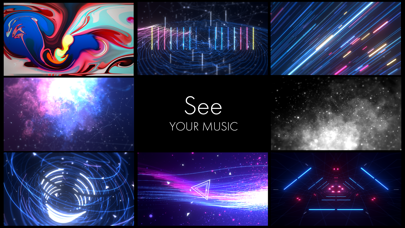
Ubah musik Anda menjadi pengalaman visual yang memukau dengan STAELLA, Mod IPA visualizer musik yang membuka alat kreatif premium. Pemutar reaktif audio ini memungkinkan Anda mengimpor musik dan foto, kemudian menyesuaikan visual yang menakjubkan secara real time dengan efek profesional, filter layar, dan mode pencampuran wallpaper. Rekam kreasi Anda sebagai video dan tingkatkan cara Anda mengalami suara.
- iAP Gratis → buka semua pembelian dalam aplikasi tanpa biaya
Aplikasi ini juga dilengkapi dengan iGameGod, yang memberi Anda akses ke Auto Touch untuk mengotomatiskan tugas berulang, App Speed Manager untuk mengatur kecepatan permainan, pengeditan nilai Memory Engine, dan alat permainan iOS lainnya yang lebih canggih.
Unduh STAELLA - Music Visualizer Modded modded IPA dari tautan di atas. Ketuk tombol pasang dan ikuti petunjuk di layar untuk memasang hack iOS ini di iPhone, iPad, atau Apple Silicon.
Butuh bantuan lebih lanjut? Lihat Pertanyaan yang Sering Diajukan untuk Aplikasi iOSGods kami untuk jawaban dan tips lengkap.
Real-time music visualizer with customizable effects and Export. Share on social media.
Experience premium visualizers instantly. Try it now.
// For Those Who //
- Want to enhance music enjoyment
- Create stunning visualized music videos for social media
| Visual Packages |
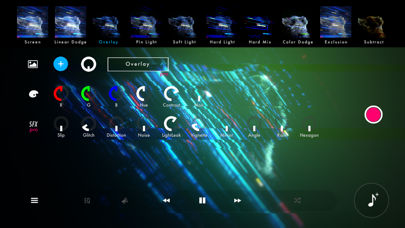
UI: Top of the screen
Four packages with eight Visuals each:
- STELLA
- TERRA
- MACHINA
- NEX
Tap selected Visual for detailed settings.
| AudioHub |
UI: Bottom-right icon on the screen
Import music from:
- Playlist (iTunes, local files, cloud storage)
- Microphone (mic or Line-In)
- Simulation (Use while playing other music apps)
| Design Tools |
UI: Left side icons on the screen
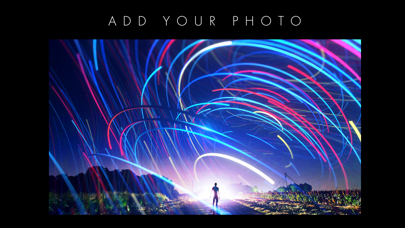
| Wallpaper | Add images as background
| Color | Customize colors, hue, contrast, monotone
| SFX | Effects like glitch and mirror to enhance visuals. Makes your music experience more captivating.
- How to use: Move knob in any direction, tap to reset
| Video Recorder |
UI: Red Rec icon on the right side of the screen
One-touch recording without capturing UI elements.
- Switch visuals during recording
- AutoMode records one song automatically (default, changeable in settings)
- Save to Camera Roll or Files (Pro)
| Audio Filters |
- Reverb for live concert atmosphere
- Eq for bass/treble adjustment
Toggle with bottom icons. Advanced settings in app menu.
| MIDI Device Integration |
■ What can be controlled
Visual switching (MIDI device pads, keys, etc.)
Color, SFX knob operations (MIDI device knobs, faders, etc.)
Setup: Settings (bottom left) > Control (finger icon)
| Keyboard Shortcuts |
■ Visual Operations
- Next visual : Shift + →
- Previous visual : Shift + ←
- Random selection : Shift + ↓
■ Toggle Operations
- Toggle Wallpaper : Shift + w
- Toggle Color : Shift + c
- Toggle SFX : Shift + s
■ Direct Visual Selection
STELLA(1) : U + [1/2/3/4/5/6/7/8]
TERRA(2) : I + [1/2/3/4/5/6/7/8]
MACHINA(3) : O + [1/2/3/4/5/6/7/8]
NEX(4) : P + [1/2/3/4/5/6/7/8]
■ Audio Operations
- Play/Pause : Alt(Option) + ↑
- Next song : Alt(Option) + →
- Previous song : Alt(Option) + ←
- Display AudioHub : Tab
■ Knob Operations
Assigned keys:
Color knobs (from left):
[a] [s] [d] [f] [g] [h] [j] [k] [l] [;]
VFX knobs Pro (from left):
[z] [x] [c] [v] [b] [n] [m] [,] [.] [/]
How to use:
[Assigned key] + → : Increase value (+0.1)
[Assigned key] + ← : Decrease value (-0.1)
[Assigned key] + ↑ : Fine increase (+0.01)
[Assigned key] + ↓ : Fine decrease (-0.01)
[Assigned key] + Space : MIN / MAX
Example:
a key + → : Increase first Color knob
a key + ↑ : Fine increase first Color knob
z key + Space : Toggle first VFX knob between MIN/MAX values
| Gestures |
Customizable screen flick shortcuts.
Select the finger icon from the settings screen at the bottom left.
By default: ↑ opens AudioHub, ←/→ switches visuals, ↓ shuffles.
------
| Using app videos or images on social media |
Feel free to use on social media.
If you want to support this app, please include:
"Created with STAELLA Music Visualizer - https://monocro.me/STAELLA"
| Notes |
- Apple Music DRM files cannot be imported.
- Ensure sufficient storage for recording.
### Bug reports, questions, and requests can be sent through in-app feedback, Discord, Mail.
Thank you for your interest in STAELLA! Enjoy a wonderful music experience!
------
Terms of Use: https://www.apple.com/legal/internet-services/itunes/dev/stdeula/

- iPhone atau iPad tanpa Jailbreak atau dengan Jailbreak.
- Sideloadly atau alternatifnya.
- Komputer dengan Windows/macOS/Linux dan iTunes terpasang.
LANGKAH 1: Unduh file .IPA yang sudah di-hack dari tautan di atas ke komputer Anda. Untuk mengunduhnya dari iOSGods App, silakan lihat Tutorial Mengunduh IPA dari iOSGods App kami yang dilengkapi contoh video.
LANGKAH 2: Unduh Sideloadly dan pasang di Windows atau Mac Anda.
LANGKAH 3: Buka Sideloadly di komputer Anda, sambungkan perangkat iOS Anda, dan tunggu hingga nama perangkat Anda muncul di Sideloadly.
LANGKAH 4: Setelah iDevice Anda terdeteksi, seret file .IPA yang sudah dimodifikasi dan lepaskan ke dalam aplikasi Sideloadly.
LANGKAH 5: Masukkan email Apple Account Anda, lalu tekan "Start". Anda kemudian akan diminta memasukkan kata sandi. Silakan isi informasi yang diminta.
LANGKAH 6: Tunggu hingga Sideloadly selesai melakukan sideloading/pemasangan IPA yang di-hack. Jika terjadi masalah saat pemasangan, silakan baca catatan di bawah ini.
LANGKAH 7: Setelah pemasangan selesai dan Anda melihat aplikasi di Layar Beranda, Anda perlu masuk ke Pengaturan → Umum → Profil / VPN & Manajemen Perangkat. Setelah itu, ketuk email yang Anda masukkan pada langkah 6, lalu ketuk "Percayai [email protected]".
LANGKAH 8: Sekarang buka Layar Beranda dan jalankan aplikasi yang baru saja dipasang; semuanya seharusnya berjalan normal. Anda mungkin perlu mengikuti petunjuk tambahan per aplikasi yang muncul di popup hack di dalam game.
CATATAN: Pada iOS/iPadOS 16 dan yang lebih baru, Anda harus mengaktifkan Mode Pengembang. Untuk akun Apple Developer gratis, Anda perlu mengulangi proses ini setiap 7 hari. Jika Anda memiliki pertanyaan atau masalah, silakan baca bagian FAQ Sideloadly di topik tersebut kami.