Inloggning krävs
Logga in med ditt iOSGods-konto för att fortsätta.
Logga in med ditt iOSGods-konto för att fortsätta.

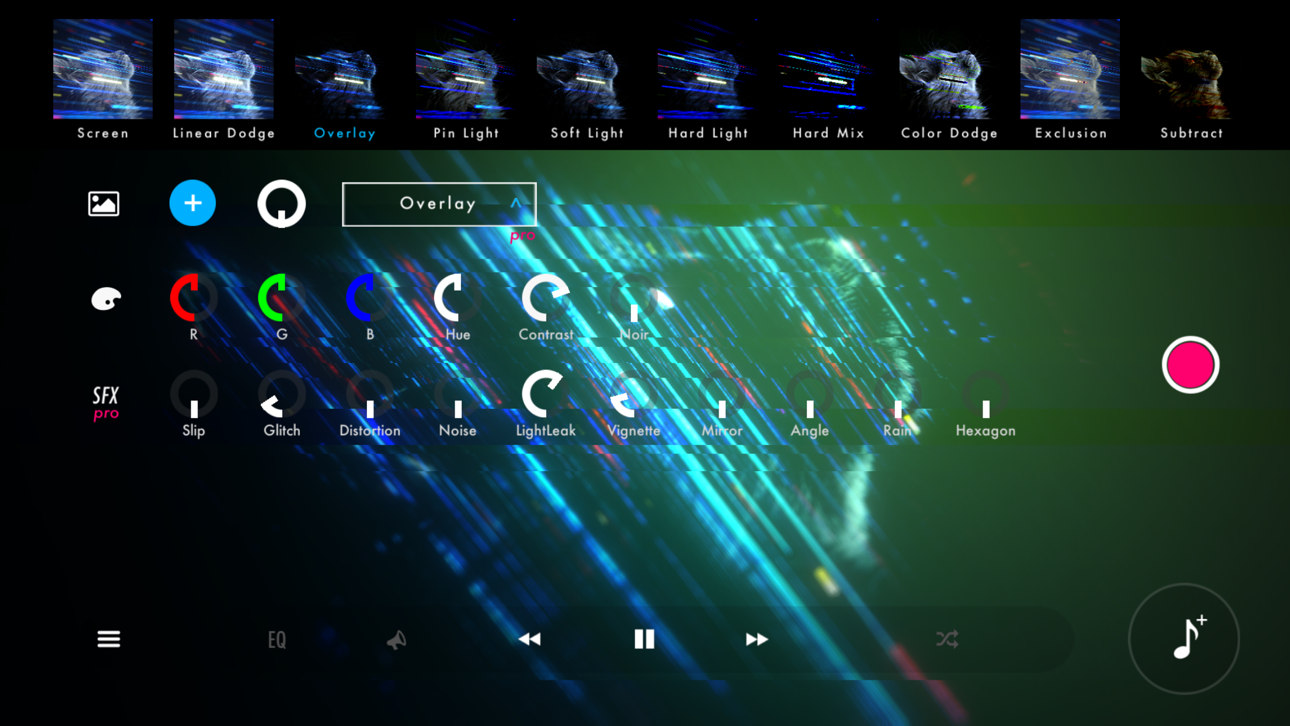
Förvandla din musik till fascinerade visuella upplevelser med STAELLA, en musikvisualiserare Mod IPA som låser upp premiumkreativa verktyg. Den här ljudreaktiva spelaren låter dig importera din musik och foton, sedan anpassa fantastiska visuella effekter i realtid med professionella effekter, skärmfilter och blandningslägen för bakgrundsbild. Spela in dina skapelser som videor och höj hur du upplever ljud.
- Gratis köp i appen → lås upp alla köp i appen utan kostnad
Den här appen levereras även med iGameGod, vilket ger dig tillgång till Auto Touch för att automatisera repetitiva uppgifter, App Speed Manager för justerbar spelhastighet, värdesredigering med Memory Engine och fler kraftfulla verktyg för iOS-spel.
Ladda ner STAELLA - Music Visualizer Modded modded IPA från länkarna ovan. Tryck på installationsknappen och följ instruktionerna för att installera denna iOS-apphack på iPhone, iPad eller Apple Silicon.
Behöver du mer hjälp? Se våra iOSGods-appens vanliga frågor för detaljerade svar och felsökningstips.
Real-time music visualization.
30 Visuals × 70 Shapes — every play, a different piece.
■ Design the visuals from a free combination
4 categories with 30 Visuals and 70 Shapes, Knobs, Text, backgrounds, 10 Screen Effects and 10 Wallpaper Blends. Layer them into anything from a club-style spectrum to an ambient nebula.
On HDR displays, glows and gradients render with brightness beyond SDR.
■ Two recording modes for different intents
Recording keeps every knob move and Visual switch you make. Export locks the UI so a stable, hands-off render finishes on its own.
Both hide the UI, support up to 4K with HDR export, and can auto-record a full song in Playlist mode.
■ Four audio sources
Files (music on device; iOS also imports from the iTunes library)
Microphone (low-latency input)
Simulation (visuals keep moving with no source)
AUv3 (visualize plugin audio)
▸ Time-synced lyrics
Songs available in a supported lyric database can display lyrics in time with the music. Song title and artist name too.
▸ External display output (AirPlay / HDMI adapters)
Connect a TV or projector via iOS Screen Mirroring (AirPlay) or an HDMI adapter.
The visuals go full screen while the UI stays on your device.
■ Play with whatever's in your hand
Touch and flick
iPad + Magic Keyboard shortcuts
MIDI controllers (long-press any knob to assign, BLE MIDI supported)
Gamepad (D-pad, buttons, sticks)
■ Where to use it
· VJ sets at clubs, live shows and streams
· Music videos and lyric videos for social
· Screen visuals for a room or a party
■ Notes
· DRM-protected tracks (e.g. Apple Music) can't be played.
· For issues or requests, reach out via in-app feedback or support.
- iPhone eller iPad utan jailbreak/jailad eller med jailbreak.
- Sideloadly eller alternativ.
- Dator med Windows/macOS/Linux och iTunes installerat.
STEG 1: Ladda ner den förhackade .IPA-filen från länken ovan till din dator. För att ladda ner från iOSGods App, se vår Guide för att ladda ner IPA i iOSGods App som även innehåller ett videoexempel.
STEG 2: Ladda ner Sideloadly och installera det på din Windows eller Mac.
STEG 3: Öppna Sideloadly på din dator, anslut din iOS-enhet och vänta tills enhetens namn visas i Sideloadly.
STEG 4: När din iEnhet känns igen drar du den moddade .IPA-filen du laddat ner och släpper den i Sideloadly-programmet.
STEG 5: Ange e-postadressen till ditt Apple Account och tryck sedan på ”Start”. Du ombeds sedan ange ditt lösenord. Fyll i de uppgifter som krävs.
STEG 6: Vänta tills Sideloadly är klar med att sideloada/installera den hackade IPA-filen. Om problem uppstår under installationen, läs noten nedan.
STEG 7: När installationen är klar och du ser appen på din hemskärm behöver du gå till Inställningar → Allmänt → Profiler / VPN & enhetshantering. Tryck där på e-postadressen du angav i steg 6 och tryck sedan på ”Lita på [email protected]”.
STEG 8: Gå nu till din hemskärm och öppna den nyligen installerade appen — allt ska fungera som det ska. Du kan behöva följa ytterligare app-specifika instruktioner i hackets popup inne i spelet.
OBS: På iOS/iPadOS 16 och senare måste du aktivera Utvecklarläge. För gratis Apple Developer-konton behöver du upprepa processen var sjunde dag. Om du har frågor eller problem, läs vår Sideloadly FAQ-avsnitt i tråden.
Hack Features:
- Inf Coins (Spend)
App Installation Instructions:
---------------------------------------------------------
----------------------------------------------------------
If you require more information or help, please read our Frequently Asked Questions topic on iOSGods.com.
----------------------------------------------------------
--------------------------------------------------