需要登录
请使用您的 iOSGods 账户登录以继续。
请使用您的 iOSGods 账户登录以继续。
使用这个 Bazaart AI Photo Editor Mod IPA 解锁高级设计和照片编辑工具,让你即时获得所有付费功能,无任何限制。Bazaart 是一款直观的 AI 驱动编辑器,用于创建专业产品照片、社交媒体内容、拼贴画和自定义设计,无需设计经验。这个破解版本移除了付费墙,让你可以在视频编辑、AI 增强和设计模板中获得完整的创意控制。
- 高级功能解锁 → 访问所有付费功能和工具
从上方链接下载 Bazaart AI Photo Editor Design iOS Mod IPA。点击安装按钮并按照屏幕提示在 iPhone、iPad 或 Apple Silicon 上安装此 iOS 应用修改版。
需要更多帮助?请查看我们的 iOSGods 应用常见问题解答 获取详细解答和故障排除技巧。
百色特是一款上手容易的 AI 照片编辑、视频编辑与设计应用。无需设计背景。用于网店、电商营销和社交媒体,创作更快。立即获得您的设计超能力!
你可以制作
用于业务:
产品图、模特照、房源图、头像、标志、传单、广告、海报。
用于社交媒体:
Reels、抖音视频、限时动态、帖子、幻灯片、缩略图、定格动画视频。
用于日常生活:
拼贴、卡片、请柬、表情包、WhatsApp 贴纸、背景、壁纸、GIF、艺术作品。
AI 工具
• 用 AI 编辑:用简单提示改变或替换照片中的任何元素
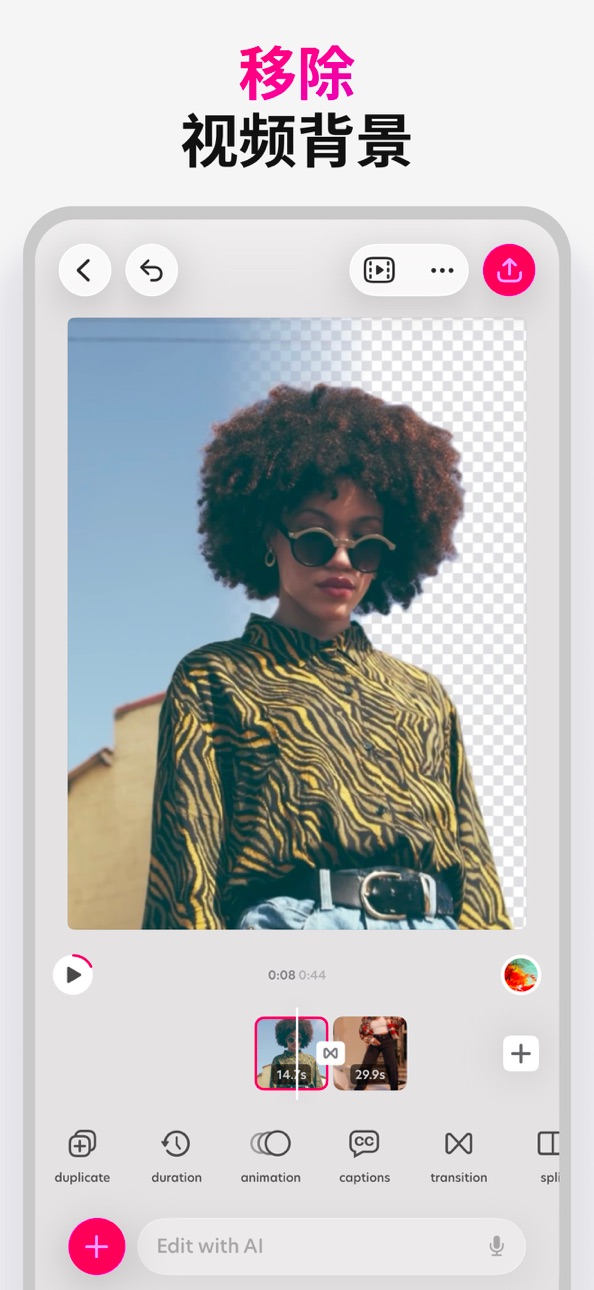
• 移除背景:照片与视频一键去背景
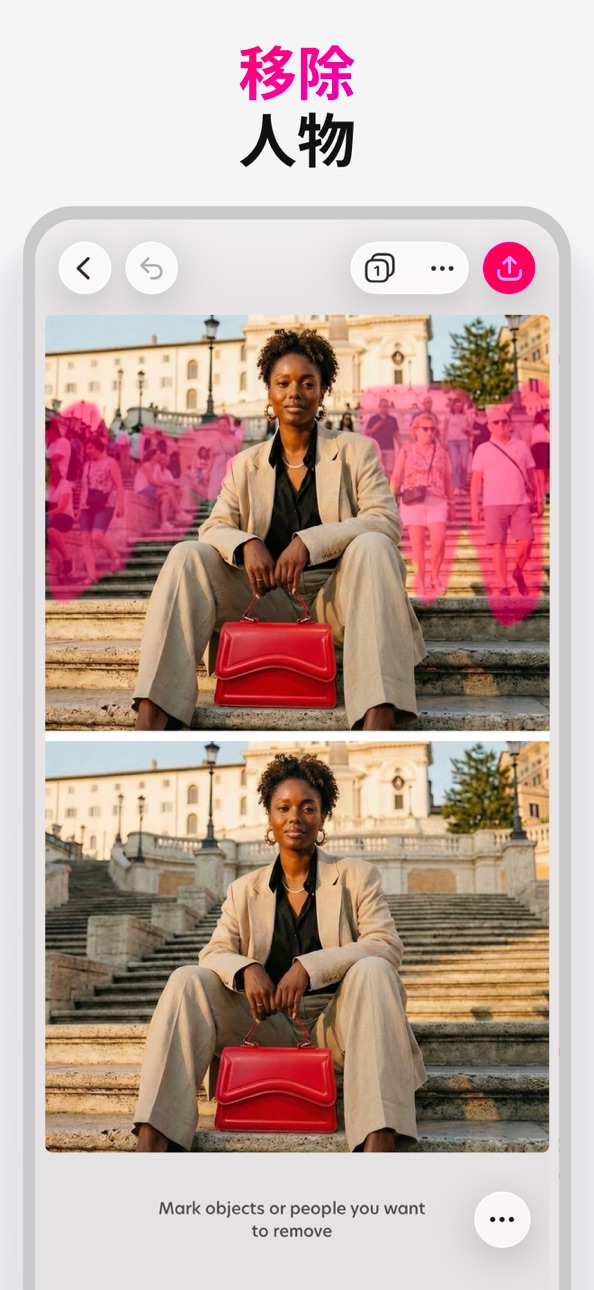
• 移除:移除照片中的物体与人物
• AI模特:生成上身产品图
• AI视频:把产品照片变成视频
• 魔幻背景:为产品与人像生成符合品牌风格的 AI 场景
• AI图像:把文字提示变成图像
• AI 重塑:一键改造照片风格(从产品试穿到创意造型)
• 魔法编辑:框选区域,输入提示即可替换
• 增强:一键提升照片质量
• 扩展:将照片扩展到任意尺寸
• 提除:抠出主体,移动并调整大小
照片与视频编辑工具
• 裁剪、剪刀、橡皮擦、形状抠图
• 调整曝光、对比度、饱和度、鲜艳度、色温、色调、阴影、高光、褪色、锐度与模糊
• 用描边与投影让元素更突出
• 通过混合模式合成照片与视频
• 批量编辑,加速处理多张照片
• 模糊背景,打造人像效果
设计工具
• 自定义尺寸与热门预设
• 自由素描与绘制
• 文本沿弧线与圆形排版
• 一键文字样式预设
• 精细调整对齐、字距与行距
• 自动吸附精准对齐
• 微调工具用于精确定位
• 分层编辑,所有更改可撤销
• 项目按文件夹管理
• 项目云端保存并保持同步
加速你创作的内容
• 由设计师打造的精美模板
• 海量背景、图形、形状与动效图形
• 照片与视频特效
• 海量字体库,亦可添加自有字体
• 可用相册、相机、文件、素材库中的照片与视频
导出与分享
• 将图片保存为 JPG 或带透明背景的 PNG
• 保存为视频或动图 GIF
• 导出为 PDF
• 随处分享
升级你的设计体验
百色特高级版
解锁AI工具与素材,更多AI用量,无水印保存,VIP支持。
百色特超级版(适合小型企业)
包含高级版的一切,AI用量提升4倍,解锁AI视频。
服务条款: https://www.bazaart.com/terms
隐私政策: https://www.bazaart.com/terms#privacy
需要帮助?发送邮件至 [email protected],我们会尽快回复。
BAZAART是Bazaart有限公司的一个注册商标。
截图 © 各自所有者 · App Store


iOSGods 与 Apple Inc.、Google LLC 及此处列出应用的开发者没有任何关联,也未获得其认可或赞助。Apple、iOS 和 App Store 是 Apple Inc. 的商标。Android 和 Google Play 是 Google LLC 的商标。其他所有应用名称、图标、图片和商标均归各自所有者所有。

- 未越狱/受限或已越狱的 iPhone 或 iPad。
- Sideloadly 或替代方案。
- 运行 Windows/macOS/Linux 且已安装 iTunes 的电脑。
步骤 1: 通过上方链接将已破解的 .IPA 文件下载到您的电脑。如需从 iOSGods App 下载,请参阅我们的 iOSGods App IPA 下载教程,其中包含视频示例。
步骤 2: 下载 Sideloadly 并将其安装到您的 Windows 或 Mac 上。
步骤 3: 在电脑上打开 Sideloadly,连接您的 iOS 设备,等待设备名称在 Sideloadly 中显示。
步骤 4: 当 Sideloadly 识别到您的 iOS 设备后,将下载好的修改版 .IPA 文件拖放到 Sideloadly 应用中。
步骤 5: 输入您的 Apple Account 邮箱,然后点击 "Start"。系统会提示您输入密码,请按要求填写信息。
步骤 6: 等待 Sideloadly 完成已破解 IPA 的旁加载/安装。如果安装过程中出现问题,请阅读下方的注意事项。
步骤 7: 安装完成并在主屏幕上看到该应用后,您需要前往 设置 → 通用 → 描述文件 / VPN 与设备管理。进入后,点击您在第 6 步中输入的邮箱,然后点击 "信任 [email protected]"。
步骤 8: 现在返回主屏幕并打开新安装的应用,一切应可正常运行。您可能需要按照游戏内修改弹窗中的具体说明执行进一步操作。
注意: 在 iOS/iPadOS 16 及更高版本上,您必须 启用开发者模式。对于免费的 Apple Developer 账户,您需要每 7 天重复一次此操作。如有任何疑问或问题,请阅读我们的 主题中的 Sideloadly 常见问题部分。
Game Name iOS Mod IPA is an action adventure game enhanced with powerful gameplay boosts and quality-of-life improvements. Win battles faster, earn rewards quicker, and enjoy uninterrupted play without ads.
- Unlimited Gold - spend freely to unlock premium content
- Damage Multiplier - deal significantly more damage in combat
- Defense Multiplier - take less damage and survive longer
- Reward Multiplier - earn more loot from every battle
- Max Level - instantly reach the highest player rank
- No Ads - play without interruptions or advertisements
This app also comes with iGameGod, giving you access to Auto Touch to automate repetitive tasks, App Speed Manager for adjustable gameplay speed, Memory Engine value editing, and more powerful iOS game tools.
从上方链接下载 Game Name Mod IPA。点击安装按钮并按照屏幕提示在 iPhone、iPad 或 Apple Silicon 上安装此 iOS 应用修改版。
需要更多帮助请查看我们的 iOSGods 应用常见问题解答 获取详细解答和故障排除技巧。
----------------------------------------------------------
--------------------------------------------------