需要登录
请使用您的 iOSGods 账户登录以继续。
请使用您的 iOSGods 账户登录以继续。
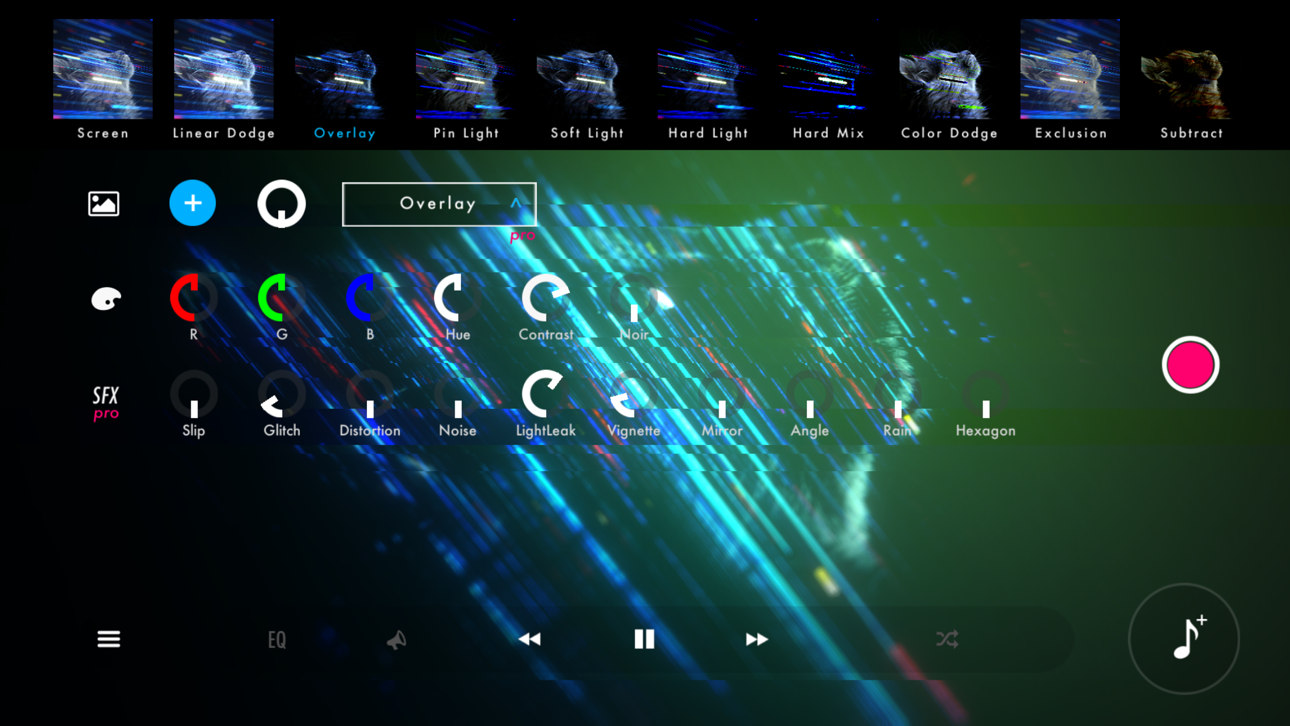
使用STAELLA音乐可视化工具将您的音乐转变为迷人的视觉体验,这是一款音乐可视化工具Mod IPA,可解锁高级创意工具。这个音频反应播放器让您导入音乐和照片,然后使用专业效果、屏幕滤镜和壁纸混合模式实时自定义令人惊艳的视觉效果。将您的创作录制为视频,提升您的音乐体验方式。
- 免费应用内购买 → 无需付费解锁所有应用内购买
此应用还内置 iGameGod,让你能够使用 Auto Touch 自动执行重复操作、通过 App Speed Manager 调节游戏速度、使用 Memory Engine 修改内存数值,以及更多强大的 iOS 游戏工具。
从上方链接下载 STAELLA - Music Visualizer Modded modded IPA。点击安装按钮并按照屏幕提示在 iPhone、iPad 或 Apple Silicon 上安装此 iOS 应用修改版。
需要更多帮助?请查看我们的 iOSGods 应用常见问题解答 获取详细解答和故障排除技巧。
Real-time music visualization.
30 Visuals × 70 Shapes — every play, a different piece.
■ Design the visuals from a free combination
4 categories with 30 Visuals and 70 Shapes, Knobs, Text, backgrounds, 10 Screen Effects and 10 Wallpaper Blends. Layer them into anything from a club-style spectrum to an ambient nebula.
On HDR displays, glows and gradients render with brightness beyond SDR.
■ Two recording modes for different intents
Recording keeps every knob move and Visual switch you make. Export locks the UI so a stable, hands-off render finishes on its own.
Both hide the UI, support up to 4K with HDR export, and can auto-record a full song in Playlist mode.
■ Four audio sources
Files (music on device; iOS also imports from the iTunes library)
Microphone (low-latency input)
Simulation (visuals keep moving with no source)
AUv3 (visualize plugin audio)
▸ Time-synced lyrics
Songs available in a supported lyric database can display lyrics in time with the music. Song title and artist name too.
▸ External display output (AirPlay / HDMI adapters)
Connect a TV or projector via iOS Screen Mirroring (AirPlay) or an HDMI adapter.
The visuals go full screen while the UI stays on your device.
■ Play with whatever's in your hand
Touch and flick
iPad + Magic Keyboard shortcuts
MIDI controllers (long-press any knob to assign, BLE MIDI supported)
Gamepad (D-pad, buttons, sticks)
■ Where to use it
· VJ sets at clubs, live shows and streams
· Music videos and lyric videos for social
· Screen visuals for a room or a party
■ Notes
· DRM-protected tracks (e.g. Apple Music) can't be played.
· For issues or requests, reach out via in-app feedback or support.

- 未越狱/受限或已越狱的 iPhone 或 iPad。
- Sideloadly 或替代方案。
- 运行 Windows/macOS/Linux 且已安装 iTunes 的电脑。
步骤 1: 通过上方链接将已破解的 .IPA 文件下载到您的电脑。如需从 iOSGods App 下载,请参阅我们的 iOSGods App IPA 下载教程,其中包含视频示例。
步骤 2: 下载 Sideloadly 并将其安装到您的 Windows 或 Mac 上。
步骤 3: 在电脑上打开 Sideloadly,连接您的 iOS 设备,等待设备名称在 Sideloadly 中显示。
步骤 4: 当 Sideloadly 识别到您的 iOS 设备后,将下载好的修改版 .IPA 文件拖放到 Sideloadly 应用中。
步骤 5: 输入您的 Apple Account 邮箱,然后点击 "Start"。系统会提示您输入密码,请按要求填写信息。
步骤 6: 等待 Sideloadly 完成已破解 IPA 的旁加载/安装。如果安装过程中出现问题,请阅读下方的注意事项。
步骤 7: 安装完成并在主屏幕上看到该应用后,您需要前往 设置 → 通用 → 描述文件 / VPN 与设备管理。进入后,点击您在第 6 步中输入的邮箱,然后点击 "信任 [email protected]"。
步骤 8: 现在返回主屏幕并打开新安装的应用,一切应可正常运行。您可能需要按照游戏内修改弹窗中的具体说明执行进一步操作。
注意: 在 iOS/iPadOS 16 及更高版本上,您必须 启用开发者模式。对于免费的 Apple Developer 账户,您需要每 7 天重复一次此操作。如有任何疑问或问题,请阅读我们的 主题中的 Sideloadly 常见问题部分。
Hack Features:
- Inf Coins (Spend)
App Installation Instructions:
---------------------------------------------------------
----------------------------------------------------------
If you require more information or help, please read our Frequently Asked Questions topic on iOSGods.com.
----------------------------------------------------------
--------------------------------------------------