Login Diperlukan
Masuk dengan akun iOSGods kamu untuk melanjutkan.
Masuk dengan akun iOSGods kamu untuk melanjutkan.
Buka fitur pemindaian premium Scanbot Pro secara gratis dengan Mod IPA ini, mendapatkan akses penuh ke pemindaian dokumen PDF dan JPG berkualitas tinggi, integrasi cloud dengan iCloud Drive, Dropbox, Box, dan Evernote, pengenalan kode QR, dan kemampuan faks tanpa membayar. Scanbot Pro menghadirkan kekuatan pemindaian tingkat desktop ke perangkat iOS Anda, memungkinkan Anda membuat pemindaian profesional dalam hitungan detik dan mengunggahnya langsung ke layanan cloud pilihan Anda.
Aplikasi ini juga dilengkapi dengan iGameGod, yang memberi Anda akses ke Auto Touch untuk mengotomatiskan tugas berulang, App Speed Manager untuk mengatur kecepatan permainan, pengeditan nilai Memory Engine, dan alat permainan iOS lainnya yang lebih canggih.
Unduh Scanbot Pro modded IPA dari tautan di atas. Ketuk tombol pasang dan ikuti petunjuk di layar untuk memasang hack iOS ini di iPhone, iPad, atau Apple Silicon.
Butuh bantuan lebih lanjut? Lihat Pertanyaan yang Sering Diajukan untuk Aplikasi iOSGods kami untuk jawaban dan tips lengkap.
SwiftScan Pro разблокирует полный доступ ко всем функциям ограничен в приложении SwiftScan в.
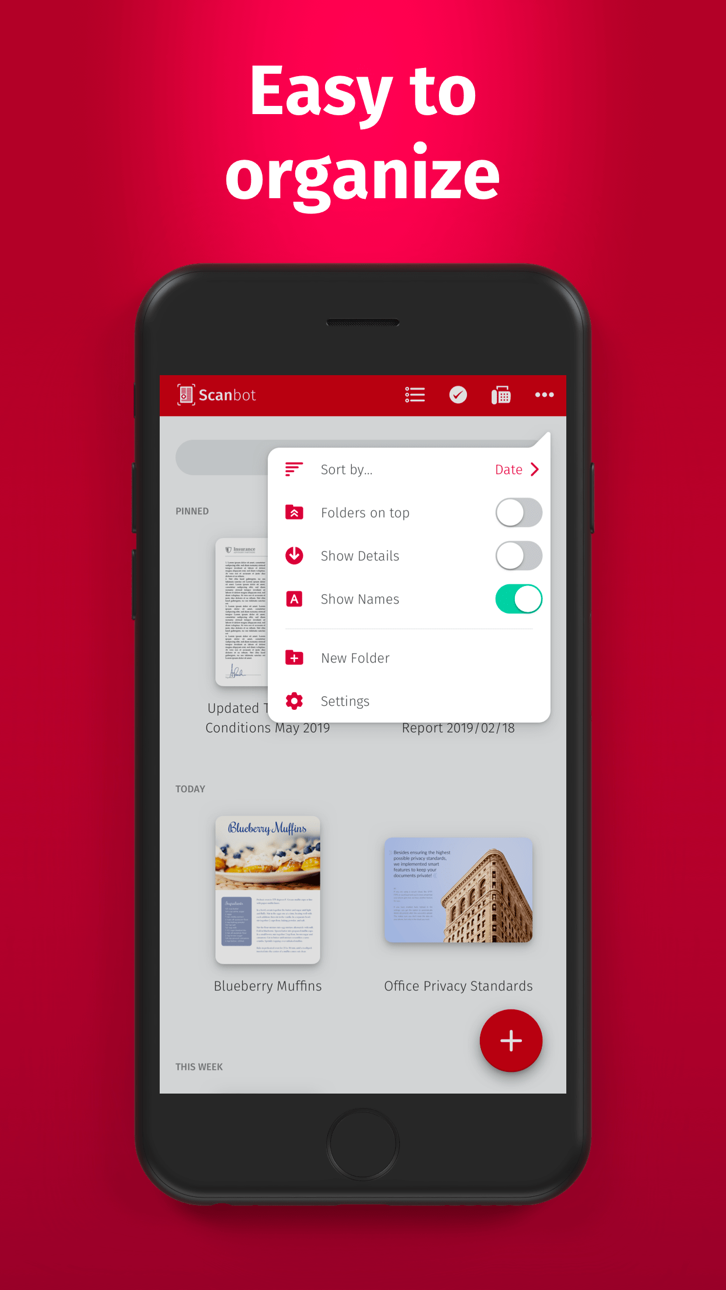
SwiftScan Pro является лучшим мобильным приложением сканера для документов и QR-кодов. Создание высококачественных PDF или JPG сканирование с помощью только одного крана. Отправка файлов по электронной почте или по факсу. Загрузить их ICloud Drive, Box, Dropbox, Evernote и другие облачных сервисы.
SwiftScan Pro пакеты всю мощь настольного сканера в одном крошечном приложение сканера!
ОСНОВНЫЕ ФУНКЦИИ
• IOS 14 штучка: Ярлык виджет обеспечивает доступ мгновенного сканирования, поиск и просмотр последних документов
• Сканирование качества премиум PDF-файлы или JPGs с 200 точек на дюйм и выше
• Расширенные инструменты искусственного интеллекта для обобщения ваших документов для быстрого понимания или даже перевода документов на другой язык.
• Факс: теперь вы можете отправить свои документы в качестве факсимильного справа от SwiftScan Pro!
• Облако интеграции: ICloud Drive, Dropbox, Box, Evernote, WebDAV и другие облачные сервисы
• Сканирование QR кода: URL-адрес, контакты, телефонные номера, местонахождение Hotspots и т.д.
• Молниеносное: автоматическое обнаружение края и сканирование
Документы • Многостраничные
• Улучшение сканирования: цветовые режимы и автоматическая оптимизация
• Смарт загрузки фона
• Красиво оформленный
• Распознавание текста (OCR): извлечь текст отсканированных для копирования, поиска, поиска и т.д.
• Красивые темы: выбрать предпочтительный внешний вид
Файл именование • Смарт
• Защита паролем с поддержкой сенсорного ID / Face ID
• Добавление страницы в существующие сканы
• Быстрый полнотекстовый поиск
• Защита PDF пароль
Сканирование ВЫСОКОКАЧЕСТВЕННЫЙ
SwiftScan Pro основан на новейшей и самой передовой технологии мобильного сканирования доступны. Отсканированные поставляются в премиум качества с 200 точек на дюйм и выше, что сопоставимо с производительностью современных настольных сканеров. Кроме того, различные цветовые режимы, автоматическая оптимизация и помощь смазанности сокращения вы, чтобы получить максимальную отдачу от ваших сканов.
сканирование БЫСТРО
Просто держите iPhone на любой документ, квитанции или доски, и это занимает всего секунду, чтобы сканировать страницу и сохранить его в формате PDF или JPG. Благодаря SwiftScan Pro, новейшей технологии, края документа автоматически определяются так, что только сам документ сканируется. SwiftScan Pro захватывает возможно лучшее изображение в идеальный момент.
НИЧЕГО Scan
SwiftScan Pro работает на все случаи жизни всех видов средств массовой информации. Сканирование любого вида документа, такие как бумажные документы, визитные карточки, квитанция, заметки, доски или пост-его. SwiftScan Pro поможет вам сохранить документы, которые важны для вас, и чтобы избавиться от бумаги беспорядок. Независимо от того, являетесь ли вы на работе или в отпуске, SwiftScan Pro с вами.
Сканирование в облако
Отсканированные документы можно по электронной почте, распечатать или загрузить в поддерживаемом облачном диск. Если включить автоматическую загрузку и SwiftScan автоматически сохранить отсканированные предпочтительное право облачного сервиса в данный момент ваш PDF сканирование было создано Pro.
Подробнее: https://swiftscan.app
Получить в контакте: [email protected]
Условия предоставления услуг: https://maplemedia.io/terms-of-service/
Политика конфиденциальности: https://maplemedia.io/privacy/
Tangkapan layar © pemiliknya masing-masing · App Store


iOSGods tidak berafiliasi, tidak didukung, dan tidak disponsori oleh Apple Inc., Google LLC, maupun pengembang aplikasi yang terdaftar di sini. Apple, iOS, dan App Store adalah merek dagang Apple Inc. Android dan Google Play adalah merek dagang Google LLC. Semua nama aplikasi, ikon, gambar, dan merek dagang lainnya adalah milik pemiliknya masing-masing.
- iPhone atau iPad tanpa Jailbreak atau dengan Jailbreak.
- Sideloadly atau alternatifnya.
- Komputer dengan Windows/macOS/Linux dan iTunes terpasang.
LANGKAH 1: Unduh file .IPA yang sudah di-hack dari tautan di atas ke komputer Anda. Untuk mengunduhnya dari iOSGods App, silakan lihat Tutorial Mengunduh IPA dari iOSGods App kami yang dilengkapi contoh video.
LANGKAH 2: Unduh Sideloadly dan pasang di Windows atau Mac Anda.
LANGKAH 3: Buka Sideloadly di komputer Anda, sambungkan perangkat iOS Anda, dan tunggu hingga nama perangkat Anda muncul di Sideloadly.
LANGKAH 4: Setelah iDevice Anda terdeteksi, seret file .IPA yang sudah dimodifikasi dan lepaskan ke dalam aplikasi Sideloadly.
LANGKAH 5: Masukkan email Apple Account Anda, lalu tekan "Start". Anda kemudian akan diminta memasukkan kata sandi. Silakan isi informasi yang diminta.
LANGKAH 6: Tunggu hingga Sideloadly selesai melakukan sideloading/pemasangan IPA yang di-hack. Jika terjadi masalah saat pemasangan, silakan baca catatan di bawah ini.
LANGKAH 7: Setelah pemasangan selesai dan Anda melihat aplikasi di Layar Beranda, Anda perlu masuk ke Pengaturan → Umum → Profil / VPN & Manajemen Perangkat. Setelah itu, ketuk email yang Anda masukkan pada langkah 6, lalu ketuk "Percayai [email protected]".
LANGKAH 8: Sekarang buka Layar Beranda dan jalankan aplikasi yang baru saja dipasang; semuanya seharusnya berjalan normal. Anda mungkin perlu mengikuti petunjuk tambahan per aplikasi yang muncul di popup hack di dalam game.
CATATAN: Pada iOS/iPadOS 16 dan yang lebih baru, Anda harus mengaktifkan Mode Pengembang. Untuk akun Apple Developer gratis, Anda perlu mengulangi proses ini setiap 7 hari. Jika Anda memiliki pertanyaan atau masalah, silakan baca bagian FAQ Sideloadly di topik tersebut kami.
Game Name iOS Mod IPA is an action adventure game enhanced with powerful gameplay boosts and quality-of-life improvements. Win battles faster, earn rewards quicker, and enjoy uninterrupted play without ads.
- Unlimited Gold - spend freely to unlock premium content
- Damage Multiplier - deal significantly more damage in combat
- Defense Multiplier - take less damage and survive longer
- Reward Multiplier - earn more loot from every battle
- Max Level - instantly reach the highest player rank
- No Ads - play without interruptions or advertisements
This app also comes with iGameGod, giving you access to Auto Touch to automate repetitive tasks, App Speed Manager for adjustable gameplay speed, Memory Engine value editing, and more powerful iOS game tools.
Unduh Game Name Mod IPA dari tautan di atas. Ketuk tombol pasang dan ikuti petunjuk di layar untuk memasang hack iOS ini di iPhone, iPad, atau Apple Silicon.
Butuh bantuan lebih lanjut Lihat Pertanyaan yang Sering Diajukan untuk Aplikasi iOSGods kami untuk jawaban dan tips lengkap.
----------------------------------------------------------
--------------------------------------------------