Login Diperlukan
Masuk dengan akun iOSGods kamu untuk melanjutkan.
Masuk dengan akun iOSGods kamu untuk melanjutkan.
Buka fitur pemindaian premium Scanbot Pro secara gratis dengan Mod IPA ini, mendapatkan akses penuh ke pemindaian dokumen PDF dan JPG berkualitas tinggi, integrasi cloud dengan iCloud Drive, Dropbox, Box, dan Evernote, pengenalan kode QR, dan kemampuan faks tanpa membayar. Scanbot Pro menghadirkan kekuatan pemindaian tingkat desktop ke perangkat iOS Anda, memungkinkan Anda membuat pemindaian profesional dalam hitungan detik dan mengunggahnya langsung ke layanan cloud pilihan Anda.
Aplikasi ini juga dilengkapi dengan iGameGod, yang memberi Anda akses ke Auto Touch untuk mengotomatiskan tugas berulang, App Speed Manager untuk mengatur kecepatan permainan, pengeditan nilai Memory Engine, dan alat permainan iOS lainnya yang lebih canggih.
Unduh Scanbot Pro modded IPA dari tautan di atas. Ketuk tombol pasang dan ikuti petunjuk di layar untuk memasang hack iOS ini di iPhone, iPad, atau Apple Silicon.
Butuh bantuan lebih lanjut? Lihat Pertanyaan yang Sering Diajukan untuk Aplikasi iOSGods kami untuk jawaban dan tips lengkap.
SwiftScan Pro unlocks full access to all the features limited in SwiftScan’s app.
SwiftScan Pro is the best mobile scanner app for documents and QR codes. Create high-quality PDF or JPG scans with just one tap. Send files via email or as a fax. Upload them to iCloud Drive, Box, Dropbox, Evernote and other cloud services.
SwiftScan Pro packs all the power of a desktop scanner into one tiny scanner app!
FEATURE HIGHLIGHTS
• iOS 14 widget: Shortcut widget provides instant access to scan, search, or view recent documents
• Scan premium quality PDFs or JPGs with 200 dpi and higher
• Advanced AI Tools to summarize your documents for quick comprehension, or even translate documents to another language
• Fax: you can now send your documents as a fax right from SwiftScan Pro!
• Cloud integration: iCloud Drive, Dropbox, Box, Evernote, WebDAV and other cloud services
• Scan QR codes: URLs, Contacts, Phone Numbers, Locations, Hotspots, etc.
• Lightning fast: automatic edge detection and scanning
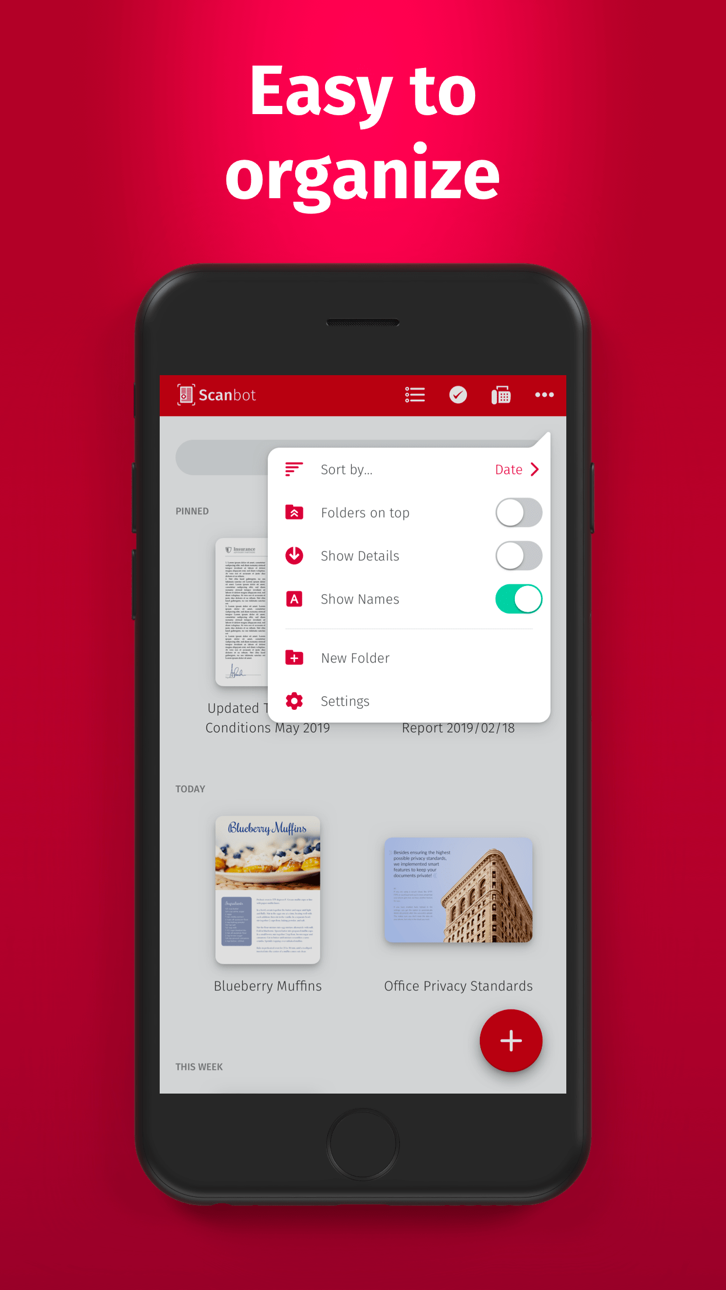
• Multi-page documents
• Enhance your scans: color modes and automatic optimization
• Smart background upload
• Beautifully designed
• Text recognition (OCR): extract the text of your scans to copy, search, lookup, etc.
• Beautiful themes: select your preferred look and feel
• Smart file naming
• Passcode protection with Touch ID / Face ID support
• Add pages to existing scans
• Fast full-text search
• PDF password protection
Scan HIGH-QUALITY
SwiftScan Pro relies on the latest and most advanced mobile scanning technology available. Your scans are delivered at a premium quality with 200 dpi and higher, which is comparable to the performance of modern desktop scanners. In addition, various color modes, auto-optimization and blur-reduction help you to get the most out of your scans.
Scan QUICKLY
Just hold your iPhone over any document, receipt or whiteboard and it takes only a second to scan a page and save it as a PDF or JPG. Thanks to SwiftScan Pro’s latest technology, the edges of the document are automatically identified so that only the document itself is scanned. SwiftScan Pro captures the best possible image in the perfect moment.
Scan ANYTHING
SwiftScan Pro works on all occasions with all kind of media. Scan any kind of document such as paper documents, business cards, receipts, notes, whiteboards or post-its. SwiftScan Pro helps you save the documents that are important for you and get rid of paper clutter. No matter whether you are at work or on holidays, SwiftScan Pro is with you.
Scan to the CLOUD
Scanned documents can be emailed, printed or uploaded to a supported cloud drive. If you enable automatic upload and SwiftScan Pro will automatically save your scans to your preferred cloud service right at the moment your PDF scan has been created.
Learn more: https://swiftscan.app
Get in touch: [email protected]
Tangkapan layar © pemiliknya masing-masing · App Store


iOSGods tidak berafiliasi, tidak didukung, dan tidak disponsori oleh Apple Inc., Google LLC, maupun pengembang aplikasi yang terdaftar di sini. Apple, iOS, dan App Store adalah merek dagang Apple Inc. Android dan Google Play adalah merek dagang Google LLC. Semua nama aplikasi, ikon, gambar, dan merek dagang lainnya adalah milik pemiliknya masing-masing.
- iPhone atau iPad tanpa Jailbreak atau dengan Jailbreak.
- Sideloadly atau alternatifnya.
- Komputer dengan Windows/macOS/Linux dan iTunes terpasang.
LANGKAH 1: Unduh file .IPA yang sudah di-hack dari tautan di atas ke komputer Anda. Untuk mengunduhnya dari iOSGods App, silakan lihat Tutorial Mengunduh IPA dari iOSGods App kami yang dilengkapi contoh video.
LANGKAH 2: Unduh Sideloadly dan pasang di Windows atau Mac Anda.
LANGKAH 3: Buka Sideloadly di komputer Anda, sambungkan perangkat iOS Anda, dan tunggu hingga nama perangkat Anda muncul di Sideloadly.
LANGKAH 4: Setelah iDevice Anda terdeteksi, seret file .IPA yang sudah dimodifikasi dan lepaskan ke dalam aplikasi Sideloadly.
LANGKAH 5: Masukkan email Apple Account Anda, lalu tekan "Start". Anda kemudian akan diminta memasukkan kata sandi. Silakan isi informasi yang diminta.
LANGKAH 6: Tunggu hingga Sideloadly selesai melakukan sideloading/pemasangan IPA yang di-hack. Jika terjadi masalah saat pemasangan, silakan baca catatan di bawah ini.
LANGKAH 7: Setelah pemasangan selesai dan Anda melihat aplikasi di Layar Beranda, Anda perlu masuk ke Pengaturan → Umum → Profil / VPN & Manajemen Perangkat. Setelah itu, ketuk email yang Anda masukkan pada langkah 6, lalu ketuk "Percayai [email protected]".
LANGKAH 8: Sekarang buka Layar Beranda dan jalankan aplikasi yang baru saja dipasang; semuanya seharusnya berjalan normal. Anda mungkin perlu mengikuti petunjuk tambahan per aplikasi yang muncul di popup hack di dalam game.
CATATAN: Pada iOS/iPadOS 16 dan yang lebih baru, Anda harus mengaktifkan Mode Pengembang. Untuk akun Apple Developer gratis, Anda perlu mengulangi proses ini setiap 7 hari. Jika Anda memiliki pertanyaan atau masalah, silakan baca bagian FAQ Sideloadly di topik tersebut kami.
Game Name iOS Mod IPA is an action adventure game enhanced with powerful gameplay boosts and quality-of-life improvements. Win battles faster, earn rewards quicker, and enjoy uninterrupted play without ads.
- Unlimited Gold - spend freely to unlock premium content
- Damage Multiplier - deal significantly more damage in combat
- Defense Multiplier - take less damage and survive longer
- Reward Multiplier - earn more loot from every battle
- Max Level - instantly reach the highest player rank
- No Ads - play without interruptions or advertisements
This app also comes with iGameGod, giving you access to Auto Touch to automate repetitive tasks, App Speed Manager for adjustable gameplay speed, Memory Engine value editing, and more powerful iOS game tools.
Unduh Game Name Mod IPA dari tautan di atas. Ketuk tombol pasang dan ikuti petunjuk di layar untuk memasang hack iOS ini di iPhone, iPad, atau Apple Silicon.
Butuh bantuan lebih lanjut Lihat Pertanyaan yang Sering Diajukan untuk Aplikasi iOSGods kami untuk jawaban dan tips lengkap.
----------------------------------------------------------
--------------------------------------------------