Inloggning krävs
Logga in med ditt iOSGods-konto för att fortsätta.
Logga in med ditt iOSGods-konto för att fortsätta.

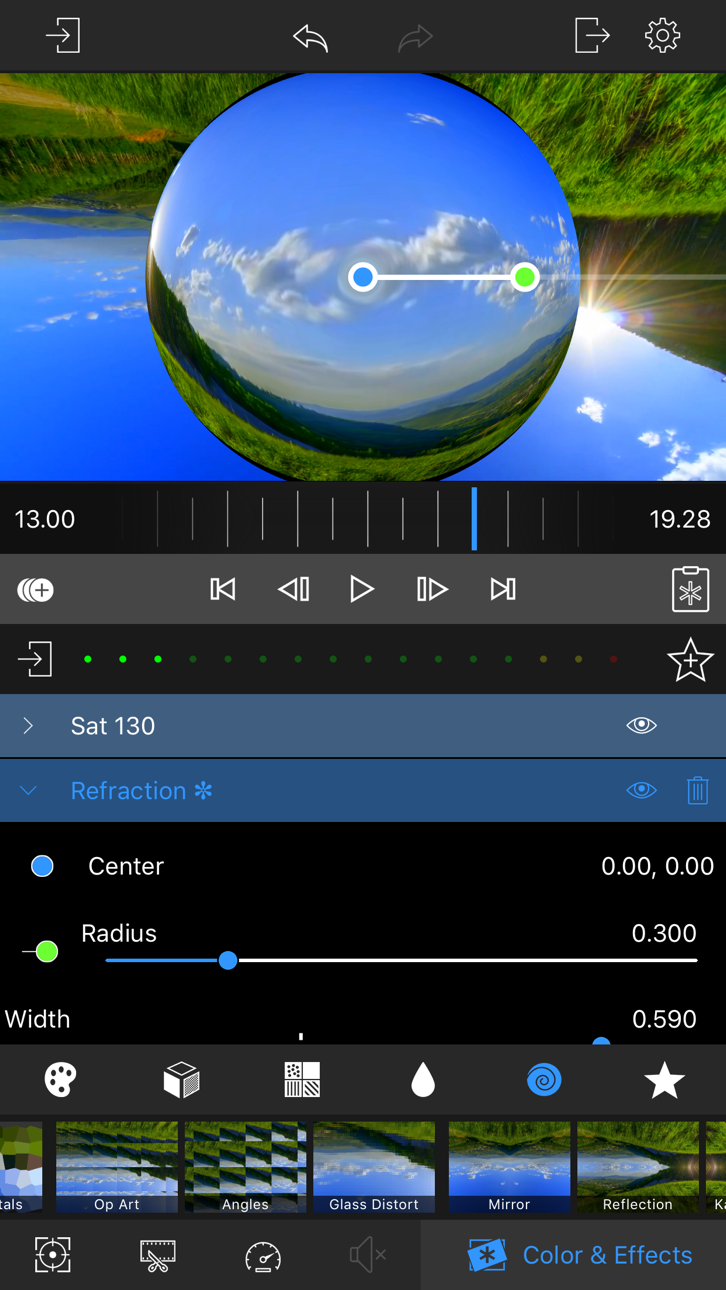
Denna videoeffekt- och färgkorrektionsapp Mod IPA låser upp premiumfunktioner gratis, så att du kan lägga till anpassningsbara effekter, stilar, suddningar, pixeleffekter och distorsioner över dina videor utan att betala. LumaFX gör professionell videoredigering tillgänglig på iOS med kraftfulla färgkorrektionsverktyg, keyframe-animation och oändliga effektkombinationer som är idealiska för mobila filmmakers och innehållsskapare.
Den här appen levereras även med iGameGod, vilket ger dig tillgång till Auto Touch för att automatisera repetitiva uppgifter, App Speed Manager för justerbar spelhastighet, värdesredigering med Memory Engine och fler kraftfulla verktyg för iOS-spel.
Ladda ner LumaFX modded IPA från länkarna ovan. Tryck på installationsknappen och följ instruktionerna för att installera denna iOS-apphack på iPhone, iPad eller Apple Silicon.
Behöver du mer hjälp? Se våra iOSGods-appens vanliga frågor för detaljerade svar och felsökningstips.
LumaFX is the most powerful, fun and easy way to layer customizable FX and color correction on your videos. Add multiple color, styles, blurs, pixel effects and distortions to create an infinite variety of effects. Adjust individual parameters on each effect and color correction. Use keyframing to animate each effect. Ideal for professional video producers, mobile journalists and movie making enthusiasts!
LumaFX is included in LumaFusion, our professional multi-track video editing app.
EFFECTS
• Start with our presets, then adjust parameters to customize
• Powerful color correction tools, including a 5 point level editor allow you to correct color problems and create just the right look
• LUT support lets you get the perfect look with a single touch. Select from included interesting and useful LUTs like FiLMiC deLog or import your own .cube or .3dl files.
• Layer multiple style effects (such as Comic and Gloom), blurs, pixel effects, and distortion effects (such as Vortex and Circle Splash)
• Layer effects, color and LUTs in any order to create an endless variety of effects
• Add unlimited keyframes to animate your effect or color at any frame
SLOW AND FAST MOTION
• Create slow motion/fast motion forward and reverse
• Fully supports 120 and 240fps slo-mo video files and time lapse video files
AUDIO
• Fill-from-left and fill-from-right configurations for dual-mono audio captures
• Keyframe audio levels and panning for perfect fades
• Audio Effects can be added to your clips and keyframed for perfect audio mixes and effects.
EDIT
• Easily crop, position and rotate with intuitive gestures
• Swiftly trim your video clips to any length
• Create projects with any aspect ratio, including landscape, portrait, square, film aspect ratios matching FiLMiC Pro, and 2:1 aspect ratio for 360° videos
• Extract a photo of any frame in the full resolution of the video
IMPORT MEDIA
• Work with any video media on your device
• Use the “Open In” feature to open compatible files from other apps
• Export at a variety of resolutions and qualities up to 4K (on supported iPhones and iPads), and a wide range of frame rates.
• View detailed information and metadata from your media
SHARE
• Easily share to the Photos App, Facebook, YouTube, Vimeo, Instagram, iCloud Drive, or open in other Apps
• Export at a variety of resolutions and qualities up to 4K.
WE SUPPORT OUR CUSTOMERS!
• Join our great video community at forums.luma-touch.com/LumaFX (registration code 4fusion90)
• Watch LumaFX tutorials on http://luma-touch.com/tutorials
• Contact us directly at [email protected]
Skärmbilder © respektive ägare · App Store


iOSGods är inte anslutet till, godkänt av eller sponsrat av Apple Inc., Google LLC eller utvecklarna av apparna som listas här. Apple, iOS och App Store är varumärken som tillhör Apple Inc. Android och Google Play är varumärken som tillhör Google LLC. Alla övriga appnamn, ikoner, bilder och varumärken tillhör sina respektive ägare.
- iPhone eller iPad utan jailbreak/jailad eller med jailbreak.
- Sideloadly eller alternativ.
- Dator med Windows/macOS/Linux och iTunes installerat.
STEG 1: Ladda ner den förhackade .IPA-filen från länken ovan till din dator. För att ladda ner från iOSGods App, se vår Guide för att ladda ner IPA i iOSGods App som även innehåller ett videoexempel.
STEG 2: Ladda ner Sideloadly och installera det på din Windows eller Mac.
STEG 3: Öppna Sideloadly på din dator, anslut din iOS-enhet och vänta tills enhetens namn visas i Sideloadly.
STEG 4: När din iEnhet känns igen drar du den moddade .IPA-filen du laddat ner och släpper den i Sideloadly-programmet.
STEG 5: Ange e-postadressen till ditt Apple Account och tryck sedan på ”Start”. Du ombeds sedan ange ditt lösenord. Fyll i de uppgifter som krävs.
STEG 6: Vänta tills Sideloadly är klar med att sideloada/installera den hackade IPA-filen. Om problem uppstår under installationen, läs noten nedan.
STEG 7: När installationen är klar och du ser appen på din hemskärm behöver du gå till Inställningar → Allmänt → Profiler / VPN & enhetshantering. Tryck där på e-postadressen du angav i steg 6 och tryck sedan på ”Lita på [email protected]”.
STEG 8: Gå nu till din hemskärm och öppna den nyligen installerade appen — allt ska fungera som det ska. Du kan behöva följa ytterligare app-specifika instruktioner i hackets popup inne i spelet.
OBS: På iOS/iPadOS 16 och senare måste du aktivera Utvecklarläge. För gratis Apple Developer-konton behöver du upprepa processen var sjunde dag. Om du har frågor eller problem, läs vår Sideloadly FAQ-avsnitt i tråden.
Game Name iOS Mod IPA is an action adventure game enhanced with powerful gameplay boosts and quality-of-life improvements. Win battles faster, earn rewards quicker, and enjoy uninterrupted play without ads.
- Unlimited Gold - spend freely to unlock premium content
- Damage Multiplier - deal significantly more damage in combat
- Defense Multiplier - take less damage and survive longer
- Reward Multiplier - earn more loot from every battle
- Max Level - instantly reach the highest player rank
- No Ads - play without interruptions or advertisements
This app also comes with iGameGod, giving you access to Auto Touch to automate repetitive tasks, App Speed Manager for adjustable gameplay speed, Memory Engine value editing, and more powerful iOS game tools.
Ladda ner Game Name Mod IPA från länkarna ovan. Tryck på installationsknappen och följ instruktionerna för att installera denna iOS-apphack på iPhone, iPad eller Apple Silicon.
Behöver du mer hjälp Se våra iOSGods-appens vanliga frågor för detaljerade svar och felsökningstips.
----------------------------------------------------------
--------------------------------------------------