Login necessário
Entre com sua conta iOSGods para continuar.
Entre com sua conta iOSGods para continuar.
Desbloqueie o acesso premium ao Prêt-à-Template Modded, o app de esboço de moda que transforma seu dispositivo iOS em um estúdio de design digital. Este Hack concede acesso completo a todos os templates premium, pincéis, padrões e ferramentas sem restrições, para que você possa esboçar roupas, acessórios e figuras de moda com recursos de nível profissional em qualquer lugar, a qualquer momento.
- Premium → acesso completo a todos os templates, pincéis e ferramentas de design
Este app também vem com iGameGod, oferecendo acesso ao Auto Touch para automatizar tarefas repetitivas, App Speed Manager para ajustar a velocidade do jogo, edição de valores com Memory Engine e outras ferramentas avançadas para jogos iOS.
Baixe Prêt-à-Template Modded modded IPA dos links acima. Toque no botão de instalação e siga as instruções para instalar este hack iOS no seu iPhone, iPad ou Apple Silicon.
Precisa de mais ajuda? Confira nossas Perguntas frequentes sobre o app iOSGods para respostas detalhadas e dicas de solução de problemas.
Bring your fashion design ideas to life, from the first sketch to the finished collection. Prêt-à-Template is a professional fashion design app created for fashion sketching, fashion illustration, outfit design, and product development. Built for students, creatives, stylists, and professional designers, it transforms inspiration into polished fashion concepts with tools designed specifically for the real fashion workflow.
Whether you are learning fashion drawing, building a fashion portfolio, developing a collection, or exploring new styling ideas, Prêt-à-Template offers a complete workspace for modern fashion design. Unlike generic drawing apps, it is built specifically for the needs of the fashion industry, combining fashion sketch tools, realistic templates, visual research, and presentation workflows in one place. It supports both creative exploration and technical development, helping designers move from early concepts to more resolved and presentation-ready ideas with greater speed and confidence.
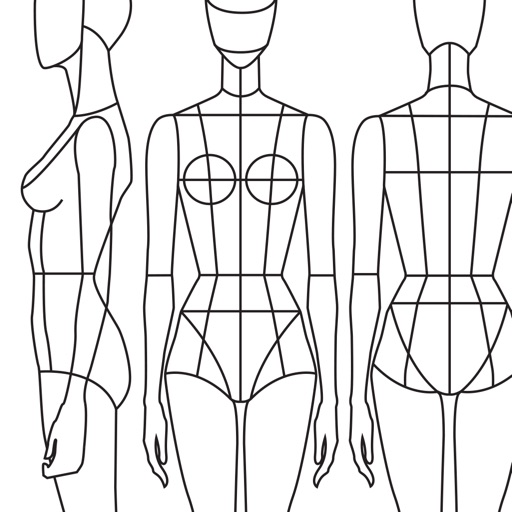
The app lets you begin creating in two distinct ways, depending on your design style. You can work with linework templates that include front, side, and back guides, making them ideal for structured fashion sketches, technical development, and clean fashion illustration. Or you can start with realistic product templates, working directly over lifelike silhouettes with depth and volume, which is perfect for outfit design, product visualization, and concept development. Puzzle Look makes the creative process even faster and more intuitive. Simply describe the look you want, and it selects the most relevant templates from the library so you can begin designing right away. AI supports your process with fashion-aware suggestions while keeping the designer fully in control of every creative decision.
Prêt-à-Template also includes a flexible mood board workspace where inspiration, materials, styling ideas, and product references can come together naturally. Its integrated fashion library includes fabrics, textile structures, prints, patterns, textures, trims, findings, sleeves, collars, cuffs, pockets, openings, construction details, care labels, and textile symbols, creating a rich environment for research, experimentation, and product thinking.
The canvas makes fashion sketching feel more expressive, natural, and realistic. You can sketch, shade, annotate, render, and refine using intuitive tools, realistic brush behavior, and a paper-like surface that gives the digital drawing experience a more tactile quality. Prêt-à-Template also uses AI with real fashion context. Its templates are built around garment proportions, silhouette logic, fabric behavior, drape, trims, and construction details, helping deliver results that feel realistic and aligned with professional fashion design workflows rather than generic image generation.
From fashion design and fashion sketching to fashion illustration, outfit design, mood board creation, collection development, styling exploration, textile research, and fashion portfolio building, Prêt-à-Template supports every stage of the fashion design process in one creative workspace, whether you are just starting out or already working at a professional level.
Subscription Pricing & Terms
Prêt-à-Template is free to download. Unlock full access with a yearly or monthly subscription. Auto-renews unless canceled 24 hours before the current period ends.
Manage your subscription in your Apple Account settings.
Terms of Use (EULA):
https://www.apple.com/legal/internet-services/itunes/dev/stdeula/
Capturas © respectivos proprietários · App Store


A iOSGods não é afiliada, endossada nem patrocinada pela Apple Inc., pela Google LLC ou pelos desenvolvedores dos apps listados aqui. Apple, iOS e App Store são marcas da Apple Inc. Android e Google Play são marcas da Google LLC. Todos os demais nomes de apps, ícones, imagens e marcas pertencem aos seus respectivos proprietários.
- iPhone ou iPad sem jailbreak/jailed ou com jailbreak.
- Sideloadly ou alternativas.
- Computador com Windows/macOS/Linux e iTunes instalado.
PASSO 1: Baixe o arquivo .IPA pré-hackeado do link acima para o seu computador. Para baixar pelo iOSGods App, veja nosso Tutorial de download de IPA do iOSGods App, que inclui um exemplo em vídeo.
PASSO 2: Baixe o Sideloadly e instale-o no seu Windows ou Mac.
PASSO 3: Abra o Sideloadly no seu computador, conecte seu dispositivo iOS e aguarde até que o nome do dispositivo apareça no Sideloadly.
PASSO 4: Assim que seu iDevice for reconhecido, arraste o arquivo .IPA modificado que você baixou e solte-o no aplicativo Sideloadly.
PASSO 5: Digite o e-mail da sua Apple Account e pressione “Start”. Em seguida, será solicitada a sua senha. Prossiga e forneça as informações solicitadas.
PASSO 6: Aguarde o Sideloadly finalizar o sideload/instalação do IPA hackeado. Se houver problemas durante a instalação, leia a observação abaixo.
PASSO 7: Quando a instalação estiver concluída e você vir o app na Tela de Início, será necessário acessar Ajustes → Geral → Perfis / Gerenciamento de VPN e Dispositivo. Lá, toque no e-mail que você inseriu no passo 6 e, em seguida, toque em “Confiar em [email protected]”.
PASSO 8: Agora vá para a Tela de Início e abra o app recém-instalado; tudo deve funcionar normalmente. Você pode precisar seguir instruções adicionais específicas no popup do hack dentro do jogo.
OBSERVAÇÃO: No iOS/iPadOS 16 e versões posteriores, você deve ativar o Modo de Desenvolvedor. Para contas Apple Developer gratuitas, será necessário repetir este processo a cada 7 dias. Se tiver dúvidas ou problemas, leia nossa seção de FAQ do Sideloadly no tópico.
Game Name iOS Mod IPA is an action adventure game enhanced with powerful gameplay boosts and quality-of-life improvements. Win battles faster, earn rewards quicker, and enjoy uninterrupted play without ads.
- Unlimited Gold - spend freely to unlock premium content
- Damage Multiplier - deal significantly more damage in combat
- Defense Multiplier - take less damage and survive longer
- Reward Multiplier - earn more loot from every battle
- Max Level - instantly reach the highest player rank
- No Ads - play without interruptions or advertisements
This app also comes with iGameGod, giving you access to Auto Touch to automate repetitive tasks, App Speed Manager for adjustable gameplay speed, Memory Engine value editing, and more powerful iOS game tools.
Baixe Game Name Mod IPA dos links acima. Toque no botão de instalação e siga as instruções para instalar este hack iOS no seu iPhone, iPad ou Apple Silicon.
Precisa de mais ajuda Confira nossas Perguntas frequentes sobre o app iOSGods para respostas detalhadas e dicas de solução de problemas.
----------------------------------------------------------
--------------------------------------------------