Требуется вход
Войдите в учётную запись iOSGods, чтобы продолжить.
Войдите в учётную запись iOSGods, чтобы продолжить.
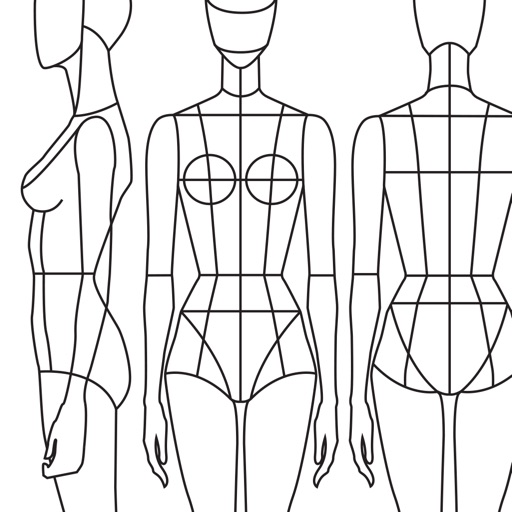
Разблокируйте премиум-доступ к Prêt-à-Template Modded, приложению для эскизирования моды, которое превращает ваше iOS устройство в цифровую студию дизайна. Этот взлом предоставляет вам полный доступ ко всем премиум-шаблонам, кистям, паттернам и инструментам без ограничений, чтобы вы могли создавать эскизы одежды, аксессуаров и модных фигур с профессиональными функциями в любом месте и в любое время.
- Премиум → полный доступ ко всем шаблонам, кистям и инструментам дизайна
Это приложение также поставляется с iGameGod, который открывает доступ к Auto Touch для автоматизации повторяющихся действий, App Speed Manager для регулируемой скорости игры, редактированию значений Memory Engine и другим мощным инструментам для iOS-игр.
Скачайте Prêt-à-Template Modded modded IPA по ссылкам выше. Нажмите кнопку установки и следуйте инструкциям, чтобы установить этот хак iOS на iPhone, iPad или Mac с Apple Silicon.
Нужна помощь? Посмотрите наши Часто задаваемые вопросы по приложению iOSGods, чтобы получить подробные ответы и советы по устранению неполадок.
Bring your fashion design ideas to life, from the first sketch to the finished collection. Prêt-à-Template is a professional fashion design app created for fashion sketching, fashion illustration, outfit design, and product development. Built for students, creatives, stylists, and professional designers, it transforms inspiration into polished fashion concepts with tools designed specifically for the real fashion workflow.
Whether you are learning fashion drawing, building a fashion portfolio, developing a collection, or exploring new styling ideas, Prêt-à-Template offers a complete workspace for modern fashion design. Unlike generic drawing apps, it is built specifically for the needs of the fashion industry, combining fashion sketch tools, realistic templates, visual research, and presentation workflows in one place. It supports both creative exploration and technical development, helping designers move from early concepts to more resolved and presentation-ready ideas with greater speed and confidence.
The app lets you begin creating in two distinct ways, depending on your design style. You can work with linework templates that include front, side, and back guides, making them ideal for structured fashion sketches, technical development, and clean fashion illustration. Or you can start with realistic product templates, working directly over lifelike silhouettes with depth and volume, which is perfect for outfit design, product visualization, and concept development. Puzzle Look makes the creative process even faster and more intuitive. Simply describe the look you want, and it selects the most relevant templates from the library so you can begin designing right away. AI supports your process with fashion-aware suggestions while keeping the designer fully in control of every creative decision.
Prêt-à-Template also includes a flexible mood board workspace where inspiration, materials, styling ideas, and product references can come together naturally. Its integrated fashion library includes fabrics, textile structures, prints, patterns, textures, trims, findings, sleeves, collars, cuffs, pockets, openings, construction details, care labels, and textile symbols, creating a rich environment for research, experimentation, and product thinking.
The canvas makes fashion sketching feel more expressive, natural, and realistic. You can sketch, shade, annotate, render, and refine using intuitive tools, realistic brush behavior, and a paper-like surface that gives the digital drawing experience a more tactile quality. Prêt-à-Template also uses AI with real fashion context. Its templates are built around garment proportions, silhouette logic, fabric behavior, drape, trims, and construction details, helping deliver results that feel realistic and aligned with professional fashion design workflows rather than generic image generation.
From fashion design and fashion sketching to fashion illustration, outfit design, mood board creation, collection development, styling exploration, textile research, and fashion portfolio building, Prêt-à-Template supports every stage of the fashion design process in one creative workspace, whether you are just starting out or already working at a professional level.
Subscription Pricing & Terms
Prêt-à-Template is free to download. Unlock full access with a yearly or monthly subscription. Auto-renews unless canceled 24 hours before the current period ends.
Manage your subscription in your Apple Account settings.
Terms of Use (EULA):
https://www.apple.com/legal/internet-services/itunes/dev/stdeula/
Скриншоты © их владельцев · App Store


iOSGods не связана с Apple Inc., Google LLC или разработчиками перечисленных здесь приложений, не одобрена и не спонсируется ими. Apple, iOS и App Store — товарные знаки Apple Inc. Android и Google Play — товарные знаки Google LLC. Все остальные названия приложений, значки, изображения и товарные знаки принадлежат их владельцам.
- iPhone или iPad без джейлбрейка/в обычном режиме или с джейлбрейком.
- Sideloadly или альтернативы.
- Компьютер с Windows/macOS/Linux и установленным iTunes.
ШАГ 1: Скачайте предварительно взломанный файл .IPA по ссылке выше на свой компьютер. Чтобы скачать его из приложения iOSGods, посмотрите наш Туториал по скачиванию IPA в приложении iOSGods, в котором есть видеопример.
ШАГ 2: Скачайте Sideloadly и установите его на Windows или Mac.
ШАГ 3: Откройте Sideloadly на компьютере, подключите iOS-устройство и дождитесь, пока его имя появится в Sideloadly.
ШАГ 4: Когда устройство будет распознано, перетащите скачанный модифицированный файл .IPA в окно Sideloadly.
ШАГ 5: Введите адрес электронной почты вашего Apple Account, затем нажмите «Start». После этого вас попросят ввести пароль. Укажите необходимые данные.
ШАГ 6: Дождитесь, пока Sideloadly завершит sideload/установку взломанного IPA. При возникновении проблем во время установки ознакомьтесь с примечанием ниже.
ШАГ 7: После завершения установки и появления приложения на главном экране перейдите в Настройки → Основные → Профили / VPN и управление устройством. Там нажмите на email, который вы ввели на шаге 6, а затем нажмите «Доверять [email protected]».
ШАГ 8: Теперь перейдите на главный экран и откройте установленное приложение — всё должно работать. Возможно, потребуется выполнить дополнительные инструкции в попапе мода внутри игры.
ПРИМЕЧАНИЕ: На iOS/iPadOS 16 и новее необходимо включить режим разработчика. Для бесплатных учётных записей Apple Developer этот процесс нужно повторять каждые 7 дней. Если возникнут вопросы или проблемы, ознакомьтесь с нашим разделом FAQ по Sideloadly в теме.
Game Name iOS Mod IPA is an action adventure game enhanced with powerful gameplay boosts and quality-of-life improvements. Win battles faster, earn rewards quicker, and enjoy uninterrupted play without ads.
- Unlimited Gold - spend freely to unlock premium content
- Damage Multiplier - deal significantly more damage in combat
- Defense Multiplier - take less damage and survive longer
- Reward Multiplier - earn more loot from every battle
- Max Level - instantly reach the highest player rank
- No Ads - play without interruptions or advertisements
This app also comes with iGameGod, giving you access to Auto Touch to automate repetitive tasks, App Speed Manager for adjustable gameplay speed, Memory Engine value editing, and more powerful iOS game tools.
Скачайте Game Name Mod IPA по ссылкам выше. Нажмите кнопку установки и следуйте инструкциям, чтобы установить этот хак iOS на iPhone, iPad или Mac с Apple Silicon.
Нужна помощь Посмотрите наши Часто задаваемые вопросы по приложению iOSGods, чтобы получить подробные ответы и советы по устранению неполадок.
----------------------------------------------------------
--------------------------------------------------