Anmeldung erforderlich
Melde dich mit deinem iOSGods-Konto an, um fortzufahren.
Melde dich mit deinem iOSGods-Konto an, um fortzufahren.
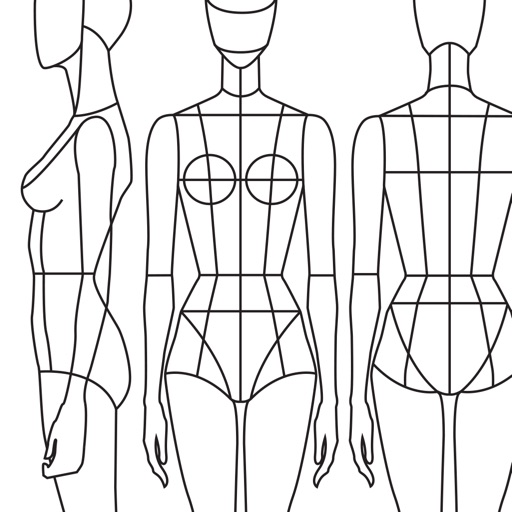
Schalte Premium-Zugang zu Prêt-à-Template Modded frei, der Fashion-Sketch-App, die dein iOS-Gerät in ein digitales Design-Studio verwandelt. Dieser Hack gewährt dir vollständigen Zugriff auf alle Premium-Vorlagen, Pinsel, Muster und Werkzeuge ohne Einschränkungen, damit du überall und jederzeit Kleidungsstücke, Accessoires und Fashion-Figuren mit professionellen Funktionen skizzieren kannst.
- Premium → vollständiger Zugriff auf alle Vorlagen, Pinsel und Design-Werkzeuge
Diese App wird zusätzlich mit iGameGod geliefert und bietet dir Zugriff auf Auto Touch zur Automatisierung sich wiederholender Aufgaben, App Speed Manager für eine anpassbare Spielgeschwindigkeit, Memory Engine zur Wertbearbeitung und weitere leistungsstarke iOS-Spielwerkzeuge.
Lade Prêt-à-Template Modded modded IPA über die obigen Links herunter. Tippe auf den Installations-Button und folge den Anweisungen, um diese iOS-App auf deinem iPhone, iPad oder Apple Silicon zu installieren.
Brauchst du mehr Hilfe? In unseren iOSGods App häufig gestellten Fragen findest du ausführliche Antworten und Tipps zur Fehlerbehebung.
Erwecken Sie Ihre Modeideen zum Leben! Ob Sie Ihre ersten Skizzen anfertigen oder ein professionelles Portfolio verfeinern – Prêt-à-Template bietet alles, was Sie für selbstbewusstes, schnelles und stilvolles Design benötigen.
Entfalten Sie Ihre Kreativität mit Tools, die Ihrem Workflow folgen. Beginnen Sie sofort mit intuitiven Funktionen und fertigen Vorlagen, damit Sie sich auf das Wesentliche konzentrieren können: Ihre eigene kreative Vision.
Prêt-à-Template 4.0: Ein Neues Kapitel der Modegestaltung
Vollständig neu gestaltet in Ästhetik, Bedienbarkeit und kreativer Tiefe, eröffnet Prêt-à-Template 4.0 eine Ära, in der digitale Werkzeuge die Perspektive von Fashion-Designer*innen wirklich erweitern.
Zwei Startpunkte: Linework Guides oder Realistic Product Renderings
Neben unseren ikonischen Dreiseiten-Guides – Seite, Front und Rücken – bieten wir nun realistische Produktdarstellungen mit Tiefe, Volumen und Materialwirkung.
Ob technisches Linework oder eine realistische Grundlage: Prêt-à-Template passt sich Ihrem Prozess an und ermöglicht volle kreative Freiheit.
Mood Boards: Ihr Kreatives Universum an einem Ort
Eine flexible Fläche – ästhetisch, inspirierend oder hochtechnisch – unterstützt von der umfangreichsten Modebibliothek, die je in eine App integriert wurde:
• Stoffe und Textilstrukturen
• Trims und Komponenten
• Pflegeetiketten und Textilsymbole
• Drucke, Muster und Texturen
• Jackenöffnungen
• Taschen, Ärmel, Manschetten
• Armausschnitte, Halsausschnitte, Kragen
• Und alle Elemente des Modeentwicklungsprozesses
Einfach zu gestalten und grenzenlos anpassbar – perfekt als Skizzenbuch, Materialwand, Moodboard oder Präsentationsfläche.
The Canvas: Wo Zeichnen Lebendig Wird
Die Zeichenfläche in Prêt-à-Template 4.0 wurde komplett überarbeitet: 3D-Papiertextur, lichtreaktive Materialien und Werkzeuge mit natürlichem Verhalten.
Puzzle Look
Puzzle Look ermöglicht Outfits per Mix-and-Match: Beschreiben Sie einfach den gewünschten Look und das System wählt sofort passende Vorlagen. Wenn es passt, können Sie direkt loslegen.
KI als Werkzeug für den Designprozess
Unsere Mission ist es, das leistungsstärkste digitale Umfeld für Modeentwicklung zu bieten. KI stärkt diese Mission weiter. Sie soll die Intuition stärken, nicht ersetzen. Deshalb führen wir eine neue Art der Zusammenarbeit ein – konstruktiv, intuitiv und mit minimalen Eingaben.
Jede Vorlage beinhaltet die Logik echter Modeprodukte:
• Proportionen und Silhouetten
• Materialverhalten
• Naht- und Finishstrukturen
• Trims und technische Komponenten
• Volumen, Fall und Konstruktion
• Kohärenz in jedem Detail
Diese Basis bietet der KI Kontext — weit mehr als reine Texteingaben es könnten — und ermöglicht realistische, technisch präzise Modeergebnisse.
Die Synergie zwischen Designerblick und KI-Rendering schafft heute den idealen Weg für Modeproduktentwicklung.
Preise & Abonnementbedingungen
Prêt-à-Template ist kostenlos mit eingeschränkten Funktionen. Volle Funktionen gibt es im Monats- oder Jahresabo. Automatische Verlängerung, außer es wird 24 h vorher gekündigt.
Aboverwaltung in den Apple-Account-Einstellungen.
Privacy Policy: pretatemplate.com/privacy-policy
Terms of Use: pretatemplate.com/terms-of-use
Screenshots © der jeweiligen Inhaber · App Store


iOSGods ist nicht mit Apple Inc., Google LLC oder den Entwicklern der hier aufgeführten Apps verbunden und wird von ihnen weder unterstützt noch gesponsert. Apple, iOS und App Store sind Marken von Apple Inc. Android und Google Play sind Marken von Google LLC. Alle weiteren App-Namen, Symbole, Grafiken und Marken gehören ihren jeweiligen Inhabern.
- Nicht-Jailbroken/Jailed oder Jailbroken iPhone oder iPad.
- Sideloadly oder Alternativen.
- Computer mit Windows/macOS/Linux und installiertem iTunes.
SCHRITT 1: Lade die vorinstallierte .IPA-Datei über den obigen Link auf deinen Computer herunter. Zum Herunterladen aus der iOSGods-App siehe unser iOSGods App IPA Download-Tutorial mit Videobeispiel.
SCHRITT 2: Lade Sideloadly herunter und installiere es auf deinem Windows oder Mac.
SCHRITT 3: Öffne Sideloadly auf deinem Computer, verbinde dein iOS-Gerät und warte, bis dein Gerätename in Sideloadly erscheint.
SCHRITT 4: Sobald dein iDevice erkannt wird, ziehe die heruntergeladene gemoddete .IPA-Datei in die Sideloadly-Anwendung.
SCHRITT 5: Gib deine Apple-Account-E-Mail ein und drücke „Start". Du wirst dann nach deinem Passwort gefragt. Gib die erforderlichen Informationen ein.
SCHRITT 6: Warte, bis Sideloadly das Sideloading/Installieren der gehackten IPA abgeschlossen hat. Bei Problemen während der Installation lies bitte den Hinweis unten.
SCHRITT 7: Sobald die Installation abgeschlossen ist und die App auf deinem Home-Bildschirm angezeigt wird, musst du zu Einstellungen → Allgemein → Profile / VPN & Geräteverwaltung gehen. Tippe dort auf die E-Mail, die du in Schritt 6 eingegeben hast, und dann auf „Trust [email protected]".
SCHRITT 8: Gehe nun zu deinem Home-Bildschirm und öffne die neu installierte App – alles sollte einwandfrei funktionieren. Möglicherweise musst du weitere App-spezifische Anweisungen im Hack-Popup im Spiel befolgen.
HINWEIS: iOS/iPadOS 16 und höher: Du musst den Entwicklermodus aktivieren. Bei kostenlosen Apple Developer-Accounts musst du diesen Vorgang alle 7 Tage wiederholen. Bei Fragen oder Problemen lies bitte unsere Sideloadly-FAQ-Sektion im Thema.
Game Name iOS Mod IPA is an action adventure game enhanced with powerful gameplay boosts and quality-of-life improvements. Win battles faster, earn rewards quicker, and enjoy uninterrupted play without ads.
- Unlimited Gold - spend freely to unlock premium content
- Damage Multiplier - deal significantly more damage in combat
- Defense Multiplier - take less damage and survive longer
- Reward Multiplier - earn more loot from every battle
- Max Level - instantly reach the highest player rank
- No Ads - play without interruptions or advertisements
This app also comes with iGameGod, giving you access to Auto Touch to automate repetitive tasks, App Speed Manager for adjustable gameplay speed, Memory Engine value editing, and more powerful iOS game tools.
Lade Game Name Mod IPA über die obigen Links herunter. Tippe auf den Installations-Button und folge den Anweisungen, um diese iOS-App auf deinem iPhone, iPad oder Apple Silicon zu installieren.
Brauchst du mehr Hilfe In unseren iOSGods App häufig gestellten Fragen findest du ausführliche Antworten und Tipps zur Fehlerbehebung.
----------------------------------------------------------
--------------------------------------------------