ログインが必要
iOSGodsアカウントでサインインして続けてください。
iOSGodsアカウントでサインインして続けてください。
Prêt-à-Template Modded のプレミアムアクセスをアンロックして、iOS デバイスをデジタルデザインスタジオに変えるファッションスケッチアプリを体験しましょう。このチートにより、すべてのプレミアムテンプレート、ブラシ、パターン、ツールに制限なくフルアクセスできるようになり、プロフェッショナルグレードの機能を使用して、いつでもどこでも衣類、アクセサリー、ファッションフィギュアをスケッチできます。
- プレミアム → すべてのテンプレート、ブラシ、デザインツールへのフルアクセス
このアプリにはiGameGodも搭載されており、繰り返し作業を自動化するAuto Touch、ゲーム速度を調整できるApp Speed Manager、Memory Engineによる値の編集など、強力なiOSゲーム用ツールをご利用いただけます。
Prêt-à-Template Modded modded IPAを上のリンクからダウンロードします。インストールボタンをタップし、画面の指示に従ってiPhone、iPad、Apple SiliconにこのiOSアプリハックをインストールします。
さらにヘルプが必要ですか? 詳しい回答とトラブルシューティングはiOSGodsアプリ よくある質問をご覧ください。
帶著你的時尚靈感開始創作吧!無論你正在繪製第一張時尚草圖,或正在完善專業作品集,Prêt-à-Template 都為你提供自信、快速又有風格的設計工具。
以順暢直覺的工具探索創意,透過直覺功能與現成模板立即開始設計,專注於最重要的事:展現你獨一無二的創意視野!
Prêt-à-Template 4.0:重新定義當代時尚的創作方式
全新設計的介面、美感與創意深度,Prêt-à-Template 4.0 開啟了數位時尚的新時代,讓工具真正延伸並提升設計師的視野。
兩種全新起點:線稿指南或真實產品渲染
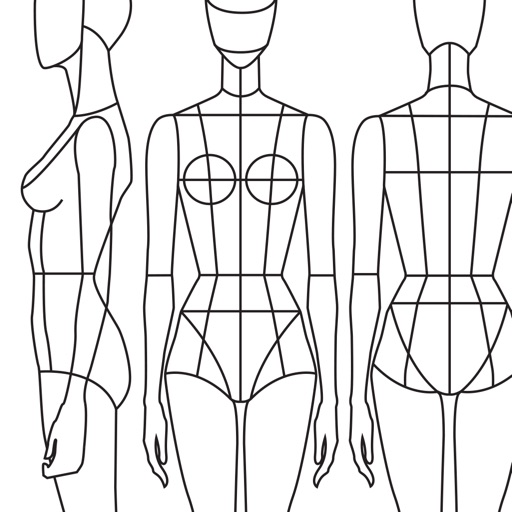
除了經典的三視圖指引(側、前、後),我們現在提供具有真實深度、體積與材質的產品渲染。無論你喜歡在線稿上作畫,或直接從逼真的基底開始,Prêt-à-Template 都能隨你的流程進行,給予你完全的創作自由。
靈感版:你的時尚宇宙,一站整合
彈性、自由、可美觀、可技術,搭載史上最完整最細緻的時尚素材庫:
• 布料與織物結構
• 配件、五金與輔料
• 洗標與紡織符號
• 印花、圖案、材質
• 外套門襟
• 口袋、袖子、袖口
• 袖籠、領口、領子
• 以及時尚創作所需的所有細節
易於組合、自由變化,這個空間成為你的速寫本、研究牆、材質實驗室與展示平台。
畫布:讓繪圖變得真正生動
全新畫布使用 3D 紙張質感、光線互動材質與真實筆刷,為你帶來直覺、熟悉又沉浸的繪圖體驗。
Puzzle Look
Puzzle Look 讓混搭穿搭變得更簡單:只要描述你想要的造型,我們的模型就會自動找出最適合的模板。喜歡結果的話,你可以立即開始創作。
AI:提升設計流程的工具,而非替代品
我們的使命始終是打造最強大的數位時尚環境,把想法變為現實。AI 讓這個使命更上一層。我們相信 AI 應該增強設計師的直覺,而不是取代它。因此我們打造了全新的 AI 合作方式:建設性、直覺式,並將指令需求降到最低,好讓創意保持在中心位置。
每個模板都包含時尚產品的真實邏輯:
• 比例與輪廓
• 布料行為與材質邏輯
• 車縫與細節結構
• 五金與技術配件
• 體積、垂墜與結構
• 每個細節之間的合理關係
這個深層基礎提供 AI 必需的脈絡,是純文字提示永遠做不到的。沒有這些時尚原生的基礎,任何模型都無法產出真實、技術正確、符合專業水準的設計結果。
正是在設計師的眼光與 AI 的呈現之間,今日的完美時尚創作協作方式才得以誕生。
訂閱價格與條款
Prêt-à-Template 可免費下載並提供有限功能。訂閱年費或月費即可解鎖全部內容。訂閱會自動續訂,除非在期限到期前 24 小時取消。
可在 Apple 帳號設定中管理訂閱。
隱私權政策:pretatemplate.com/privacy-policy
使用條款:pretatemplate.com/terms-of-use
スクリーンショット © 各権利者 · App Store


iOSGods は Apple Inc.、Google LLC、および掲載アプリの開発者と提携しておらず、承認や協賛も受けていません。Apple、iOS、App Store は Apple Inc. の商標です。Android および Google Play は Google LLC の商標です。その他のアプリ名、アイコン、画像、商標はすべて各権利者に帰属します。
- 脱獄/Jailed済みまたは脱獄済みのiPhoneまたはiPad。
- Sideloadlyまたは代替手段。
- iTunesがインストールされているWindows/macOS/Linuxを実行しているコンピュータ。
ステップ1: 上のリンクから事前にハックされた.IPAファイルをコンピュータにダウンロードします。iOSGodsアプリからダウンロードする方法は、ビデオ例付きのiOSGodsアプリIPAダウンロードチュートリアルをご覧ください。
ステップ2: SideloadlyをダウンロードしてWindowsまたはMacにインストールします。
ステップ3: コンピュータでSideloadlyを開き、iOSデバイスを接続して、デバイス名がSideloadlyに表示されるまで待ちます。
ステップ4: iDeviceが認識されたら、ダウンロードしたModされた.IPAファイルをSideloadlyアプリにドラッグ&ドロップします。
ステップ5: Apple Accountのメールアドレスを入力し、「Start」を押します。次にパスワードの入力を求められます。必要な情報を入力してください。
ステップ6: Sideloadlyがハックされたipaのサイドロード/インストールを完了するのを待ちます。インストール中に問題が発生した場合は、以下の注意事項をお読みください。
ステップ7: インストールが完了し、ホーム画面にアプリが表示されたら、設定 → 一般 → プロファイル / VPNとデバイス管理に移動する必要があります。そこで、ステップ6で入力したメールをタップし、「Trust [email protected]」をタップします。
ステップ8: ホーム画面に戻り、新しくインストールされたアプリを開けば、すべて正常に動作するはずです。ゲーム内のハックのポップアップで、アプリごとの追加指示に従う必要がある場合があります。
注意: iOS/iPadOS 16以降では、デベロッパモードを有効にするが必要です。無料のApple Developerアカウントの場合、このプロセスを7日ごとに繰り返す必要があります。質問や問題がある場合は、トピックのSideloadly FAQセクションをお読みください。
Game Name iOS Mod IPA is an action adventure game enhanced with powerful gameplay boosts and quality-of-life improvements. Win battles faster, earn rewards quicker, and enjoy uninterrupted play without ads.
- Unlimited Gold - spend freely to unlock premium content
- Damage Multiplier - deal significantly more damage in combat
- Defense Multiplier - take less damage and survive longer
- Reward Multiplier - earn more loot from every battle
- Max Level - instantly reach the highest player rank
- No Ads - play without interruptions or advertisements
This app also comes with iGameGod, giving you access to Auto Touch to automate repetitive tasks, App Speed Manager for adjustable gameplay speed, Memory Engine value editing, and more powerful iOS game tools.
Game Name Mod IPAを上のリンクからダウンロードします。インストールボタンをタップし、画面の指示に従ってiPhone、iPad、Apple SiliconにこのiOSアプリハックをインストールします。
さらにヘルプが必要ですか 詳しい回答とトラブルシューティングはiOSGodsアプリ よくある質問をご覧ください。
----------------------------------------------------------
--------------------------------------------------