Inloggning krävs
Logga in med ditt iOSGods-konto för att fortsätta.
Logga in med ditt iOSGods-konto för att fortsätta.
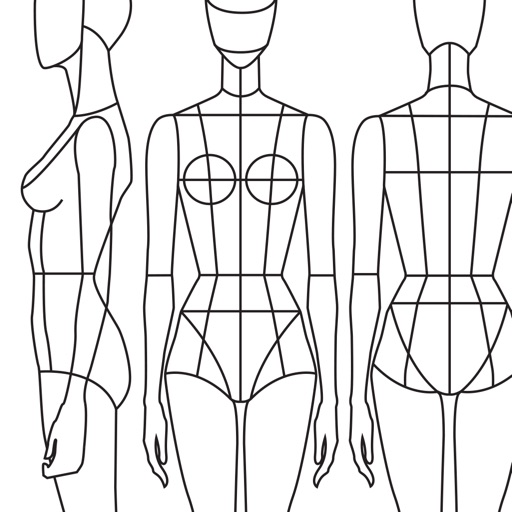
Lås upp premiumåtkomst till Prêt-à-Template Modded, fashionritningsappen som förvandlar din iOS-enhet till en digital designstudio. Detta hack ger dig fullständig åtkomst till alla premiummallar, penslar, mönster och verktyg utan begränsningar, så att du kan skissa på kläder, accessoarer och fashionfigurer med professionell funktionalitet var som helst, när som helst.
- Premium → fullständig åtkomst till alla mallar, penslar och designverktyg
Den här appen levereras även med iGameGod, vilket ger dig tillgång till Auto Touch för att automatisera repetitiva uppgifter, App Speed Manager för justerbar spelhastighet, värdesredigering med Memory Engine och fler kraftfulla verktyg för iOS-spel.
Ladda ner Prêt-à-Template Modded modded IPA från länkarna ovan. Tryck på installationsknappen och följ instruktionerna för att installera denna iOS-apphack på iPhone, iPad eller Apple Silicon.
Behöver du mer hjälp? Se våra iOSGods-appens vanliga frågor för detaljerade svar och felsökningstips.
Bring your fashion design ideas to life, from the first sketch to the finished collection. Prêt-à-Template is a professional fashion design app created for fashion sketching, fashion illustration, outfit design, and product development. Built for students, creatives, stylists, and professional designers, it transforms inspiration into polished fashion concepts with tools designed specifically for the real fashion workflow.
Whether you are learning fashion drawing, building a fashion portfolio, developing a collection, or exploring new styling ideas, Prêt-à-Template offers a complete workspace for modern fashion design. Unlike generic drawing apps, it is built specifically for the needs of the fashion industry, combining fashion sketch tools, realistic templates, visual research, and presentation workflows in one place. It supports both creative exploration and technical development, helping designers move from early concepts to more resolved and presentation-ready ideas with greater speed and confidence.
The app lets you begin creating in two distinct ways, depending on your design style. You can work with linework templates that include front, side, and back guides, making them ideal for structured fashion sketches, technical development, and clean fashion illustration. Or you can start with realistic product templates, working directly over lifelike silhouettes with depth and volume, which is perfect for outfit design, product visualization, and concept development. Puzzle Look makes the creative process even faster and more intuitive. Simply describe the look you want, and it selects the most relevant templates from the library so you can begin designing right away. AI supports your process with fashion-aware suggestions while keeping the designer fully in control of every creative decision.
Prêt-à-Template also includes a flexible mood board workspace where inspiration, materials, styling ideas, and product references can come together naturally. Its integrated fashion library includes fabrics, textile structures, prints, patterns, textures, trims, findings, sleeves, collars, cuffs, pockets, openings, construction details, care labels, and textile symbols, creating a rich environment for research, experimentation, and product thinking.
The canvas makes fashion sketching feel more expressive, natural, and realistic. You can sketch, shade, annotate, render, and refine using intuitive tools, realistic brush behavior, and a paper-like surface that gives the digital drawing experience a more tactile quality. Prêt-à-Template also uses AI with real fashion context. Its templates are built around garment proportions, silhouette logic, fabric behavior, drape, trims, and construction details, helping deliver results that feel realistic and aligned with professional fashion design workflows rather than generic image generation.
From fashion design and fashion sketching to fashion illustration, outfit design, mood board creation, collection development, styling exploration, textile research, and fashion portfolio building, Prêt-à-Template supports every stage of the fashion design process in one creative workspace, whether you are just starting out or already working at a professional level.
Subscription Pricing & Terms
Prêt-à-Template is free to download. Unlock full access with a yearly or monthly subscription. Auto-renews unless canceled 24 hours before the current period ends.
Manage your subscription in your Apple Account settings.
Terms of Use (EULA):
https://www.apple.com/legal/internet-services/itunes/dev/stdeula/
Skärmbilder © respektive ägare · App Store


iOSGods är inte anslutet till, godkänt av eller sponsrat av Apple Inc., Google LLC eller utvecklarna av apparna som listas här. Apple, iOS och App Store är varumärken som tillhör Apple Inc. Android och Google Play är varumärken som tillhör Google LLC. Alla övriga appnamn, ikoner, bilder och varumärken tillhör sina respektive ägare.
- iPhone eller iPad utan jailbreak/jailad eller med jailbreak.
- Sideloadly eller alternativ.
- Dator med Windows/macOS/Linux och iTunes installerat.
STEG 1: Ladda ner den förhackade .IPA-filen från länken ovan till din dator. För att ladda ner från iOSGods App, se vår Guide för att ladda ner IPA i iOSGods App som även innehåller ett videoexempel.
STEG 2: Ladda ner Sideloadly och installera det på din Windows eller Mac.
STEG 3: Öppna Sideloadly på din dator, anslut din iOS-enhet och vänta tills enhetens namn visas i Sideloadly.
STEG 4: När din iEnhet känns igen drar du den moddade .IPA-filen du laddat ner och släpper den i Sideloadly-programmet.
STEG 5: Ange e-postadressen till ditt Apple Account och tryck sedan på ”Start”. Du ombeds sedan ange ditt lösenord. Fyll i de uppgifter som krävs.
STEG 6: Vänta tills Sideloadly är klar med att sideloada/installera den hackade IPA-filen. Om problem uppstår under installationen, läs noten nedan.
STEG 7: När installationen är klar och du ser appen på din hemskärm behöver du gå till Inställningar → Allmänt → Profiler / VPN & enhetshantering. Tryck där på e-postadressen du angav i steg 6 och tryck sedan på ”Lita på [email protected]”.
STEG 8: Gå nu till din hemskärm och öppna den nyligen installerade appen — allt ska fungera som det ska. Du kan behöva följa ytterligare app-specifika instruktioner i hackets popup inne i spelet.
OBS: På iOS/iPadOS 16 och senare måste du aktivera Utvecklarläge. För gratis Apple Developer-konton behöver du upprepa processen var sjunde dag. Om du har frågor eller problem, läs vår Sideloadly FAQ-avsnitt i tråden.
Game Name iOS Mod IPA is an action adventure game enhanced with powerful gameplay boosts and quality-of-life improvements. Win battles faster, earn rewards quicker, and enjoy uninterrupted play without ads.
- Unlimited Gold - spend freely to unlock premium content
- Damage Multiplier - deal significantly more damage in combat
- Defense Multiplier - take less damage and survive longer
- Reward Multiplier - earn more loot from every battle
- Max Level - instantly reach the highest player rank
- No Ads - play without interruptions or advertisements
This app also comes with iGameGod, giving you access to Auto Touch to automate repetitive tasks, App Speed Manager for adjustable gameplay speed, Memory Engine value editing, and more powerful iOS game tools.
Ladda ner Game Name Mod IPA från länkarna ovan. Tryck på installationsknappen och följ instruktionerna för att installera denna iOS-apphack på iPhone, iPad eller Apple Silicon.
Behöver du mer hjälp Se våra iOSGods-appens vanliga frågor för detaljerade svar och felsökningstips.
----------------------------------------------------------
--------------------------------------------------