Inicio de sesión requerido
Inicia sesión con tu cuenta de iOSGods para continuar.
Inicia sesión con tu cuenta de iOSGods para continuar.
Transforma tu iPhone en una cámara de cine profesional con Protake Mod IPA, desbloqueando herramientas de producción cinematográfica premium para vloggers, directores y creadores. Esta versión modificada te otorga acceso completo a modos de cámara avanzados, gradación de color profesional y funciones de composición cinematográfica que normalmente requieren una suscripción de pago, permitiéndote capturar video de calidad de transmisión en dispositivos móviles sin limitaciones.
- Premium Desbloqueado → acceso completo a todas las funciones profesionales
Esta app también incluye iGameGod, que te ofrece acceso a Auto Touch para automatizar tareas repetitivas, App Speed Manager para ajustar la velocidad del juego, edición de valores con Memory Engine y más potentes herramientas para juegos de iOS.
Descarga Protake - Mobile Cinema Camera Modded modded IPA desde los enlaces de arriba. Toca el botón de instalación y sigue las instrucciones para instalar este hack iOS en tu iPhone, iPad o Mac con Apple Silicon.
¿Necesitas más ayuda? Consulta nuestras Preguntas frecuentes de la app iOSGods para respuestas detalladas y consejos de solución de problemas.
Protake brings the filmmaking experience of professional cinema cameras to your mobile devices.
No matter you're a daily vlogger, a commercial director, or a well-established filmmaker, you will benefit from Protake's features, including:
# [NEW] WI-FI VIDEO TRANSMISSION
· In the landscape orientation of AUTO and PRO modes, you can start the brand new Wi-Fi Video Transmission system.
· You can transmit the video from 1 "camera" to 4 "monitors" (yes, we're talking about iPhones and iPads).
· You can watch up to 4 "cameras" on 1 "monitor".
· You can wirelessly start and stop the recording of all "cameras".
· You can even monitor HDR and SDR video streams on the same screen.
· It's a ground-breaking end-to-end mobile recording and monitoring experience.
· It's brought to you by Protake.
# MODES
· AUTO mode: a mode optimized for vloggers and YouTubers, you can use it single-handedly.
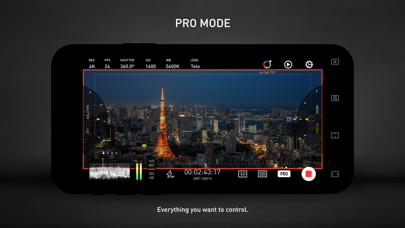
· PRO mode: a mode designed for professional filmmakers. All the camera information and control settings are well aligned on the screen.
· DUAL mode: recording video with two cameras working at the same time. Recorded in one file as Picture in Picture or two files.
· PORTRAIT mode: with iPhone Pro and iPad Pro's LiDAR sensor and the devices' powerful processors, you can record "portrait mode video" with real-time blurred background.
# COLOR
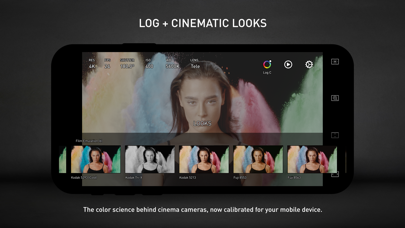
· LOG: it's not only a genuine LOG gamma curve -- we strictly matched your mobile device's color to the industrial standard - ALEXA Log C.
· Cinematic Looks: we provided a dozen of cinematic looks for filmmakers -- the styles are categorized into Neutral Styles, Film Emulation (classic Kodak and Fuji cinema film), Movie Inspired (blockbusters and indie masterpieces), and ALEXA Looks.
# ASSISTANTS
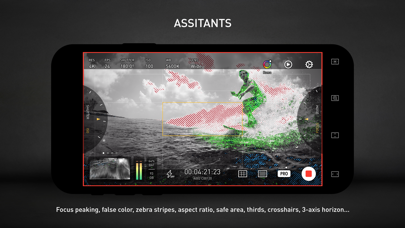
· Monitoring tools: Waveform, Parade, Histogram, RGB Histogram, Audio Meter.
· Composition assistants: Aspect Ratios, Safe Area, Thirds, Crosshairs, and 3-axis Horizon Indicators.
· Exposure assistants: Zebra Strips,False Color, Exposure Compensation, Auto Exposure.
· Focus assistants: Focus Peaking and Auto Focus.
· Recording: Record Beeper, Record Flash, Volume Key Record.
· Zooming and Focusing: A-B Point.
# DATA
· Frame Rate Normalization: Mobile devices don't have perfect frame rate control, therefore, it's easy to get non-standard variable frame rate. Protake solves this problem fundamentally and makes strictly constant FPS of 24, 25, 30, 60, 120, etc.
· File-naming: All the video files saved by Protake use the standard naming system: Camera Unit + Reel Number + Clip Count + Date + Suffix. It's something like "A001C00203_200412_IR8J.MOV"... Sounds familiar?
· Metadata: Everything including device model, ISO, shutter angel, white balance, lens, connected accessories, location, are all well recorded in the file's metadata.
· Time code: We provided both options for you -- Free Run and Record Run. It's compatible with your cinema cameras.
# Protake+
· With a Protake+ membership, you can use all the features, including: Pro mode, LOG gamma curve, Protake Cinematic Looks, all the assistant tools, data management, 3rd-party accessories.
· Protake+ provides 1-year membership for you to purchase;
· Payment will be charged to your iTunes Account at confirmation of purchase;
· Your subscription automatically renews unless auto-renew is turned off at least 24-hours before the end of the current period;
· Your account will be charged for renewal within 24-hours prior to the end of the current period;
· The renewal price for 1-year membership is USD 19.99.
· You can manage your subscription and switch off the auto-renewal by accessing your Account Settings after purchase;
· All personal data is handled under the terms and conditions of Protake’s privacy policy. More details can be found here:
https://terms.alicdn.com/legal-agreement/terms/platform_service/20220621172324148/20220621172324148.html
https://terms.alicdn.com/legal-agreement/terms/privacy/20220704104156634/20220704104156634.html
- iPhone o iPad con o sin Jailbreak.
- Sideloadly u otras alternativas.
- Ordenador con Windows/macOS/Linux e iTunes instalado.
PASO 1: Descargue el archivo .IPA pre-modificado desde el enlace de arriba a su ordenador. Para descargarlo desde la iOSGods App, consulte nuestro Tutorial de descarga del IPA desde la iOSGods App, que incluye un ejemplo en vídeo.
PASO 2: Descargue Sideloadly e instálelo en su Windows o Mac.
PASO 3: Abra Sideloadly en su ordenador, conecte su dispositivo iOS y espere hasta que el nombre del dispositivo aparezca en Sideloadly.
PASO 4: Una vez que su iDevice sea reconocido, arrastre el archivo .IPA modificado que descargó y suéltelo en la aplicación Sideloadly.
PASO 5: Introduzca el correo electrónico de su Apple Account y, a continuación, pulse «Start». Le pedirá que introduzca su contraseña. Proporcione la información solicitada.
PASO 6: Espere a que Sideloadly termine de hacer sideload/instalar el IPA modificado. Si surgen problemas durante la instalación, por favor lea la nota a continuación.
PASO 7: Una vez completada la instalación y al ver la app en la pantalla de inicio, deberá ir a Ajustes → General → Perfiles / VPN y Gestión de Dispositivos. Una vez allí, toque el correo electrónico que introdujo en el paso 6 y, después, toque en «Confiar en [email protected]».
PASO 8: Ahora vaya a la pantalla de inicio y abra la app recién instalada; todo debería funcionar correctamente. Es posible que tenga que seguir instrucciones adicionales específicas de cada app dentro del popup del hack en el juego.
NOTA: En iOS/iPadOS 16 y posteriores, debe activar el Modo Desarrollador. Para cuentas gratuitas de Apple Developer, deberá repetir este proceso cada 7 días. Si tiene alguna pregunta o problema, lea nuestra sección de Preguntas Frecuentes de Sideloadly del tema.