Accesso richiesto
Accedi con il tuo account iOSGods per continuare.
Accedi con il tuo account iOSGods per continuare.
Trasforma il tuo iPhone in una fotocamera professionale per il cinema con Protake - Mobile Cinema Camera Modded, sbloccando strumenti di produzione video avanzati per vlogger, registi e creator. Questa versione modificata ti concede accesso completo alle modalità fotocamera avanzate, color grading professionale e funzioni di composizione cinematografica che normalmente richiedono un abbonamento a pagamento, permettendoti di catturare video di qualità broadcast su dispositivo mobile senza limitazioni.
- Premium Sbloccato → accesso completo a tutte le funzioni professionali
Questa app include anche iGameGod, che ti offre accesso ad Auto Touch per automatizzare attività ripetitive, App Speed Manager per regolare la velocità di gioco, modifica dei valori con Memory Engine e altri potenti strumenti per giochi iOS.
Scarica Protake - Mobile Cinema Camera Modded modded IPA dai link sopra. Tocca il pulsante di installazione e segui le istruzioni per installare questo hack iOS sul tuo iPhone, iPad o Mac con Apple Silicon.
Hai bisogno di altro aiuto? Consulta le nostre Domande frequenti sull'app iOSGods per risposte dettagliate e consigli per la risoluzione dei problemi.
Protake brings the filmmaking experience of professional cinema cameras to your mobile devices.
No matter you're a daily vlogger, a commercial director, or a well-established filmmaker, you will benefit from Protake's features, including:
# [NEW] WI-FI VIDEO TRANSMISSION
· In the landscape orientation of AUTO and PRO modes, you can start the brand new Wi-Fi Video Transmission system.
· You can transmit the video from 1 "camera" to 4 "monitors" (yes, we're talking about iPhones and iPads).
· You can watch up to 4 "cameras" on 1 "monitor".
· You can wirelessly start and stop the recording of all "cameras".
· You can even monitor HDR and SDR video streams on the same screen.
· It's a ground-breaking end-to-end mobile recording and monitoring experience.
· It's brought to you by Protake.
# MODES
· AUTO mode: a mode optimized for vloggers and YouTubers, you can use it single-handedly.
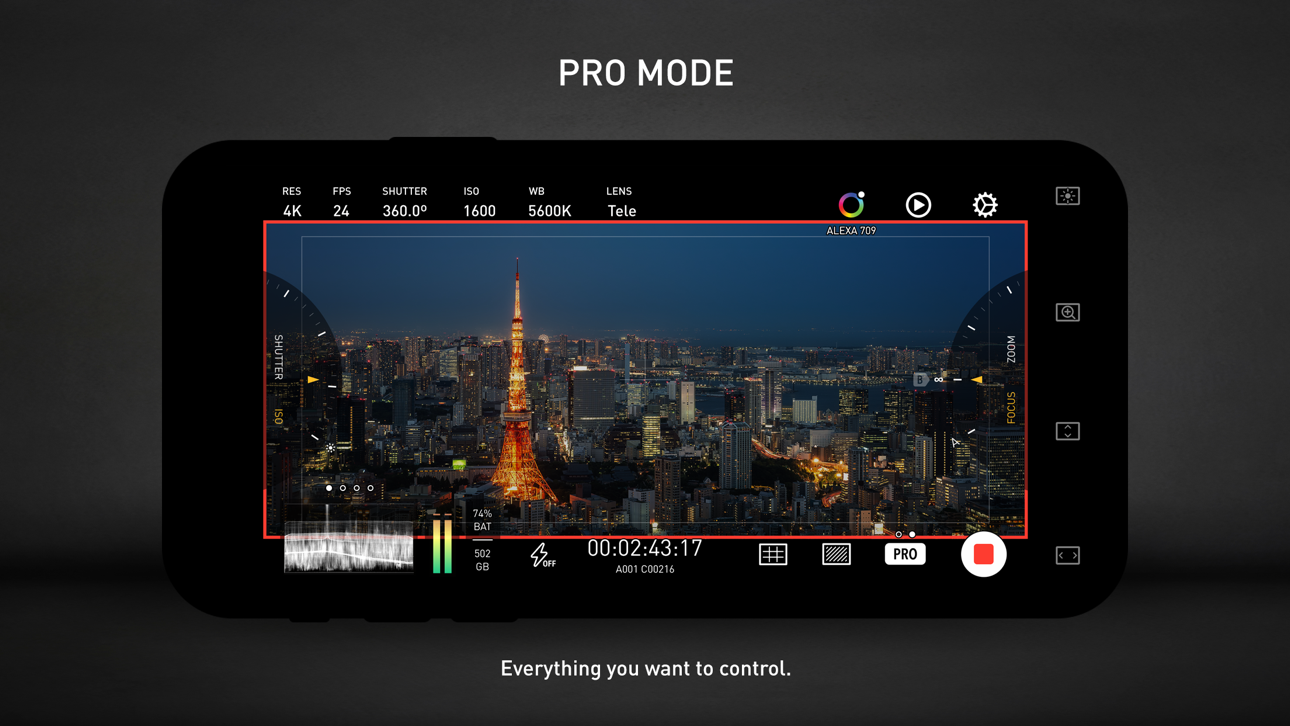
· PRO mode: a mode designed for professional filmmakers. All the camera information and control settings are well aligned on the screen.
· DUAL mode: recording video with two cameras working at the same time. Recorded in one file as Picture in Picture or two files.
· PORTRAIT mode: with iPhone Pro and iPad Pro's LiDAR sensor and the devices' powerful processors, you can record "portrait mode video" with real-time blurred background.
# COLOR
· LOG: it's not only a genuine LOG gamma curve -- we strictly matched your mobile device's color to the industrial standard - ALEXA Log C.
· Cinematic Looks: we provided a dozen of cinematic looks for filmmakers -- the styles are categorized into Neutral Styles, Film Emulation (classic Kodak and Fuji cinema film), Movie Inspired (blockbusters and indie masterpieces), and ALEXA Looks.
# ASSISTANTS
· Monitoring tools: Waveform, Parade, Histogram, RGB Histogram, Audio Meter.
· Composition assistants: Aspect Ratios, Safe Area, Thirds, Crosshairs, and 3-axis Horizon Indicators.
· Exposure assistants: Zebra Strips,False Color, Exposure Compensation, Auto Exposure.
· Focus assistants: Focus Peaking and Auto Focus.
· Recording: Record Beeper, Record Flash, Volume Key Record.
· Zooming and Focusing: A-B Point.
# DATA
· Frame Rate Normalization: Mobile devices don't have perfect frame rate control, therefore, it's easy to get non-standard variable frame rate. Protake solves this problem fundamentally and makes strictly constant FPS of 24, 25, 30, 60, 120, etc.
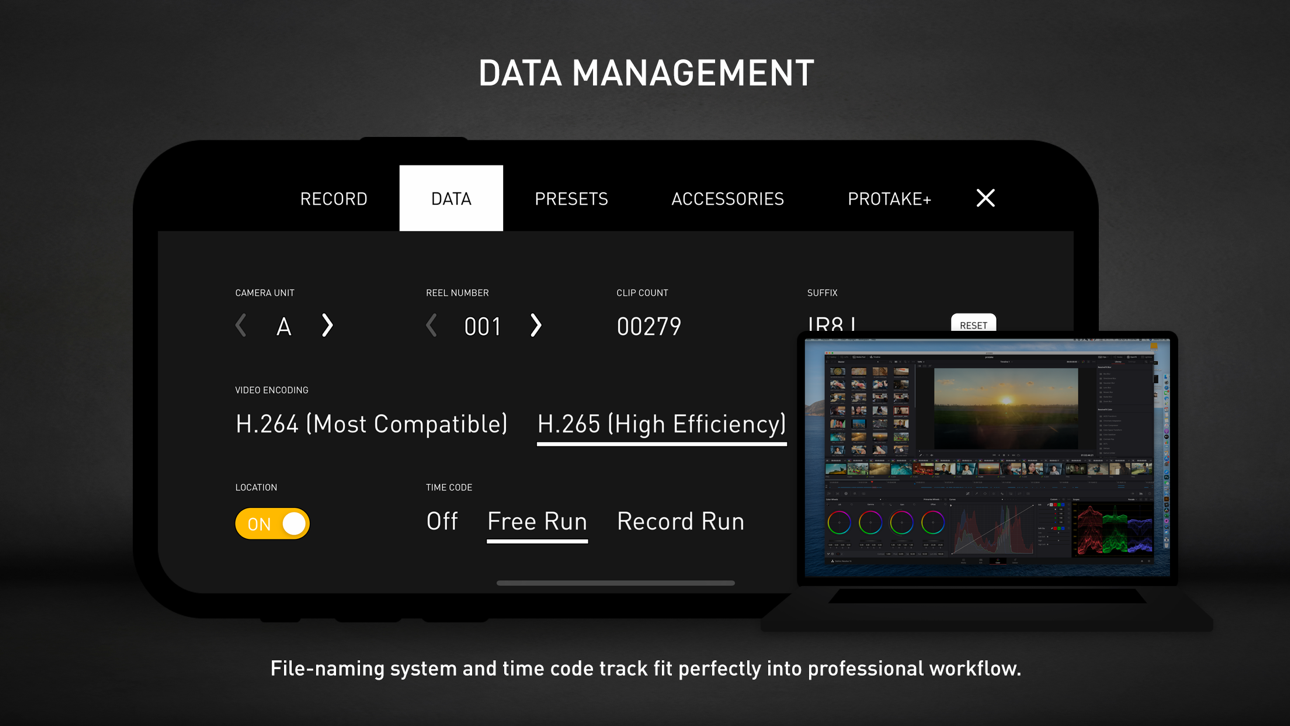
· File-naming: All the video files saved by Protake use the standard naming system: Camera Unit + Reel Number + Clip Count + Date + Suffix. It's something like "A001C00203_200412_IR8J.MOV"... Sounds familiar?
· Metadata: Everything including device model, ISO, shutter angel, white balance, lens, connected accessories, location, are all well recorded in the file's metadata.
· Time code: We provided both options for you -- Free Run and Record Run. It's compatible with your cinema cameras.
# Protake+
· With a Protake+ membership, you can use all the features, including: Pro mode, LOG gamma curve, Protake Cinematic Looks, all the assistant tools, data management, 3rd-party accessories.
· Protake+ provides 1-year membership for you to purchase;
· Payment will be charged to your iTunes Account at confirmation of purchase;
· Your subscription automatically renews unless auto-renew is turned off at least 24-hours before the end of the current period;
· Your account will be charged for renewal within 24-hours prior to the end of the current period;
· The renewal price for 1-year membership is USD 19.99.
· You can manage your subscription and switch off the auto-renewal by accessing your Account Settings after purchase;
· All personal data is handled under the terms and conditions of Protake’s privacy policy. More details can be found here:
https://terms.alicdn.com/legal-agreement/terms/platform_service/20220621172324148/20220621172324148.html
https://terms.alicdn.com/legal-agreement/terms/privacy/20220704104156634/20220704104156634.html
Screenshot © rispettivi proprietari · App Store


iOSGods non è affiliata, approvata né sponsorizzata da Apple Inc., Google LLC o dagli sviluppatori delle app elencate qui. Apple, iOS e App Store sono marchi di Apple Inc. Android e Google Play sono marchi di Google LLC. Tutti gli altri nomi delle app, icone, immagini e marchi appartengono ai rispettivi proprietari.
- iPhone o iPad non jailbroken/jailed oppure jailbroken.
- Sideloadly o alternative.
- Computer con Windows/macOS/Linux con iTunes installato.
PASSO 1: Scarica il file .IPA pre-modificato dal link sopra sul tuo computer. Per scaricarlo dall'iOSGods App, consulta il nostro Tutorial download IPA dell'iOSGods App, che include un esempio video.
PASSO 2: Scarica Sideloadly e installalo sul tuo Windows o Mac.
PASSO 3: Apri Sideloadly sul tuo computer, collega il tuo dispositivo iOS e attendi finché il nome del dispositivo non appare in Sideloadly.
PASSO 4: Una volta riconosciuto il tuo iDevice, trascina il file .IPA moddato che hai scaricato e rilascialo nell'applicazione Sideloadly.
PASSO 5: Inserisci l'email del tuo Apple Account, poi premi “Start”. Ti verrà quindi chiesto di inserire la password. Procedi e fornisci le informazioni richieste.
PASSO 6: Attendi che Sideloadly completi il sideload/installazione dell'IPA modificata. Se ci sono problemi durante l'installazione, leggi la nota qui sotto.
PASSO 7: Una volta completata l'installazione e vista l'app sulla schermata Home, dovrai andare in Impostazioni → Generali → Profili / Gestione VPN e dispositivi. Una volta lì, tocca l'email inserita al passo 6 e poi tocca “Autorizza [email protected]”.
PASSO 8: Ora vai sulla schermata Home e apri l'app appena installata: tutto dovrebbe funzionare correttamente. Potrebbe essere necessario seguire ulteriori istruzioni specifiche all'interno del popup dell'hack nel gioco.
NOTA: Per iOS/iPadOS 16 e versioni successive, devi attivare la Modalità sviluppatore. Per gli account Apple Developer gratuiti, dovrai ripetere questa procedura ogni 7 giorni. Se hai domande o problemi, leggi la nostra sezione FAQ Sideloadly del topic.
Game Name iOS Mod IPA is an action adventure game enhanced with powerful gameplay boosts and quality-of-life improvements. Win battles faster, earn rewards quicker, and enjoy uninterrupted play without ads.
- Unlimited Gold - spend freely to unlock premium content
- Damage Multiplier - deal significantly more damage in combat
- Defense Multiplier - take less damage and survive longer
- Reward Multiplier - earn more loot from every battle
- Max Level - instantly reach the highest player rank
- No Ads - play without interruptions or advertisements
This app also comes with iGameGod, giving you access to Auto Touch to automate repetitive tasks, App Speed Manager for adjustable gameplay speed, Memory Engine value editing, and more powerful iOS game tools.
Scarica Game Name Mod IPA dai link sopra. Tocca il pulsante di installazione e segui le istruzioni per installare questo hack iOS sul tuo iPhone, iPad o Mac con Apple Silicon.
Hai bisogno di altro aiuto Consulta le nostre Domande frequenti sull'app iOSGods per risposte dettagliate e consigli per la risoluzione dei problemi.
----------------------------------------------------------
--------------------------------------------------