需要登录
请使用您的 iOSGods 账户登录以继续。
请使用您的 iOSGods 账户登录以继续。
使用 Protake - Mobile Cinema Camera Modded 将您的 iPhone 转变为专业电影摄像机,为视频博主、导演和创意工作者解锁高级电影制作工具。这个破解版本授予您完整访问权限,包括高级摄像模式、专业调色和电影构图功能,这些功能通常需要付费订阅,让您能够在移动设备上捕捉广播级视频,不受任何限制。
- 高级功能解锁 → 完整访问所有专业功能
此应用还内置 iGameGod,让你能够使用 Auto Touch 自动执行重复操作、通过 App Speed Manager 调节游戏速度、使用 Memory Engine 修改内存数值,以及更多强大的 iOS 游戏工具。
从上方链接下载 Protake - Mobile Cinema Camera Modded modded IPA。点击安装按钮并按照屏幕提示在 iPhone、iPad 或 Apple Silicon 上安装此 iOS 应用修改版。
需要更多帮助?请查看我们的 iOSGods 应用常见问题解答 获取详细解答和故障排除技巧。
Protake brings the filmmaking experience of professional cinema cameras to your mobile devices.
No matter you're a daily vlogger, a commercial director, or a well-established filmmaker, you will benefit from Protake's features, including:
# [NEW] WI-FI VIDEO TRANSMISSION
· In the landscape orientation of AUTO and PRO modes, you can start the brand new Wi-Fi Video Transmission system.
· You can transmit the video from 1 "camera" to 4 "monitors" (yes, we're talking about iPhones and iPads).
· You can watch up to 4 "cameras" on 1 "monitor".
· You can wirelessly start and stop the recording of all "cameras".
· You can even monitor HDR and SDR video streams on the same screen.
· It's a ground-breaking end-to-end mobile recording and monitoring experience.
· It's brought to you by Protake.
# MODES
· AUTO mode: a mode optimized for vloggers and YouTubers, you can use it single-handedly.
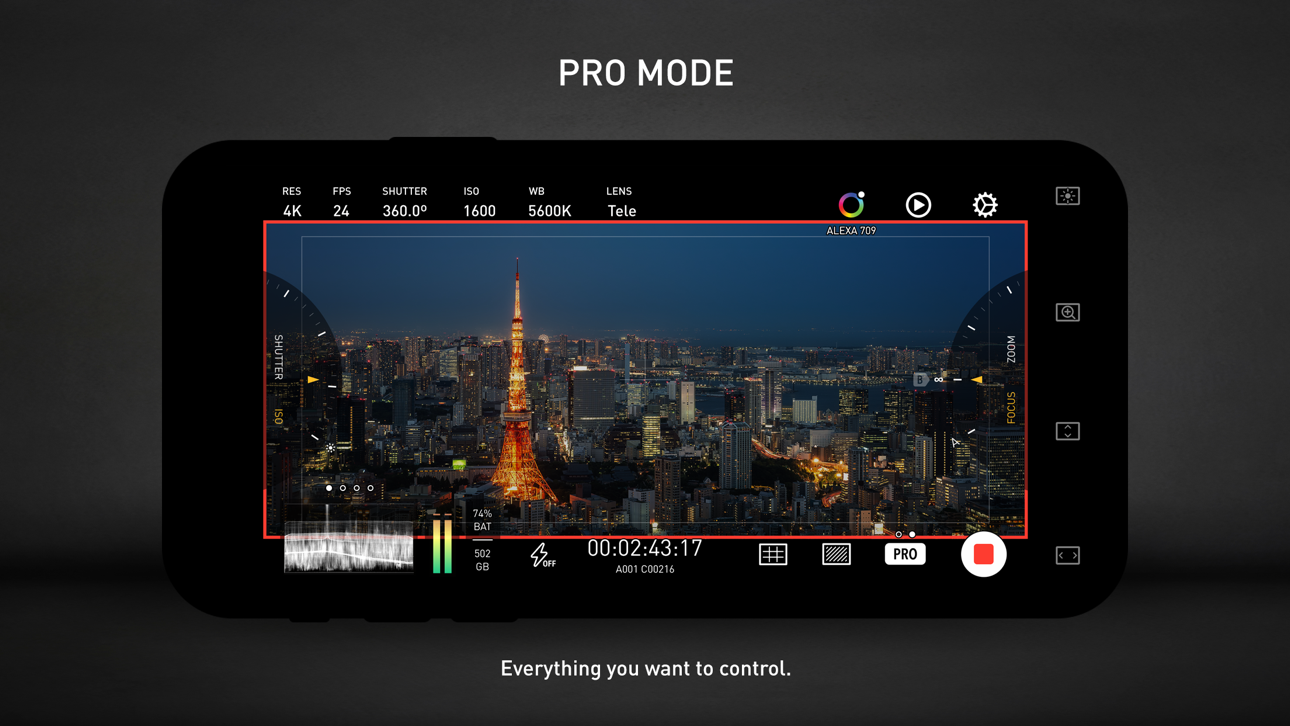
· PRO mode: a mode designed for professional filmmakers. All the camera information and control settings are well aligned on the screen.
· DUAL mode: recording video with two cameras working at the same time. Recorded in one file as Picture in Picture or two files.
· PORTRAIT mode: with iPhone Pro and iPad Pro's LiDAR sensor and the devices' powerful processors, you can record "portrait mode video" with real-time blurred background.
# COLOR
· LOG: it's not only a genuine LOG gamma curve -- we strictly matched your mobile device's color to the industrial standard - ALEXA Log C.
· Cinematic Looks: we provided a dozen of cinematic looks for filmmakers -- the styles are categorized into Neutral Styles, Film Emulation (classic Kodak and Fuji cinema film), Movie Inspired (blockbusters and indie masterpieces), and ALEXA Looks.
# ASSISTANTS
· Monitoring tools: Waveform, Parade, Histogram, RGB Histogram, Audio Meter.
· Composition assistants: Aspect Ratios, Safe Area, Thirds, Crosshairs, and 3-axis Horizon Indicators.
· Exposure assistants: Zebra Strips,False Color, Exposure Compensation, Auto Exposure.
· Focus assistants: Focus Peaking and Auto Focus.
· Recording: Record Beeper, Record Flash, Volume Key Record.
· Zooming and Focusing: A-B Point.
# DATA
· Frame Rate Normalization: Mobile devices don't have perfect frame rate control, therefore, it's easy to get non-standard variable frame rate. Protake solves this problem fundamentally and makes strictly constant FPS of 24, 25, 30, 60, 120, etc.
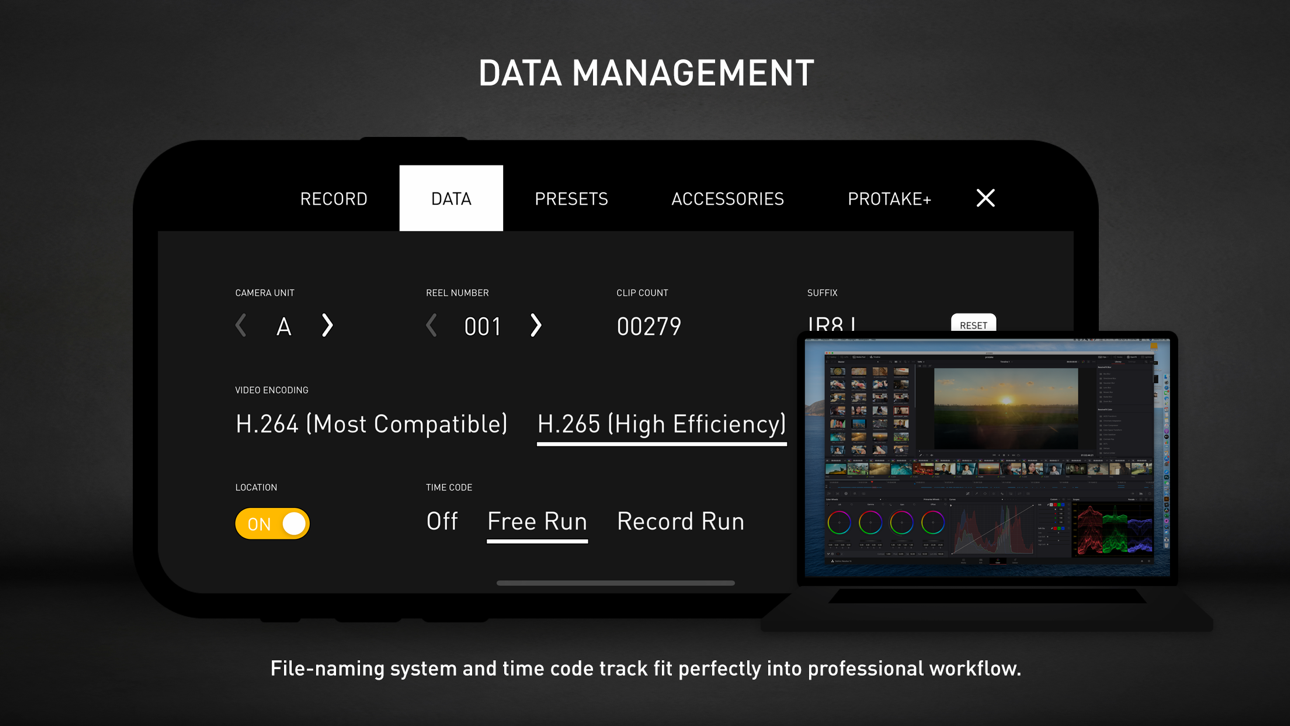
· File-naming: All the video files saved by Protake use the standard naming system: Camera Unit + Reel Number + Clip Count + Date + Suffix. It's something like "A001C00203_200412_IR8J.MOV"... Sounds familiar?
· Metadata: Everything including device model, ISO, shutter angel, white balance, lens, connected accessories, location, are all well recorded in the file's metadata.
· Time code: We provided both options for you -- Free Run and Record Run. It's compatible with your cinema cameras.
# Protake+
· With a Protake+ membership, you can use all the features, including: Pro mode, LOG gamma curve, Protake Cinematic Looks, all the assistant tools, data management, 3rd-party accessories.
· Protake+ provides 1-year membership for you to purchase;
· Payment will be charged to your iTunes Account at confirmation of purchase;
· Your subscription automatically renews unless auto-renew is turned off at least 24-hours before the end of the current period;
· Your account will be charged for renewal within 24-hours prior to the end of the current period;
· The renewal price for 1-year membership is USD 19.99.
· You can manage your subscription and switch off the auto-renewal by accessing your Account Settings after purchase;
· All personal data is handled under the terms and conditions of Protake’s privacy policy. More details can be found here:
https://terms.alicdn.com/legal-agreement/terms/platform_service/20220621172324148/20220621172324148.html
https://terms.alicdn.com/legal-agreement/terms/privacy/20220704104156634/20220704104156634.html
截图 © 各自所有者 · App Store


iOSGods 与 Apple Inc.、Google LLC 及此处列出应用的开发者没有任何关联,也未获得其认可或赞助。Apple、iOS 和 App Store 是 Apple Inc. 的商标。Android 和 Google Play 是 Google LLC 的商标。其他所有应用名称、图标、图片和商标均归各自所有者所有。
- 未越狱/受限或已越狱的 iPhone 或 iPad。
- Sideloadly 或替代方案。
- 运行 Windows/macOS/Linux 且已安装 iTunes 的电脑。
步骤 1: 通过上方链接将已破解的 .IPA 文件下载到您的电脑。如需从 iOSGods App 下载,请参阅我们的 iOSGods App IPA 下载教程,其中包含视频示例。
步骤 2: 下载 Sideloadly 并将其安装到您的 Windows 或 Mac 上。
步骤 3: 在电脑上打开 Sideloadly,连接您的 iOS 设备,等待设备名称在 Sideloadly 中显示。
步骤 4: 当 Sideloadly 识别到您的 iOS 设备后,将下载好的修改版 .IPA 文件拖放到 Sideloadly 应用中。
步骤 5: 输入您的 Apple Account 邮箱,然后点击 "Start"。系统会提示您输入密码,请按要求填写信息。
步骤 6: 等待 Sideloadly 完成已破解 IPA 的旁加载/安装。如果安装过程中出现问题,请阅读下方的注意事项。
步骤 7: 安装完成并在主屏幕上看到该应用后,您需要前往 设置 → 通用 → 描述文件 / VPN 与设备管理。进入后,点击您在第 6 步中输入的邮箱,然后点击 "信任 [email protected]"。
步骤 8: 现在返回主屏幕并打开新安装的应用,一切应可正常运行。您可能需要按照游戏内修改弹窗中的具体说明执行进一步操作。
注意: 在 iOS/iPadOS 16 及更高版本上,您必须 启用开发者模式。对于免费的 Apple Developer 账户,您需要每 7 天重复一次此操作。如有任何疑问或问题,请阅读我们的 主题中的 Sideloadly 常见问题部分。
Game Name iOS Mod IPA is an action adventure game enhanced with powerful gameplay boosts and quality-of-life improvements. Win battles faster, earn rewards quicker, and enjoy uninterrupted play without ads.
- Unlimited Gold - spend freely to unlock premium content
- Damage Multiplier - deal significantly more damage in combat
- Defense Multiplier - take less damage and survive longer
- Reward Multiplier - earn more loot from every battle
- Max Level - instantly reach the highest player rank
- No Ads - play without interruptions or advertisements
This app also comes with iGameGod, giving you access to Auto Touch to automate repetitive tasks, App Speed Manager for adjustable gameplay speed, Memory Engine value editing, and more powerful iOS game tools.
从上方链接下载 Game Name Mod IPA。点击安装按钮并按照屏幕提示在 iPhone、iPad 或 Apple Silicon 上安装此 iOS 应用修改版。
需要更多帮助请查看我们的 iOSGods 应用常见问题解答 获取详细解答和故障排除技巧。
----------------------------------------------------------
--------------------------------------------------