ต้องเข้าสู่ระบบ
เข้าสู่ระบบด้วยบัญชี iOSGods เพื่อดำเนินการต่อ
เข้าสู่ระบบด้วยบัญชี iOSGods เพื่อดำเนินการต่อ
แปลง iPhone ของคุณให้เป็นกล้องภาพยนตร์มืออาชีพด้วย Protake Mod IPA ปลดล็อกเครื่องมือการสร้างภาพยนตร์ระดับพรีเมียมสำหรับผู้สร้างวิดีโอ ผู้กำกับ และนักสร้างสรรค์ เวอร์ชันโมดนี้ให้สิทธิ์การเข้าถึงโหมดกล้องขั้นสูง การแต่งสีระดับมืออาชีพ และฟีเจอร์การจัดองค์ประกอบภาพยนตร์ที่ปกติต้องใช้การสมัครสมาชิกแบบชำระเงิน ช่วยให้คุณจับภาพวิดีโอคุณภาพระดับออกอากาศบนมือถือโดยไม่มีข้อจำกัด
- ปลดล็อกพรีเมียม → เข้าถึงฟีเจอร์โปรทั้งหมดได้เต็มที่
แอปนี้ยังมาพร้อมกับ iGameGod ซึ่งช่วยให้คุณเข้าถึง Auto Touch สำหรับการทำงานซ้ำ ๆ โดยอัตโนมัติ, App Speed Manager สำหรับปรับความเร็วของเกม, การแก้ไขค่าด้วย Memory Engine และเครื่องมือสำหรับเกม iOS ที่ทรงพลังอื่น ๆ อีกมากมาย
ดาวน์โหลด Protake - Mobile Cinema Camera Modded modded IPA จากลิงก์ด้านบน แตะปุ่มติดตั้งและทำตามคำแนะนำบนหน้าจอเพื่อติดตั้งแฮ็กแอป iOS นี้บน iPhone, iPad หรือ Apple Silicon
ต้องการความช่วยเหลือเพิ่มเติม? ดู คำถามที่พบบ่อยของแอป iOSGods สำหรับคำตอบโดยละเอียดและเคล็ดลับการแก้ไขปัญหา
Protake brings the filmmaking experience of professional cinema cameras to your mobile devices.
No matter you're a daily vlogger, a commercial director, or a well-established filmmaker, you will benefit from Protake's features, including:
# [NEW] WI-FI VIDEO TRANSMISSION
· In the landscape orientation of AUTO and PRO modes, you can start the brand new Wi-Fi Video Transmission system.
· You can transmit the video from 1 "camera" to 4 "monitors" (yes, we're talking about iPhones and iPads).
· You can watch up to 4 "cameras" on 1 "monitor".
· You can wirelessly start and stop the recording of all "cameras".
· You can even monitor HDR and SDR video streams on the same screen.
· It's a ground-breaking end-to-end mobile recording and monitoring experience.
· It's brought to you by Protake.
# MODES
· AUTO mode: a mode optimized for vloggers and YouTubers, you can use it single-handedly.
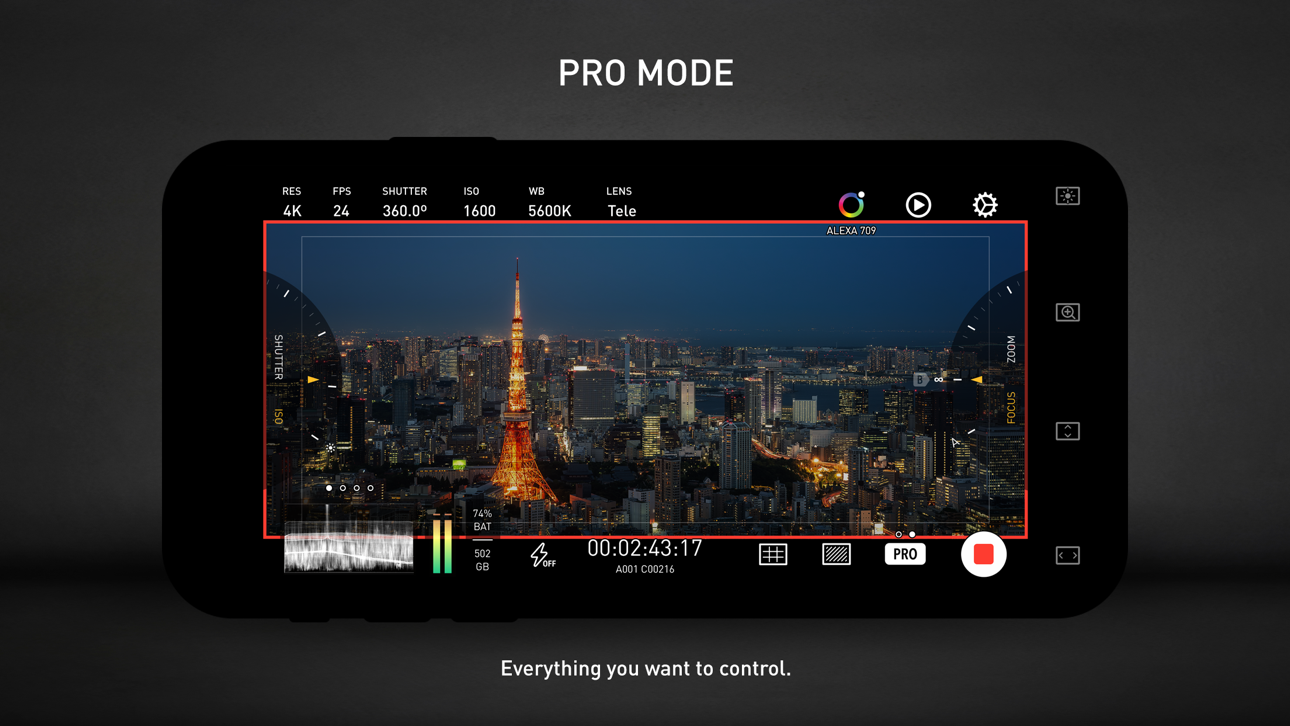
· PRO mode: a mode designed for professional filmmakers. All the camera information and control settings are well aligned on the screen.
· DUAL mode: recording video with two cameras working at the same time. Recorded in one file as Picture in Picture or two files.
· PORTRAIT mode: with iPhone Pro and iPad Pro's LiDAR sensor and the devices' powerful processors, you can record "portrait mode video" with real-time blurred background.
# COLOR
· LOG: it's not only a genuine LOG gamma curve -- we strictly matched your mobile device's color to the industrial standard - ALEXA Log C.
· Cinematic Looks: we provided a dozen of cinematic looks for filmmakers -- the styles are categorized into Neutral Styles, Film Emulation (classic Kodak and Fuji cinema film), Movie Inspired (blockbusters and indie masterpieces), and ALEXA Looks.
# ASSISTANTS
· Monitoring tools: Waveform, Parade, Histogram, RGB Histogram, Audio Meter.
· Composition assistants: Aspect Ratios, Safe Area, Thirds, Crosshairs, and 3-axis Horizon Indicators.
· Exposure assistants: Zebra Strips,False Color, Exposure Compensation, Auto Exposure.
· Focus assistants: Focus Peaking and Auto Focus.
· Recording: Record Beeper, Record Flash, Volume Key Record.
· Zooming and Focusing: A-B Point.
# DATA
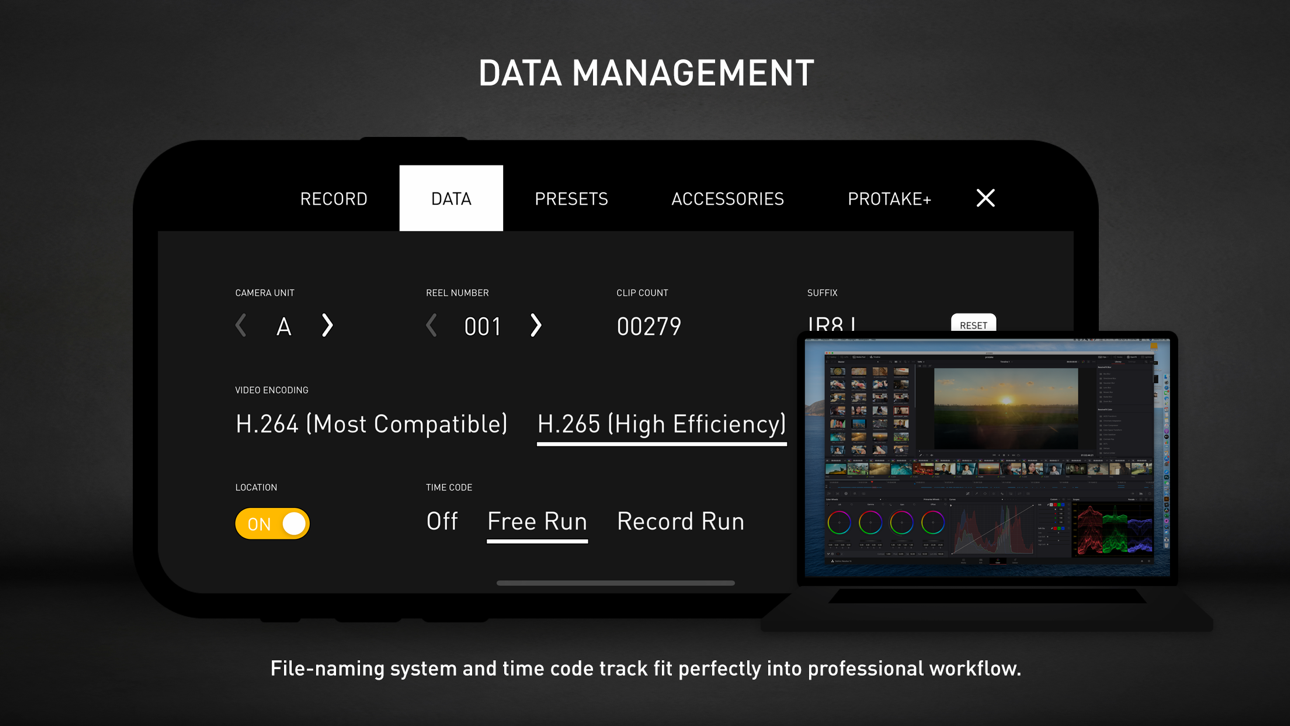
· Frame Rate Normalization: Mobile devices don't have perfect frame rate control, therefore, it's easy to get non-standard variable frame rate. Protake solves this problem fundamentally and makes strictly constant FPS of 24, 25, 30, 60, 120, etc.
· File-naming: All the video files saved by Protake use the standard naming system: Camera Unit + Reel Number + Clip Count + Date + Suffix. It's something like "A001C00203_200412_IR8J.MOV"... Sounds familiar?
· Metadata: Everything including device model, ISO, shutter angel, white balance, lens, connected accessories, location, are all well recorded in the file's metadata.
· Time code: We provided both options for you -- Free Run and Record Run. It's compatible with your cinema cameras.
# Protake+
· With a Protake+ membership, you can use all the features, including: Pro mode, LOG gamma curve, Protake Cinematic Looks, all the assistant tools, data management, 3rd-party accessories.
· Protake+ provides 1-year membership for you to purchase;
· Payment will be charged to your iTunes Account at confirmation of purchase;
· Your subscription automatically renews unless auto-renew is turned off at least 24-hours before the end of the current period;
· Your account will be charged for renewal within 24-hours prior to the end of the current period;
· The renewal price for 1-year membership is USD 19.99.
· You can manage your subscription and switch off the auto-renewal by accessing your Account Settings after purchase;
· All personal data is handled under the terms and conditions of Protake’s privacy policy. More details can be found here:
https://terms.alicdn.com/legal-agreement/terms/platform_service/20220621172324148/20220621172324148.html
https://terms.alicdn.com/legal-agreement/terms/privacy/20220704104156634/20220704104156634.html
ภาพหน้าจอ © เจ้าของแต่ละราย · App Store


iOSGods ไม่มีความเกี่ยวข้อง ไม่ได้รับการรับรอง และไม่ได้รับการสนับสนุนจาก Apple Inc., Google LLC หรือผู้พัฒนาแอปที่แสดงไว้ที่นี่ Apple, iOS และ App Store เป็นเครื่องหมายการค้าของ Apple Inc. Android และ Google Play เป็นเครื่องหมายการค้าของ Google LLC ชื่อแอป ไอคอน ภาพ และเครื่องหมายการค้าอื่นทั้งหมดเป็นทรัพย์สินของเจ้าของแต่ละราย
- iPhone หรือ iPad ที่ไม่ได้เจลเบรก/ไม่ได้เจลเบรก หรือเจลเบรกแล้ว
- Sideloadly หรือทางเลือกอื่น
- คอมพิวเตอร์ที่ใช้ Windows/macOS/Linux และติดตั้ง iTunes ไว้
ขั้นตอนที่ 1: ดาวน์โหลดไฟล์ .IPA ที่แฮกไว้ล่วงหน้าจากลิงก์ด้านบนลงในคอมพิวเตอร์ของคุณ หากต้องการดาวน์โหลดจากแอป iOSGods โปรดดู วิธีดาวน์โหลด IPA ในแอป iOSGods ซึ่งมีตัวอย่างวิดีโอประกอบ
ขั้นตอนที่ 2: ดาวน์โหลด Sideloadly แล้วติดตั้งบน Windows หรือ Mac ของคุณ
ขั้นตอนที่ 3: เปิด Sideloadly บนคอมพิวเตอร์ เชื่อมต่ออุปกรณ์ iOS แล้วรอจนกว่าชื่ออุปกรณ์ของคุณจะปรากฏใน Sideloadly
ขั้นตอนที่ 4: เมื่อ iDevice ของคุณถูกตรวจพบแล้ว ให้ลากไฟล์ .IPA ที่ม็อดมาวางลงในโปรแกรม Sideloadly
ขั้นตอนที่ 5: กรอกอีเมล Apple Account ของคุณ จากนั้นกด "Start" ระบบจะถามรหัสผ่าน กรอกข้อมูลที่จำเป็นให้เรียบร้อย
ขั้นตอนที่ 6: รอจนกว่า Sideloadly จะ sideload/ติดตั้งไฟล์ IPA ที่แฮกเสร็จ หากเกิดปัญหาระหว่างติดตั้ง โปรดอ่านหมายเหตุด้านล่าง
ขั้นตอนที่ 7: เมื่อการติดตั้งเสร็จสิ้นและเห็นแอปบนหน้าจอหลักแล้ว ให้ไปที่ การตั้งค่า → ทั่วไป → โปรไฟล์ / VPN และการจัดการอุปกรณ์ จากนั้นแตะที่อีเมลที่คุณกรอกในขั้นตอนที่ 6 แล้วแตะ "เชื่อถือ [email protected]"
ขั้นตอนที่ 8: จากนั้นไปที่หน้าจอหลักและเปิดแอปที่ติดตั้งใหม่ ทุกอย่างควรทำงานได้ปกติ คุณอาจต้องทำตามคำแนะนำเพิ่มเติมเฉพาะแอปในป๊อปอัปของม็อดในเกม
หมายเหตุ: สำหรับ iOS/iPadOS 16 ขึ้นไป คุณต้อง เปิดโหมดนักพัฒนา (Developer Mode) สำหรับบัญชี Apple Developer แบบฟรี คุณต้องทำขั้นตอนนี้ซ้ำทุก 7 วัน หากมีคำถามหรือพบปัญหา โปรดอ่าน หัวข้อ FAQ ของ Sideloadly ในกระทู้
Game Name iOS Mod IPA is an action adventure game enhanced with powerful gameplay boosts and quality-of-life improvements. Win battles faster, earn rewards quicker, and enjoy uninterrupted play without ads.
- Unlimited Gold - spend freely to unlock premium content
- Damage Multiplier - deal significantly more damage in combat
- Defense Multiplier - take less damage and survive longer
- Reward Multiplier - earn more loot from every battle
- Max Level - instantly reach the highest player rank
- No Ads - play without interruptions or advertisements
This app also comes with iGameGod, giving you access to Auto Touch to automate repetitive tasks, App Speed Manager for adjustable gameplay speed, Memory Engine value editing, and more powerful iOS game tools.
ดาวน์โหลด Game Name Mod IPA จากลิงก์ด้านบน แตะปุ่มติดตั้งและทำตามคำแนะนำบนหน้าจอเพื่อติดตั้งแฮ็กแอป iOS นี้บน iPhone, iPad หรือ Apple Silicon
ต้องการความช่วยเหลือเพิ่มเติม ดู คำถามที่พบบ่อยของแอป iOSGods สำหรับคำตอบโดยละเอียดและเคล็ดลับการแก้ไขปัญหา
----------------------------------------------------------
--------------------------------------------------