Anmeldung erforderlich
Melden Sie sich mit Ihrem iOSGods-Konto an, um fortzufahren.
Melden Sie sich mit Ihrem iOSGods-Konto an, um fortzufahren.
Verwandeln Sie Ihr iPhone in eine professionelle Filmkamera mit Protake Mod IPA und schalten Sie Premium-Filmmaking-Tools für Vlogger, Regisseure und Creator frei. Diese modifizierte Version gewährt vollständigen Zugriff auf erweiterte Kameramodi, professionelle Farbkorrektur und kinematografische Kompositionsfunktionen, die normalerweise ein bezahltes Abonnement erfordern, sodass Sie Videos in Broadcast-Qualität auf dem Mobilgerät ohne Einschränkungen aufnehmen können.
- Premium freigeschaltet → vollständiger Zugriff auf alle Pro-Funktionen
Diese App wird zusätzlich mit iGameGod geliefert und bietet Ihnen Zugriff auf Auto Touch zur Automatisierung sich wiederholender Aufgaben, App Speed Manager für eine anpassbare Spielgeschwindigkeit, Memory Engine zur Wertbearbeitung und weitere leistungsstarke iOS-Spielwerkzeuge.
Laden Sie Protake - Mobile Cinema Camera Modded modded IPA über die obigen Links herunter. Tippen Sie auf den Installations-Button und folgen Sie den Anweisungen, um diese iOS-App auf Ihrem iPhone, iPad oder Apple Silicon zu installieren.
Brauchen Sie mehr Hilfe? In unseren iOSGods App häufig gestellten Fragen finden Sie ausführliche Antworten und Tipps zur Fehlerbehebung.
Protake 為你在移動裝置上,帶來專業電影機的拍攝體驗。
無論你是拍攝 vlog、廣告還是影視作品,你都能夠從 Protake 的專業功能中獲益,它包括了:
# [新功能] Wi-Fi 網路影片監看
· 在「自動」和「專業」兩個模式的橫屏模式中,你可以開啟全新的 Wi-Fi 網路影片監看系統。
· 你不再需要購買昂貴的圖傳配件!僅需一些 iPhone 和 iPad,即可搭建龐大的現場監看網路。
· 你可以從 1 台「攝影機」傳輸影片到 4 台「監視器」上(是的,我們說的是 iPhone 和 iPad)。
· 你可以在 1 台「監視器」上,最多看到 4 台「攝影機」的畫面。
· 你可以透過無線的方式,開啟和停止所有「攝影機」的錄製。
· 你甚至可以在一塊螢幕上同時監看 HDR 和 SDR 畫面。
· 這是前所未見的全流程移動錄製與監看體驗。
· 這個體驗由 Protake 為你呈現。
# 模式
· 「自動」模式:這個模式為 vlogger 和網路影片拍攝者最佳化,你可以輕鬆地單手操作,又能夠使用我們的電影調色包,以及專業的構圖輔助工具。
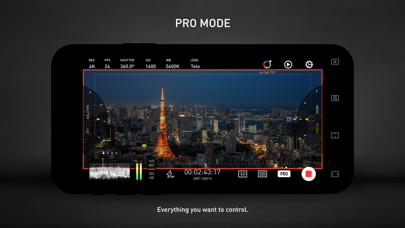
· 「專業」模式:這個模式為專業的影片拍攝者而生。所有的相機資料,以及控制按鈕,都被非常科學地放置於介面上。你最想使用的功能,永遠在眼前。
· 「雙攝」模式:用兩顆鏡頭同時錄影——前置+後置、長焦+超廣角……各種組合方式。可以選擇以「畫中畫」方式錄製在一個影片檔案,或者分別錄製成兩個檔案。
· 「人像」模式:得益於 iPhone Pro 和 iPad Pro 上的 LiDAR 感測器和這些裝置強大的處理器,現在可以拍攝實時虛化背景的「人像模式影片」了。
# 色彩
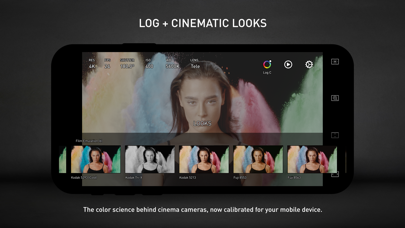
· LOG:這不僅僅是一條貨真價實的 LOG 曲線。我們將移動裝置的色彩與電影工業的標準—— ALEXA Log C 做了嚴格的匹配。除去擁有不凡的動態範圍,調色師還能將他們為 ALEXA 電影機準備的調色方案,輕鬆用於手機拍攝的影片素材上。
· 電影調色包:我們為影片創作者準備了一整包調色方案,並分為數類:日常風格、膠片模擬(柯達和富士的經典電影膠片)、電影風格(好萊塢大片和獨立精品)以及 ALEXA 風格。
# 輔助功能
· 丟幀提示:移動裝置並未被設計成專業的電影機,所以如果發生丟幀的情況,你需要第一時間知道。
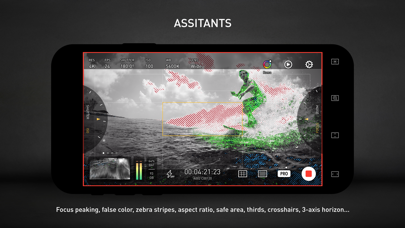
· 監看工具:波形圖、RGB 示波器、直方圖、RGB 直方圖、音量表。
· 構圖輔助:畫幅比例、安全區域、三分線、中心指示、水平指示。
· 曝光輔助:斑馬紋、偽色、曝光補償、自動曝光。
· 對焦輔助:對焦峰值和自動對焦。
· 錄影提示:錄製提示音、錄製閃光、音量鍵錄製。
· 變焦和對焦:A-B 點。
# 資料
· 幀率一致性:移動裝置通常沒有完美的幀率控制,容易產生非標準的變化幀率(VFR)。我們從根本上解決這個問題,並讓影片擁有嚴格的一致幀率:24、25、30、60、120 等。
· 檔案命名:Protake 錄製的所有檔案,都擁有工業標準的檔名:機號+卷號+條數+尾綴。看起來大概是「A001C00203_200412_IR8J.MOV」,是否感覺親切?
· 元資料(metadata):所有在片場發生的事情,包括 ISO、快門開角、白平衡、鏡頭、連線的附件、地理資訊等,都會被很好地記錄在檔案的元資料裡。
· 時間碼:我們提供了兩個選項給您——自由執行和錄製時執行。這能夠和您的專業電影機完全相容。
# Protake+
· 如果您擁有 Protake+ 會員,您可以使用所有的功能,包括:專業模式、LOG 曲線、Protake 電影風格包、所有的輔助工具、資料管理、第三方配件接入。
· 更多的功能將在未來推出。
# 其他
- Protake+ 當前提供 1 年會員選項供您購買;
- 費用將在確認購買時向您的 iTunes 賬戶收取;
- 您的訂閱會自動更新,除非您在已付費期間結束前至少 24 小時關閉自動更新;
- 您的賬戶會在已付費期間結束前 24 小時內被再次收費;
- 每年的會員續費價格是 148 元人民幣;
- 您可以在購買後前往賬戶設定管理訂閱並關閉自動更新;
- 所有私人資料都會遵守 Protake 隱私政策及條款處理。請點選連結參見更多詳情:
https://terms.alicdn.com/legal-agreement/terms/suit_bu1_taobao/suit_bu1_taobao202204181941_68444.html
https://terms.alicdn.com/legal-agreement/terms/suit_bu1_taobao/suit_bu1_taobao202204202141_98092.html
- Nicht-Jailbroken/Jailed oder Jailbroken iPhone oder iPad.
- Sideloadly oder Alternativen.
- Computer mit Windows/macOS/Linux und installiertem iTunes.
SCHRITT 1: Laden Sie die vorinstallierte .IPA-Datei über den obigen Link auf Ihren Computer herunter. Zum Herunterladen aus der iOSGods-App siehe unser iOSGods App IPA Download-Tutorial mit Videobeispiel.
SCHRITT 2: Laden Sie Sideloadly herunter und installieren Sie es auf Ihrem Windows oder Mac.
SCHRITT 3: Öffnen Sie Sideloadly auf Ihrem Computer, verbinden Sie Ihr iOS-Gerät und warten Sie, bis Ihr Gerätename in Sideloadly erscheint.
SCHRITT 4: Sobald Ihr iDevice erkannt wird, ziehen Sie die heruntergeladene gemoddete .IPA-Datei in die Sideloadly-Anwendung.
SCHRITT 5: Geben Sie Ihre Apple-Account-E-Mail ein und drücken Sie „Start". Sie werden dann nach Ihrem Passwort gefragt. Geben Sie die erforderlichen Informationen ein.
SCHRITT 6: Warten Sie, bis Sideloadly das Sideloading/Installieren der gehackten IPA abgeschlossen hat. Bei Problemen während der Installation lesen Sie bitte den Hinweis unten.
SCHRITT 7: Sobald die Installation abgeschlossen ist und die App auf Ihrem Home-Bildschirm angezeigt wird, müssen Sie zu Einstellungen → Allgemein → Profile / VPN & Geräteverwaltung gehen. Tippen Sie dort auf die E-Mail, die Sie in Schritt 6 eingegeben haben, und dann auf „Trust [email protected]".
SCHRITT 8: Gehen Sie nun zu Ihrem Home-Bildschirm und öffnen Sie die neu installierte App – alles sollte einwandfrei funktionieren. Möglicherweise müssen Sie weitere App-spezifische Anweisungen im Hack-Popup im Spiel befolgen.
HINWEIS: iOS/iPadOS 16 und höher: Sie müssen den Entwicklermodus aktivieren. Bei kostenlosen Apple Developer-Accounts müssen Sie diesen Vorgang alle 7 Tage wiederholen. Bei Fragen oder Problemen lesen Sie bitte unsere Sideloadly-FAQ-Sektion im Thema.