Giriş Gerekli
Devam etmek için iOSGods hesabınızla giriş yapın.
Devam etmek için iOSGods hesabınızla giriş yapın.
iPhone'unuzu Protake Mod IPA ile profesyonel sinema kamerasına dönüştürün, vlogcular, yönetmenler ve yaratıcılar için premium film yapım araçlarının kilidini açın. Bu değiştirilmiş sürüm, normalde ücretli abonelik gerektiren gelişmiş kamera modlarına, profesyonel renk düzeltmesine ve sinematik kompozisyon özelliklerine tam erişim sağlayarak, sınırlamalar olmadan mobilde yayın kalitesinde video çekmenizi mümkün kılar.
- Premium Kilidi Açılmış → tüm pro özelliklere tam erişim
Bu uygulama ayrıca, tekrar eden görevleri otomatikleştirmek için Auto Touch, ayarlanabilir oyun hızı için App Speed Manager, Memory Engine ile değer düzenleme ve daha pek çok güçlü iOS oyun aracına erişim sağlayan iGameGod ile birlikte gelir.
Yukarıdaki bağlantılardan Protake - Mobile Cinema Camera Modded modded IPA indirin. Yükle düğmesine dokunup ekrandaki yönergeleri izleyerek bu iOS uygulama hack'ini iPhone, iPad veya Apple Silicon'a yükleyin.
Daha fazla yardıma mı ihtiyacınız var? Ayrıntılı yanıtlar ve sorun giderme ipuçları için iOSGods Uygulaması Sık Sorulan Sorular sayfamıza bakın.
Protake brings the filmmaking experience of professional cinema cameras to your mobile devices.
No matter you're a daily vlogger, a commercial director, or a well-established filmmaker, you will benefit from Protake's features, including:
# [NEW] WI-FI VIDEO TRANSMISSION
· In the landscape orientation of AUTO and PRO modes, you can start the brand new Wi-Fi Video Transmission system.
· You can transmit the video from 1 "camera" to 4 "monitors" (yes, we're talking about iPhones and iPads).
· You can watch up to 4 "cameras" on 1 "monitor".
· You can wirelessly start and stop the recording of all "cameras".
· You can even monitor HDR and SDR video streams on the same screen.
· It's a ground-breaking end-to-end mobile recording and monitoring experience.
· It's brought to you by Protake.
# MODES
· AUTO mode: a mode optimized for vloggers and YouTubers, you can use it single-handedly.
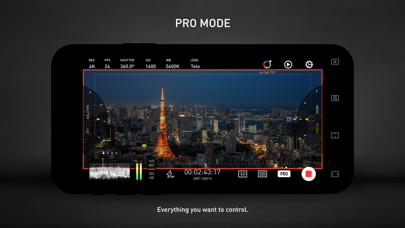
· PRO mode: a mode designed for professional filmmakers. All the camera information and control settings are well aligned on the screen.
· DUAL mode: recording video with two cameras working at the same time. Recorded in one file as Picture in Picture or two files.
· PORTRAIT mode: with iPhone Pro and iPad Pro's LiDAR sensor and the devices' powerful processors, you can record "portrait mode video" with real-time blurred background.
# COLOR
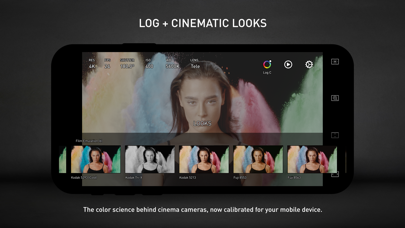
· LOG: it's not only a genuine LOG gamma curve -- we strictly matched your mobile device's color to the industrial standard - ALEXA Log C.
· Cinematic Looks: we provided a dozen of cinematic looks for filmmakers -- the styles are categorized into Neutral Styles, Film Emulation (classic Kodak and Fuji cinema film), Movie Inspired (blockbusters and indie masterpieces), and ALEXA Looks.
# ASSISTANTS
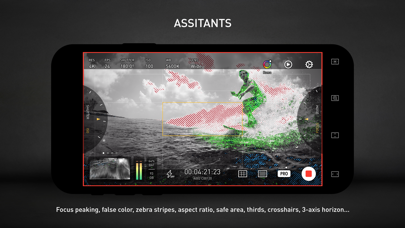
· Monitoring tools: Waveform, Parade, Histogram, RGB Histogram, Audio Meter.
· Composition assistants: Aspect Ratios, Safe Area, Thirds, Crosshairs, and 3-axis Horizon Indicators.
· Exposure assistants: Zebra Strips,False Color, Exposure Compensation, Auto Exposure.
· Focus assistants: Focus Peaking and Auto Focus.
· Recording: Record Beeper, Record Flash, Volume Key Record.
· Zooming and Focusing: A-B Point.
# DATA
· Frame Rate Normalization: Mobile devices don't have perfect frame rate control, therefore, it's easy to get non-standard variable frame rate. Protake solves this problem fundamentally and makes strictly constant FPS of 24, 25, 30, 60, 120, etc.
· File-naming: All the video files saved by Protake use the standard naming system: Camera Unit + Reel Number + Clip Count + Date + Suffix. It's something like "A001C00203_200412_IR8J.MOV"... Sounds familiar?
· Metadata: Everything including device model, ISO, shutter angel, white balance, lens, connected accessories, location, are all well recorded in the file's metadata.
· Time code: We provided both options for you -- Free Run and Record Run. It's compatible with your cinema cameras.
# Protake+
· With a Protake+ membership, you can use all the features, including: Pro mode, LOG gamma curve, Protake Cinematic Looks, all the assistant tools, data management, 3rd-party accessories.
· Protake+ provides 1-year membership for you to purchase;
· Payment will be charged to your iTunes Account at confirmation of purchase;
· Your subscription automatically renews unless auto-renew is turned off at least 24-hours before the end of the current period;
· Your account will be charged for renewal within 24-hours prior to the end of the current period;
· The renewal price for 1-year membership is USD 19.99.
· You can manage your subscription and switch off the auto-renewal by accessing your Account Settings after purchase;
· All personal data is handled under the terms and conditions of Protake’s privacy policy. More details can be found here:
https://terms.alicdn.com/legal-agreement/terms/platform_service/20220621172324148/20220621172324148.html
https://terms.alicdn.com/legal-agreement/terms/privacy/20220704104156634/20220704104156634.html
- Jailbreak'siz/normal ya da jailbreak'li iPhone veya iPad.
- Sideloadly veya alternatifleri.
- iTunes yüklü Windows/macOS/Linux çalıştıran bir bilgisayar.
ADIM 1: Yukarıdaki bağlantıdan önceden hacklenmiş .IPA dosyasını bilgisayarınıza indirin. iOSGods App üzerinden indirmek için video örneği de içeren iOSGods App IPA İndirme Kılavuzu bölümümüze göz atın.
ADIM 2: Sideloadly indirin ve Windows veya Mac'inize kurun.
ADIM 3: Bilgisayarınızda Sideloadly'yi açın, iOS cihazınızı bağlayın ve cihaz adınız Sideloadly'de görünene kadar bekleyin.
ADIM 4: iCihazınız tanındıktan sonra, indirdiğiniz modlu .IPA dosyasını sürükleyip Sideloadly uygulamasına bırakın.
ADIM 5: Apple Account e-posta adresinizi girin ve ardından "Start" düğmesine basın. Sonrasında sizden şifreniz istenecektir. Gerekli bilgileri girin.
ADIM 6: Sideloadly'nin hacklenmiş IPA'yı sideload edip yüklemesini bekleyin. Yükleme sırasında bir sorun olursa lütfen aşağıdaki notu okuyun.
ADIM 7: Yükleme tamamlandıktan ve uygulamayı Ana Ekranınızda gördükten sonra Ayarlar → Genel → Profiller / VPN ve Cihaz Yönetimi bölümüne gitmelisiniz. Burada 6. adımda girdiğiniz e-postaya dokunun ve ardından "[email protected]'a Güven" seçeneğine dokunun.
ADIM 8: Şimdi Ana Ekranınıza gidin ve yeni yüklediğiniz uygulamayı açın; her şey sorunsuz çalışmalıdır. Oyun içindeki hack açılır penceresinde uygulamaya özel ek talimatları takip etmeniz gerekebilir.
NOT: iOS/iPadOS 16 ve sonrasında Geliştirici Modu'nu etkinleştirmeniz gerekir. Ücretsiz Apple Developer hesapları için bu işlemi her 7 günde bir tekrarlamanız gerekir. Sorularınız veya sorunlarınız varsa konunun Sideloadly SSS bölümünü okuyun.