需要登入
請使用您的 iOSGods 帳戶登入以繼續。
請使用您的 iOSGods 帳戶登入以繼續。
解鎖 Prêt-à-Template Modded 的進階功能,這款時尚素描應用程式將您的 iOS 裝置轉變為數位設計工作室。此破解版本讓您完全存取所有進階範本、筆刷、圖案和工具,不受任何限制,您可以隨時隨地用專業級功能素描服裝、配飾和時尚人物。
- 進階版 → 完全存取所有範本、筆刷和設計工具
此應用程式也內建 iGameGod,讓你可以使用 Auto Touch 自動執行重複操作、透過 App Speed Manager 調整遊戲速度、使用 Memory Engine 修改記憶體數值,以及更多強大的 iOS 遊戲工具。
從上方連結下載 Prêt-à-Template Modded modded IPA。點選安裝按鈕並依照畫面指示在 iPhone、iPad 或 Apple Silicon 上安裝此 iOS 應用程式修改版。
需要更多協助?請查看我們的 iOSGods 應用程式常見問題 以獲得詳細解答與疑難排解。
당신의 패션 아이디어를 실현해보세요! 첫 패션 스케치를 그리는 단계든, 프로페셔널 포트폴리오를 다듬는 중이든, Prêt-à-Template은 자신감 있고 빠르며 스타일리시하게 디자인할 수 있는 모든 도구를 제공합니다.
직관적인 기능과 다양한 템플릿으로 바로 디자인을 시작하고, 가장 중요한 일—당신만의 독창적인 비전을 표현하는 데 집중하세요!
Prêt-à-Template 4.0: 오늘날 패션이 만들어지는 새로운 방식
미적 감각, 사용성, 창의적 깊이까지 완전히 새롭게 재설계된 Prêt-à-Template 4.0은 디지털 패션 디자인의 새로운 시대를 엽니다.
두 가지 시작 방식: 라인워크 가이드 또는 사실적인 제품 렌더링
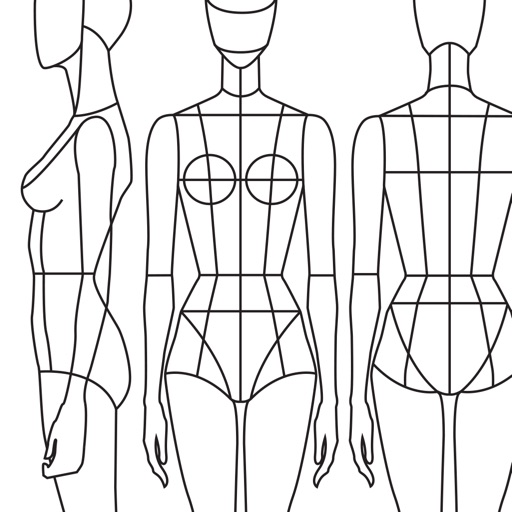
대표적인 3뷰 가이드(측면, 정면, 후면)에 더해, 깊이와 입체감, 소재감이 살아있는 사실적인 렌더링을 제공합니다.
테크니컬 라인 위에서 그리든 사실적 베이스 위에 직접 작업하든, Prêt-à-Template은 당신의 흐름에 맞추어 완전한 창작 자유를 제공합니다.
무드보드: 당신의 창의적 우주, 한곳에
미적, 영감, 기술적 목적 모두 가능한 유연한 빈 캔버스 — 앱에 통합된 가장 풍부하고 세밀한 패션 라이브러리와 함께:
• 패브릭과 섬유 구조
• 장식, 부자재
• 케어 라벨과 섬유 기호
• 프린트, 패턴, 텍스처
• 재킷 여밈
• 포켓, 소매, 커프스
• 암홀, 넥라인, 칼라
• 패션 제작에 필요한 모든 요소들
쉽게 구성하고 다양하게 변형할 수 있어, 이 공간은 당신의 스케치북이자 연구 벽, 소재 실험실, 프레젠테이션 보드가 됩니다.
캔버스: 살아 있는 듯한 드로잉 경험
새로운 캔버스는 3D 종이 질감, 빛에 반응하는 소재, 실제 도구처럼 작동하는 브러시로 더욱 자연스러운 드로잉을 제공합니다.
Puzzle Look
Puzzle Look은 우리의 기반 모델을 활용해 믹스 앤 매치 스타일링을 쉽게 만들어줍니다. 원하는 룩을 설명하면 가장 적합한 템플릿을 즉시 제안합니다.
AI: 디자이너의 워크플로우를 강화하는 도구
우리의 목표는 항상 패션 아이디어를 현실로 만드는 강력한 디지털 환경을 제공하는 것이었습니다. AI는 이 목표를 더욱 확장합니다.
AI는 디자이너의 직관을 대체하는 것이 아니라 강화해야 한다고 우리는 믿습니다. 그래서 최소한의 프롬프트로 창의성에 집중할 수 있는 새로운 AI 협업 방식을 도입했습니다.
각 템플릿에는 실제 패션 제품의 논리가 담겨 있습니다:
• 비율과 실루엣
• 직물의 거동과 소재 논리
• 봉제 및 마감 구조
• 부자재와 기술 요소
• 볼륨, 드레이프, 구조
• 모든 디테일 간의 일관된 관계
이 깊이 있는 기반은 AI가 필요한 맥락을 제공합니다. 순수 텍스트 프롬프트만으로는 절대 얻을 수 없는 것입니다.
패션 디자이너의 시선과 AI의 표현 능력이 만나야만 패션 제품 창작의 새로운 시너지가 탄생합니다.
구독 가격 및 이용 약관
Prêt-à-Template은 일부 기능을 제한한 무료 버전이 제공됩니다. 전체 기능은 월간 또는 연간 구독으로 이용할 수 있습니다.
현재 기간 종료 24시간 전까지 취소하지 않으면 자동 갱신됩니다.
구독은 Apple 계정 설정에서 관리할 수 있습니다.
개인정보 처리방침: pretatemplate.com/privacy-policy
이용약관: pretatemplate.com/terms-of-use
螢幕截圖 © 各自所有者 · App Store


iOSGods 與 Apple Inc.、Google LLC 及此處列出應用程式的開發者並無關聯,亦未獲其認可或贊助。Apple、iOS 與 App Store 為 Apple Inc. 的商標。Android 與 Google Play 為 Google LLC 的商標。其他所有應用程式名稱、圖示、圖片與商標均屬其各自所有者。
- 未越獄/受限或已越獄的 iPhone 或 iPad。
- Sideloadly 或替代方案。
- 執行 Windows/macOS/Linux 且已安裝 iTunes 的電腦。
步驟 1: 透過上方連結將已破解的 .IPA 檔案下載到您的電腦。若要從 iOSGods App 下載,請參閱我們的 iOSGods App IPA 下載教學,其中包含影片範例。
步驟 2: 下載 Sideloadly 並將其安裝在您的 Windows 或 Mac 上。
步驟 3: 在電腦上開啟 Sideloadly,連接您的 iOS 裝置,並等待裝置名稱出現在 Sideloadly 中。
步驟 4: 當 Sideloadly 辨識到您的 iOS 裝置後,將下載好的修改版 .IPA 檔案拖曳並放到 Sideloadly 應用程式中。
步驟 5: 輸入您的 Apple Account 電子郵件,然後按下「Start」。系統會要求您輸入密碼,請依指示提供所需資訊。
步驟 6: 等待 Sideloadly 完成已破解 IPA 的旁載/安裝。如果安裝過程中發生問題,請閱讀下方的注意事項。
步驟 7: 安裝完成並在主畫面上看到該應用程式後,您需要前往 設定 → 一般 → 描述檔 / VPN 與裝置管理。進入後,點選您在步驟 6 中輸入的電子郵件,然後點選「信任 [email protected]」。
步驟 8: 現在回到主畫面並開啟新安裝的應用程式,一切應該都能正常運作。您可能需要依照遊戲內破解彈出視窗中的進一步指示操作。
注意: 在 iOS/iPadOS 16 及更新版本上,您必須 啟用開發者模式。若使用免費的 Apple Developer 帳號,您將需要每 7 天重複此程序。如有任何疑問或問題,請閱讀我們的 主題中的 Sideloadly 常見問題區段。
Game Name iOS Mod IPA is an action adventure game enhanced with powerful gameplay boosts and quality-of-life improvements. Win battles faster, earn rewards quicker, and enjoy uninterrupted play without ads.
- Unlimited Gold - spend freely to unlock premium content
- Damage Multiplier - deal significantly more damage in combat
- Defense Multiplier - take less damage and survive longer
- Reward Multiplier - earn more loot from every battle
- Max Level - instantly reach the highest player rank
- No Ads - play without interruptions or advertisements
This app also comes with iGameGod, giving you access to Auto Touch to automate repetitive tasks, App Speed Manager for adjustable gameplay speed, Memory Engine value editing, and more powerful iOS game tools.
從上方連結下載 Game Name Mod IPA。點選安裝按鈕並依照畫面指示在 iPhone、iPad 或 Apple Silicon 上安裝此 iOS 應用程式修改版。
需要更多協助請查看我們的 iOSGods 應用程式常見問題 以獲得詳細解答與疑難排解。
----------------------------------------------------------
--------------------------------------------------