Потрібен вхід
Увійдіть у свій обліковий запис iOSGods, щоб продовжити.
Увійдіть у свій обліковий запис iOSGods, щоб продовжити.

Цей лайфхак розблоковує преміум-версію Motivation - Daily quotes Mod IPA, надаючи вам доступ до всього натхненного контенту без обмежень. Налаштовуйте дизайн цитат, діліться надихаючими повідомленнями з друзями та використовуйте їх як шпалери або пости в соціальних мережах, щоб щодня мати позитивні нагадування на увазі.
- Преміум розблокований → доступ до всіх функцій та контенту без обмежень
Цей застосунок також постачається з iGameGod, який надає доступ до Auto Touch для автоматизації повторюваних дій, App Speed Manager для регулювання швидкості гри, редагування значень за допомогою Memory Engine та інших потужних інструментів для iOS-ігор.
Завантажте Motivation - Daily quotes Modded modded IPA за посиланнями вище. Натисніть кнопку встановлення та дотримуйтесь інструкцій, щоб встановити цей хак iOS на iPhone, iPad або Apple Silicon.
Потрібна додаткова допомога? Перегляньте наш Поширені запитання про застосунок iOSGods для детальних відповідей та порад з усунення несправностей.
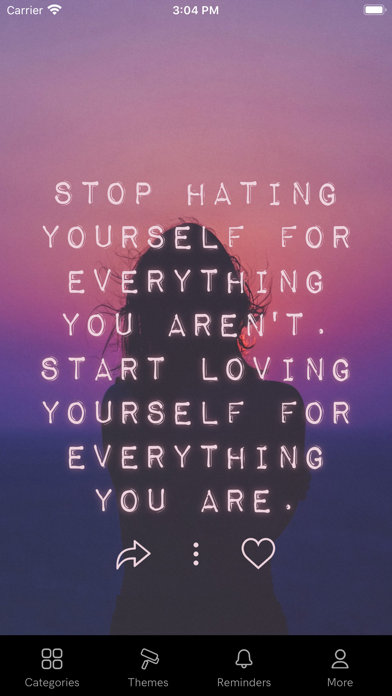
Whether you're going through hard times, need an extra push to get stuff done, or like sharing inspirational quotes on social media, Motivation has you covered.
Positive reminders are one of the simplest and most powerful tools for mental growth. It’s all about keeping the right thoughts top of mind from the get-go every day, so they’re readily available on those hard days when you need them most.
Now, from iOS 14, you can think positive thoughts without even trying with the Motivation widget! Simply install the widget in your home screen and customize it from the app. You can have as many widgets as you want!
Customize the design of the quotes and share the uplifting message of the day with your friends, or use the image for Instagram or as a wallpaper.
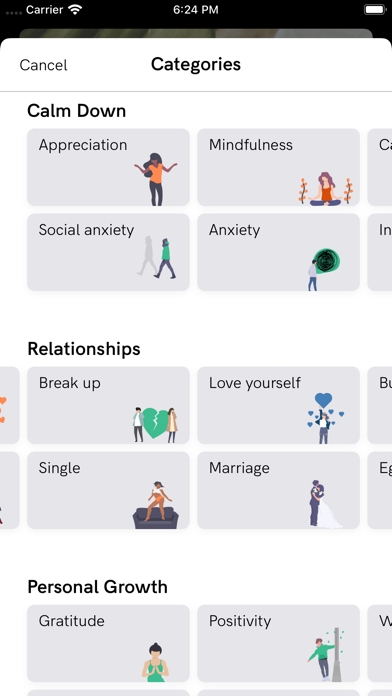
The app includes a wide range of topics such as self-esteem, relationships, and dealing with stress, as well as a selection of carefully designed themes to choose from - updated frequently.
+ Read through Hundreds of Quotes
+ Find Motivational Books
+ Save or Share your Quotes
+ Set Motivational Reminders throughout the Day
+ Save your Favorite Quotes
+ Change Font and Colors
+ Filter Quotes by Category
+ Set a Home Screen Motivation Widget
From quotes about working out to love and family quotes, Motivation has them all! Browse thousands of quotes organized by category:
- Motivation to work harder
- Love quotes
- Motivation to train and work out
- Help for depression
- Boost your self-esteem and self-confidence
- Get over a break up
- Life lessons and sayings
- Sports quotes from athletes and trainers
- Business, money, success, and career
- Being present and mindful
- Quotes from and for women
- Philosophy from the best minds
- Quotes to be thankful for what you got
- Inspirations for joy
- Quotes from movies
- Verses from the Bible
- And much more!
And now with Motivation Premium you can:
+ Remove ads
+ Unlock all themes and categories
+ Set background photo
+ Get unlimited reminders
+ Search quotes
To get access to the Motivation Premium content and functionality, you can choose between a lifetime, monthly, and yearly auto-renewable subscription. This is a recurring transaction that will be charged to your iTunes Account at confirmation of purchase and will automatically renew unless you cancel it at least 24 hours before the end of your subscription. Renewals will be charged at the same cost within 24 hours prior to the end of the current period. You can manage your subscriptions and auto-renewal can be turned off by going to your iTunes Account Settings after purchase.
Find tons of inspiring content on our blog: https://blog.motivation.app/
Privacy Policy: https://monkeytaps.net/privacy
Terms of Use: https://monkeytaps.net/terms
- iPhone або iPad без джейлбрейку/у заводському стані або з джейлбрейком.
- Sideloadly або альтернативи.
- Комп'ютер під керуванням Windows/macOS/Linux із встановленим iTunes.
КРОК 1: Завантажте попередньо зламаний .IPA-файл за посиланням вище на свій комп'ютер. Щоб завантажити з iOSGods App, перегляньте наш Посібник із завантаження IPA в iOSGods App, який містить відеоприклад.
КРОК 2: Завантажте Sideloadly і встановіть його на своєму Windows або Mac.
КРОК 3: Відкрийте Sideloadly на комп'ютері, підключіть свій iOS-пристрій і зачекайте, поки назва пристрою з'явиться у Sideloadly.
КРОК 4: Коли ваш iDevice буде розпізнано, перетягніть завантажений модифікований .IPA-файл і відпустіть його в застосунок Sideloadly.
КРОК 5: Введіть електронну пошту вашого Apple Account, потім натисніть «Start». Після цього вас попросять ввести пароль. Введіть необхідні дані.
КРОК 6: Зачекайте, доки Sideloadly завершить sideload/встановлення зламаного IPA. Якщо під час встановлення виникнуть проблеми, прочитайте примітку нижче.
КРОК 7: Коли встановлення завершено й ви побачите застосунок на головному екрані, перейдіть до Налаштування → Загальні → Профілі / VPN і керування пристроєм. Там натисніть на електронну пошту, яку ви ввели на кроці 6, а потім натисніть «Довіряти [email protected]».
КРОК 8: Тепер перейдіть на головний екран і відкрийте щойно встановлений застосунок — усе має працювати належним чином. Можливо, доведеться виконати додаткові інструкції для конкретного застосунку в спливаючому вікні хака в грі.
ПРИМІТКА: У iOS/iPadOS 16 і пізніших версіях потрібно увімкнути режим розробника. Для безкоштовних облікових записів Apple Developer цей процес доведеться повторювати кожні 7 днів. Якщо у вас є запитання або проблеми, прочитайте наш розділ FAQ зі Sideloadly у темі.