تسجيل الدخول مطلوب
سجّل الدخول بحساب iOSGods للمتابعة.
سجّل الدخول بحساب iOSGods للمتابعة.
افتح جميع الميزات المتقدمة في VideoShow Video Editor & Maker باستخدام هذا الـ Mod IPA المعدل، مما يمنحك إمكانية الوصول إلى جميع أدوات التحرير الاحترافية بدون قيود. VideoShow هو محرر الفيديو الأكثر شهرة في العالم، وموثوق به من قبل 500 مليون مستخدم لقص ودمج وتقليص وعكس وتحويل مقاطع الفيديو باستخدام المؤثرات المتقدمة والطبقات الإضافية والمرشحات. يزيل هذا التهكير جدران الدفع حتى تتمكن من التحرير مثل المحترفين أثناء التنقل.
- Premium مفتوح → جميع أدوات التحرير الاحترافية والمؤثرات متاحة
يأتي هذا التطبيق أيضًا مع iGameGod، مما يتيح لك الوصول إلى Auto Touch لأتمتة المهام المتكررة، وApp Speed Manager لضبط سرعة اللعب، وتعديل القيم عبر Memory Engine، والمزيد من أدوات ألعاب iOS القوية.
قم بتنزيل VideoShow Video Editor & Maker Modded modded IPA من الروابط أعلاه. اضغط على زر التثبيت واتبع التعليمات لتثبيت هذا التعديل لـ iOS على iPhone أو iPad أو Apple Silicon.
هل تحتاج إلى مزيد من المساعدة؟ راجع الأسئلة الشائعة لتطبيق iOSGods للحصول على إجابات مفصلة ونصائح لاستكشاف الأخطاء.
VideoShow - AI Video Editor & AI Video Generator helps you create stunning videos effortlessly. Transform your favorite moments into beautiful videos with photos, music, stickers, filters, and AI effects—making every memory unforgettable.
Key Features:
AI Video Generator: Turn photos or text into amazing AI-powered videos. Generate from photo to video, image to video, or text to video instantly. Create stylish story clips or viral effects with ease.
AI Text to Video Editing: Reimagine any short video with AI using a text prompt or reference image. Add or remove objects, transform backgrounds, weather, lighting, or style, and use AI green screen cutout and relighting to create a newly reimagined video with natural motion and effortless editing.
AI Video Editing: Choose your content and let AI automatically add effects, filters, transitions, and subtitles—crafting cinematic videos with visuals, voiceovers, and captions in one tap.
AI Text to Image: Turn your words into stunning AI-generated images. Describe your idea, and convert your creation into a photo with one tap.
AI Image Edit: Reimagine any photo with AI using simple text prompts. Replace content, transform styles, rewrite specific areas, or upload a reference image to guide the look and feel of your edit.
Trending AI Effects: Explore viral templates like AI Anime, AI Dance, and more! Create unique, eye-catching AI videos that stand out on TikTok, Instagram, and Facebook.
Now upgraded with HappyHorse 1.0 & Seedance 2.0 for Text-to-Video & Image-to-Video — Generate higher-quality AI videos from text or photo with smoother motion, stronger visual storytelling, and more cinematic results.
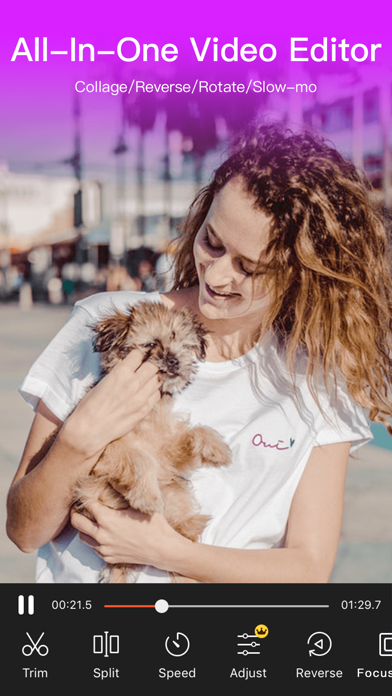
Smart Video Editing: Merge, crop, split, reverse, copy, or rotate clips easily. Adjust video speed, zoom in/out, or blur backgrounds to focus attention.
Creative Elements: Enjoy 30+ filters, fun stickers, dynamic transitions, GIFs, and stylish text options. Access the best content center with themes, effects, stickers, emojis, and sound FX.
AI Cutout Tools: Instantly remove video or image backgrounds with AI-powered Video Cutout & Image Cutout, simplify editing and create professional-quality results.
Compress & Optimize: Reduce video size in seconds without losing quality. Export in 720P/1080P/4K HD—fast, clear, and smooth.
AI Music Generator: Transform text into unique music tracks with AI. Generate original melodies from your words for vlogs, short films, or storytelling.
AI Photo Enhancer: Bring photos to life with AI-powered upscaling and detail enhancement.
AI Colorizer: Turn old black & white photos into colorful, vibrant images using intelligent color restoration.
AI Object Removal: Perfect your videos or photos by removing unwanted objects instantly with precision AI.
AI Voice Changer: Change your voice to cute, mature, robotic, or funny tones—add personality and fun to your videos.
Music & Sound: Choose from hundreds of background tracks or import your own music to match your vibe.
VideoShow makes editing and AI generation easy, fun, and powerful—all in one app. Whether you want to edit, enhance, or create videos from text or photos, VideoShow turns imagination into stunning reality!
[VideoShow VIP Membership Service]
Unlock all premium features. Payment is charged to your iTunes account and renews automatically unless canceled 24 hours before the current period ends. Manage or cancel anytime in iTunes settings.
Privacy Policy: https://d10nkoc3mu17gd.cloudfront.net/privacy/VideoShow_Privacy_Policy_ios_en.html
Terms of Use: https://d10nkoc3mu17gd.cloudfront.net/privacy/videoshow_user_agreement_ios_en.html

- iPhone أو iPad بجيلبريك أو بدون جيلبريك.
- Sideloadly أو بدائلها.
- كمبيوتر يعمل بنظام Windows/macOS/Linux مع تثبيت iTunes.
الخطوة 1: قم بتنزيل ملف .IPA المعدّل مسبقًا من الرابط أعلاه إلى الكمبيوتر الخاص بك. للتنزيل من تطبيق iOSGods App، اطلع على دليل تنزيل IPA من تطبيق iOSGods App الذي يتضمن مثالًا بالفيديو.
الخطوة 2: قم بتنزيل Sideloadly وتثبيته على جهاز Windows أو Mac.
الخطوة 3: افتح Sideloadly على الكمبيوتر، ووصّل جهاز iOS الخاص بك، وانتظر حتى يظهر اسم جهازك داخل Sideloadly.
الخطوة 4: بمجرد التعرّف على جهاز iDevice الخاص بك، اسحب ملف .IPA المعدّل الذي قمت بتنزيله وأفلِته داخل تطبيق Sideloadly.
الخطوة 5: أدخل البريد الإلكتروني لحساب Apple Account الخاص بك، ثم اضغط على «Start». سيُطلب منك بعد ذلك إدخال كلمة المرور. تابع وأدخل المعلومات المطلوبة.
الخطوة 6: انتظر حتى ينتهي Sideloadly من تحميل/تثبيت ملف IPA المعدّل. في حال واجهت أي مشاكل أثناء التثبيت، يرجى قراءة الملاحظة أدناه.
الخطوة 7: بعد اكتمال التثبيت ورؤية التطبيق على الشاشة الرئيسية، انتقل إلى Settings → General → Profiles / VPN & Device Management. ثم اضغط على البريد الإلكتروني الذي أدخلته في الخطوة 6، ثم اضغط على «الوثوق بـ [email protected]».
الخطوة 8: الآن انتقل إلى الشاشة الرئيسية وافتح التطبيق الذي تم تثبيته للتو وسيعمل كل شيء بشكل صحيح. قد تحتاج إلى اتباع تعليمات إضافية خاصة بكل تطبيق داخل النافذة المنبثقة للتعديل أثناء اللعب.
ملاحظة: بدءًا من iOS/iPadOS 16 وما بعده، يجب تفعيل وضع المطور (Developer Mode). بالنسبة لحسابات Apple Developer المجانية، ستحتاج إلى تكرار هذه العملية كل 7 أيام. إذا كانت لديك أي أسئلة أو مشاكل، يرجى قراءة قسم الأسئلة الشائعة حول Sideloadly في الموضوع.