Login Diperlukan
Masuk dengan akun iOSGods kamu untuk melanjutkan.
Hack Features:
- Free iAP
Unduh RNI Films Modded modded IPA dari tautan di atas. Ketuk tombol pasang dan ikuti petunjuk di layar untuk memasang hack iOS ini di iPhone, iPad, atau Apple Silicon.
Butuh bantuan lebih lanjut? Lihat Pertanyaan yang Sering Diajukan untuk Aplikasi iOSGods kami untuk jawaban dan tips lengkap.
Get real film look while shooting digital.
At RNI we always wanted to transfer the true character of analogue film to digital medium. So we did by digitising our library of analog slides and negatives, building their profiles and packaging those profiles into a lightweight and easy to use mobile app.
RNI Films is a great mobile companion for those who appreciate the beauty of analogue photography. And this little app enables creators to bring the artistic flair of film into their mobile workflow.
Many professional photographers find our film profiles to be more sophisticated and true to real film than rivals. That's because we work really hard to recreate every subtle aspect of real film, with great attention to general accuracy, colour separation, skin tones and grain texture.
RNI's film-simulating expertise is proven by time and appreciated by photographers from all over the globe. Our desktop and mobile solutions have been praised in a number of independent online reviews, so don't hesitate to search for RNI Films online to find out more about our products, philosophy and approach.
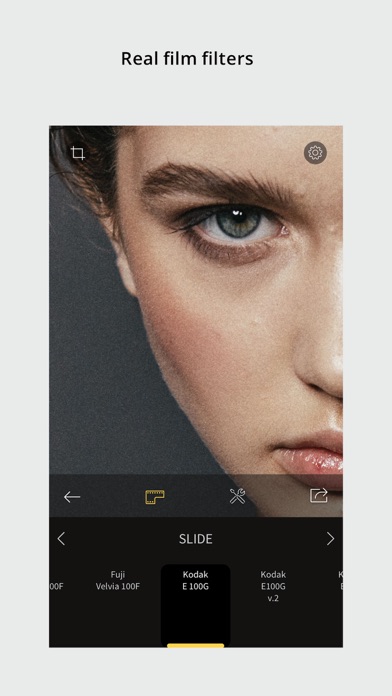
Film filters
The RNI Films' filters are born from real film stocks and split into categories that include negative, slide, instant, black & white and vintage. The app comes with a generous introductory package of free film filters. Also additional filter packages can be added via in-app purchase.
Adjustment tools
Use RNI image adjustment tools to make sure your images perfectly meet your creative vision. You can crop and rotate, alter the brightness, contrast, and colour, enhance shadows and highlights, add vignette and real film grain, and much more.
RAW support
RNI Films supports RAW. Some minor image artefacts may bee seen while editing RAW in the app's viewport which uses draft mode. But those artefacts won't be there on export. And generally the quality of the output of this little app is comparable with professional desktop software.
Sharing
Share your photos to your social networks directly from the app. Supported networks include Instagram, Facebook and Twitter.
In-app workflow
The RNI Films app is simple, intuitive and straightforward to use. It’s designed with high efficiency in mind, from opening a photo to sharing the result. No clutter, no extra taps to ‘hide/unhide that panel’, no unnecessary confirmation steps – everything is streamlined and simple for your convenience.
#RNI and #RNIFilms
Tag your photos with #RNI and #RNIFilms for a chance to get featured in RNI’s official newsletter, blog and Instagram @reallyniceimages.
To find out more about RNI products please visit
reallyniceimages.com
- iPhone atau iPad tanpa Jailbreak atau dengan Jailbreak.
- Sideloadly atau alternatifnya.
- Komputer dengan Windows/macOS/Linux dan iTunes terpasang.
LANGKAH 1: Unduh file .IPA yang sudah di-hack dari tautan di atas ke komputer Anda. Untuk mengunduhnya dari iOSGods App, silakan lihat Tutorial Mengunduh IPA dari iOSGods App kami yang dilengkapi contoh video.
LANGKAH 2: Unduh Sideloadly dan pasang di Windows atau Mac Anda.
LANGKAH 3: Buka Sideloadly di komputer Anda, sambungkan perangkat iOS Anda, dan tunggu hingga nama perangkat Anda muncul di Sideloadly.
LANGKAH 4: Setelah iDevice Anda terdeteksi, seret file .IPA yang sudah dimodifikasi dan lepaskan ke dalam aplikasi Sideloadly.
LANGKAH 5: Masukkan email Apple Account Anda, lalu tekan "Start". Anda kemudian akan diminta memasukkan kata sandi. Silakan isi informasi yang diminta.
LANGKAH 6: Tunggu hingga Sideloadly selesai melakukan sideloading/pemasangan IPA yang di-hack. Jika terjadi masalah saat pemasangan, silakan baca catatan di bawah ini.
LANGKAH 7: Setelah pemasangan selesai dan Anda melihat aplikasi di Layar Beranda, Anda perlu masuk ke Pengaturan → Umum → Profil / VPN & Manajemen Perangkat. Setelah itu, ketuk email yang Anda masukkan pada langkah 6, lalu ketuk "Percayai [email protected]".
LANGKAH 8: Sekarang buka Layar Beranda dan jalankan aplikasi yang baru saja dipasang; semuanya seharusnya berjalan normal. Anda mungkin perlu mengikuti petunjuk tambahan per aplikasi yang muncul di popup hack di dalam game.
CATATAN: Pada iOS/iPadOS 16 dan yang lebih baru, Anda harus mengaktifkan Mode Pengembang. Untuk akun Apple Developer gratis, Anda perlu mengulangi proses ini setiap 7 hari. Jika Anda memiliki pertanyaan atau masalah, silakan baca bagian FAQ Sideloadly di topik tersebut kami.