Accesso richiesto
Accedi con il tuo account iOSGods per continuare.
Hack Features:
- Free iAP
Scarica RNI Films Modded modded IPA dai link sopra. Tocca il pulsante di installazione e segui le istruzioni per installare questo hack iOS sul tuo iPhone, iPad o Mac con Apple Silicon.
Hai bisogno di altro aiuto? Consulta le nostre Domande frequenti sull'app iOSGods per risposte dettagliate e consigli per la risoluzione dei problemi.
Get real film look while shooting digital.
At RNI we always wanted to transfer the true character of analogue film to digital medium. So we did by digitising our library of analog slides and negatives, building their profiles and packaging those profiles into a lightweight and easy to use mobile app.
RNI Films is a great mobile companion for those who appreciate the beauty of analogue photography. And this little app enables creators to bring the artistic flair of film into their mobile workflow.
Many professional photographers find our film profiles to be more sophisticated and true to real film than rivals. That's because we work really hard to recreate every subtle aspect of real film, with great attention to general accuracy, colour separation, skin tones and grain texture.
RNI's film-simulating expertise is proven by time and appreciated by photographers from all over the globe. Our desktop and mobile solutions have been praised in a number of independent online reviews, so don't hesitate to search for RNI Films online to find out more about our products, philosophy and approach.
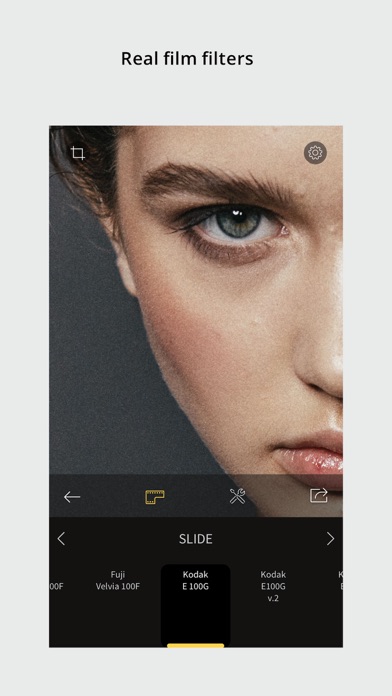
Film filters
The RNI Films' filters are born from real film stocks and split into categories that include negative, slide, instant, black & white and vintage. The app comes with a generous introductory package of free film filters. Also additional filter packages can be added via in-app purchase.
Adjustment tools
Use RNI image adjustment tools to make sure your images perfectly meet your creative vision. You can crop and rotate, alter the brightness, contrast, and colour, enhance shadows and highlights, add vignette and real film grain, and much more.
RAW support
RNI Films supports RAW. Some minor image artefacts may bee seen while editing RAW in the app's viewport which uses draft mode. But those artefacts won't be there on export. And generally the quality of the output of this little app is comparable with professional desktop software.
Sharing
Share your photos to your social networks directly from the app. Supported networks include Instagram, Facebook and Twitter.
In-app workflow
The RNI Films app is simple, intuitive and straightforward to use. It’s designed with high efficiency in mind, from opening a photo to sharing the result. No clutter, no extra taps to ‘hide/unhide that panel’, no unnecessary confirmation steps – everything is streamlined and simple for your convenience.
#RNI and #RNIFilms
Tag your photos with #RNI and #RNIFilms for a chance to get featured in RNI’s official newsletter, blog and Instagram @reallyniceimages.
To find out more about RNI products please visit
reallyniceimages.com
- iPhone o iPad non jailbroken/jailed oppure jailbroken.
- Sideloadly o alternative.
- Computer con Windows/macOS/Linux con iTunes installato.
PASSO 1: Scarica il file .IPA pre-modificato dal link sopra sul tuo computer. Per scaricarlo dall'iOSGods App, consulta il nostro Tutorial download IPA dell'iOSGods App, che include un esempio video.
PASSO 2: Scarica Sideloadly e installalo sul tuo Windows o Mac.
PASSO 3: Apri Sideloadly sul tuo computer, collega il tuo dispositivo iOS e attendi finché il nome del dispositivo non appare in Sideloadly.
PASSO 4: Una volta riconosciuto il tuo iDevice, trascina il file .IPA moddato che hai scaricato e rilascialo nell'applicazione Sideloadly.
PASSO 5: Inserisci l'email del tuo Apple Account, poi premi “Start”. Ti verrà quindi chiesto di inserire la password. Procedi e fornisci le informazioni richieste.
PASSO 6: Attendi che Sideloadly completi il sideload/installazione dell'IPA modificata. Se ci sono problemi durante l'installazione, leggi la nota qui sotto.
PASSO 7: Una volta completata l'installazione e vista l'app sulla schermata Home, dovrai andare in Impostazioni → Generali → Profili / Gestione VPN e dispositivi. Una volta lì, tocca l'email inserita al passo 6 e poi tocca “Autorizza [email protected]”.
PASSO 8: Ora vai sulla schermata Home e apri l'app appena installata: tutto dovrebbe funzionare correttamente. Potrebbe essere necessario seguire ulteriori istruzioni specifiche all'interno del popup dell'hack nel gioco.
NOTA: Per iOS/iPadOS 16 e versioni successive, devi attivare la Modalità sviluppatore. Per gli account Apple Developer gratuiti, dovrai ripetere questa procedura ogni 7 giorni. Se hai domande o problemi, leggi la nostra sezione FAQ Sideloadly del topic.