Giriş Gerekli
Devam etmek için iOSGods hesabınızla giriş yapın.
Hack Features:
- Free iAP
Bu uygulama, tekrar eden görevleri otomatikleştirmek için Auto Touch, ayarlanabilir oyun hızı için App Speed Manager, Memory Engine ile değer düzenleme ve daha pek çok güçlü iOS oyun aracına erişim sağlayan iGameGod ile birlikte gelir.
Yukarıdaki bağlantılardan RNI Films Modded modded IPA indirin. Yükle düğmesine dokunup ekrandaki yönergeleri izleyerek bu iOS uygulama hack'ini iPhone, iPad veya Apple Silicon'a yükleyin.
Daha fazla yardıma mı ihtiyacınız var? Ayrıntılı yanıtlar ve sorun giderme ipuçları için iOSGods Uygulaması Sık Sorulan Sorular sayfamıza bakın.
Get real film look while shooting digital.
At RNI we always wanted to transfer the true character of analogue film to digital medium. So we did by digitising our library of analog slides and negatives, building their profiles and packaging those profiles into a lightweight and easy to use mobile app.
RNI Films is a great mobile companion for those who appreciate the beauty of analogue photography. And this little app enables creators to bring the artistic flair of film into their mobile workflow.
Many professional photographers find our film profiles to be more sophisticated and true to real film than rivals. That's because we work really hard to recreate every subtle aspect of real film, with great attention to general accuracy, colour separation, skin tones and grain texture.
RNI's film-simulating expertise is proven by time and appreciated by photographers from all over the globe. Our desktop and mobile solutions have been praised in a number of independent online reviews, so don't hesitate to search for RNI Films online to find out more about our products, philosophy and approach.
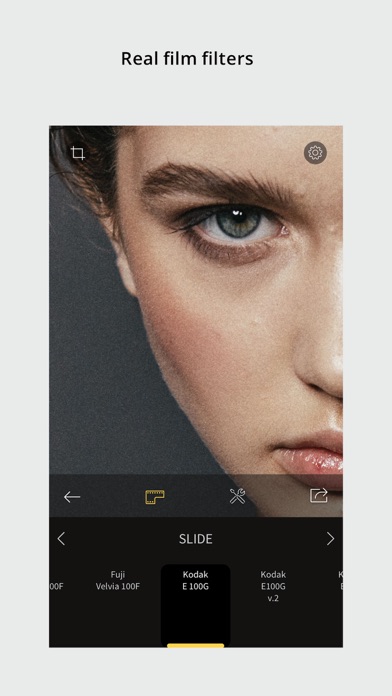
Film filters
The RNI Films' filters are born from real film stocks and split into categories that include negative, slide, instant, black & white and vintage. The app comes with a generous introductory package of free film filters. Also additional filter packages can be added via in-app purchase.
Adjustment tools
Use RNI image adjustment tools to make sure your images perfectly meet your creative vision. You can crop and rotate, alter the brightness, contrast, and colour, enhance shadows and highlights, add vignette and real film grain, and much more.
RAW support
RNI Films supports RAW. Some minor image artefacts may bee seen while editing RAW in the app's viewport which uses draft mode. But those artefacts won't be there on export. And generally the quality of the output of this little app is comparable with professional desktop software.
Sharing
Share your photos to your social networks directly from the app. Supported networks include Instagram, Facebook and Twitter.
In-app workflow
The RNI Films app is simple, intuitive and straightforward to use. It’s designed with high efficiency in mind, from opening a photo to sharing the result. No clutter, no extra taps to ‘hide/unhide that panel’, no unnecessary confirmation steps – everything is streamlined and simple for your convenience.
#RNI and #RNIFilms
Tag your photos with #RNI and #RNIFilms for a chance to get featured in RNI’s official newsletter, blog and Instagram @reallyniceimages.
To find out more about RNI products please visit
reallyniceimages.com
- Jailbreak'siz/normal ya da jailbreak'li iPhone veya iPad.
- Sideloadly veya alternatifleri.
- iTunes yüklü Windows/macOS/Linux çalıştıran bir bilgisayar.
ADIM 1: Yukarıdaki bağlantıdan önceden hacklenmiş .IPA dosyasını bilgisayarınıza indirin. iOSGods App üzerinden indirmek için video örneği de içeren iOSGods App IPA İndirme Kılavuzu bölümümüze göz atın.
ADIM 2: Sideloadly indirin ve Windows veya Mac'inize kurun.
ADIM 3: Bilgisayarınızda Sideloadly'yi açın, iOS cihazınızı bağlayın ve cihaz adınız Sideloadly'de görünene kadar bekleyin.
ADIM 4: iCihazınız tanındıktan sonra, indirdiğiniz modlu .IPA dosyasını sürükleyip Sideloadly uygulamasına bırakın.
ADIM 5: Apple Account e-posta adresinizi girin ve ardından "Start" düğmesine basın. Sonrasında sizden şifreniz istenecektir. Gerekli bilgileri girin.
ADIM 6: Sideloadly'nin hacklenmiş IPA'yı sideload edip yüklemesini bekleyin. Yükleme sırasında bir sorun olursa lütfen aşağıdaki notu okuyun.

ADIM 7: Yükleme tamamlandıktan ve uygulamayı Ana Ekranınızda gördükten sonra Ayarlar → Genel → Profiller / VPN ve Cihaz Yönetimi bölümüne gitmelisiniz. Burada 6. adımda girdiğiniz e-postaya dokunun ve ardından "[email protected]'a Güven" seçeneğine dokunun.
ADIM 8: Şimdi Ana Ekranınıza gidin ve yeni yüklediğiniz uygulamayı açın; her şey sorunsuz çalışmalıdır. Oyun içindeki hack açılır penceresinde uygulamaya özel ek talimatları takip etmeniz gerekebilir.
NOT: iOS/iPadOS 16 ve sonrasında Geliştirici Modu'nu etkinleştirmeniz gerekir. Ücretsiz Apple Developer hesapları için bu işlemi her 7 günde bir tekrarlamanız gerekir. Sorularınız veya sorunlarınız varsa konunun Sideloadly SSS bölümünü okuyun.