Inloggen vereist
Log in met je iOSGods-account om door te gaan.

Hack Features:
- Free iAP
Download RNI Films Modded modded IPA via de bovenstaande links. Tik op de installatieknop en volg de instructies om deze iOS-app-hack op je iPhone, iPad of Apple Silicon te installeren.
Meer hulp nodig? Bekijk onze Veelgestelde vragen over de iOSGods-app voor uitgebreide antwoorden en probleemoplossingstips.
Get real film look while shooting digital.
At RNI we always wanted to transfer the true character of analogue film to digital medium. So we did by digitising our library of analog slides and negatives, building their profiles and packaging those profiles into a lightweight and easy to use mobile app.
RNI Films is a great mobile companion for those who appreciate the beauty of analogue photography. And this little app enables creators to bring the artistic flair of film into their mobile workflow.
Many professional photographers find our film profiles to be more sophisticated and true to real film than rivals. That's because we work really hard to recreate every subtle aspect of real film, with great attention to general accuracy, colour separation, skin tones and grain texture.
RNI's film-simulating expertise is proven by time and appreciated by photographers from all over the globe. Our desktop and mobile solutions have been praised in a number of independent online reviews, so don't hesitate to search for RNI Films online to find out more about our products, philosophy and approach.
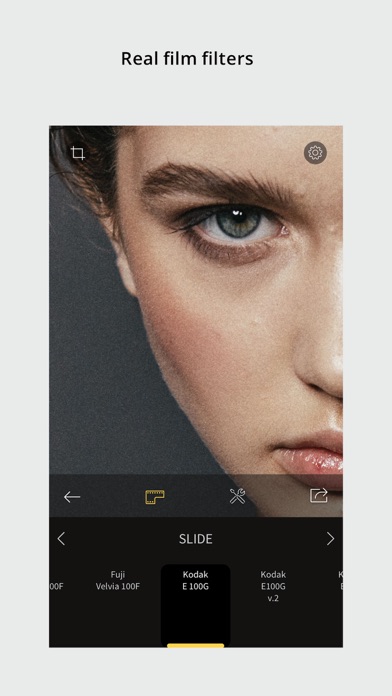
Film filters
The RNI Films' filters are born from real film stocks and split into categories that include negative, slide, instant, black & white and vintage. The app comes with a generous introductory package of free film filters. Also additional filter packages can be added via in-app purchase.
Adjustment tools
Use RNI image adjustment tools to make sure your images perfectly meet your creative vision. You can crop and rotate, alter the brightness, contrast, and colour, enhance shadows and highlights, add vignette and real film grain, and much more.
RAW support
RNI Films supports RAW. Some minor image artefacts may bee seen while editing RAW in the app's viewport which uses draft mode. But those artefacts won't be there on export. And generally the quality of the output of this little app is comparable with professional desktop software.
Sharing
Share your photos to your social networks directly from the app. Supported networks include Instagram, Facebook and Twitter.
In-app workflow
The RNI Films app is simple, intuitive and straightforward to use. It’s designed with high efficiency in mind, from opening a photo to sharing the result. No clutter, no extra taps to ‘hide/unhide that panel’, no unnecessary confirmation steps – everything is streamlined and simple for your convenience.
#RNI and #RNIFilms
Tag your photos with #RNI and #RNIFilms for a chance to get featured in RNI’s official newsletter, blog and Instagram @reallyniceimages.
To find out more about RNI products please visit
reallyniceimages.com
- Niet-jailbroken/jailed of jailbroken iPhone of iPad.
- Sideloadly of alternatieven.
- Computer met Windows/macOS/Linux en iTunes geïnstalleerd.
STAP 1: Download het vooraf gehackte .IPA-bestand via de link hierboven naar uw computer. Om het te downloaden vanuit de iOSGods App, bekijk onze iOSGods App IPA-downloadhandleiding met een videovoorbeeld.
STAP 2: Download Sideloadly en installeer het op uw Windows of Mac.
STAP 3: Open Sideloadly op uw computer, sluit uw iOS-apparaat aan en wacht tot de naam van uw apparaat in Sideloadly verschijnt.
STAP 4: Zodra uw iDevice is herkend, sleept u het gedownloade gemodde .IPA-bestand naar de Sideloadly-applicatie.
STAP 5: Voer het e-mailadres van uw Apple Account in en druk op “Start”. U wordt vervolgens gevraagd om uw wachtwoord in te voeren. Geef de gevraagde informatie op.
STAP 6: Wacht tot Sideloadly het sideloaden/installeren van de gehackte IPA heeft voltooid. Als er problemen zijn tijdens de installatie, lees dan onderstaande opmerking.
STAP 7: Zodra de installatie is voltooid en u de app op uw beginscherm ziet, gaat u naar Instellingen → Algemeen → Profielen / VPN- en apparaatbeheer. Tik daar op het e-mailadres dat u in stap 6 hebt ingevoerd en tik vervolgens op “Vertrouw [email protected]”.
STAP 8: Ga nu naar uw beginscherm en open de zojuist geïnstalleerde app; alles zou correct moeten werken. Mogelijk moet u verdere app-specifieke instructies volgen in de hack-popup in het spel.
OPMERKING: Op iOS/iPadOS 16 en later moet u Ontwikkelaarsmodus inschakelen. Voor gratis Apple Developer-accounts moet u dit proces elke 7 dagen herhalen. Als u vragen of problemen hebt, lees dan onze Sideloadly FAQ-sectie van het onderwerp.