ログインが必要
iOSGodsアカウントでサインインして続けてください。

Hack Features:
- Free iAP
RNI Films Modded modded IPAを上のリンクからダウンロードします。インストールボタンをタップし、画面の指示に従ってiPhone、iPad、Apple SiliconにこのiOSアプリハックをインストールします。
さらにヘルプが必要ですか? 詳しい回答とトラブルシューティングはiOSGodsアプリ よくある質問をご覧ください。
Get real film look while shooting digital.
At RNI we always wanted to transfer the true character of analogue film to digital medium. So we did by digitising our library of analog slides and negatives, building their profiles and packaging those profiles into a lightweight and easy to use mobile app.
RNI Films is a great mobile companion for those who appreciate the beauty of analogue photography. And this little app enables creators to bring the artistic flair of film into their mobile workflow.
Many professional photographers find our film profiles to be more sophisticated and true to real film than rivals. That's because we work really hard to recreate every subtle aspect of real film, with great attention to general accuracy, colour separation, skin tones and grain texture.
RNI's film-simulating expertise is proven by time and appreciated by photographers from all over the globe. Our desktop and mobile solutions have been praised in a number of independent online reviews, so don't hesitate to search for RNI Films online to find out more about our products, philosophy and approach.
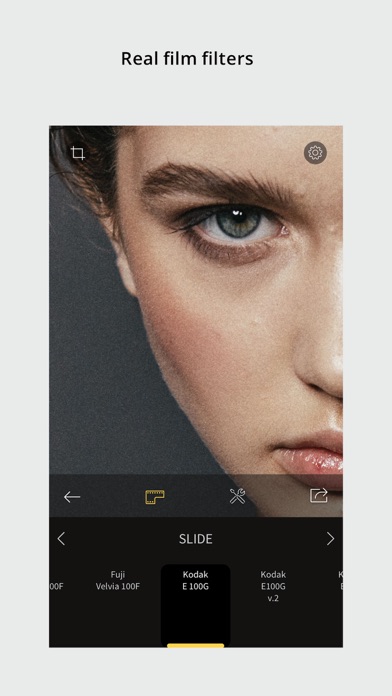
REAL FILM FILTERS
The RNI Films' filters are born from real film stocks and split into categories that include negative, slide, instant, black & white and vintage. The app comes with a generous introductory package of free film filters. Also additional filter packages can be added via in-app purchase.
REAL FILM GRAIN
Authentic film grain powered by our custom engine—accurately simulating grain structure, colour, and resolution behaviour.
REAL FILM BLOOM & HALATION
Recreate the optical effects of real film. Bloom adds a soft glow to highlights, while halation produces a warm, subtle halo around bright areas. Both are modelled to behave naturally, just like in real film photography.
ADJUSTMENT TOOLS
Use RNI image adjustment tools to make sure your images perfectly meet your creative vision. You can crop and rotate, alter the brightness, contrast, and colour, enhance shadows and highlights, add vignette and real film grain, and much more.
RAW EDITOR
RNI Films can open and edit RAW files from your mobile or third-party camera*. Some minor image artefacts may be seen while editing RAW in the app's viewport which uses draft mode. Those artefacts won't be there on export. Generally, the quality of the output of this little app is comparable with professional desktop software.
* Your third-party camera RAW format needs to be supported by iOS. Please refer to your iOS version documentation for more details.
VIDEO GRADING (beta)
RNI Films can colour-grade your videos. All its film filters and many editing tools now support video. More video-focused tools and features will be added later. At the moment video grading is in beta. So if you spot any bugs or issues—please let us know at [email protected]
SHARING
Share your photos to your social networks directly from the app. Supported networks include Instagram, Facebook and Twitter.
IN-APP WORKFLOW
The RNI Films app is simple, intuitive and straightforward to use. It’s designed with high efficiency in mind, from opening a photo to sharing the result. No clutter, no extra taps to ‘hide/unhide that panel’, no unnecessary confirmation steps – everything is streamlined and simple for your convenience.
#RNI and #RNIFilms
Tag your photos with #RNI and #RNIFilms for a chance to get featured in RNI’s official newsletter, blog and Instagram @reallyniceimages.
To find out more about RNI products please visit
reallyniceimages.com
Terms of Use: https://www.apple.com/legal/internet-services/itunes/dev/stdeula/
- 脱獄/Jailed済みまたは脱獄済みのiPhoneまたはiPad。
- Sideloadlyまたは代替手段。
- iTunesがインストールされているWindows/macOS/Linuxを実行しているコンピュータ。
ステップ1: 上のリンクから事前にハックされた.IPAファイルをコンピュータにダウンロードします。iOSGodsアプリからダウンロードする方法は、ビデオ例付きのiOSGodsアプリIPAダウンロードチュートリアルをご覧ください。
ステップ2: SideloadlyをダウンロードしてWindowsまたはMacにインストールします。
ステップ3: コンピュータでSideloadlyを開き、iOSデバイスを接続して、デバイス名がSideloadlyに表示されるまで待ちます。
ステップ4: iDeviceが認識されたら、ダウンロードしたModされた.IPAファイルをSideloadlyアプリにドラッグ&ドロップします。
ステップ5: Apple Accountのメールアドレスを入力し、「Start」を押します。次にパスワードの入力を求められます。必要な情報を入力してください。
ステップ6: Sideloadlyがハックされたipaのサイドロード/インストールを完了するのを待ちます。インストール中に問題が発生した場合は、以下の注意事項をお読みください。

ステップ7: インストールが完了し、ホーム画面にアプリが表示されたら、設定 → 一般 → プロファイル / VPNとデバイス管理に移動する必要があります。そこで、ステップ6で入力したメールをタップし、「Trust [email protected]」をタップします。
ステップ8: ホーム画面に戻り、新しくインストールされたアプリを開けば、すべて正常に動作するはずです。ゲーム内のハックのポップアップで、アプリごとの追加指示に従う必要がある場合があります。
注意: iOS/iPadOS 16以降では、デベロッパモードを有効にするが必要です。無料のApple Developerアカウントの場合、このプロセスを7日ごとに繰り返す必要があります。質問や問題がある場合は、トピックのSideloadly FAQセクションをお読みください。