تسجيل الدخول مطلوب
سجّل الدخول بحساب iOSGods للمتابعة.
سجّل الدخول بحساب iOSGods للمتابعة.
- Never Die
- Higher Angry Gain
- High Sell Price
يأتي هذا التطبيق أيضًا مع iGameGod، مما يتيح لك الوصول إلى Auto Touch لأتمتة المهام المتكررة، وApp Speed Manager لضبط سرعة اللعب، وتعديل القيم عبر Memory Engine، والمزيد من أدوات ألعاب iOS القوية.
قم بتنزيل Kaz Warrior 3: Shinobi Legend Hack modded IPA من الروابط أعلاه. اضغط على زر التثبيت واتبع التعليمات لتثبيت هذا التعديل لـ iOS على iPhone أو iPad أو Apple Silicon.
هل تحتاج إلى مزيد من المساعدة؟ راجع الأسئلة الشائعة لتطبيق iOSGods للحصول على إجابات مفصلة ونصائح لاستكشاف الأخطاء.
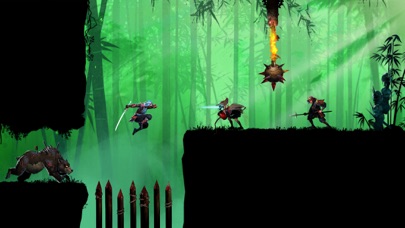
Become a powerful Kaz Warrior – a Ninja ready to confront the formidable Boss! Play the action Role-playing game: Kaz Warrior 3 – Shinobi Legend!
Features of fighting game - Kaz Warrior 3:
- Immerse yourself in epic battle scenes with beautiful graphics
- An RPG with lively and powerful sound effects
- Ninja game: Shadow fight is a role-playing game with an attractive storyline
- Easy gameplay in RPG
- The strategy game offers thousands of different challenges
- Diverse weapons in fighting game: darts, swords and more
- In the fighting game, dress your character in its own unique style
- Optimal ninja game design takes up less memory
The backstory of Kaz in Ninja game – Shinobi Legend:
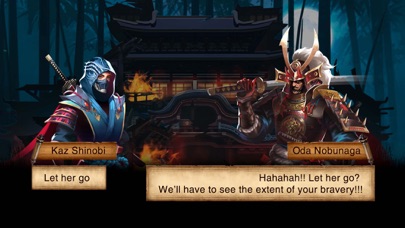
The land of Fukui was peaceful and happy. Suddenly, a brutal force invaded the village and burned it. They brutally massacred people, including Kaz’s parents and wife.
After returning from the forest, he saw that scene and felt extremely sad and angry. His heart boiled with the will to find and rescue his wife. And from that moment on, he embarked on a journey full of hardships, challenges, and enemy traps.
Not only that, the enemy forces still had the intention of invading, so he and the villagers continued to fight.
The henchmen under the boss's leadership raided the village, stealing the shinobi's thousand-year-old treasures and the dragon blood scrolls.
Kaz could not let his beloved village be destroyed by them, so he stood up to fight to reclaim the treasures and destroy the demons.
During that arduous journey, Kaz Warrior met shinobi and samurai allies. Samurai, ninjas, and Kaz fight together to defeat enemies and rebuild a peaceful, beautiful homeland.
Skills of a shinobi – ninja in the shadow fight game:
- Skillful use of swords with quick slashes
- Throws four-bladed shurikens forward, dealing high damage
- The fire-breathing technique inflicts burns on the target
- The art of disguise and stealth to avoid detection by enemies
- Extreme teleportation, high jumping, and acrobatics
Complete difficult challenges in ninja game:
- In the action game – shadow fight, a shinobi – ninja defeats enemies and battles the final boss
- With the shinobi legend, prove your bravery in epic shadow fight and complete battle chains to receive more items and increase your combat power.
- Come back every day to take on different challenges and diversify your collection.
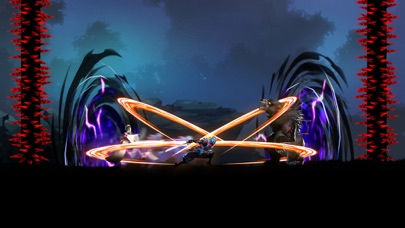
Fight epic Boss battles
With equipped power, shinobi Kaz is ready to confront the Boss.
This epic battle will culminate in the Boss's destruction at the hands of Kaz.
The new era of blood and fire is coming, is your shinobi (ninja) spirit ready? Download the action RPG - Kaz Warrior 3 to start your adventure and fight! Can you become the strongest assassin?
Please contact us if you have any questions or suggestions about this ninja game!

- iPhone أو iPad بجيلبريك أو بدون جيلبريك.
- Sideloadly أو بدائلها.
- كمبيوتر يعمل بنظام Windows/macOS/Linux مع تثبيت iTunes.
الخطوة 1: قم بتنزيل ملف .IPA المعدّل مسبقًا من الرابط أعلاه إلى الكمبيوتر الخاص بك. للتنزيل من تطبيق iOSGods App، اطلع على دليل تنزيل IPA من تطبيق iOSGods App الذي يتضمن مثالًا بالفيديو.
الخطوة 2: قم بتنزيل Sideloadly وتثبيته على جهاز Windows أو Mac.
الخطوة 3: افتح Sideloadly على الكمبيوتر، ووصّل جهاز iOS الخاص بك، وانتظر حتى يظهر اسم جهازك داخل Sideloadly.
الخطوة 4: بمجرد التعرّف على جهاز iDevice الخاص بك، اسحب ملف .IPA المعدّل الذي قمت بتنزيله وأفلِته داخل تطبيق Sideloadly.
الخطوة 5: أدخل البريد الإلكتروني لحساب Apple Account الخاص بك، ثم اضغط على «Start». سيُطلب منك بعد ذلك إدخال كلمة المرور. تابع وأدخل المعلومات المطلوبة.
الخطوة 6: انتظر حتى ينتهي Sideloadly من تحميل/تثبيت ملف IPA المعدّل. في حال واجهت أي مشاكل أثناء التثبيت، يرجى قراءة الملاحظة أدناه.
الخطوة 7: بعد اكتمال التثبيت ورؤية التطبيق على الشاشة الرئيسية، انتقل إلى Settings → General → Profiles / VPN & Device Management. ثم اضغط على البريد الإلكتروني الذي أدخلته في الخطوة 6، ثم اضغط على «الوثوق بـ [email protected]».
الخطوة 8: الآن انتقل إلى الشاشة الرئيسية وافتح التطبيق الذي تم تثبيته للتو وسيعمل كل شيء بشكل صحيح. قد تحتاج إلى اتباع تعليمات إضافية خاصة بكل تطبيق داخل النافذة المنبثقة للتعديل أثناء اللعب.
ملاحظة: بدءًا من iOS/iPadOS 16 وما بعده، يجب تفعيل وضع المطور (Developer Mode). بالنسبة لحسابات Apple Developer المجانية، ستحتاج إلى تكرار هذه العملية كل 7 أيام. إذا كانت لديك أي أسئلة أو مشاكل، يرجى قراءة قسم الأسئلة الشائعة حول Sideloadly في الموضوع.