Accesso richiesto
Accedi con il tuo account iOSGods per continuare.
Accedi con il tuo account iOSGods per continuare.
I trucchi Never Die e Higher Angry Gain trasformano Kaz Warrior 3: Shinobi Legend in un'avventura ninja inarrestabile con questo hack di action RPG. Sopravvivi a ogni battaglia contro i boss senza sconfitta, costruisci il tuo metro della rabbia più velocemente e domina la campagna Shinobi Legend con il potere modificato che mantiene il tuo guerriero in piedi.
- Non Morire Mai → sopravvivi a tutti gli scontri senza sconfitta
- Guadagno Rabbia Superiore → costruisci il tuo metro della rabbia più velocemente in combattimento
- Prezzo di Vendita Alto → guadagna più valuta dalla vendita di oggetti
Questa app include anche iGameGod, che ti offre accesso ad Auto Touch per automatizzare attività ripetitive, App Speed Manager per regolare la velocità di gioco, modifica dei valori con Memory Engine e altri potenti strumenti per giochi iOS.
Scarica Kaz Warrior 3: Shinobi Legend Hack modded IPA dai link sopra. Tocca il pulsante di installazione e segui le istruzioni per installare questo hack iOS sul tuo iPhone, iPad o Mac con Apple Silicon.
Hai bisogno di altro aiuto? Consulta le nostre Domande frequenti sull'app iOSGods per risposte dettagliate e consigli per la risoluzione dei problemi.
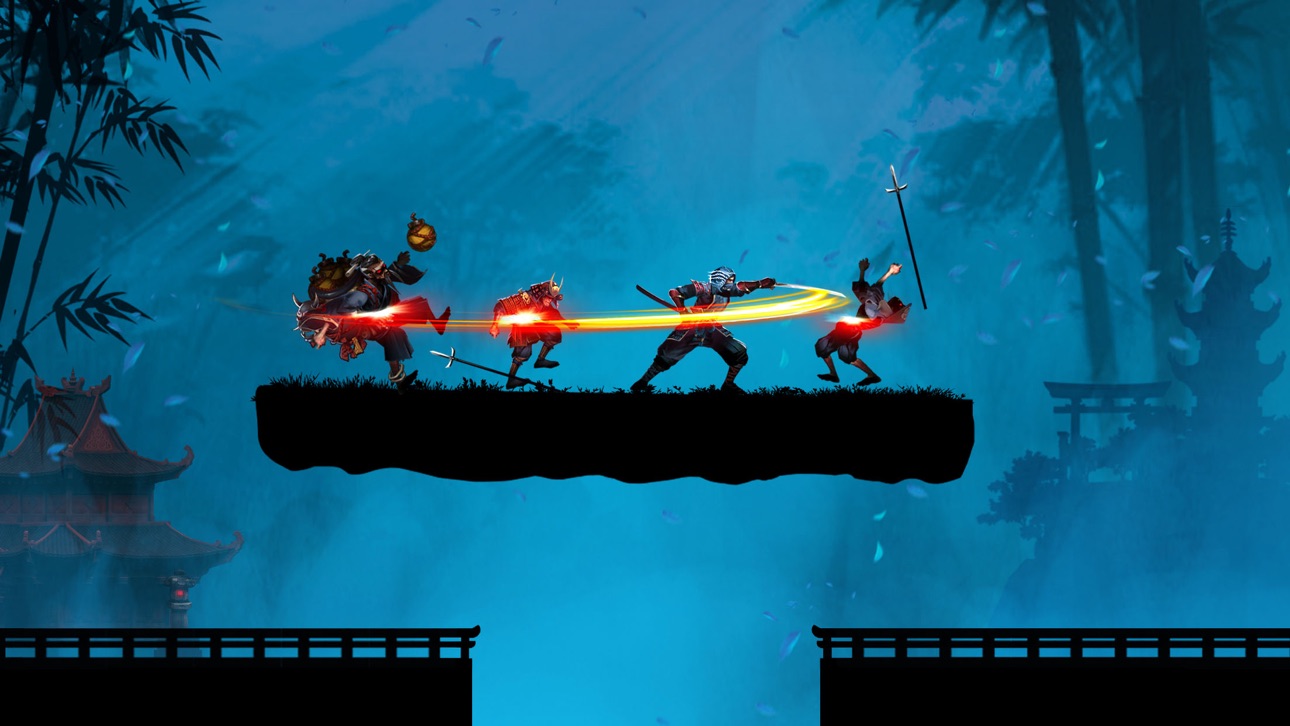
Diventa un potente Kaz Warrior, un Ninja pronto ad affrontare il formidabile Boss! Gioca all'azione Gioco di ruolo: Kaz Warrior 3 – Shinobi Legend!
Caratteristiche del gioco di combattimento - Kaz Warrior 3:
- Immergiti in epiche scene di battaglia con una grafica meravigliosa
- RPG con suono vivace e potente
- Gioco Ninja: Shadow Fight è un gioco di ruolo con una trama interessante
- Gameplay semplice in giochi di ruolo
- Il gioco di strategia ha migliaia di sfide diverse
- Diverse armi nel gioco di combattimento: dardi, spade, veleno, ...
- Nel gioco di combattimento, vesti il personaggio nel suo stile
- Il design ottimale del gioco ninja occupa meno memoria
Il retroscena di Kaz nel gioco Ninja – Shinobi Legend:
La terra di Fukui era pacifica e felice. All'improvviso, una forza brutale ha invaso il villaggio e lo ha bruciato. Hanno massacrato brutalmente le persone, compresi i genitori e la moglie di Kaz.
Dopo essere tornato dalla foresta, vide quella scena e si sentì estremamente triste e arrabbiato. Il suo cuore ribolliva dalla volontà di trovare e salvare sua moglie. E da quel momento in poi intraprese un viaggio pieno di difficoltà, sfide e trappole nemiche.
Non solo, le forze nemiche avevano ancora intenzione di invadere, quindi lui e gli abitanti del villaggio continuarono a combattere.
Gli scagnozzi sotto la guida del capo hanno fatto irruzione nel villaggio, hanno rubato i tesori millenari degli shinobi e le pergamene del sangue di drago sono state rubate da loro.
Kaz non poteva lasciare che il suo amato villaggio venisse distrutto da loro, quindi si alzò per combattere per reclamare i tesori e distruggere i demoni.
E in quell'arduo viaggio, Kaz Warrior ha incontrato amici shinobi e samurai. Samurai, ninja e Kaz combattono insieme per sconfiggere i nemici e ricostruire una patria pacifica e meravigliosa.
Abilità di uno shinobi - ninja nel gioco di lotta con le ombre:
- Uso abile delle spade con fendenti rapidi
- Lancia in avanti shuriken a quattro lame, infliggendo danni elevati
- La tecnica sputafuoco provoca ustioni al bersaglio
- L'arte di travestirsi e nascondersi per non essere riconosciuti dai nemici
- Teletrasporto estremo, salto in alto e acrobazie
Completa sfide difficili nel gioco di combattimento ombra:
- Nel gioco d'azione - shadow fight, uno shinobi - ninja sconfigge il nemico e combatte contro il boss finale
- Con la leggenda shinobi, dimostra il tuo coraggio nell'epico combattimento con le ombre e completa le catene di battaglia per ricevere più oggetti e aumentare il tuo potere di combattimento.
- Torna ogni giorno per affrontare sfide diverse e diversificare la tua collezione.
Combatti epiche battaglie contro i boss
Con il potere equipaggiato, lo shinobi Kaz è pronto ad affrontare il Boss.
Questa sarà una battaglia che promette molte cose emozionanti ed epiche quando il Boss verrà distrutto per mano di Kaz.
La nuova era del sangue e del fuoco sta arrivando, il tuo spirito shinobi (ninja) è pronto? Scarica il RPG d'azione - Kaz Warrior 3 per iniziare la tua avventura e combattere! Riuscirai a diventare l'assassino più forte?
Contattaci se hai domande o suggerimenti su questo gioco ninja di ombre!
Screenshot © rispettivi proprietari · App Store


iOSGods non è affiliata, approvata né sponsorizzata da Apple Inc., Google LLC o dagli sviluppatori delle app elencate qui. Apple, iOS e App Store sono marchi di Apple Inc. Android e Google Play sono marchi di Google LLC. Tutti gli altri nomi delle app, icone, immagini e marchi appartengono ai rispettivi proprietari.

- iPhone o iPad non jailbroken/jailed oppure jailbroken.
- Sideloadly o alternative.
- Computer con Windows/macOS/Linux con iTunes installato.
PASSO 1: Scarica il file .IPA pre-modificato dal link sopra sul tuo computer. Per scaricarlo dall'iOSGods App, consulta il nostro Tutorial download IPA dell'iOSGods App, che include un esempio video.
PASSO 2: Scarica Sideloadly e installalo sul tuo Windows o Mac.
PASSO 3: Apri Sideloadly sul tuo computer, collega il tuo dispositivo iOS e attendi finché il nome del dispositivo non appare in Sideloadly.
PASSO 4: Una volta riconosciuto il tuo iDevice, trascina il file .IPA moddato che hai scaricato e rilascialo nell'applicazione Sideloadly.
PASSO 5: Inserisci l'email del tuo Apple Account, poi premi “Start”. Ti verrà quindi chiesto di inserire la password. Procedi e fornisci le informazioni richieste.
PASSO 6: Attendi che Sideloadly completi il sideload/installazione dell'IPA modificata. Se ci sono problemi durante l'installazione, leggi la nota qui sotto.
PASSO 7: Una volta completata l'installazione e vista l'app sulla schermata Home, dovrai andare in Impostazioni → Generali → Profili / Gestione VPN e dispositivi. Una volta lì, tocca l'email inserita al passo 6 e poi tocca “Autorizza [email protected]”.
PASSO 8: Ora vai sulla schermata Home e apri l'app appena installata: tutto dovrebbe funzionare correttamente. Potrebbe essere necessario seguire ulteriori istruzioni specifiche all'interno del popup dell'hack nel gioco.
NOTA: Per iOS/iPadOS 16 e versioni successive, devi attivare la Modalità sviluppatore. Per gli account Apple Developer gratuiti, dovrai ripetere questa procedura ogni 7 giorni. Se hai domande o problemi, leggi la nostra sezione FAQ Sideloadly del topic.
Game Name iOS Mod IPA is an action adventure game enhanced with powerful gameplay boosts and quality-of-life improvements. Win battles faster, earn rewards quicker, and enjoy uninterrupted play without ads.
- Unlimited Gold - spend freely to unlock premium content
- Damage Multiplier - deal significantly more damage in combat
- Defense Multiplier - take less damage and survive longer
- Reward Multiplier - earn more loot from every battle
- Max Level - instantly reach the highest player rank
- No Ads - play without interruptions or advertisements
This app also comes with iGameGod, giving you access to Auto Touch to automate repetitive tasks, App Speed Manager for adjustable gameplay speed, Memory Engine value editing, and more powerful iOS game tools.
Scarica Game Name Mod IPA dai link sopra. Tocca il pulsante di installazione e segui le istruzioni per installare questo hack iOS sul tuo iPhone, iPad o Mac con Apple Silicon.
Hai bisogno di altro aiuto Consulta le nostre Domande frequenti sull'app iOSGods per risposte dettagliate e consigli per la risoluzione dei problemi.
----------------------------------------------------------
--------------------------------------------------