Giriş Gerekli
Devam etmek için iOSGods hesabınızla giriş yapın.
Devam etmek için iOSGods hesabınızla giriş yapın.
Kaz Warrior 3: Shinobi Legend Hack ile Ölmeme ve Daha Yüksek Öfke Kazanımı hileleri, bu aksiyon RPG modunda seni durdurulamaz bir ninja macerasına dönüştürür. Her boss savaşında yenilgiye uğramadan hayatta kal, öfke metrenizi daha hızlı oluştur ve modlanmış güçle Shinobi Legend kampanyasında hakim ol, savaşçın ayakta kalır.
- Ölmeme → tüm karşılaşmalarda yenilgiye uğramadan hayatta kal
- Daha Yüksek Öfke Kazanımı → savaşta öfke metrenizi daha hızlı oluştur
- Yüksek Satış Fiyatı → eşya satışlarından daha fazla para kazan
Bu uygulama ayrıca, tekrar eden görevleri otomatikleştirmek için Auto Touch, ayarlanabilir oyun hızı için App Speed Manager, Memory Engine ile değer düzenleme ve daha pek çok güçlü iOS oyun aracına erişim sağlayan iGameGod ile birlikte gelir.
Yukarıdaki bağlantılardan Kaz Warrior 3: Shinobi Legend Hack modded IPA indirin. Yükle düğmesine dokunup ekrandaki yönergeleri izleyerek bu iOS uygulama hack'ini iPhone, iPad veya Apple Silicon'a yükleyin.
Daha fazla yardıma mı ihtiyacınız var? Ayrıntılı yanıtlar ve sorun giderme ipuçları için iOSGods Uygulaması Sık Sorulan Sorular sayfamıza bakın.
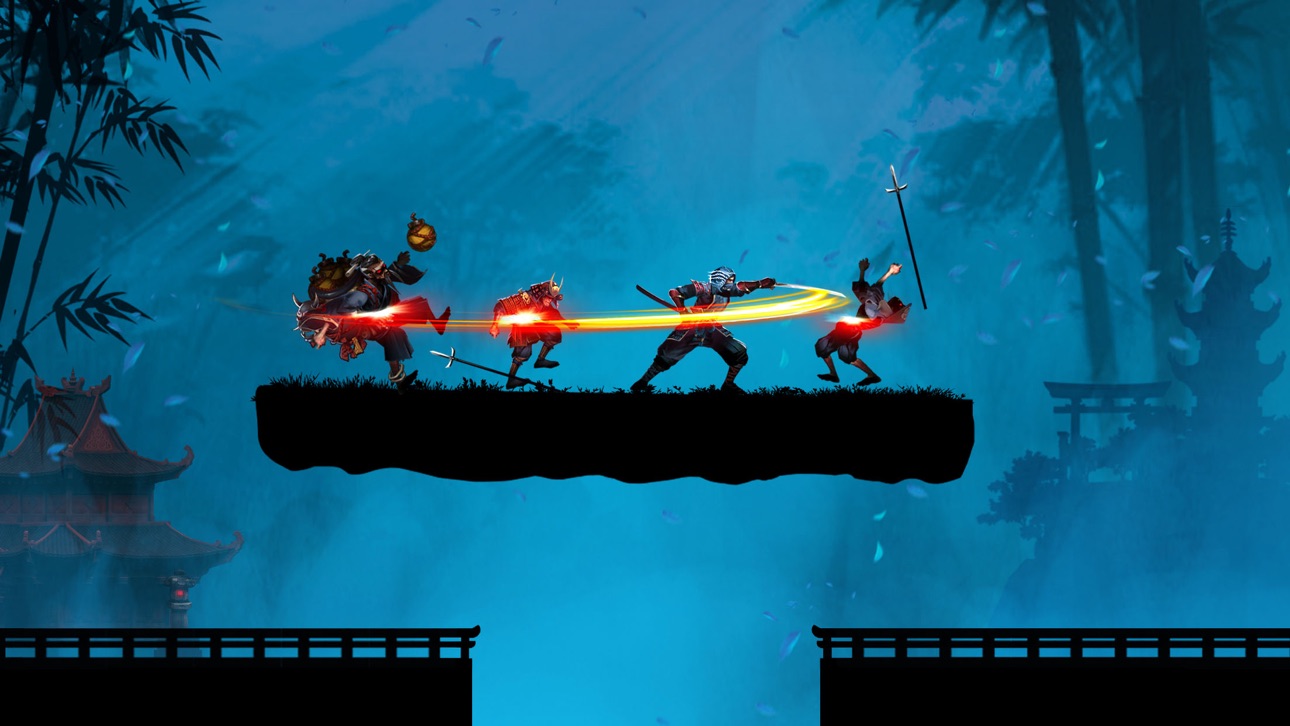
Become a powerful Kaz Warrior – a Ninja ready to confront the formidable Boss! Play the action Role-playing game: Kaz Warrior 3 – Shinobi Legend!
Features of fighting game - Kaz Warrior 3:
- Immerse yourself in epic battle scenes with beautiful graphics
- An RPG with lively and powerful sound effects
- Ninja game: Shadow fight is a role-playing game with an attractive storyline
- Easy gameplay in RPG
- The strategy game offers thousands of different challenges
- Diverse weapons in fighting game: darts, swords and more
- In the fighting game, dress your character in its own unique style
- Optimal ninja game design takes up less memory
The backstory of Kaz in Ninja game – Shinobi Legend:
The land of Fukui was peaceful and happy. Suddenly, a brutal force invaded the village and burned it. They brutally massacred people, including Kaz’s parents and wife.
After returning from the forest, he saw that scene and felt extremely sad and angry. His heart boiled with the will to find and rescue his wife. And from that moment on, he embarked on a journey full of hardships, challenges, and enemy traps.
Not only that, the enemy forces still had the intention of invading, so he and the villagers continued to fight.
The henchmen under the boss's leadership raided the village, stealing the shinobi's thousand-year-old treasures and the dragon blood scrolls.
Kaz could not let his beloved village be destroyed by them, so he stood up to fight to reclaim the treasures and destroy the demons.
During that arduous journey, Kaz Warrior met shinobi and samurai allies. Samurai, ninjas, and Kaz fight together to defeat enemies and rebuild a peaceful, beautiful homeland.
Skills of a shinobi – ninja in the shadow fight game:
- Skillful use of swords with quick slashes
- Throws four-bladed shurikens forward, dealing high damage
- The fire-breathing technique inflicts burns on the target
- The art of disguise and stealth to avoid detection by enemies
- Extreme teleportation, high jumping, and acrobatics
Complete difficult challenges in ninja game:
- In the action game – shadow fight, a shinobi – ninja defeats enemies and battles the final boss
- With the shinobi legend, prove your bravery in epic shadow fight and complete battle chains to receive more items and increase your combat power.
- Come back every day to take on different challenges and diversify your collection.
Fight epic Boss battles
With equipped power, shinobi Kaz is ready to confront the Boss.
This epic battle will culminate in the Boss's destruction at the hands of Kaz.
The new era of blood and fire is coming, is your shinobi (ninja) spirit ready? Download the action RPG - Kaz Warrior 3 to start your adventure and fight! Can you become the strongest assassin?
Please contact us if you have any questions or suggestions about this ninja game!
Ekran görüntüleri © ilgili sahipleri · App Store


iOSGods; Apple Inc., Google LLC veya burada listelenen uygulamaların geliştiricileriyle bağlantılı değildir, onlar tarafından onaylanmamış ve desteklenmemiştir. Apple, iOS ve App Store, Apple Inc. şirketinin ticari markalarıdır. Android ve Google Play, Google LLC şirketinin ticari markalarıdır. Diğer tüm uygulama adları, simgeler, görseller ve ticari markalar ilgili sahiplerine aittir.

- Jailbreak'siz/normal ya da jailbreak'li iPhone veya iPad.
- Sideloadly veya alternatifleri.
- iTunes yüklü Windows/macOS/Linux çalıştıran bir bilgisayar.
ADIM 1: Yukarıdaki bağlantıdan önceden hacklenmiş .IPA dosyasını bilgisayarınıza indirin. iOSGods App üzerinden indirmek için video örneği de içeren iOSGods App IPA İndirme Kılavuzu bölümümüze göz atın.
ADIM 2: Sideloadly indirin ve Windows veya Mac'inize kurun.
ADIM 3: Bilgisayarınızda Sideloadly'yi açın, iOS cihazınızı bağlayın ve cihaz adınız Sideloadly'de görünene kadar bekleyin.
ADIM 4: iCihazınız tanındıktan sonra, indirdiğiniz modlu .IPA dosyasını sürükleyip Sideloadly uygulamasına bırakın.
ADIM 5: Apple Account e-posta adresinizi girin ve ardından "Start" düğmesine basın. Sonrasında sizden şifreniz istenecektir. Gerekli bilgileri girin.
ADIM 6: Sideloadly'nin hacklenmiş IPA'yı sideload edip yüklemesini bekleyin. Yükleme sırasında bir sorun olursa lütfen aşağıdaki notu okuyun.
ADIM 7: Yükleme tamamlandıktan ve uygulamayı Ana Ekranınızda gördükten sonra Ayarlar → Genel → Profiller / VPN ve Cihaz Yönetimi bölümüne gitmelisiniz. Burada 6. adımda girdiğiniz e-postaya dokunun ve ardından "[email protected]'a Güven" seçeneğine dokunun.
ADIM 8: Şimdi Ana Ekranınıza gidin ve yeni yüklediğiniz uygulamayı açın; her şey sorunsuz çalışmalıdır. Oyun içindeki hack açılır penceresinde uygulamaya özel ek talimatları takip etmeniz gerekebilir.
NOT: iOS/iPadOS 16 ve sonrasında Geliştirici Modu'nu etkinleştirmeniz gerekir. Ücretsiz Apple Developer hesapları için bu işlemi her 7 günde bir tekrarlamanız gerekir. Sorularınız veya sorunlarınız varsa konunun Sideloadly SSS bölümünü okuyun.
Game Name iOS Mod IPA is an action adventure game enhanced with powerful gameplay boosts and quality-of-life improvements. Win battles faster, earn rewards quicker, and enjoy uninterrupted play without ads.
- Unlimited Gold - spend freely to unlock premium content
- Damage Multiplier - deal significantly more damage in combat
- Defense Multiplier - take less damage and survive longer
- Reward Multiplier - earn more loot from every battle
- Max Level - instantly reach the highest player rank
- No Ads - play without interruptions or advertisements
This app also comes with iGameGod, giving you access to Auto Touch to automate repetitive tasks, App Speed Manager for adjustable gameplay speed, Memory Engine value editing, and more powerful iOS game tools.
Yukarıdaki bağlantılardan Game Name Mod IPA indirin. Yükle düğmesine dokunup ekrandaki yönergeleri izleyerek bu iOS uygulama hack'ini iPhone, iPad veya Apple Silicon'a yükleyin.
Daha fazla yardıma mı ihtiyacınız var Ayrıntılı yanıtlar ve sorun giderme ipuçları için iOSGods Uygulaması Sık Sorulan Sorular sayfamıza bakın.
----------------------------------------------------------
--------------------------------------------------