需要登入
請使用您的 iOSGods 帳戶登入以繼續。
請使用您的 iOSGods 帳戶登入以繼續。
使用這個解鎖的 Mod IPA 版本 Duet Display,將你的 iPad 或 iPhone 變成 Mac 和 PC 的高級第二顯示器。由前 Apple 工程師開發,這個破解版本提供零延遲性能和專業級顯示品質,透過雙螢幕多工作業將你的生產力翻倍。只需透過充電線連接,即可立即在兩個螢幕上開始工作。
- 完整付費應用程式 → 完全存取所有高級功能
此應用程式也內建 iGameGod,讓你可以使用 Auto Touch 自動執行重複操作、透過 App Speed Manager 調整遊戲速度、使用 Memory Engine 修改記憶體數值,以及更多強大的 iOS 遊戲工具。
從上方連結下載 Duet Display modded IPA。點選安裝按鈕並依照畫面指示在 iPhone、iPad 或 Apple Silicon 上安裝此 iOS 應用程式修改版。
需要更多協助?請查看我們的 iOSGods 應用程式常見問題 以獲得詳細解答與疑難排解。
橫掃美、日、英、德及其他 17 個國家最高銷量 iPad App 榜冠軍!
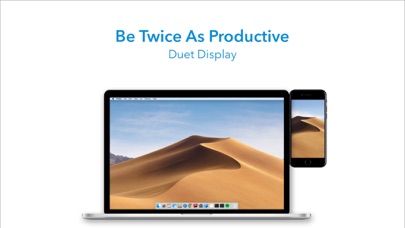
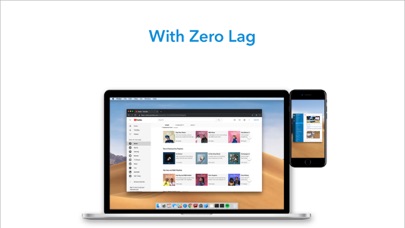
《Duet》能將 iPad 及 iPhone 變成 Mac 或 PC 最高端的額外螢幕。它由一群前蘋果工程師開發,提供無與倫比的效能及畫面顯示質量,並帶給用家零延遲的體驗。
— 提高工作效率 —
在雙螢幕上多工作業能使生產率加倍。對於出差的人而言,這更能提供一個便攜式的方式工作。
— 易懂易用 —
用家只要利用充電線將 iPad 連接電腦即可開始使用。免費的《Duet》電腦 App 會自動偵測裝置,並將其變成高效能的觸控式螢幕。
你無需擔心 Wi-Fi 不可靠、執行出現延遲、畫面出現顆粒以及網路密碼管理等問題。
— 觸控式螢幕 —
透過觸控及手勢操控 Mac 或 PC,享受前所未有的互動體驗,包括雙指滾動、平移與縮放。
— Apple Pencil 適用 —
有了《Duet Pro》,你可以將 iPad 及 Apple Pencil 變成一台專業的圖形平板電腦。我們重新設計了算圖演算法,為設計師、插畫師及藝術家提供反應靈敏的繪畫工具。
此外,《Duet Pro》還解鎖了壓力及傾斜角度感應、停留、防手掌誤觸等功能,讓專業人士能在各大專業繪圖程式中隨心所欲地繪畫,包括 Photoshop、Corel Painter、Lightroom、ToonBoom、Illustrator、Manga Studio 等。
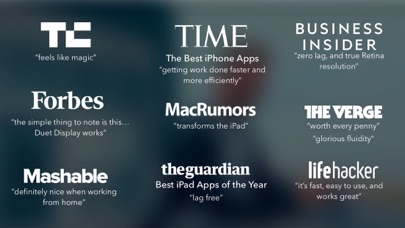
— 媒體報導 —
TechCrunch - 「如同魔法一般」
Time -「以更快、更有效率方式完成工作」
The Guardian -「無延遲」
Forbes -「簡而言之...Duet Display 有用。」
The Verge -「超級流暢」
Lifehacker -「快速、易用且超好用」
Business Insider -「零延遲且真正的視網膜解析度」
— 用戶好評 —
「我真的很喜歡這套應用程式,我想我可以給予的最大讚美是,設定非常簡單,幾乎像是 Apple 的產品。」
~Mat Nightingale
「我拿到 iPad 後就一直想要這樣的功能,超好用,本來就應該這樣。神奇!就好像我忽然有一個全新、可以在任何地方使用的第二個螢幕。謝謝。」
~Isaac Shore
「順道一提,對我來說非常神奇的解決方案。和我期望的一樣,實際上,這是我買 iPad 的主要理由 : )」
~Mikkel Gemzoe
「我用了 Duet,使用經驗非常棒!」
~Vineet T.
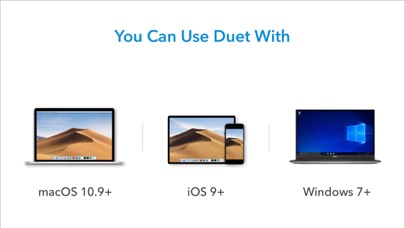
《Duet》適用於:
所有 iOS 7.0 或以上的 iPhone 及 iPad
所有 10.9 (Mavericks) 或以上的 Mac
所有 Windows 7 或以上的 PC
《Duet Pro》適用於:
所有 iPad Pro 及 Apple Pencil
所有 10.9 (Mavericks) 或以上的 Mac
所有 Windows 8.1 或以上(64 位元)的 PC
Duet Pro is an optional upgrade for additional features, and price may vary by location. Duet Pro subscriptions will be charged to your credit card through your iTunes account. Your subscription will automatically renew unless canceled at least 24 hours before the end of the current period. You will not be able to cancel the subscription once activated. Manage Duet Pro in Account Settings after the optional upgrade.
如欲了解更多內容,歡迎瀏覽 http://www.duetdisplay.com
Terms: https://www.duetdisplay.com/help-center/duet-terms-and-conditions
Privacy Policy: https://www.duetdisplay.com/help-center/duet-privacy-policy

- 未越獄/受限或已越獄的 iPhone 或 iPad。
- Sideloadly 或替代方案。
- 執行 Windows/macOS/Linux 且已安裝 iTunes 的電腦。
步驟 1: 透過上方連結將已破解的 .IPA 檔案下載到您的電腦。若要從 iOSGods App 下載,請參閱我們的 iOSGods App IPA 下載教學,其中包含影片範例。
步驟 2: 下載 Sideloadly 並將其安裝在您的 Windows 或 Mac 上。
步驟 3: 在電腦上開啟 Sideloadly,連接您的 iOS 裝置,並等待裝置名稱出現在 Sideloadly 中。
步驟 4: 當 Sideloadly 辨識到您的 iOS 裝置後,將下載好的修改版 .IPA 檔案拖曳並放到 Sideloadly 應用程式中。
步驟 5: 輸入您的 Apple Account 電子郵件,然後按下「Start」。系統會要求您輸入密碼,請依指示提供所需資訊。
步驟 6: 等待 Sideloadly 完成已破解 IPA 的旁載/安裝。如果安裝過程中發生問題,請閱讀下方的注意事項。
步驟 7: 安裝完成並在主畫面上看到該應用程式後,您需要前往 設定 → 一般 → 描述檔 / VPN 與裝置管理。進入後,點選您在步驟 6 中輸入的電子郵件,然後點選「信任 [email protected]」。
步驟 8: 現在回到主畫面並開啟新安裝的應用程式,一切應該都能正常運作。您可能需要依照遊戲內破解彈出視窗中的進一步指示操作。
注意: 在 iOS/iPadOS 16 及更新版本上,您必須 啟用開發者模式。若使用免費的 Apple Developer 帳號,您將需要每 7 天重複此程序。如有任何疑問或問題,請閱讀我們的 主題中的 Sideloadly 常見問題區段。