Cần đăng nhập
Đăng nhập bằng tài khoản iOSGods để tiếp tục.
Đăng nhập bằng tài khoản iOSGods để tiếp tục.
Tạo những video VHS retro chính hãng trông như được quay bằng máy quay phim năm 1984 với Rarevision VHS - Retro 80s Cam, ứng dụng iOS được sửa đổi yêu thích của các ngôi sao và được giới thiệu trên SNL. Hack miễn phí này mở khóa toàn bộ tiềm năng sáng tạo của ứng dụng, cho phép bạn áp dụng các hiệu ứng video cổ điển, biến dạng và thẩm mỹ analog để biến footage của bạn thành những kiệt tác hoài cổ sẽ khiến bạn bè tự hỏi liệu bạn có thực sự sở hữu một chiếc máy du hành thời gian hay không.
Ứng dụng này cũng đi kèm với iGameGod, cho phép bạn truy cập Auto Touch để tự động hóa các thao tác lặp lại, App Speed Manager để điều chỉnh tốc độ chơi game, chỉnh sửa giá trị bằng Memory Engine, và nhiều công cụ mạnh mẽ khác cho game iOS.
Tải Rarevision VHS - Retro 80s Cam modded IPA từ các liên kết ở trên. Nhấn nút cài đặt và làm theo hướng dẫn để cài bản hack iOS lên iPhone, iPad hoặc Apple Silicon.
Cần thêm trợ giúp? Hãy xem Câu hỏi thường gặp ứng dụng iOSGods để có câu trả lời chi tiết và mẹo khắc phục sự cố.
Used by Kendall Jenner, Snoop Dogg, BTS, Ariana Grande, Khloe Kardashian, Wiz Khalifa, Victoria Beckham, Die Antwoord and featured on SNL (S41E01) and in countless TV shows and music videos!
Covered by WIRED, Forbes, The Wall Street Journal, Popular Mechanics, The Independent, Macworld, TMZ, TechCrunch, Mashable and many others!
App of the Day for Friday, Dec 22, 2017
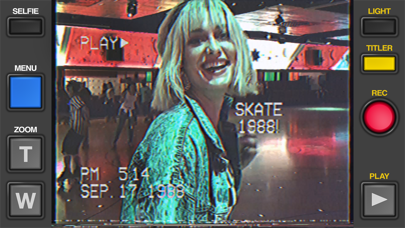
It's 1984, and you've got a VHS camcorder! It'll look that way when you record and send old, messed up-looking retro videos to friends. They'll swear you built a time machine: "OMG, how'd you shoot that?"
With Rarevision VHS, you'll make videos that look and sound like real retro video tapes pulled out of storage after 30 years. You can change the on-screen date to trick your friends, create custom animated titles, glitch up the picture by shaking your device and use the fake zoom to emphasize those truly embarrassing moments!
"That's freakin' amazing!" -Everyone
Here's Why You Need It:
• Four words: Best. Throwback. Videos. Ever.
• Create VHS-style retro videos of your kids that look like the ones from your childhood
• The only VHS cam app you should ever consider to capture your 80s and 90s-themed parties
• Shoot your own "found footage" movie and become a big Hollywood director like those other guys
• Make your kids' incredibly boring school plays actually rad
• Impress the new girl by using our app to convince her you built a time machine
• Pretend like you lived through the rad 1980s using our app!
What Rarevision VHS Can Do:
• Realism: the ORIGINAL and BEST VHS cam app for simulating the glitches of old videotape recordings
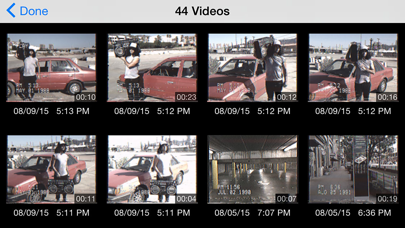
• Import videos and give them the VHS look
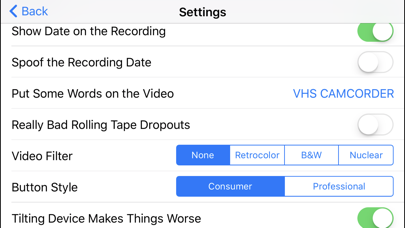
• Make your own signature look using the old-school picture adjustment menu
• Create your own animated titles for the ultimate in on-screen awesomeness
• Change the on-screen date so people think you're way younger (or older) than you really are
• Glitch the picture during recording using your finger or by shaking your device
• Fake zoom feature dramatically enhances the cheese factor
• Don't think we forgot to make things sound retro terrible. We didn't.
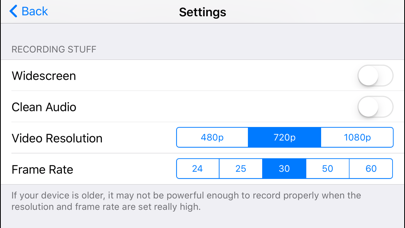
• Up to 60p recording for a more accurate VHS video look (depends on device capability)
• Widescreen recording option (but would you REALLY want to use it?)
Follow Rarevision:
http://instagram.com/rarevision
http://x.com/rarevision
http://facebook.com/rarevisionvhs
Rarevision is a US-based company.
Copyright © 2015-2025 Rarevision LLC. All rights reserved.
- iPhone hoặc iPad chưa jailbreak/đã đóng hoặc đã jailbreak.
- Sideloadly hoặc các lựa chọn thay thế.
- Máy tính chạy Windows/macOS/Linux đã cài iTunes.
BƯỚC 1: Tải tệp .IPA đã được hack sẵn từ liên kết phía trên về máy tính của bạn. Để tải từ iOSGods App, hãy xem Hướng dẫn tải IPA bằng iOSGods App của chúng tôi, có kèm ví dụ bằng video.
BƯỚC 2: Tải Sideloadly và cài đặt trên Windows hoặc Mac của bạn.
BƯỚC 3: Mở Sideloadly trên máy tính, kết nối thiết bị iOS của bạn và chờ cho đến khi tên thiết bị hiển thị trong Sideloadly.
BƯỚC 4: Khi thiết bị iOS của bạn đã được nhận diện, hãy kéo tệp .IPA đã chỉnh sửa mà bạn tải về và thả vào ứng dụng Sideloadly.
BƯỚC 5: Nhập email Apple Account của bạn, sau đó nhấn "Start." Bạn sẽ được yêu cầu nhập mật khẩu. Hãy cung cấp các thông tin cần thiết.
BƯỚC 6: Chờ Sideloadly hoàn tất quá trình sideload/cài đặt tệp IPA đã hack. Nếu gặp sự cố trong quá trình cài đặt, vui lòng đọc lưu ý bên dưới.
BƯỚC 7: Khi cài đặt hoàn tất và bạn thấy ứng dụng trên Màn hình chính, bạn cần truy cập Cài đặt → Cài đặt chung → Hồ sơ / VPN & Quản lý thiết bị. Tại đó, nhấn vào email bạn đã nhập ở bước 6, rồi nhấn "Tin cậy [email protected]".
BƯỚC 8: Bây giờ hãy về Màn hình chính và mở ứng dụng vừa cài đặt, mọi thứ sẽ hoạt động bình thường. Bạn có thể cần làm theo hướng dẫn riêng của từng ứng dụng trong cửa sổ popup của bản hack trong game.
LƯU Ý: Trên iOS/iPadOS 16 trở lên, bạn phải bật Chế độ nhà phát triển. Với tài khoản Apple Developer miễn phí, bạn sẽ cần lặp lại quy trình này mỗi 7 ngày. Nếu bạn có thắc mắc hoặc gặp sự cố, hãy đọc mục FAQ về Sideloadly trong chủ đề của chúng tôi.