Login necessário
Entre com sua conta iOSGods para continuar.
Entre com sua conta iOSGods para continuar.
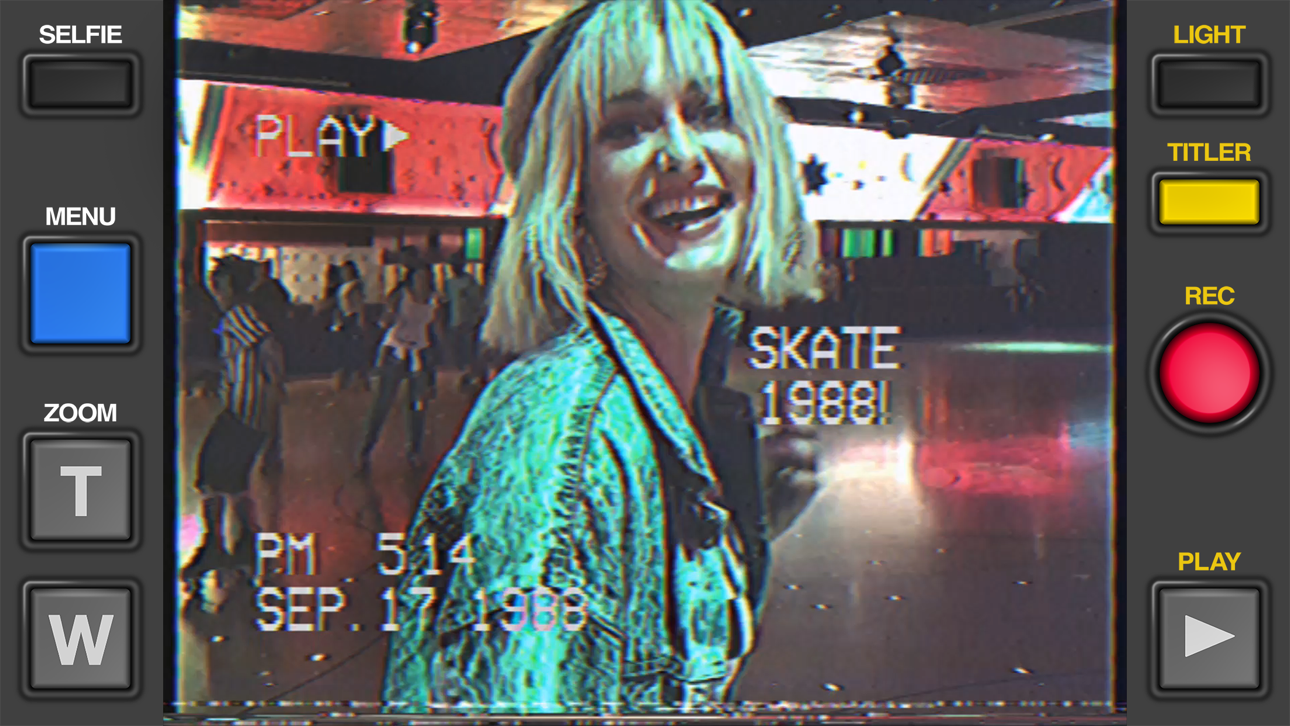
Crie vídeos VHS autênticos que parecem ter sido gravados em uma câmera de 1984 com Rarevision VHS - Retro 80s Cam, o app iOS modificado amado por celebridades e destaque no SNL. Este hack gratuito desbloqueia todo o potencial criativo do app, permitindo que você aplique efeitos de vídeo vintage, distorção e estética analógica para transformar suas gravações em obras-primas nostálgicas que farão seus amigos se perguntarem se você realmente possui uma máquina do tempo.
Este app também vem com iGameGod, oferecendo acesso ao Auto Touch para automatizar tarefas repetitivas, App Speed Manager para ajustar a velocidade do jogo, edição de valores com Memory Engine e outras ferramentas avançadas para jogos iOS.
Baixe Rarevision VHS - Retro 80s Cam modded IPA dos links acima. Toque no botão de instalação e siga as instruções para instalar este hack iOS no seu iPhone, iPad ou Apple Silicon.
Precisa de mais ajuda? Confira nossas Perguntas frequentes sobre o app iOSGods para respostas detalhadas e dicas de solução de problemas.
Used by Kendall Jenner, Snoop Dogg, BTS, Ariana Grande, Khloe Kardashian, Wiz Khalifa, Victoria Beckham, Die Antwoord and featured on SNL (S41E01) and in countless TV shows and music videos!
Covered by WIRED, Forbes, The Wall Street Journal, Popular Mechanics, The Independent, Macworld, TMZ, TechCrunch, Mashable and many others!
App of the Day for Friday, Dec 22, 2017
It's 1984, and you've got a VHS camcorder! It'll look that way when you record and send old, messed up-looking retro videos to friends. They'll swear you built a time machine: "OMG, how'd you shoot that?"
With Rarevision VHS, you'll make videos that look and sound like real retro video tapes pulled out of storage after 30 years. You can change the on-screen date to trick your friends, create custom animated titles, glitch up the picture by shaking your device and use the fake zoom to emphasize those truly embarrassing moments!
"That's freakin' amazing!" -Everyone
Here's Why You Need It:
• Four words: Best. Throwback. Videos. Ever.
• Create VHS-style retro videos of your kids that look like the ones from your childhood
• The only VHS cam app you should ever consider to capture your 80s and 90s-themed parties
• Shoot your own "found footage" movie and become a big Hollywood director like those other guys
• Make your kids' incredibly boring school plays actually rad
• Impress the new girl by using our app to convince her you built a time machine
• Pretend like you lived through the rad 1980s using our app!
What Rarevision VHS Can Do:
• Realism: the ORIGINAL and BEST VHS cam app for simulating the glitches of old videotape recordings
• Import videos and give them the VHS look
• Make your own signature look using the old-school picture adjustment menu
• Create your own animated titles for the ultimate in on-screen awesomeness
• Change the on-screen date so people think you're way younger (or older) than you really are
• Glitch the picture during recording using your finger or by shaking your device
• Fake zoom feature dramatically enhances the cheese factor
• Don't think we forgot to make things sound retro terrible. We didn't.
• Up to 60p recording for a more accurate VHS video look (depends on device capability)
• Widescreen recording option (but would you REALLY want to use it?)
Follow Rarevision:
http://instagram.com/rarevision
http://x.com/rarevision
http://facebook.com/rarevisionvhs
Rarevision is a US-based company.
Copyright © 2015-2025 Rarevision LLC. All rights reserved.
Capturas © respectivos proprietários · App Store


A iOSGods não é afiliada, endossada nem patrocinada pela Apple Inc., pela Google LLC ou pelos desenvolvedores dos apps listados aqui. Apple, iOS e App Store são marcas da Apple Inc. Android e Google Play são marcas da Google LLC. Todos os demais nomes de apps, ícones, imagens e marcas pertencem aos seus respectivos proprietários.
- iPhone ou iPad sem jailbreak/jailed ou com jailbreak.
- Sideloadly ou alternativas.
- Computador com Windows/macOS/Linux e iTunes instalado.
PASSO 1: Baixe o arquivo .IPA pré-hackeado do link acima para o seu computador. Para baixar pelo iOSGods App, veja nosso Tutorial de download de IPA do iOSGods App, que inclui um exemplo em vídeo.
PASSO 2: Baixe o Sideloadly e instale-o no seu Windows ou Mac.
PASSO 3: Abra o Sideloadly no seu computador, conecte seu dispositivo iOS e aguarde até que o nome do dispositivo apareça no Sideloadly.
PASSO 4: Assim que seu iDevice for reconhecido, arraste o arquivo .IPA modificado que você baixou e solte-o no aplicativo Sideloadly.
PASSO 5: Digite o e-mail da sua Apple Account e pressione “Start”. Em seguida, será solicitada a sua senha. Prossiga e forneça as informações solicitadas.
PASSO 6: Aguarde o Sideloadly finalizar o sideload/instalação do IPA hackeado. Se houver problemas durante a instalação, leia a observação abaixo.
PASSO 7: Quando a instalação estiver concluída e você vir o app na Tela de Início, será necessário acessar Ajustes → Geral → Perfis / Gerenciamento de VPN e Dispositivo. Lá, toque no e-mail que você inseriu no passo 6 e, em seguida, toque em “Confiar em [email protected]”.
PASSO 8: Agora vá para a Tela de Início e abra o app recém-instalado; tudo deve funcionar normalmente. Você pode precisar seguir instruções adicionais específicas no popup do hack dentro do jogo.
OBSERVAÇÃO: No iOS/iPadOS 16 e versões posteriores, você deve ativar o Modo de Desenvolvedor. Para contas Apple Developer gratuitas, será necessário repetir este processo a cada 7 dias. Se tiver dúvidas ou problemas, leia nossa seção de FAQ do Sideloadly no tópico.
Game Name iOS Mod IPA is an action adventure game enhanced with powerful gameplay boosts and quality-of-life improvements. Win battles faster, earn rewards quicker, and enjoy uninterrupted play without ads.
- Unlimited Gold - spend freely to unlock premium content
- Damage Multiplier - deal significantly more damage in combat
- Defense Multiplier - take less damage and survive longer
- Reward Multiplier - earn more loot from every battle
- Max Level - instantly reach the highest player rank
- No Ads - play without interruptions or advertisements
This app also comes with iGameGod, giving you access to Auto Touch to automate repetitive tasks, App Speed Manager for adjustable gameplay speed, Memory Engine value editing, and more powerful iOS game tools.
Baixe Game Name Mod IPA dos links acima. Toque no botão de instalação e siga as instruções para instalar este hack iOS no seu iPhone, iPad ou Apple Silicon.
Precisa de mais ajuda Confira nossas Perguntas frequentes sobre o app iOSGods para respostas detalhadas e dicas de solução de problemas.
----------------------------------------------------------
--------------------------------------------------