تسجيل الدخول مطلوب
سجّل الدخول بحساب iOSGods للمتابعة.
سجّل الدخول بحساب iOSGods للمتابعة.
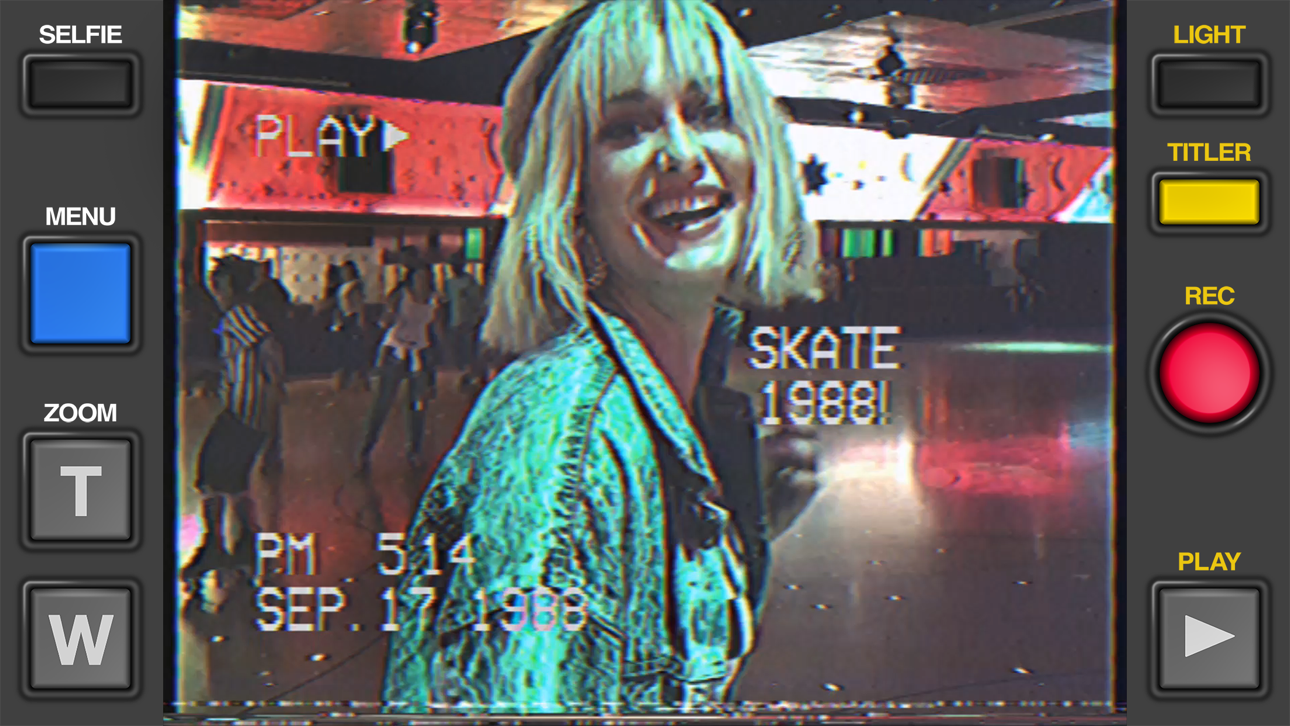
أنشئ مقاطع فيديو VHS عتيقة حقيقية تبدو وكأنها تم تصويرها على كاميرا فيديو من عام 1984 باستخدام Rarevision VHS - Retro 80s Cam، تطبيق iOS المعدل المفضل لدى المشاهير والذي ظهر على SNL. يفتح هذا التهكير المجاني الإمكانات الإبداعية الكاملة للتطبيق، مما يتيح لك تطبيق تأثيرات الفيديو العتيقة والتشويه والجماليات التناظرية لتحويل لقطاتك إلى روائع حنينية ستجعل الأصدقاء يتساءلون عما إذا كنت تمتلك آلة زمن حقيقية.
يأتي هذا التطبيق أيضًا مع iGameGod، مما يتيح لك الوصول إلى Auto Touch لأتمتة المهام المتكررة، وApp Speed Manager لضبط سرعة اللعب، وتعديل القيم عبر Memory Engine، والمزيد من أدوات ألعاب iOS القوية.
قم بتنزيل Rarevision VHS - Retro 80s Cam modded IPA من الروابط أعلاه. اضغط على زر التثبيت واتبع التعليمات لتثبيت هذا التعديل لـ iOS على iPhone أو iPad أو Apple Silicon.
هل تحتاج إلى مزيد من المساعدة؟ راجع الأسئلة الشائعة لتطبيق iOSGods للحصول على إجابات مفصلة ونصائح لاستكشاف الأخطاء.
Used by Kendall Jenner, Snoop Dogg, BTS, Ariana Grande, Khloe Kardashian, Wiz Khalifa, Victoria Beckham, Die Antwoord and featured on SNL (S41E01) and in countless TV shows and music videos!
Covered by WIRED, Forbes, The Wall Street Journal, Popular Mechanics, The Independent, Macworld, TMZ, TechCrunch, Mashable and many others!
App of the Day for Friday, Dec 22, 2017
It's 1984, and you've got a VHS camcorder! It'll look that way when you record and send old, messed up-looking retro videos to friends. They'll swear you built a time machine: "OMG, how'd you shoot that?"
With Rarevision VHS, you'll make videos that look and sound like real retro video tapes pulled out of storage after 30 years. You can change the on-screen date to trick your friends, create custom animated titles, glitch up the picture by shaking your device and use the fake zoom to emphasize those truly embarrassing moments!
"That's freakin' amazing!" -Everyone
Here's Why You Need It:
• Four words: Best. Throwback. Videos. Ever.
• Create VHS-style retro videos of your kids that look like the ones from your childhood
• The only VHS cam app you should ever consider to capture your 80s and 90s-themed parties
• Shoot your own "found footage" movie and become a big Hollywood director like those other guys
• Make your kids' incredibly boring school plays actually rad
• Impress the new girl by using our app to convince her you built a time machine
• Pretend like you lived through the rad 1980s using our app!
What Rarevision VHS Can Do:
• Realism: the ORIGINAL and BEST VHS cam app for simulating the glitches of old videotape recordings
• Import videos and give them the VHS look
• Make your own signature look using the old-school picture adjustment menu
• Create your own animated titles for the ultimate in on-screen awesomeness
• Change the on-screen date so people think you're way younger (or older) than you really are
• Glitch the picture during recording using your finger or by shaking your device
• Fake zoom feature dramatically enhances the cheese factor
• Don't think we forgot to make things sound retro terrible. We didn't.
• Up to 60p recording for a more accurate VHS video look (depends on device capability)
• Widescreen recording option (but would you REALLY want to use it?)
Follow Rarevision:
http://instagram.com/rarevision
http://x.com/rarevision
http://facebook.com/rarevisionvhs
Rarevision is a US-based company.
Copyright © 2015-2025 Rarevision LLC. All rights reserved.
لقطات الشاشة © لأصحابها · App Store


iOSGods ليست تابعة لشركة Apple Inc. أو Google LLC أو مطوّري التطبيقات المدرجة هنا، وليست معتمدة أو مدعومة منهم. Apple وiOS وApp Store علامات تجارية لشركة Apple Inc. وAndroid وGoogle Play علامتان تجاريتان لشركة Google LLC. أما بقية أسماء التطبيقات والأيقونات والصور والعلامات التجارية فهي ملك لأصحابها.
- iPhone أو iPad بجيلبريك أو بدون جيلبريك.
- Sideloadly أو بدائلها.
- كمبيوتر يعمل بنظام Windows/macOS/Linux مع تثبيت iTunes.
الخطوة 1: قم بتنزيل ملف .IPA المعدّل مسبقًا من الرابط أعلاه إلى الكمبيوتر الخاص بك. للتنزيل من تطبيق iOSGods App، اطلع على دليل تنزيل IPA من تطبيق iOSGods App الذي يتضمن مثالًا بالفيديو.
الخطوة 2: قم بتنزيل Sideloadly وتثبيته على جهاز Windows أو Mac.
الخطوة 3: افتح Sideloadly على الكمبيوتر، ووصّل جهاز iOS الخاص بك، وانتظر حتى يظهر اسم جهازك داخل Sideloadly.
الخطوة 4: بمجرد التعرّف على جهاز iDevice الخاص بك، اسحب ملف .IPA المعدّل الذي قمت بتنزيله وأفلِته داخل تطبيق Sideloadly.
الخطوة 5: أدخل البريد الإلكتروني لحساب Apple Account الخاص بك، ثم اضغط على «Start». سيُطلب منك بعد ذلك إدخال كلمة المرور. تابع وأدخل المعلومات المطلوبة.
الخطوة 6: انتظر حتى ينتهي Sideloadly من تحميل/تثبيت ملف IPA المعدّل. في حال واجهت أي مشاكل أثناء التثبيت، يرجى قراءة الملاحظة أدناه.
الخطوة 7: بعد اكتمال التثبيت ورؤية التطبيق على الشاشة الرئيسية، انتقل إلى Settings → General → Profiles / VPN & Device Management. ثم اضغط على البريد الإلكتروني الذي أدخلته في الخطوة 6، ثم اضغط على «الوثوق بـ [email protected]».
الخطوة 8: الآن انتقل إلى الشاشة الرئيسية وافتح التطبيق الذي تم تثبيته للتو وسيعمل كل شيء بشكل صحيح. قد تحتاج إلى اتباع تعليمات إضافية خاصة بكل تطبيق داخل النافذة المنبثقة للتعديل أثناء اللعب.
ملاحظة: بدءًا من iOS/iPadOS 16 وما بعده، يجب تفعيل وضع المطور (Developer Mode). بالنسبة لحسابات Apple Developer المجانية، ستحتاج إلى تكرار هذه العملية كل 7 أيام. إذا كانت لديك أي أسئلة أو مشاكل، يرجى قراءة قسم الأسئلة الشائعة حول Sideloadly في الموضوع.
Game Name iOS Mod IPA is an action adventure game enhanced with powerful gameplay boosts and quality-of-life improvements. Win battles faster, earn rewards quicker, and enjoy uninterrupted play without ads.
- Unlimited Gold - spend freely to unlock premium content
- Damage Multiplier - deal significantly more damage in combat
- Defense Multiplier - take less damage and survive longer
- Reward Multiplier - earn more loot from every battle
- Max Level - instantly reach the highest player rank
- No Ads - play without interruptions or advertisements
This app also comes with iGameGod, giving you access to Auto Touch to automate repetitive tasks, App Speed Manager for adjustable gameplay speed, Memory Engine value editing, and more powerful iOS game tools.
قم بتنزيل Game Name Mod IPA من الروابط أعلاه. اضغط على زر التثبيت واتبع التعليمات لتثبيت هذا التعديل لـ iOS على iPhone أو iPad أو Apple Silicon.
هل تحتاج إلى مزيد من المساعدة؟ راجع الأسئلة الشائعة لتطبيق iOSGods للحصول على إجابات مفصلة ونصائح لاستكشاف الأخطاء.
----------------------------------------------------------
--------------------------------------------------