Login Diperlukan
Masuk dengan akun iOSGods kamu untuk melanjutkan.
Masuk dengan akun iOSGods kamu untuk melanjutkan.
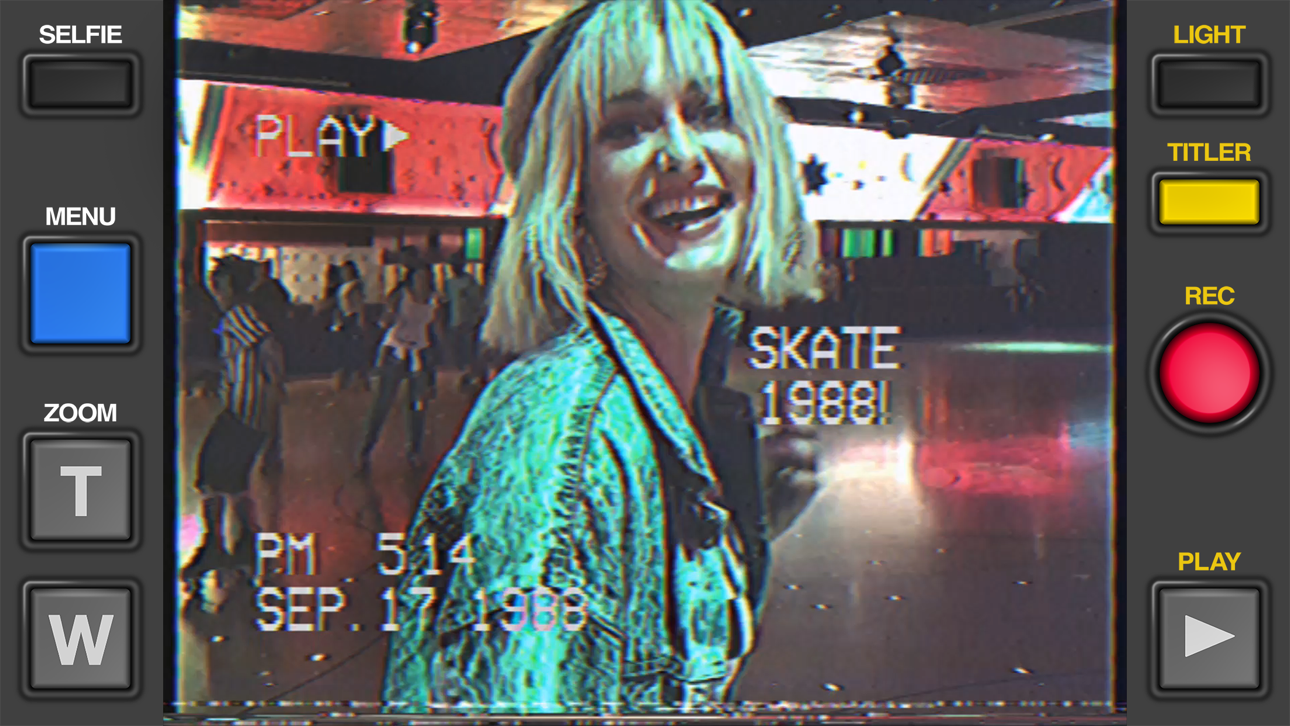
Buat video VHS retro autentik yang terlihat seperti diambil dengan camcorder 1984 menggunakan Rarevision VHS - Retro 80s Cam, aplikasi iOS termodifikasi yang dicintai selebriti dan ditampilkan di SNL. Hack gratis ini membuka potensi kreatif penuh aplikasi, memungkinkan Anda menerapkan efek video vintage, distorsi, dan estetika analog untuk mengubah footage Anda menjadi mahakarya nostalgia yang akan membuat teman bertanya-tanya apakah Anda benar-benar memiliki mesin waktu.
Aplikasi ini juga dilengkapi dengan iGameGod, yang memberi Anda akses ke Auto Touch untuk mengotomatiskan tugas berulang, App Speed Manager untuk mengatur kecepatan permainan, pengeditan nilai Memory Engine, dan alat permainan iOS lainnya yang lebih canggih.
Unduh Rarevision VHS - Retro 80s Cam modded IPA dari tautan di atas. Ketuk tombol pasang dan ikuti petunjuk di layar untuk memasang hack iOS ini di iPhone, iPad, atau Apple Silicon.
Butuh bantuan lebih lanjut? Lihat Pertanyaan yang Sering Diajukan untuk Aplikasi iOSGods kami untuk jawaban dan tips lengkap.
Used by Kendall Jenner, Snoop Dogg, BTS, Ariana Grande, Khloe Kardashian, Wiz Khalifa, Victoria Beckham, Die Antwoord and featured on SNL (S41E01) and in countless TV shows and music videos!
Covered by WIRED, Forbes, The Wall Street Journal, Popular Mechanics, The Independent, Macworld, TMZ, TechCrunch, Mashable and many others!
App of the Day for Friday, Dec 22, 2017
It's 1984, and you've got a VHS camcorder! It'll look that way when you record and send old, messed up-looking retro videos to friends. They'll swear you built a time machine: "OMG, how'd you shoot that?"
With Rarevision VHS, you'll make videos that look and sound like real retro video tapes pulled out of storage after 30 years. You can change the on-screen date to trick your friends, create custom animated titles, glitch up the picture by shaking your device and use the fake zoom to emphasize those truly embarrassing moments!
"That's freakin' amazing!" -Everyone
Here's Why You Need It:
• Four words: Best. Throwback. Videos. Ever.
• Create VHS-style retro videos of your kids that look like the ones from your childhood
• The only VHS cam app you should ever consider to capture your 80s and 90s-themed parties
• Shoot your own "found footage" movie and become a big Hollywood director like those other guys
• Make your kids' incredibly boring school plays actually rad
• Impress the new girl by using our app to convince her you built a time machine
• Pretend like you lived through the rad 1980s using our app!
What Rarevision VHS Can Do:
• Realism: the ORIGINAL and BEST VHS cam app for simulating the glitches of old videotape recordings
• Import videos and give them the VHS look
• Make your own signature look using the old-school picture adjustment menu
• Create your own animated titles for the ultimate in on-screen awesomeness
• Change the on-screen date so people think you're way younger (or older) than you really are
• Glitch the picture during recording using your finger or by shaking your device
• Fake zoom feature dramatically enhances the cheese factor
• Don't think we forgot to make things sound retro terrible. We didn't.
• Up to 60p recording for a more accurate VHS video look (depends on device capability)
• Widescreen recording option (but would you REALLY want to use it?)
Follow Rarevision:
http://instagram.com/rarevision
http://x.com/rarevision
http://facebook.com/rarevisionvhs
Rarevision is a US-based company.
Copyright © 2015-2025 Rarevision LLC. All rights reserved.
Tangkapan layar © pemiliknya masing-masing · App Store


iOSGods tidak berafiliasi, tidak didukung, dan tidak disponsori oleh Apple Inc., Google LLC, maupun pengembang aplikasi yang terdaftar di sini. Apple, iOS, dan App Store adalah merek dagang Apple Inc. Android dan Google Play adalah merek dagang Google LLC. Semua nama aplikasi, ikon, gambar, dan merek dagang lainnya adalah milik pemiliknya masing-masing.
- iPhone atau iPad tanpa Jailbreak atau dengan Jailbreak.
- Sideloadly atau alternatifnya.
- Komputer dengan Windows/macOS/Linux dan iTunes terpasang.
LANGKAH 1: Unduh file .IPA yang sudah di-hack dari tautan di atas ke komputer Anda. Untuk mengunduhnya dari iOSGods App, silakan lihat Tutorial Mengunduh IPA dari iOSGods App kami yang dilengkapi contoh video.
LANGKAH 2: Unduh Sideloadly dan pasang di Windows atau Mac Anda.
LANGKAH 3: Buka Sideloadly di komputer Anda, sambungkan perangkat iOS Anda, dan tunggu hingga nama perangkat Anda muncul di Sideloadly.
LANGKAH 4: Setelah iDevice Anda terdeteksi, seret file .IPA yang sudah dimodifikasi dan lepaskan ke dalam aplikasi Sideloadly.
LANGKAH 5: Masukkan email Apple Account Anda, lalu tekan "Start". Anda kemudian akan diminta memasukkan kata sandi. Silakan isi informasi yang diminta.
LANGKAH 6: Tunggu hingga Sideloadly selesai melakukan sideloading/pemasangan IPA yang di-hack. Jika terjadi masalah saat pemasangan, silakan baca catatan di bawah ini.
LANGKAH 7: Setelah pemasangan selesai dan Anda melihat aplikasi di Layar Beranda, Anda perlu masuk ke Pengaturan → Umum → Profil / VPN & Manajemen Perangkat. Setelah itu, ketuk email yang Anda masukkan pada langkah 6, lalu ketuk "Percayai [email protected]".
LANGKAH 8: Sekarang buka Layar Beranda dan jalankan aplikasi yang baru saja dipasang; semuanya seharusnya berjalan normal. Anda mungkin perlu mengikuti petunjuk tambahan per aplikasi yang muncul di popup hack di dalam game.
CATATAN: Pada iOS/iPadOS 16 dan yang lebih baru, Anda harus mengaktifkan Mode Pengembang. Untuk akun Apple Developer gratis, Anda perlu mengulangi proses ini setiap 7 hari. Jika Anda memiliki pertanyaan atau masalah, silakan baca bagian FAQ Sideloadly di topik tersebut kami.
Game Name iOS Mod IPA is an action adventure game enhanced with powerful gameplay boosts and quality-of-life improvements. Win battles faster, earn rewards quicker, and enjoy uninterrupted play without ads.
- Unlimited Gold - spend freely to unlock premium content
- Damage Multiplier - deal significantly more damage in combat
- Defense Multiplier - take less damage and survive longer
- Reward Multiplier - earn more loot from every battle
- Max Level - instantly reach the highest player rank
- No Ads - play without interruptions or advertisements
This app also comes with iGameGod, giving you access to Auto Touch to automate repetitive tasks, App Speed Manager for adjustable gameplay speed, Memory Engine value editing, and more powerful iOS game tools.
Unduh Game Name Mod IPA dari tautan di atas. Ketuk tombol pasang dan ikuti petunjuk di layar untuk memasang hack iOS ini di iPhone, iPad, atau Apple Silicon.
Butuh bantuan lebih lanjut Lihat Pertanyaan yang Sering Diajukan untuk Aplikasi iOSGods kami untuk jawaban dan tips lengkap.
----------------------------------------------------------
--------------------------------------------------