ต้องเข้าสู่ระบบ
เข้าสู่ระบบด้วยบัญชี iOSGods เพื่อดำเนินการต่อ
เข้าสู่ระบบด้วยบัญชี iOSGods เพื่อดำเนินการต่อ
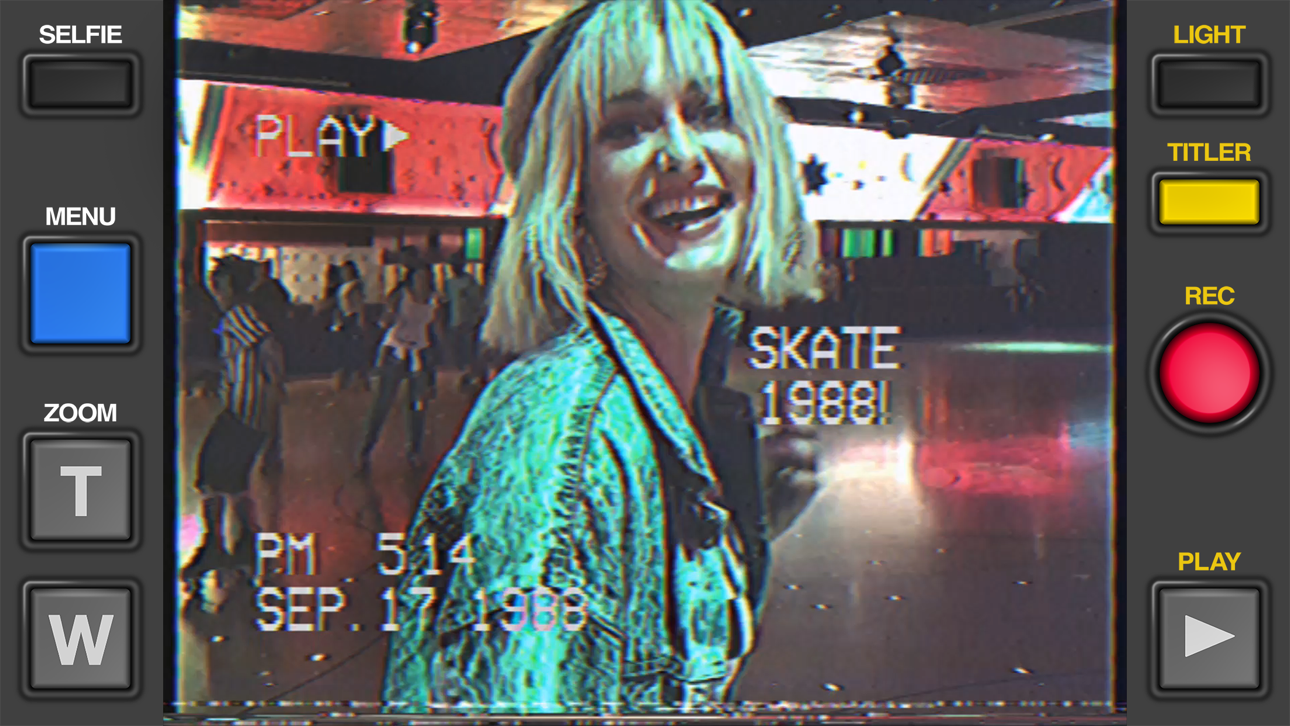
สร้างวิดีโอ VHS แบบย้อนยุคที่ดูเหมือนถ่ายด้วยกล้องวิดีโอปี 1984 ด้วย Rarevision VHS - Retro 80s Cam ซึ่งเป็นแอปที่ได้รับความนิยมจากเซเลบริตี้และเคยปรากฏตัวใน SNL แฮคฟรีนี้ปลดล็อกศักยภาพสร้างสรรค์เต็มรูปแบบของแอป ให้คุณใช้เอฟเฟกต์วิดีโอวินเทจ การบิดเบือน และสุนทรียศาสตร์แบบอนาล็อกเพื่อแปลงฟุตเทจของคุณเป็นผลงานที่เต็มไปด้วยความหวนึ่งถึงอดีต ที่จะทำให้เพื่อนๆ สงสัยว่าคุณมีเครื่องจักรเดินทางข้ามเวลาจริงๆ หรือเปล่า
แอปนี้ยังมาพร้อมกับ iGameGod ซึ่งช่วยให้คุณเข้าถึง Auto Touch สำหรับการทำงานซ้ำ ๆ โดยอัตโนมัติ, App Speed Manager สำหรับปรับความเร็วของเกม, การแก้ไขค่าด้วย Memory Engine และเครื่องมือสำหรับเกม iOS ที่ทรงพลังอื่น ๆ อีกมากมาย
ดาวน์โหลด Rarevision VHS - Retro 80s Cam modded IPA จากลิงก์ด้านบน แตะปุ่มติดตั้งและทำตามคำแนะนำบนหน้าจอเพื่อติดตั้งแฮ็กแอป iOS นี้บน iPhone, iPad หรือ Apple Silicon
ต้องการความช่วยเหลือเพิ่มเติม? ดู คำถามที่พบบ่อยของแอป iOSGods สำหรับคำตอบโดยละเอียดและเคล็ดลับการแก้ไขปัญหา
Used by Kendall Jenner, Snoop Dogg, BTS, Ariana Grande, Khloe Kardashian, Wiz Khalifa, Victoria Beckham, Die Antwoord and featured on SNL (S41E01) and in countless TV shows and music videos!
Covered by WIRED, Forbes, The Wall Street Journal, Popular Mechanics, The Independent, Macworld, TMZ, TechCrunch, Mashable and many others!
App of the Day for Friday, Dec 22, 2017
It's 1984, and you've got a VHS camcorder! It'll look that way when you record and send old, messed up-looking retro videos to friends. They'll swear you built a time machine: "OMG, how'd you shoot that?"
With Rarevision VHS, you'll make videos that look and sound like real retro video tapes pulled out of storage after 30 years. You can change the on-screen date to trick your friends, create custom animated titles, glitch up the picture by shaking your device and use the fake zoom to emphasize those truly embarrassing moments!
"That's freakin' amazing!" -Everyone
Here's Why You Need It:
• Four words: Best. Throwback. Videos. Ever.
• Create VHS-style retro videos of your kids that look like the ones from your childhood
• The only VHS cam app you should ever consider to capture your 80s and 90s-themed parties
• Shoot your own "found footage" movie and become a big Hollywood director like those other guys
• Make your kids' incredibly boring school plays actually rad
• Impress the new girl by using our app to convince her you built a time machine
• Pretend like you lived through the rad 1980s using our app!
What Rarevision VHS Can Do:
• Realism: the ORIGINAL and BEST VHS cam app for simulating the glitches of old videotape recordings
• Import videos and give them the VHS look
• Make your own signature look using the old-school picture adjustment menu
• Create your own animated titles for the ultimate in on-screen awesomeness
• Change the on-screen date so people think you're way younger (or older) than you really are
• Glitch the picture during recording using your finger or by shaking your device
• Fake zoom feature dramatically enhances the cheese factor
• Don't think we forgot to make things sound retro terrible. We didn't.
• Up to 60p recording for a more accurate VHS video look (depends on device capability)
• Widescreen recording option (but would you REALLY want to use it?)
Follow Rarevision:
http://instagram.com/rarevision
http://x.com/rarevision
http://facebook.com/rarevisionvhs
Rarevision is a US-based company.
Copyright © 2015-2025 Rarevision LLC. All rights reserved.
ภาพหน้าจอ © เจ้าของแต่ละราย · App Store


iOSGods ไม่มีความเกี่ยวข้อง ไม่ได้รับการรับรอง และไม่ได้รับการสนับสนุนจาก Apple Inc., Google LLC หรือผู้พัฒนาแอปที่แสดงไว้ที่นี่ Apple, iOS และ App Store เป็นเครื่องหมายการค้าของ Apple Inc. Android และ Google Play เป็นเครื่องหมายการค้าของ Google LLC ชื่อแอป ไอคอน ภาพ และเครื่องหมายการค้าอื่นทั้งหมดเป็นทรัพย์สินของเจ้าของแต่ละราย
- iPhone หรือ iPad ที่ไม่ได้เจลเบรก/ไม่ได้เจลเบรก หรือเจลเบรกแล้ว
- Sideloadly หรือทางเลือกอื่น
- คอมพิวเตอร์ที่ใช้ Windows/macOS/Linux และติดตั้ง iTunes ไว้
ขั้นตอนที่ 1: ดาวน์โหลดไฟล์ .IPA ที่แฮกไว้ล่วงหน้าจากลิงก์ด้านบนลงในคอมพิวเตอร์ของคุณ หากต้องการดาวน์โหลดจากแอป iOSGods โปรดดู วิธีดาวน์โหลด IPA ในแอป iOSGods ซึ่งมีตัวอย่างวิดีโอประกอบ
ขั้นตอนที่ 2: ดาวน์โหลด Sideloadly แล้วติดตั้งบน Windows หรือ Mac ของคุณ
ขั้นตอนที่ 3: เปิด Sideloadly บนคอมพิวเตอร์ เชื่อมต่ออุปกรณ์ iOS แล้วรอจนกว่าชื่ออุปกรณ์ของคุณจะปรากฏใน Sideloadly
ขั้นตอนที่ 4: เมื่อ iDevice ของคุณถูกตรวจพบแล้ว ให้ลากไฟล์ .IPA ที่ม็อดมาวางลงในโปรแกรม Sideloadly
ขั้นตอนที่ 5: กรอกอีเมล Apple Account ของคุณ จากนั้นกด "Start" ระบบจะถามรหัสผ่าน กรอกข้อมูลที่จำเป็นให้เรียบร้อย
ขั้นตอนที่ 6: รอจนกว่า Sideloadly จะ sideload/ติดตั้งไฟล์ IPA ที่แฮกเสร็จ หากเกิดปัญหาระหว่างติดตั้ง โปรดอ่านหมายเหตุด้านล่าง
ขั้นตอนที่ 7: เมื่อการติดตั้งเสร็จสิ้นและเห็นแอปบนหน้าจอหลักแล้ว ให้ไปที่ การตั้งค่า → ทั่วไป → โปรไฟล์ / VPN และการจัดการอุปกรณ์ จากนั้นแตะที่อีเมลที่คุณกรอกในขั้นตอนที่ 6 แล้วแตะ "เชื่อถือ [email protected]"
ขั้นตอนที่ 8: จากนั้นไปที่หน้าจอหลักและเปิดแอปที่ติดตั้งใหม่ ทุกอย่างควรทำงานได้ปกติ คุณอาจต้องทำตามคำแนะนำเพิ่มเติมเฉพาะแอปในป๊อปอัปของม็อดในเกม
หมายเหตุ: สำหรับ iOS/iPadOS 16 ขึ้นไป คุณต้อง เปิดโหมดนักพัฒนา (Developer Mode) สำหรับบัญชี Apple Developer แบบฟรี คุณต้องทำขั้นตอนนี้ซ้ำทุก 7 วัน หากมีคำถามหรือพบปัญหา โปรดอ่าน หัวข้อ FAQ ของ Sideloadly ในกระทู้
Game Name iOS Mod IPA is an action adventure game enhanced with powerful gameplay boosts and quality-of-life improvements. Win battles faster, earn rewards quicker, and enjoy uninterrupted play without ads.
- Unlimited Gold - spend freely to unlock premium content
- Damage Multiplier - deal significantly more damage in combat
- Defense Multiplier - take less damage and survive longer
- Reward Multiplier - earn more loot from every battle
- Max Level - instantly reach the highest player rank
- No Ads - play without interruptions or advertisements
This app also comes with iGameGod, giving you access to Auto Touch to automate repetitive tasks, App Speed Manager for adjustable gameplay speed, Memory Engine value editing, and more powerful iOS game tools.
ดาวน์โหลด Game Name Mod IPA จากลิงก์ด้านบน แตะปุ่มติดตั้งและทำตามคำแนะนำบนหน้าจอเพื่อติดตั้งแฮ็กแอป iOS นี้บน iPhone, iPad หรือ Apple Silicon
ต้องการความช่วยเหลือเพิ่มเติม ดู คำถามที่พบบ่อยของแอป iOSGods สำหรับคำตอบโดยละเอียดและเคล็ดลับการแก้ไขปัญหา
----------------------------------------------------------
--------------------------------------------------