Inicio de sesión requerido
Inicia sesión con tu cuenta de iOSGods para continuar.
Hack Features:
- PREMIUM
Descarga Darkr - fine bw analog image Modded modded IPA desde los enlaces de arriba. Toca el botón de instalación y sigue las instrucciones para instalar este hack iOS en tu iPhone, iPad o Mac con Apple Silicon.

¿Necesitas más ayuda? Consulta nuestras Preguntas frecuentes de la app iOSGods para respuestas detalladas y consejos de solución de problemas.
Over 1 million downloads
Featured as Today's app in several countries and is the perfect app for learning photography.
"Darkr actually taught us how to frame pictures better"
- AppleInsider
Have you ever dreamt of trying an old darkroom, but don't have the equipment nor the time?
Now you can, and without getting wet.
DARKROOM
In a fun and intuitive way you will pick the strip that has the best time and contrast.
And just like a real darkroom, you can make parts of the image brighter and darker by blocking or adding more light to the image.
You will be presented in a very easy way with lots of tutorials on how to use the tools.
The images will only be in black and white (but you may tone them).
DARKROOM FEATURES
+ Develop either your images from your camera-roll or taken by the Large-Format camera
+ Only Black & White
+ Stripes - As in a real darkroom you'll have to find the best strip. It will be challenging, fun and very powerful
+ Crop / Rotate - Both crop and rotate the image in the same tool
+ Dodge - Make a selected part of the image brighter.
+ Burn - Make a selected part of the image darker
+ Blur - Enhance the background with some beautiful blurriness.
+ Tone - Tone the images with various strength. The toners that can be used are Selenium, Cyanotype and Sepia.
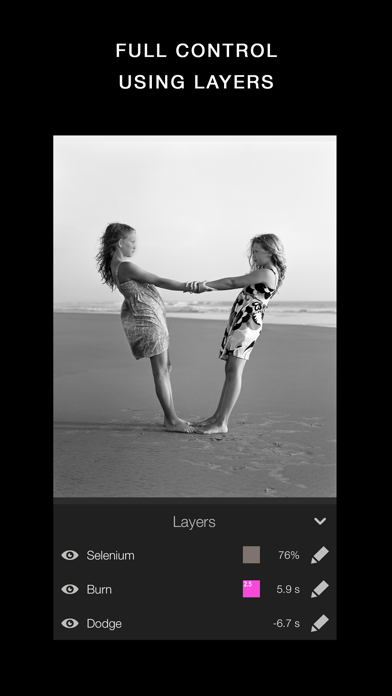
+ Layers - You can add as many effects as you want. Each effect will be treated as a layer that can be edited, deleted and changed its visibility.
+ Zoom - You can zoom the image ten times. This will make it really easy to make the detailed work.
+ OpenGL - Darkr uses OpenGL, the drawing is fast and very fluid.
CAMERA
By shooting with a large-format camera where the image is upside-down you will actually get more control over the image.
The camera is only manual and back in the old days you could not even zoom with the camera, you had to walk.
You will be forced to slow down the process and by doing so, your photographs will be so much better.
At first it may feel a bit odd to look at the upside-down image and it can even be a bit challanging to know if you should move the camera to the left or right when framing the image.
Sometimes you will even laugh at yourself, but the more you use it, the less you will even have to think about it.
MORE CAMERA-MODELS
Darkr has now added two more camera-models.
+ Medium-format which will produce a square image and just as the large-format camera it is manual.
+ Small-format which is a real basic point and shoot camera where you pretty much only shoot at what you see. Nothing to set up with, nor zoom.
CAMERA FEATURES
+ Manual - Just as in a real old analog camera, it is only manual
+ Shutter / ISO - You will set these individually
+ Focus - With a beautiful crafted loupe, you will get full control over the sharpness
+ Tilt / Shift - Just as a large-format camera you will be able to straight up any lines
+ 4x5" - The negative's size will be in the 4x5-ratio as the most popular large-format camera does
SHARE
You can naturally share both the negatives and prints.
You can optimize the resolution to lots of social media's sites like Facebook, Instagram, Twitter
SUPPORT
We are eager to hear from you. We just love to hear both good stuff and bad stuff.
And it's much likely that your opinion will be added into the next update.
Please don't hesitate to contact us at:
- iPhone o iPad con o sin Jailbreak.
- Sideloadly u otras alternativas.
- Ordenador con Windows/macOS/Linux e iTunes instalado.
PASO 1: Descargue el archivo .IPA pre-modificado desde el enlace de arriba a su ordenador. Para descargarlo desde la iOSGods App, consulte nuestro Tutorial de descarga del IPA desde la iOSGods App, que incluye un ejemplo en vídeo.
PASO 2: Descargue Sideloadly e instálelo en su Windows o Mac.
PASO 3: Abra Sideloadly en su ordenador, conecte su dispositivo iOS y espere hasta que el nombre del dispositivo aparezca en Sideloadly.
PASO 4: Una vez que su iDevice sea reconocido, arrastre el archivo .IPA modificado que descargó y suéltelo en la aplicación Sideloadly.
PASO 5: Introduzca el correo electrónico de su Apple Account y, a continuación, pulse «Start». Le pedirá que introduzca su contraseña. Proporcione la información solicitada.
PASO 6: Espere a que Sideloadly termine de hacer sideload/instalar el IPA modificado. Si surgen problemas durante la instalación, por favor lea la nota a continuación.
PASO 7: Una vez completada la instalación y al ver la app en la pantalla de inicio, deberá ir a Ajustes → General → Perfiles / VPN y Gestión de Dispositivos. Una vez allí, toque el correo electrónico que introdujo en el paso 6 y, después, toque en «Confiar en [email protected]».
PASO 8: Ahora vaya a la pantalla de inicio y abra la app recién instalada; todo debería funcionar correctamente. Es posible que tenga que seguir instrucciones adicionales específicas de cada app dentro del popup del hack en el juego.
NOTA: En iOS/iPadOS 16 y posteriores, debe activar el Modo Desarrollador. Para cuentas gratuitas de Apple Developer, deberá repetir este proceso cada 7 días. Si tiene alguna pregunta o problema, lea nuestra sección de Preguntas Frecuentes de Sideloadly del tema.