Login Diperlukan
Masuk dengan akun iOSGods kamu untuk melanjutkan.
Buka fitur darkroom premium di Darkr, editor foto analog hitam putih pemenang penghargaan yang mengajarkan teknik darkroom nyata. Aplikasi iOS yang dimodifikasi ini memungkinkan Anda menguasai dasar-dasar fotografi film, dodging, burning, dan kontrol kontras, tanpa peralatan darkroom atau kekacauan.
- Premium → semua fitur pro terbuka
Aplikasi ini juga dilengkapi dengan iGameGod, yang memberi Anda akses ke Auto Touch untuk mengotomatiskan tugas berulang, App Speed Manager untuk mengatur kecepatan permainan, pengeditan nilai Memory Engine, dan alat permainan iOS lainnya yang lebih canggih.
Unduh Darkr - fine bw analog image Modded modded IPA dari tautan di atas. Ketuk tombol pasang dan ikuti petunjuk di layar untuk memasang hack iOS ini di iPhone, iPad, atau Apple Silicon.
Butuh bantuan lebih lanjut? Lihat Pertanyaan yang Sering Diajukan untuk Aplikasi iOSGods kami untuk jawaban dan tips lengkap.
3 million downloads
Featured on Today's tab in several countries and is the perfect app for learning photography.
"Darkr actually taught us how to frame pictures better"
- AppleInsider
Have you ever dreamt of trying an old darkroom, but don't have the equipment nor the time?
Now you can, and without getting wet.
DARKROOM
In a fun and intuitive way you will pick the strip that has the best time and contrast.
And just like a real darkroom, you can make parts of the image brighter and darker by blocking or adding more light to the image.
You will be presented in a very easy way with lots of tutorials on how to use the tools.
The images will only be in black and white (but you may tone them).
DARKROOM FEATURES
+ Develop either your images from your camera-roll or taken by the Large-Format camera
+ Only Black & White
+ Stripes - As in a real darkroom you'll have to find the best strip. It will be challenging, fun and very powerful
+ Crop / Rotate - Both crop and rotate the image in the same tool
+ Dodge - Make a selected part of the image brighter.
+ Burn - Make a selected part of the image darker
+ Blur - Enhance the background with some beautiful blurriness.
+ Tone - Tone the images with various strength. The toners that can be used are Selenium, Cyanotype and Sepia.
+ Layers - You can add as many effects as you want. Each effect will be treated as a layer that can be edited, deleted and changed its visibility.
+ Zoom - You can zoom the image ten times. This will make it really easy to make the detailed work.
+ OpenGL - Darkr uses OpenGL, the drawing is fast and very fluid.
CAMERA
By shooting with a large-format camera where the image is upside-down you will actually get more control over the image.
The camera is only manual and back in the old days you could not even zoom with the camera, you had to walk.
You will be forced to slow down the process and by doing so, your photographs will be so much better.
At first it may feel a bit odd to look at the upside-down image and it can even be a bit challanging to know if you should move the camera to the left or right when framing the image.
Sometimes you will even laugh at yourself, but the more you use it, the less you will even have to think about it.
MORE CAMERA-MODELS
Darkr has now added two more camera-models.
+ Medium-format which will produce a square image and just as the large-format camera it is manual.
+ Small-format which is a real basic point and shoot camera where you pretty much only shoot at what you see. Nothing to set up with, nor zoom.
CAMERA FEATURES
+ Manual - Just as in a real old analog camera, it is only manual
+ Shutter / ISO - You will set these individually
+ Focus - With a beautiful crafted loupe, you will get full control over the sharpness
+ Tilt / Shift - Just as a large-format camera you will be able to straight up any lines
+ 4x5" - The negative's size will be in the 4x5-ratio as the most popular large-format camera does
IN-APP PURCHASE
Darkr is free to download, but the following features requires in-app purchase to be available.
These in-app purchases are one-time purchase, so you don't have to worry about a subscription.
Large-format camera
Medium-format camera
Edit layers
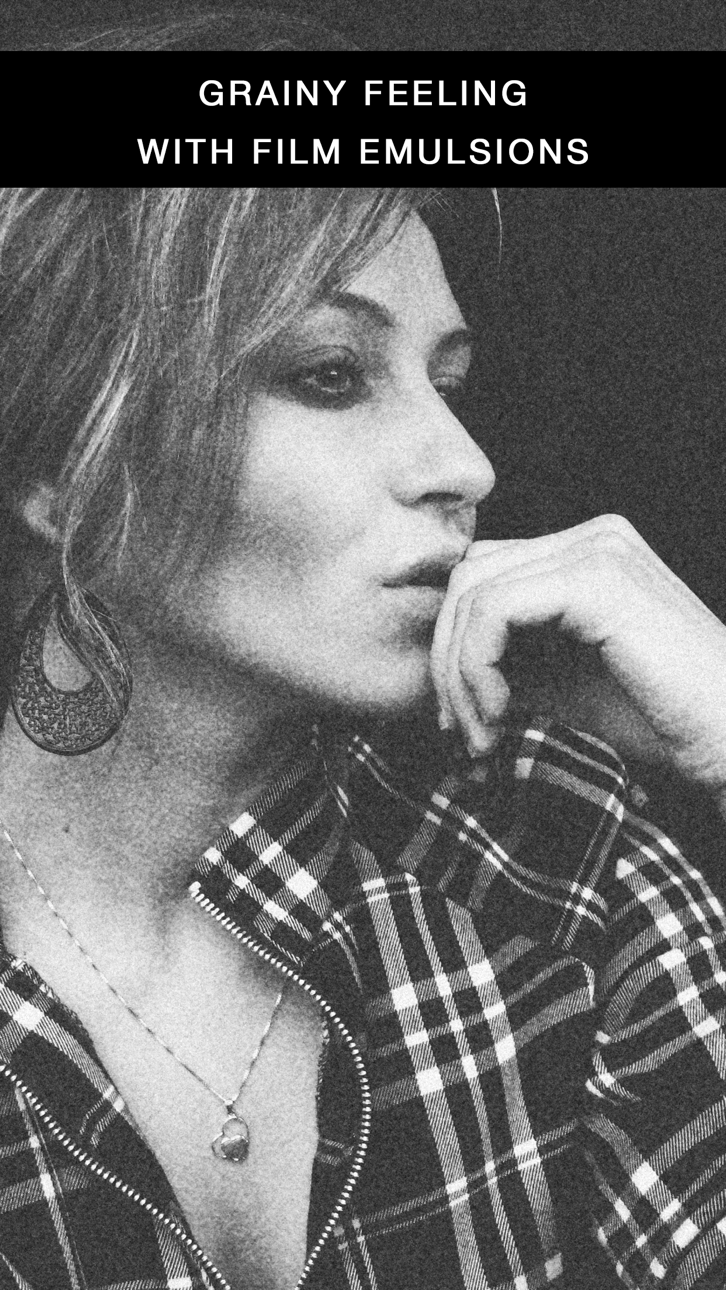
Simulate film-emulsion
Tone the image
SHARE
You can naturally share both the negatives and prints.
You can optimize the resolution to lots of social media's sites like Facebook, Instagram, Twitter
SUPPORT
We are eager to hear from you. We just love to hear both good stuff and bad stuff.
And it's much likely that your opinion will be added into the next update.
Please don't hesitate to contact us at:
[email protected]
Tangkapan layar © pemiliknya masing-masing · App Store


iOSGods tidak berafiliasi, tidak didukung, dan tidak disponsori oleh Apple Inc., Google LLC, maupun pengembang aplikasi yang terdaftar di sini. Apple, iOS, dan App Store adalah merek dagang Apple Inc. Android dan Google Play adalah merek dagang Google LLC. Semua nama aplikasi, ikon, gambar, dan merek dagang lainnya adalah milik pemiliknya masing-masing.

- iPhone atau iPad tanpa Jailbreak atau dengan Jailbreak.
- Sideloadly atau alternatifnya.
- Komputer dengan Windows/macOS/Linux dan iTunes terpasang.
LANGKAH 1: Unduh file .IPA yang sudah di-hack dari tautan di atas ke komputer Anda. Untuk mengunduhnya dari iOSGods App, silakan lihat Tutorial Mengunduh IPA dari iOSGods App kami yang dilengkapi contoh video.
LANGKAH 2: Unduh Sideloadly dan pasang di Windows atau Mac Anda.
LANGKAH 3: Buka Sideloadly di komputer Anda, sambungkan perangkat iOS Anda, dan tunggu hingga nama perangkat Anda muncul di Sideloadly.
LANGKAH 4: Setelah iDevice Anda terdeteksi, seret file .IPA yang sudah dimodifikasi dan lepaskan ke dalam aplikasi Sideloadly.
LANGKAH 5: Masukkan email Apple Account Anda, lalu tekan "Start". Anda kemudian akan diminta memasukkan kata sandi. Silakan isi informasi yang diminta.
LANGKAH 6: Tunggu hingga Sideloadly selesai melakukan sideloading/pemasangan IPA yang di-hack. Jika terjadi masalah saat pemasangan, silakan baca catatan di bawah ini.
LANGKAH 7: Setelah pemasangan selesai dan Anda melihat aplikasi di Layar Beranda, Anda perlu masuk ke Pengaturan → Umum → Profil / VPN & Manajemen Perangkat. Setelah itu, ketuk email yang Anda masukkan pada langkah 6, lalu ketuk "Percayai [email protected]".
LANGKAH 8: Sekarang buka Layar Beranda dan jalankan aplikasi yang baru saja dipasang; semuanya seharusnya berjalan normal. Anda mungkin perlu mengikuti petunjuk tambahan per aplikasi yang muncul di popup hack di dalam game.
CATATAN: Pada iOS/iPadOS 16 dan yang lebih baru, Anda harus mengaktifkan Mode Pengembang. Untuk akun Apple Developer gratis, Anda perlu mengulangi proses ini setiap 7 hari. Jika Anda memiliki pertanyaan atau masalah, silakan baca bagian FAQ Sideloadly di topik tersebut kami.
Game Name iOS Mod IPA is an action adventure game enhanced with powerful gameplay boosts and quality-of-life improvements. Win battles faster, earn rewards quicker, and enjoy uninterrupted play without ads.
- Unlimited Gold - spend freely to unlock premium content
- Damage Multiplier - deal significantly more damage in combat
- Defense Multiplier - take less damage and survive longer
- Reward Multiplier - earn more loot from every battle
- Max Level - instantly reach the highest player rank
- No Ads - play without interruptions or advertisements
This app also comes with iGameGod, giving you access to Auto Touch to automate repetitive tasks, App Speed Manager for adjustable gameplay speed, Memory Engine value editing, and more powerful iOS game tools.
Unduh Game Name Mod IPA dari tautan di atas. Ketuk tombol pasang dan ikuti petunjuk di layar untuk memasang hack iOS ini di iPhone, iPad, atau Apple Silicon.
Butuh bantuan lebih lanjut Lihat Pertanyaan yang Sering Diajukan untuk Aplikasi iOSGods kami untuk jawaban dan tips lengkap.
----------------------------------------------------------
--------------------------------------------------