Cần đăng nhập
Đăng nhập bằng tài khoản iOSGods để tiếp tục.
Hack Features:
- PREMIUM
Tải Darkr - fine bw analog image Modded modded IPA từ các liên kết ở trên. Nhấn nút cài đặt và làm theo hướng dẫn để cài bản hack iOS lên iPhone, iPad hoặc Apple Silicon.
Cần thêm trợ giúp? Hãy xem Câu hỏi thường gặp ứng dụng iOSGods để có câu trả lời chi tiết và mẹo khắc phục sự cố.
Over 1 million downloads
Featured as Today's app in several countries and is the perfect app for learning photography.
"Darkr actually taught us how to frame pictures better"
- AppleInsider
Have you ever dreamt of trying an old darkroom, but don't have the equipment nor the time?
Now you can, and without getting wet.
DARKROOM
In a fun and intuitive way you will pick the strip that has the best time and contrast.
And just like a real darkroom, you can make parts of the image brighter and darker by blocking or adding more light to the image.
You will be presented in a very easy way with lots of tutorials on how to use the tools.
The images will only be in black and white (but you may tone them).
DARKROOM FEATURES
+ Develop either your images from your camera-roll or taken by the Large-Format camera
+ Only Black & White
+ Stripes - As in a real darkroom you'll have to find the best strip. It will be challenging, fun and very powerful
+ Crop / Rotate - Both crop and rotate the image in the same tool
+ Dodge - Make a selected part of the image brighter.
+ Burn - Make a selected part of the image darker
+ Blur - Enhance the background with some beautiful blurriness.
+ Tone - Tone the images with various strength. The toners that can be used are Selenium, Cyanotype and Sepia.
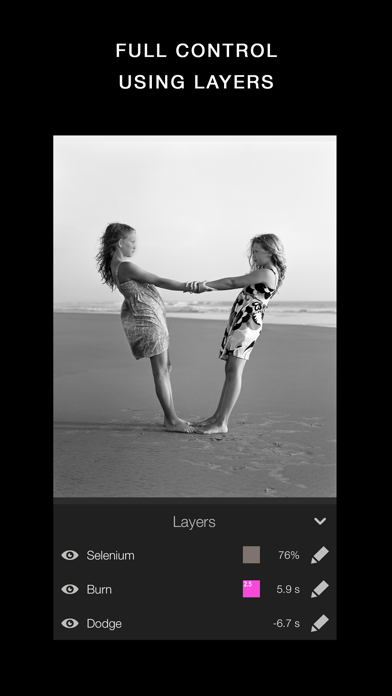
+ Layers - You can add as many effects as you want. Each effect will be treated as a layer that can be edited, deleted and changed its visibility.
+ Zoom - You can zoom the image ten times. This will make it really easy to make the detailed work.
+ OpenGL - Darkr uses OpenGL, the drawing is fast and very fluid.
CAMERA
By shooting with a large-format camera where the image is upside-down you will actually get more control over the image.
The camera is only manual and back in the old days you could not even zoom with the camera, you had to walk.
You will be forced to slow down the process and by doing so, your photographs will be so much better.
At first it may feel a bit odd to look at the upside-down image and it can even be a bit challanging to know if you should move the camera to the left or right when framing the image.
Sometimes you will even laugh at yourself, but the more you use it, the less you will even have to think about it.
MORE CAMERA-MODELS
Darkr has now added two more camera-models.
+ Medium-format which will produce a square image and just as the large-format camera it is manual.
+ Small-format which is a real basic point and shoot camera where you pretty much only shoot at what you see. Nothing to set up with, nor zoom.
CAMERA FEATURES
+ Manual - Just as in a real old analog camera, it is only manual
+ Shutter / ISO - You will set these individually
+ Focus - With a beautiful crafted loupe, you will get full control over the sharpness
+ Tilt / Shift - Just as a large-format camera you will be able to straight up any lines
+ 4x5" - The negative's size will be in the 4x5-ratio as the most popular large-format camera does
SHARE
You can naturally share both the negatives and prints.
You can optimize the resolution to lots of social media's sites like Facebook, Instagram, Twitter
SUPPORT
We are eager to hear from you. We just love to hear both good stuff and bad stuff.
And it's much likely that your opinion will be added into the next update.
Please don't hesitate to contact us at:
- iPhone hoặc iPad chưa jailbreak/đã đóng hoặc đã jailbreak.
- Sideloadly hoặc các lựa chọn thay thế.
- Máy tính chạy Windows/macOS/Linux đã cài iTunes.
BƯỚC 1: Tải tệp .IPA đã được hack sẵn từ liên kết phía trên về máy tính của bạn. Để tải từ iOSGods App, hãy xem Hướng dẫn tải IPA bằng iOSGods App của chúng tôi, có kèm ví dụ bằng video.
BƯỚC 2: Tải Sideloadly và cài đặt trên Windows hoặc Mac của bạn.
BƯỚC 3: Mở Sideloadly trên máy tính, kết nối thiết bị iOS của bạn và chờ cho đến khi tên thiết bị hiển thị trong Sideloadly.
BƯỚC 4: Khi thiết bị iOS của bạn đã được nhận diện, hãy kéo tệp .IPA đã chỉnh sửa mà bạn tải về và thả vào ứng dụng Sideloadly.
BƯỚC 5: Nhập email Apple Account của bạn, sau đó nhấn "Start." Bạn sẽ được yêu cầu nhập mật khẩu. Hãy cung cấp các thông tin cần thiết.
BƯỚC 6: Chờ Sideloadly hoàn tất quá trình sideload/cài đặt tệp IPA đã hack. Nếu gặp sự cố trong quá trình cài đặt, vui lòng đọc lưu ý bên dưới.
BƯỚC 7: Khi cài đặt hoàn tất và bạn thấy ứng dụng trên Màn hình chính, bạn cần truy cập Cài đặt → Cài đặt chung → Hồ sơ / VPN & Quản lý thiết bị. Tại đó, nhấn vào email bạn đã nhập ở bước 6, rồi nhấn "Tin cậy [email protected]".

BƯỚC 8: Bây giờ hãy về Màn hình chính và mở ứng dụng vừa cài đặt, mọi thứ sẽ hoạt động bình thường. Bạn có thể cần làm theo hướng dẫn riêng của từng ứng dụng trong cửa sổ popup của bản hack trong game.
LƯU Ý: Trên iOS/iPadOS 16 trở lên, bạn phải bật Chế độ nhà phát triển. Với tài khoản Apple Developer miễn phí, bạn sẽ cần lặp lại quy trình này mỗi 7 ngày. Nếu bạn có thắc mắc hoặc gặp sự cố, hãy đọc mục FAQ về Sideloadly trong chủ đề của chúng tôi.