로그인 필요
계속하려면 iOSGods 계정으로 로그인하세요.
Hack Features:
- PREMIUM
위의 링크에서 Darkr - fine bw analog image Modded modded IPA을 다운로드합니다. 설치 버튼을 누르고 화면 안내에 따라 iPhone, iPad 또는 Apple Silicon에 이 iOS 앱 해킹을 설치합니다.
더 많은 도움이 필요하신가요? 자세한 답변과 문제 해결 팁은 iOSGods 앱 자주 묻는 질문을 확인하세요.
Over 1 million downloads
Featured as Today's app in several countries and is the perfect app for learning photography.
"Darkr actually taught us how to frame pictures better"
- AppleInsider
Have you ever dreamt of trying an old darkroom, but don't have the equipment nor the time?
Now you can, and without getting wet.
DARKROOM
In a fun and intuitive way you will pick the strip that has the best time and contrast.
And just like a real darkroom, you can make parts of the image brighter and darker by blocking or adding more light to the image.
You will be presented in a very easy way with lots of tutorials on how to use the tools.
The images will only be in black and white (but you may tone them).
DARKROOM FEATURES
+ Develop either your images from your camera-roll or taken by the Large-Format camera
+ Only Black & White
+ Stripes - As in a real darkroom you'll have to find the best strip. It will be challenging, fun and very powerful
+ Crop / Rotate - Both crop and rotate the image in the same tool
+ Dodge - Make a selected part of the image brighter.
+ Burn - Make a selected part of the image darker
+ Blur - Enhance the background with some beautiful blurriness.
+ Tone - Tone the images with various strength. The toners that can be used are Selenium, Cyanotype and Sepia.
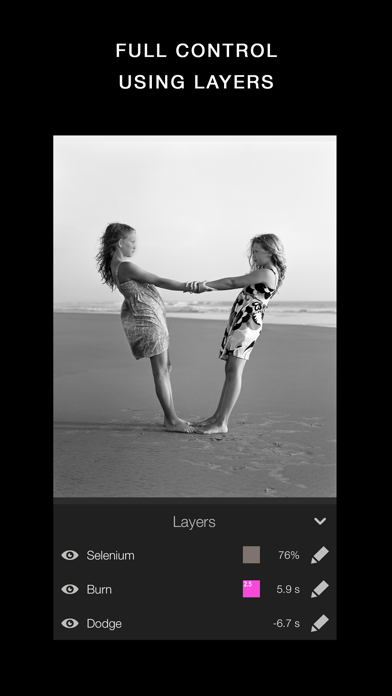
+ Layers - You can add as many effects as you want. Each effect will be treated as a layer that can be edited, deleted and changed its visibility.
+ Zoom - You can zoom the image ten times. This will make it really easy to make the detailed work.
+ OpenGL - Darkr uses OpenGL, the drawing is fast and very fluid.
CAMERA
By shooting with a large-format camera where the image is upside-down you will actually get more control over the image.
The camera is only manual and back in the old days you could not even zoom with the camera, you had to walk.
You will be forced to slow down the process and by doing so, your photographs will be so much better.
At first it may feel a bit odd to look at the upside-down image and it can even be a bit challanging to know if you should move the camera to the left or right when framing the image.
Sometimes you will even laugh at yourself, but the more you use it, the less you will even have to think about it.
MORE CAMERA-MODELS
Darkr has now added two more camera-models.
+ Medium-format which will produce a square image and just as the large-format camera it is manual.
+ Small-format which is a real basic point and shoot camera where you pretty much only shoot at what you see. Nothing to set up with, nor zoom.
CAMERA FEATURES
+ Manual - Just as in a real old analog camera, it is only manual
+ Shutter / ISO - You will set these individually
+ Focus - With a beautiful crafted loupe, you will get full control over the sharpness
+ Tilt / Shift - Just as a large-format camera you will be able to straight up any lines
+ 4x5" - The negative's size will be in the 4x5-ratio as the most popular large-format camera does
SHARE
You can naturally share both the negatives and prints.
You can optimize the resolution to lots of social media's sites like Facebook, Instagram, Twitter
SUPPORT
We are eager to hear from you. We just love to hear both good stuff and bad stuff.
And it's much likely that your opinion will be added into the next update.
Please don't hesitate to contact us at:
- 탈옥/제일 또는 탈옥된 iPhone 또는 iPad가 필요합니다.
- Sideloadly 또는 대체 도구가 필요합니다.
- iTunes가 설치된 Windows/macOS/Linux 컴퓨터가 필요합니다.
1단계: 위 링크에서 미리 해킹된 .IPA 파일을 컴퓨터에 다운로드합니다. iOSGods App에서 다운로드하려면 동영상 예시가 포함된 iOSGods App IPA 다운로드 튜토리얼를 참고하십시오.

2단계: Sideloadly를 다운로드하여 Windows 또는 Mac에 설치합니다.
3단계: 컴퓨터에서 Sideloadly를 실행하고 iOS 기기를 연결한 후, Sideloadly에 기기 이름이 표시될 때까지 기다립니다.
4단계: iDevice가 인식되면, 다운로드한 모드된 .IPA 파일을 Sideloadly 애플리케이션에 끌어다 놓습니다.
5단계: Apple Account 이메일을 입력한 후 “Start”를 누릅니다. 그러면 비밀번호를 입력하라는 메시지가 표시됩니다. 요청된 정보를 제공해 주십시오.

6단계: Sideloadly가 해킹된 IPA의 사이드로드/설치를 완료할 때까지 기다리십시오. 설치 중 문제가 발생하면 아래 참고 사항을 읽어 주십시오.

7단계: 설치가 완료되어 홈 화면에서 앱이 보이면 설정 → 일반 → 프로파일 / VPN 및 기기 관리 경로로 이동해야 합니다. 그곳에서 6단계에서 입력한 이메일을 탭한 다음 “[email protected] 신뢰”를 탭하십시오.
8단계: 이제 홈 화면으로 돌아가 새로 설치된 앱을 열면 모든 것이 정상적으로 작동할 것입니다. 게임 내 해킹 팝업에서 앱별 추가 안내를 따라야 할 수도 있습니다.
참고: iOS/iPadOS 16 이상에서는 개발자 모드를 활성화해야 합니다. 무료 Apple Developer 계정의 경우 이 과정을 7일마다 반복해야 합니다. 질문이나 문제가 있는 경우 해당 토픽의 Sideloadly FAQ 섹션를 읽어보십시오.