ログインが必要
iOSGodsアカウントでサインインして続けてください。
Papumba: Games for Kids 2-7 Modded modded IPAを上のリンクからダウンロードします。インストールボタンをタップし、画面の指示に従ってiPhone、iPad、Apple SiliconにこのiOSアプリハックをインストールします。
さらにヘルプが必要ですか? 詳しい回答とトラブルシューティングはiOSGodsアプリ よくある質問をご覧ください。
***#1 play-based preschool academy in 30+ countries***
***Tailored for kids aged 2 to 7***
Worried about the quality of your child's screen time?
Rest easy with Papumba.
Papumba features:
EDUCATOR CURATED, PLAY-BASED ACTIVITIES
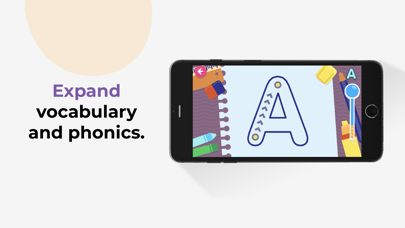
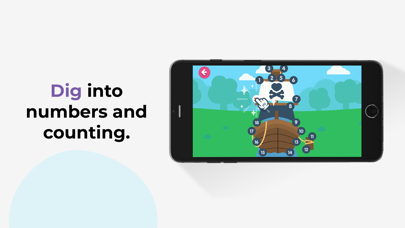
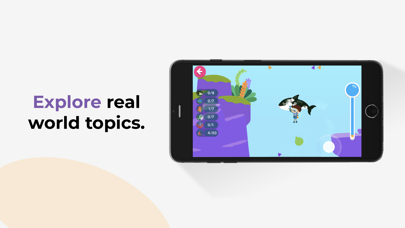
● 500+ interactive games and learning activities.
● Games designed around developmental milestones for ages 2–7.
● Endless hours of play-based learning to keep kids engaged.
PERSONALIZED LEARNING FOR EVERY CHILD
● Each activity adapts to your child's age and aptitude.
● Games are designed around key preschool curriculum milestones.
● Give your kids a head start in learning 21st-century STEAM skills.
AD-FREE, KID-SAFE SPACE
● Papumba’s online environment is 100% ad-free, private and safe online environment for kids.
● Kids learn at their own pace with no high stress or addictive gimmicks.
● Activities encourage independent play and critical thinking.
OFFLINE, FAMILY-FOCUSED FUN
● Downloadable activities: No Internet connection needed.
● Great tool for quality learning time during long trips and waits.
● Offline family-centered activities designed to let families join in the fun!
Start your free trial today to give your kids a head start in preschool and critical STEAM skills! Cancel any time during the trial period.
Subscription details:
- Papumba is a subscription app that gives your child access to thousands of developmentally appropriate games and activities approved by educators.
- Regular price: $5.99/month*.
- Cancel online any time—there is no cancellation fee.
- Payment will be charged to iTunes account upon confirmation of purchase.
- Use your subscription on any device registered with your Apple account.
- Subscription automatically renews unless auto-renew is turned off at least 24 hours before the end of the current period.
- Account will be charged for renewal within 24 hours prior to the end of the current period.The cost of the renewal will be identified as such.
- Subscriptions can be managed by the user. Automatic renewal can be turned off in the user's account settings after purchase.
- Cancellation will not go into effect until the end of the monthly billing cycle.
- Any unused portion of a free trial period, if offered, will be forfeited when the user purchases a subscription.
- Privacy policy: https://www.papumba.com/privacy/
- Terms And Conditions: https://www.papumba.com/terms/
*This fee is the U.S subscription cost. Fees vary by country.
Love Papumba?
Like us on Facebook: http://www.facebook.com/papumbagames
Follow us on Twitter: http://twitter.com/papumba_ok
Follow us on Instagram: https://www.instagram.com/papumba/
E-Mail: [email protected]
- 脱獄/Jailed済みまたは脱獄済みのiPhoneまたはiPad。
- Sideloadlyまたは代替手段。
- iTunesがインストールされているWindows/macOS/Linuxを実行しているコンピュータ。
ステップ1: 上のリンクから事前にハックされた.IPAファイルをコンピュータにダウンロードします。iOSGodsアプリからダウンロードする方法は、ビデオ例付きのiOSGodsアプリIPAダウンロードチュートリアルをご覧ください。
ステップ2: SideloadlyをダウンロードしてWindowsまたはMacにインストールします。
ステップ3: コンピュータでSideloadlyを開き、iOSデバイスを接続して、デバイス名がSideloadlyに表示されるまで待ちます。
ステップ4: iDeviceが認識されたら、ダウンロードしたModされた.IPAファイルをSideloadlyアプリにドラッグ&ドロップします。
ステップ5: Apple Accountのメールアドレスを入力し、「Start」を押します。次にパスワードの入力を求められます。必要な情報を入力してください。
ステップ6: Sideloadlyがハックされたipaのサイドロード/インストールを完了するのを待ちます。インストール中に問題が発生した場合は、以下の注意事項をお読みください。

ステップ7: インストールが完了し、ホーム画面にアプリが表示されたら、設定 → 一般 → プロファイル / VPNとデバイス管理に移動する必要があります。そこで、ステップ6で入力したメールをタップし、「Trust [email protected]」をタップします。
ステップ8: ホーム画面に戻り、新しくインストールされたアプリを開けば、すべて正常に動作するはずです。ゲーム内のハックのポップアップで、アプリごとの追加指示に従う必要がある場合があります。
注意: iOS/iPadOS 16以降では、デベロッパモードを有効にするが必要です。無料のApple Developerアカウントの場合、このプロセスを7日ごとに繰り返す必要があります。質問や問題がある場合は、トピックのSideloadly FAQセクションをお読みください。