Потрібен вхід
Увійдіть у свій обліковий запис iOSGods, щоб продовжити.
Увійдіть у свій обліковий запис iOSGods, щоб продовжити.

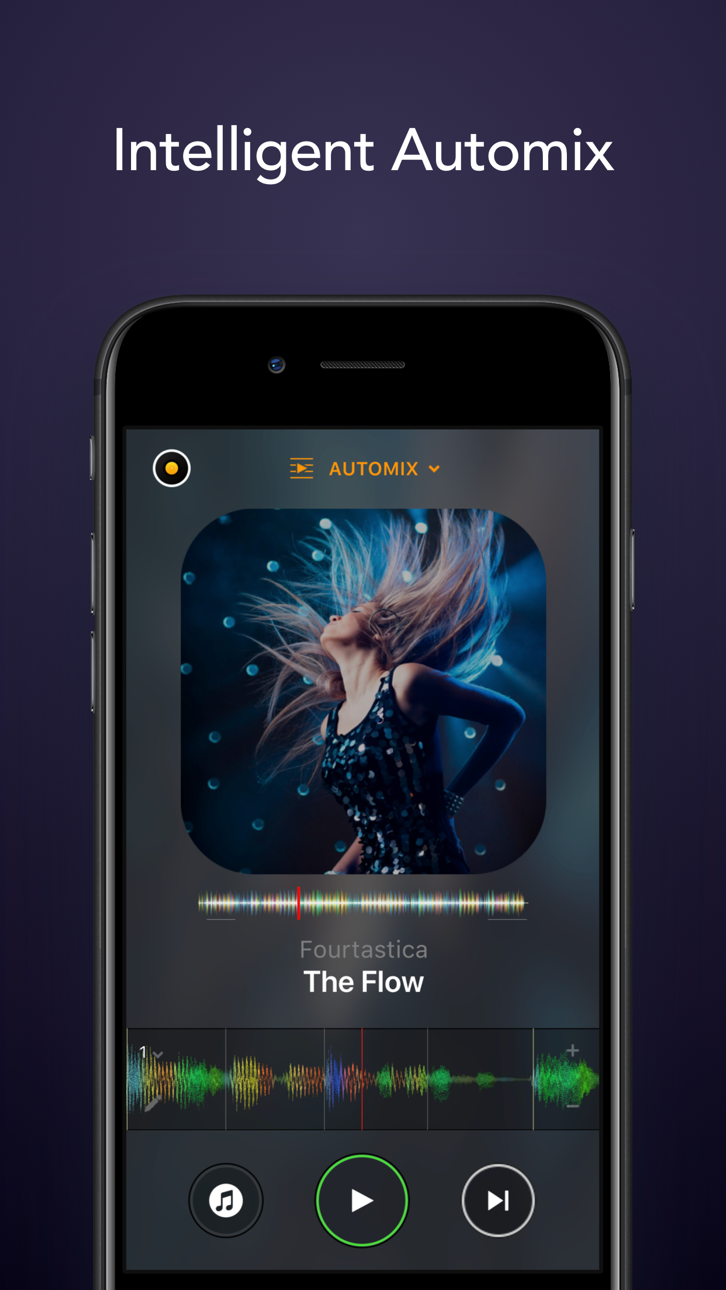
Цей додаток для DJ та AI мікшера розблоковує PRO функції, перетворюючи ваш пристрій iOS на повнофункціональну систему музичної продукції з технологією Neural Mix. Ізолюйте вокал, барабани та інструментальні партії в реальному часі, безперебійно мікшуйте улюблені пісні та виконуйте живе або ввімкніть режим Automix для автоматичного мікшування, все з преміум-доступом через цей Mod IPA.
- PRO → розблоковує преміум функції DJ та продакшену
Цей застосунок також постачається з iGameGod, який надає доступ до Auto Touch для автоматизації повторюваних дій, App Speed Manager для регулювання швидкості гри, редагування значень за допомогою Memory Engine та інших потужних інструментів для iOS-ігор.
Завантажте djay - DJ App & AI Mixer Hack modded IPA за посиланнями вище. Натисніть кнопку встановлення та дотримуйтесь інструкцій, щоб встановити цей хак iOS на iPhone, iPad або Apple Silicon.
Потрібна додаткова допомога? Перегляньте наш Поширені запитання про застосунок iOSGods для детальних відповідей та порад з усунення несправностей.
*** Now with Spotify and Apple Music integration ***
Welcome to djay! The #1 DJ app and winner of multiple Apple Design Awards lets you start mixing your favorite music instantly. Connect your Spotify or Apple Music account to access millions of songs and create your own DJ mixes in no time – right inside djay.
djay transforms your iOS device into a full-featured DJ system. Seamlessly integrated with your music library, djay allows you to mix your favorite songs and playlists. You can perform live, remix tracks, or enable Automix mode to let djay create a seamless mix for you automatically. Whether you are a professional DJ or a beginner who just loves to play with music, djay offers you the most intuitive yet powerful DJ experience on an iOS device.
SPOTIFY INTEGRATION
• Access to the full Spotify music catalog
• Your playlists, editorial selections, and more seamlessly integrated
• Powerful search capabilities for the vast music catalog of Spotify
APPLE MUSIC INTEGRATION
• Access to over 100 million songs
• Your library: all your music seamlessly integrated
• Powerful search capabilities for the vast music catalog of Apple Music
• Match: recommendations based on the currently playing song
• Add songs and playlists to your Apple Music library right from within djay
ADVANCED MEDIA LIBRARY
• Spotify: Millions of tracks + your own playlists (Spotify Premium subscription)
• Apple Music: Millions of tracks + your personal library in the cloud (Apple Music subscription)
• TIDAL: Millions of tracks, music videos, high quality sound (TIDAL DJ Extension)
• SoundCloud: Millions of underground and premium tracks (SoundCloud Go+)
• Beatport: Millions of electronic music tracks (Beatport Advanced Subscriptions)
• Beatsource: Millions of open-format music tracks (Beatsource Subscription)
• Files: access files in the cloud (e.g. Dropbox), on your iOS device, or on external hard drives seamlessly
• My Collection: Powerful playlists management and meta data editing
AUTOMIX
• Automatic, beat-matched mixes
• Queue and Playlist automation
NEURAL MIX™
• Isolate vocals, drums, and instrumentals in real time (not available with Apple Music or Spotify)
MUSIC PRODUCTION TOOLS
• Sequencer: create beats on top of your music live
• Looper: remix your music with up to 48 loops per track
• Beat-matched sequencing of drums and samples
• Extensive content library with 1000+ loops and samples.
HARDWARE INTEGRATION
• Plug-and-play integration with 100+ MIDI controllers by Pioneer DJ, AlphaTheta, Reloop, Hercules, Numark, Denon DJ
• Digital Vinyl System (DVS) Integration
• Advanced MIDI Learn to map any class-compliant MIDI controller
• Support for Bluetooth audio and MIDI
• Support for multi-channel USB audio interfaces and video output
POWERFUL AUDIO ENGINE
• Ableton Link integration
• High-quality mixer, filter, EQ, isolator, and limiter
• Advanced time-stretching and pitch shifting
• Over 40 built-in audio effects
• Live recording
ADVANCED AUDIO ANALYSIS
• Fluid Beat Grid: the world’s most sophisticated beat detection and sync engine
• Key detection
• Colored waveforms
• Auto-Gain
BUILT FOR iOS
• Accessible via VoiceOver
• Airplay, Apple Watch, and iCloud integration
The optional PRO subscription allows you to subscribe once and use djay Pro across all your Mac and iOS devices, including access to all PRO features, as well as 1000+ loops, samples, and visuals. Cancel anytime.
A supported streaming subscription and an internet connection are required to access songs from a streaming service in djay. No recording available for streamed songs. Neural Mix cannot be used when streaming from Apple Music or Spotify. Specific songs may not be available or accessible on your account or in your country. Streaming service availability and pricing may vary depending on country, currency and service.
Знімки екрана © їхніх власників · App Store



iOSGods не пов’язана з Apple Inc., Google LLC або розробниками перелічених тут застосунків, не схвалена та не спонсорується ними. Apple, iOS і App Store — торгові марки Apple Inc. Android і Google Play — торгові марки Google LLC. Усі інші назви застосунків, іконки, зображення й торгові марки належать їхнім власникам.
- iPhone або iPad без джейлбрейку/у заводському стані або з джейлбрейком.
- Sideloadly або альтернативи.
- Комп'ютер під керуванням Windows/macOS/Linux із встановленим iTunes.
КРОК 1: Завантажте попередньо зламаний .IPA-файл за посиланням вище на свій комп'ютер. Щоб завантажити з iOSGods App, перегляньте наш Посібник із завантаження IPA в iOSGods App, який містить відеоприклад.
КРОК 2: Завантажте Sideloadly і встановіть його на своєму Windows або Mac.
КРОК 3: Відкрийте Sideloadly на комп'ютері, підключіть свій iOS-пристрій і зачекайте, поки назва пристрою з'явиться у Sideloadly.
КРОК 4: Коли ваш iDevice буде розпізнано, перетягніть завантажений модифікований .IPA-файл і відпустіть його в застосунок Sideloadly.
КРОК 5: Введіть електронну пошту вашого Apple Account, потім натисніть «Start». Після цього вас попросять ввести пароль. Введіть необхідні дані.
КРОК 6: Зачекайте, доки Sideloadly завершить sideload/встановлення зламаного IPA. Якщо під час встановлення виникнуть проблеми, прочитайте примітку нижче.
КРОК 7: Коли встановлення завершено й ви побачите застосунок на головному екрані, перейдіть до Налаштування → Загальні → Профілі / VPN і керування пристроєм. Там натисніть на електронну пошту, яку ви ввели на кроці 6, а потім натисніть «Довіряти [email protected]».
КРОК 8: Тепер перейдіть на головний екран і відкрийте щойно встановлений застосунок — усе має працювати належним чином. Можливо, доведеться виконати додаткові інструкції для конкретного застосунку в спливаючому вікні хака в грі.
ПРИМІТКА: У iOS/iPadOS 16 і пізніших версіях потрібно увімкнути режим розробника. Для безкоштовних облікових записів Apple Developer цей процес доведеться повторювати кожні 7 днів. Якщо у вас є запитання або проблеми, прочитайте наш розділ FAQ зі Sideloadly у темі.
Game Name iOS Mod IPA is an action adventure game enhanced with powerful gameplay boosts and quality-of-life improvements. Win battles faster, earn rewards quicker, and enjoy uninterrupted play without ads.
- Unlimited Gold - spend freely to unlock premium content
- Damage Multiplier - deal significantly more damage in combat
- Defense Multiplier - take less damage and survive longer
- Reward Multiplier - earn more loot from every battle
- Max Level - instantly reach the highest player rank
- No Ads - play without interruptions or advertisements
This app also comes with iGameGod, giving you access to Auto Touch to automate repetitive tasks, App Speed Manager for adjustable gameplay speed, Memory Engine value editing, and more powerful iOS game tools.
Завантажте Game Name Mod IPA за посиланнями вище. Натисніть кнопку встановлення та дотримуйтесь інструкцій, щоб встановити цей хак iOS на iPhone, iPad або Apple Silicon.
Потрібна додаткова допомога Перегляньте наш Поширені запитання про застосунок iOSGods для детальних відповідей та порад з усунення несправностей.
----------------------------------------------------------
--------------------------------------------------