Anmeldung erforderlich
Melde dich mit deinem iOSGods-Konto an, um fortzufahren.
Melde dich mit deinem iOSGods-Konto an, um fortzufahren.

Diese DJ-App und dieser AI-Mixer Hack entsperrt PRO-Funktionen und verwandelt dein iOS-Gerät in ein vollwertiges Musikproduktionssystem mit Neural-Mix-Technologie. Isoliere Vocals, Drums und Instrumentals in Echtzeit, mixe deine Lieblingssongs nahtlos und führe Live-Performances durch oder aktiviere den Automix-Modus für automatisches Mischen, alles mit Premium-Zugang über diese Mod IPA.
- PRO → entsperrt Premium-DJ- und Produktionsfunktionen
Diese App wird zusätzlich mit iGameGod geliefert und bietet dir Zugriff auf Auto Touch zur Automatisierung sich wiederholender Aufgaben, App Speed Manager für eine anpassbare Spielgeschwindigkeit, Memory Engine zur Wertbearbeitung und weitere leistungsstarke iOS-Spielwerkzeuge.
Lade djay - DJ App & AI Mixer Hack modded IPA über die obigen Links herunter. Tippe auf den Installations-Button und folge den Anweisungen, um diese iOS-App auf deinem iPhone, iPad oder Apple Silicon zu installieren.
Brauchst du mehr Hilfe? In unseren iOSGods App häufig gestellten Fragen findest du ausführliche Antworten und Tipps zur Fehlerbehebung.
*** Now with Spotify and Apple Music integration ***
Welcome to djay! The #1 DJ app and winner of multiple Apple Design Awards lets you start mixing your favorite music instantly. Connect your Spotify or Apple Music account to access millions of songs and create your own DJ mixes in no time – right inside djay.
djay transforms your iOS device into a full-featured DJ system. Seamlessly integrated with your music library, djay allows you to mix your favorite songs and playlists. You can perform live, remix tracks, or enable Automix mode to let djay create a seamless mix for you automatically. Whether you are a professional DJ or a beginner who just loves to play with music, djay offers you the most intuitive yet powerful DJ experience on an iOS device.
SPOTIFY INTEGRATION
• Access to the full Spotify music catalog
• Your playlists, editorial selections, and more seamlessly integrated
• Powerful search capabilities for the vast music catalog of Spotify
APPLE MUSIC INTEGRATION
• Access to over 100 million songs
• Your library: all your music seamlessly integrated
• Powerful search capabilities for the vast music catalog of Apple Music
• Match: recommendations based on the currently playing song
• Add songs and playlists to your Apple Music library right from within djay
ADVANCED MEDIA LIBRARY
• Spotify: Millions of tracks + your own playlists (Spotify Premium subscription)
• Apple Music: Millions of tracks + your personal library in the cloud (Apple Music subscription)
• TIDAL: Millions of tracks, music videos, high quality sound (TIDAL DJ Extension)
• SoundCloud: Millions of underground and premium tracks (SoundCloud Go+)
• Beatport: Millions of electronic music tracks (Beatport Advanced Subscriptions)
• Beatsource: Millions of open-format music tracks (Beatsource Subscription)
• Files: access files in the cloud (e.g. Dropbox), on your iOS device, or on external hard drives seamlessly
• My Collection: Powerful playlists management and meta data editing
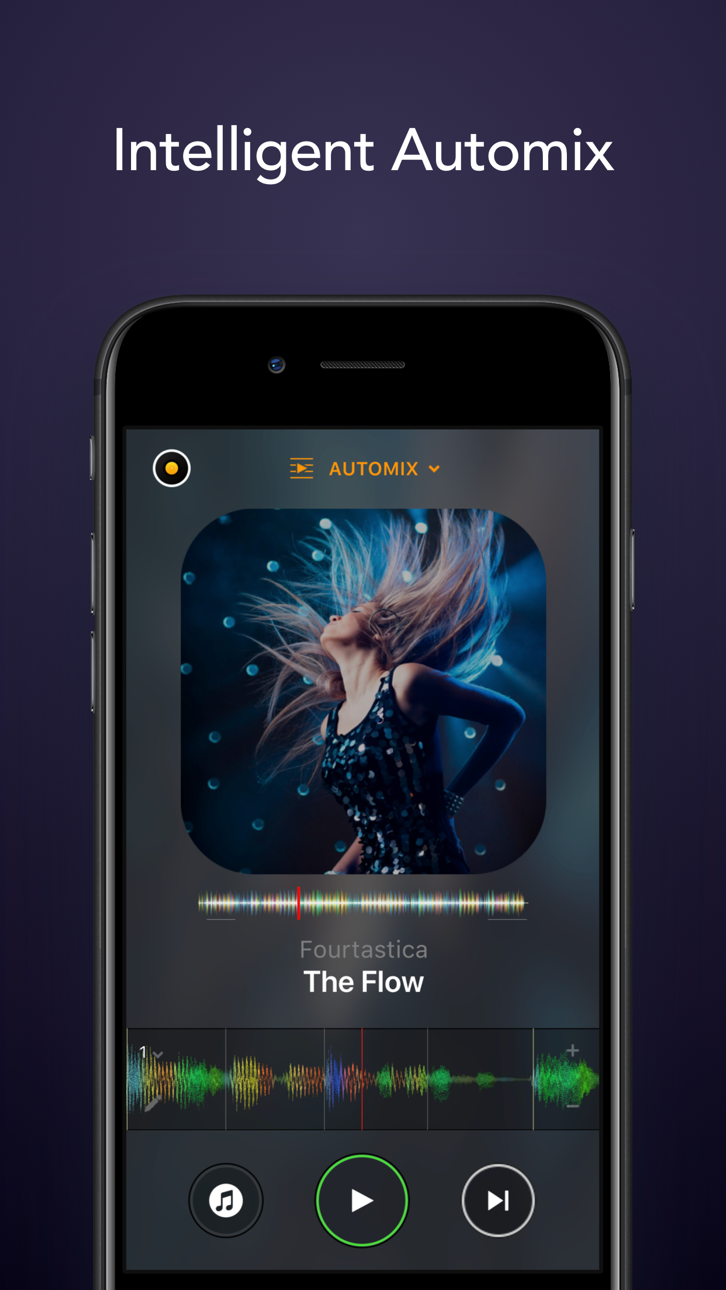
AUTOMIX
• Automatic, beat-matched mixes
• Queue and Playlist automation
NEURAL MIX™
• Isolate vocals, drums, and instrumentals in real time (not available with Apple Music or Spotify)
MUSIC PRODUCTION TOOLS
• Sequencer: create beats on top of your music live
• Looper: remix your music with up to 48 loops per track
• Beat-matched sequencing of drums and samples
• Extensive content library with 1000+ loops and samples.
HARDWARE INTEGRATION
• Plug-and-play integration with 100+ MIDI controllers by Pioneer DJ, AlphaTheta, Reloop, Hercules, Numark, Denon DJ
• Digital Vinyl System (DVS) Integration
• Advanced MIDI Learn to map any class-compliant MIDI controller
• Support for Bluetooth audio and MIDI
• Support for multi-channel USB audio interfaces and video output
POWERFUL AUDIO ENGINE
• Ableton Link integration
• High-quality mixer, filter, EQ, isolator, and limiter
• Advanced time-stretching and pitch shifting
• Over 40 built-in audio effects
• Live recording
ADVANCED AUDIO ANALYSIS
• Fluid Beat Grid: the world’s most sophisticated beat detection and sync engine
• Key detection
• Colored waveforms
• Auto-Gain
BUILT FOR iOS
• Accessible via VoiceOver
• Airplay, Apple Watch, and iCloud integration
The optional PRO subscription allows you to subscribe once and use djay Pro across all your Mac and iOS devices, including access to all PRO features, as well as 1000+ loops, samples, and visuals. Cancel anytime.
A supported streaming subscription and an internet connection are required to access songs from a streaming service in djay. No recording available for streamed songs. Neural Mix cannot be used when streaming from Apple Music or Spotify. Specific songs may not be available or accessible on your account or in your country. Streaming service availability and pricing may vary depending on country, currency and service.
Screenshots © der jeweiligen Inhaber · App Store



iOSGods ist nicht mit Apple Inc., Google LLC oder den Entwicklern der hier aufgeführten Apps verbunden und wird von ihnen weder unterstützt noch gesponsert. Apple, iOS und App Store sind Marken von Apple Inc. Android und Google Play sind Marken von Google LLC. Alle weiteren App-Namen, Symbole, Grafiken und Marken gehören ihren jeweiligen Inhabern.
- Nicht-Jailbroken/Jailed oder Jailbroken iPhone oder iPad.
- Sideloadly oder Alternativen.
- Computer mit Windows/macOS/Linux und installiertem iTunes.
SCHRITT 1: Lade die vorinstallierte .IPA-Datei über den obigen Link auf deinen Computer herunter. Zum Herunterladen aus der iOSGods-App siehe unser iOSGods App IPA Download-Tutorial mit Videobeispiel.
SCHRITT 2: Lade Sideloadly herunter und installiere es auf deinem Windows oder Mac.
SCHRITT 3: Öffne Sideloadly auf deinem Computer, verbinde dein iOS-Gerät und warte, bis dein Gerätename in Sideloadly erscheint.
SCHRITT 4: Sobald dein iDevice erkannt wird, ziehe die heruntergeladene gemoddete .IPA-Datei in die Sideloadly-Anwendung.
SCHRITT 5: Gib deine Apple-Account-E-Mail ein und drücke „Start". Du wirst dann nach deinem Passwort gefragt. Gib die erforderlichen Informationen ein.
SCHRITT 6: Warte, bis Sideloadly das Sideloading/Installieren der gehackten IPA abgeschlossen hat. Bei Problemen während der Installation lies bitte den Hinweis unten.
SCHRITT 7: Sobald die Installation abgeschlossen ist und die App auf deinem Home-Bildschirm angezeigt wird, musst du zu Einstellungen → Allgemein → Profile / VPN & Geräteverwaltung gehen. Tippe dort auf die E-Mail, die du in Schritt 6 eingegeben hast, und dann auf „Trust [email protected]".
SCHRITT 8: Gehe nun zu deinem Home-Bildschirm und öffne die neu installierte App – alles sollte einwandfrei funktionieren. Möglicherweise musst du weitere App-spezifische Anweisungen im Hack-Popup im Spiel befolgen.
HINWEIS: iOS/iPadOS 16 und höher: Du musst den Entwicklermodus aktivieren. Bei kostenlosen Apple Developer-Accounts musst du diesen Vorgang alle 7 Tage wiederholen. Bei Fragen oder Problemen lies bitte unsere Sideloadly-FAQ-Sektion im Thema.
Game Name iOS Mod IPA is an action adventure game enhanced with powerful gameplay boosts and quality-of-life improvements. Win battles faster, earn rewards quicker, and enjoy uninterrupted play without ads.
- Unlimited Gold - spend freely to unlock premium content
- Damage Multiplier - deal significantly more damage in combat
- Defense Multiplier - take less damage and survive longer
- Reward Multiplier - earn more loot from every battle
- Max Level - instantly reach the highest player rank
- No Ads - play without interruptions or advertisements
This app also comes with iGameGod, giving you access to Auto Touch to automate repetitive tasks, App Speed Manager for adjustable gameplay speed, Memory Engine value editing, and more powerful iOS game tools.
Lade Game Name Mod IPA über die obigen Links herunter. Tippe auf den Installations-Button und folge den Anweisungen, um diese iOS-App auf deinem iPhone, iPad oder Apple Silicon zu installieren.
Brauchst du mehr Hilfe In unseren iOSGods App häufig gestellten Fragen findest du ausführliche Antworten und Tipps zur Fehlerbehebung.
----------------------------------------------------------
--------------------------------------------------