Giriş Gerekli
Devam etmek için iOSGods hesabınızla giriş yapın.
Devam etmek için iOSGods hesabınızla giriş yapın.
Ücretsiz Ücretli Uygulama, Procreate for iPad'in tam profesyonel sanat stüdyosunun kilidini açın ve ödeme yapmayın. Bu değiştirilmiş iOS sürümü, tüm premium fırçalara, gelişmiş katman araçlarına ve güçlü Valkyrie grafik motoruna hiçbir ücret ödemeden erişim sağlar, böylece iPad'inizde istediğiniz zaman ve yerde etkileyici çizimler, zengin resimler ve güzel illüstrasyonlar oluşturabilirsiniz.
Bu uygulama ayrıca, tekrar eden görevleri otomatikleştirmek için Auto Touch, ayarlanabilir oyun hızı için App Speed Manager, Memory Engine ile değer düzenleme ve daha pek çok güçlü iOS oyun aracına erişim sağlayan iGameGod ile birlikte gelir.
Yukarıdaki bağlantılardan Procreate for iPad modded IPA indirin. Yükle düğmesine dokunup ekrandaki yönergeleri izleyerek bu iOS uygulama hack'ini iPhone, iPad veya Apple Silicon'a yükleyin.
Daha fazla yardıma mı ihtiyacınız var? Ayrıntılı yanıtlar ve sorun giderme ipuçları için iOSGods Uygulaması Sık Sorulan Sorular sayfamıza bakın.
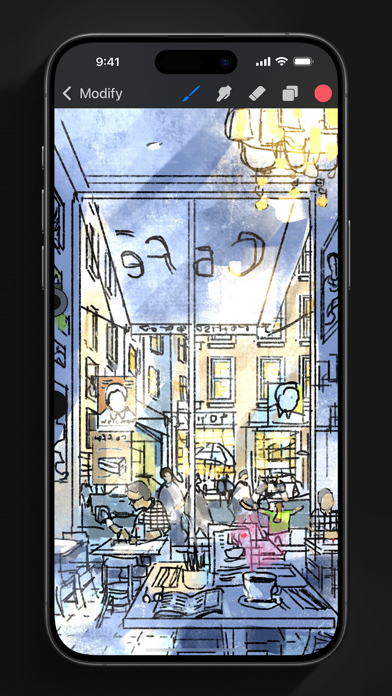
App of the Year winner Procreate Pocket is the most feature-packed and versatile art app ever designed for iPhone.
Procreate Pocket has everything you need to create expressive sketches, rich paintings, gorgeous illustrations, and beautiful animations. Offering hundreds of handmade brushes, a suite of intuitive artistic tools, an advanced layer system, and the powerful Valkyrie graphics engine. Work on the couch, on the train, at the beach, or while waiting in line for coffee.
It’s a complete art studio in the palm of your hand.
Highlights:
• High resolution canvases — up to 16k by 4k on compatible devices
• Intuitive Dark Mode interface made for iPhone
• Revolutionary QuickShape feature for perfect shapes
• Smooth and responsive smudge sampling
• Powered by Valkyrie, the lightning-fast 64-bit painting engine
• Create art in stunning 64-bit colour
• 250 levels of undo and redo
• Continuous auto-save — never lose work again
Breakthrough brushes:
• Packed with 100s of beautifully crafted brushes
• Brush sets keep your painting, sketching, and drawing brushes organised
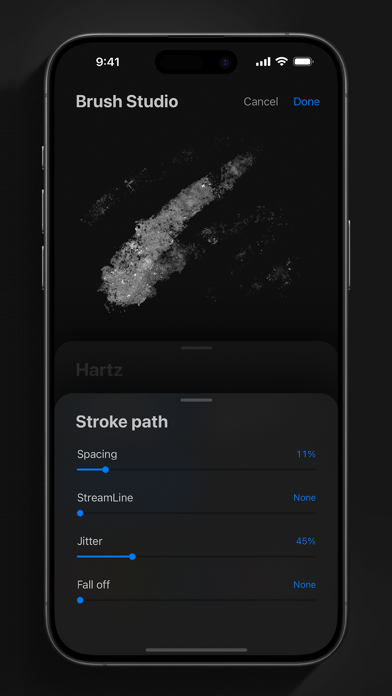
• Over 100 customisable settings for every brush
• Brush Studio — design custom brushes
• Import and export custom Procreate brushes
• Import Adobe® Photoshop® brushes, and run them faster than Photoshop®
Full-featured layering system:
• Layer your art for precise control over details and composition
• Create Layer and Clipping Masks for non-destructive editing
• Stay organised by combining layers into groups
• Transform objects simultaneously across multiple layers
• Access over 25 layer blend modes for industry-grade compositing
Colour without compromise:
• Fill your line work with ColorDrop
• Disc, Classic, Harmony, Value, and Palette colour panels
• Import colour profiles for colour matching
• Assign Colour Dynamics to any brush
Precision design tools:
• Add vector text to your illustrations
• Easily import all your favourite fonts
• Crop and resize your canvas for perfect composition
• Perspective, isometric, 2D, and symmetry visual guides
• Drawing Assist perfects your strokes in real time
• StreamLine smooths your strokes for beautiful lettering and expert inking
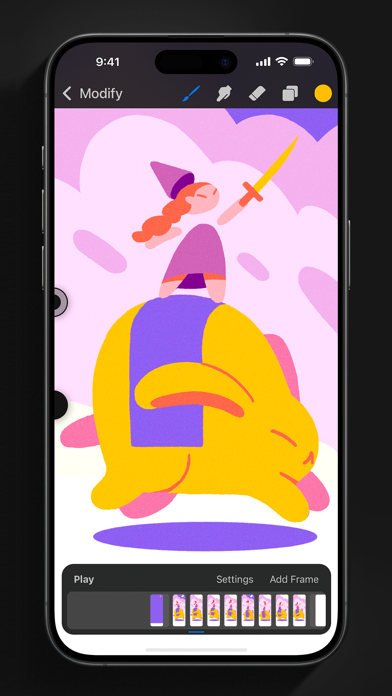
Animation Assist:
• Easy frame-by-frame animation with customisable onion skinning
• Create storyboards, GIFs, animatics, and simple animations
• Export your animations in the full resolution of your canvas
Dramatic finishing effects:
• Gradient Map — remap your image’s colours with a customisable gradient
• Glitch, Chromatic Aberration, Glow, and Halftone to add new dimensions to your work
• Gaussian and Motion Blur filters for depth and movement, or use Sharpen for perfect clarity
• Advanced Noise filter gives you more control for a classic, retro look
• Adjust Hue, Saturation, or Brightness in real time
• Powerful image adjustments including Colour Balance, Curves, and HSB
• Bring your art to life with the fun, intuitive, and creative Warp, Symmetry, and Liquify Dynamics
Time-lapse replay:
• Relive your creative journey with Procreate's celebrated Time-lapse Replay
• Export your Time-lapse recording in 4K for high-end video production
• Share a short, 30-second version of your Time-lapse on your socials
Reference Companion:
• Keep a full canvas or reference image with you at all times
• Paint on your face with AR
• Colour-pick right from the reference window
Import assets and share your creations:
• Import or export your art as Adobe® Photoshop® PSD files
• Import Adobe® ASE and ACO Colour Palettes
• Import images files such as JPG, PNG, and TIFF
• Drag and drop artworks, brushes, palettes, and fonts between applications
• Export to AirDrop, iCloud Drive, Photos, iTunes, Dropbox, Google Drive, Facebook, X (formerly Twitter), Instagram, TikTok, Weibo, Mail, and more
• Share your art as PDF, JPEG, PNG, TIFF, GIF, HEVC, or MP4 files

- Jailbreak'siz/normal ya da jailbreak'li iPhone veya iPad.
- Sideloadly veya alternatifleri.
- iTunes yüklü Windows/macOS/Linux çalıştıran bir bilgisayar.
ADIM 1: Yukarıdaki bağlantıdan önceden hacklenmiş .IPA dosyasını bilgisayarınıza indirin. iOSGods App üzerinden indirmek için video örneği de içeren iOSGods App IPA İndirme Kılavuzu bölümümüze göz atın.
ADIM 2: Sideloadly indirin ve Windows veya Mac'inize kurun.
ADIM 3: Bilgisayarınızda Sideloadly'yi açın, iOS cihazınızı bağlayın ve cihaz adınız Sideloadly'de görünene kadar bekleyin.
ADIM 4: iCihazınız tanındıktan sonra, indirdiğiniz modlu .IPA dosyasını sürükleyip Sideloadly uygulamasına bırakın.
ADIM 5: Apple Account e-posta adresinizi girin ve ardından "Start" düğmesine basın. Sonrasında sizden şifreniz istenecektir. Gerekli bilgileri girin.
ADIM 6: Sideloadly'nin hacklenmiş IPA'yı sideload edip yüklemesini bekleyin. Yükleme sırasında bir sorun olursa lütfen aşağıdaki notu okuyun.
ADIM 7: Yükleme tamamlandıktan ve uygulamayı Ana Ekranınızda gördükten sonra Ayarlar → Genel → Profiller / VPN ve Cihaz Yönetimi bölümüne gitmelisiniz. Burada 6. adımda girdiğiniz e-postaya dokunun ve ardından "[email protected]'a Güven" seçeneğine dokunun.
ADIM 8: Şimdi Ana Ekranınıza gidin ve yeni yüklediğiniz uygulamayı açın; her şey sorunsuz çalışmalıdır. Oyun içindeki hack açılır penceresinde uygulamaya özel ek talimatları takip etmeniz gerekebilir.
NOT: iOS/iPadOS 16 ve sonrasında Geliştirici Modu'nu etkinleştirmeniz gerekir. Ücretsiz Apple Developer hesapları için bu işlemi her 7 günde bir tekrarlamanız gerekir. Sorularınız veya sorunlarınız varsa konunun Sideloadly SSS bölümünü okuyun.