تسجيل الدخول مطلوب
سجّل الدخول بحساب iOSGods للمتابعة.
Hack Features:
- Fully unlocked
قم بتنزيل Whorl, Playful Art & Design Hack modded IPA من الروابط أعلاه. اضغط على زر التثبيت واتبع التعليمات لتثبيت هذا التعديل لـ iOS على iPhone أو iPad أو Apple Silicon.
هل تحتاج إلى مزيد من المساعدة؟ راجع الأسئلة الشائعة لتطبيق iOSGods للحصول على إجابات مفصلة ونصائح لاستكشاف الأخطاء.
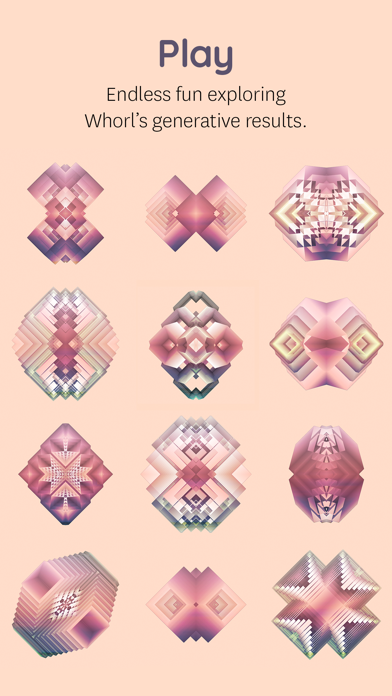
Playfully create original graphic images, generative art, and animation. Explore shapes, styles, textures, colors, patterns, and symmetry for fun, relaxation and online sharing.
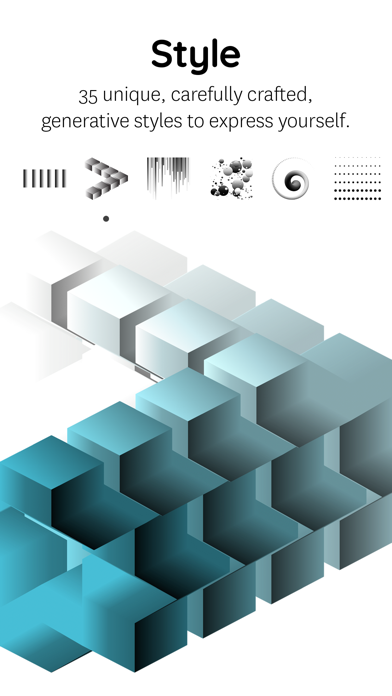
STYLES
35 unique, carefully crafted generative styles to express yourself. Combine with any of the shapes and colors to play without end.
SHAPES
Explore over a hundred variations. Customize your whorl with square, triangle, round, number & letter shapes.
COLORS
Whorl’s coloring system has a unique way of applying colors to a style. Select the colors yourself or let whorl choose superb color combinations.
SCULPT
Change volume, twist, rotate and glitch. Physical manipulation, as fun and easy as playing with clay.
PATTERN
Wander the sphere of geometric patterns. Try each of the 4 different pattern types using your whorl image as the source. Each pattern type can be resized and rotated in real-time to create a wealth of variations.
REFLECT
Create symmetrical spectacle using whorl's multi-axis mirror. Select up to 4 mirror options and rotate the axis lines to reflect your Whorl.
PHOTO
Mix your own image or photo with a Whorl creation right in the app. Choose out of 8 blend modes, change Contrast, Brightness, and Grayscale levels to tune your photo into wicked art. Use the Whorl Photo feature to create artistic photos, mix two whorl images, overlay textures, patterns, logo’s, and whatever one comes up with.
The Photo overlay and pattern feature requires iOS 11 or newer. Due to hardware limitations, the devices that don’t support the Photo feature are iPhone 5s, iPad Air, iPad mini 2, iPad mini 3.
Privacy policy
http://wwwhorl.com/privacy-policy.html
HIGH RESOLUTION
With a Whorl Pro subscription, you have unlimited access to save a 4k image of your beautiful whorl creations. High-res images are great to find beautiful cut-outs & details to post online, high-res projections and making your own prints.
RECORD
Record and conduct your whorl in motion! Toggle volume, rotation, and glitch to change how your whorl will be automatically animated. Record directly inside whorl to export a video. The Screen Recording feature requires iOS 11 or newer.
SHARE
Save your image as a better rendered 1024 x 1024 pixel image to share online. We’re sharing regularly on Instagram. Find and connect with us @whorl or tag your shared whorl creations using #whorl. We love to see what you create.
PRO
ry the app as long as you like using the free styles and shapes. You get to play with the Pro elements for a certain amount of actions. To continue using all shapes, styles, colors, remove watermarks and export high-res images please consider purchasing Whorl Pro. You can purchase Whorl Pro once, or you can purchase a subscription and get Whorl Pro for a limited time.
The subscription length is either per month or per year. A yearly subscription gives you a substantial discount. Payment will be charged to iTunes Account at confirmation of purchase
. Subscription automatically renews unless auto-renew is turned off at least 24-hours before the end of the current period
. Your account will be charged for renewal within 24-hours prior to the end of the current period, and identify the cost of the renewal
. Subscriptions may be managed by the user and auto-renewal may be turned off by going to the user’s Account Settings after purchase.
Terms of service
http://wwwhorl.com/terms-of-service.html
GET IN TOUCH
For any questions or comments, we love to hear from you.
Email: [email protected]
Instagram: Follow us @whorl for regular examples and inspiration.
- iPhone أو iPad بجيلبريك أو بدون جيلبريك.
- Sideloadly أو بدائلها.
- كمبيوتر يعمل بنظام Windows/macOS/Linux مع تثبيت iTunes.
الخطوة 1: قم بتنزيل ملف .IPA المعدّل مسبقًا من الرابط أعلاه إلى الكمبيوتر الخاص بك. للتنزيل من تطبيق iOSGods App، اطلع على دليل تنزيل IPA من تطبيق iOSGods App الذي يتضمن مثالًا بالفيديو.
الخطوة 2: قم بتنزيل Sideloadly وتثبيته على جهاز Windows أو Mac.
الخطوة 3: افتح Sideloadly على الكمبيوتر، ووصّل جهاز iOS الخاص بك، وانتظر حتى يظهر اسم جهازك داخل Sideloadly.
الخطوة 4: بمجرد التعرّف على جهاز iDevice الخاص بك، اسحب ملف .IPA المعدّل الذي قمت بتنزيله وأفلِته داخل تطبيق Sideloadly.
الخطوة 5: أدخل البريد الإلكتروني لحساب Apple Account الخاص بك، ثم اضغط على «Start». سيُطلب منك بعد ذلك إدخال كلمة المرور. تابع وأدخل المعلومات المطلوبة.
الخطوة 6: انتظر حتى ينتهي Sideloadly من تحميل/تثبيت ملف IPA المعدّل. في حال واجهت أي مشاكل أثناء التثبيت، يرجى قراءة الملاحظة أدناه.
الخطوة 7: بعد اكتمال التثبيت ورؤية التطبيق على الشاشة الرئيسية، انتقل إلى Settings → General → Profiles / VPN & Device Management. ثم اضغط على البريد الإلكتروني الذي أدخلته في الخطوة 6، ثم اضغط على «الوثوق بـ [email protected]».
الخطوة 8: الآن انتقل إلى الشاشة الرئيسية وافتح التطبيق الذي تم تثبيته للتو وسيعمل كل شيء بشكل صحيح. قد تحتاج إلى اتباع تعليمات إضافية خاصة بكل تطبيق داخل النافذة المنبثقة للتعديل أثناء اللعب.
ملاحظة: بدءًا من iOS/iPadOS 16 وما بعده، يجب تفعيل وضع المطور (Developer Mode). بالنسبة لحسابات Apple Developer المجانية، ستحتاج إلى تكرار هذه العملية كل 7 أيام. إذا كانت لديك أي أسئلة أو مشاكل، يرجى قراءة قسم الأسئلة الشائعة حول Sideloadly في الموضوع.