Inicio de sesión requerido
Inicia sesión con tu cuenta de iOSGods para continuar.
Inicia sesión con tu cuenta de iOSGods para continuar.
Crea arte generativo lúdico y animaciones con Whorl, Playful Art & Design Hack, una aplicación de diseño gráfico completamente desbloqueada mediante este hack Mod IPA. Explora 35 estilos únicos, más de cien variaciones de formas y combinaciones de colores personalizadas para diseñar obras de arte originales para relajación y compartir, con todas las funciones premium accesibles sin restricciones.
- Completamente desbloqueado → todas las funciones y estilos premium disponibles
Esta app también incluye iGameGod, que te ofrece acceso a Auto Touch para automatizar tareas repetitivas, App Speed Manager para ajustar la velocidad del juego, edición de valores con Memory Engine y más potentes herramientas para juegos de iOS.
Descarga Whorl, Playful Art & Design Hack modded IPA desde los enlaces de arriba. Toca el botón de instalación y sigue las instrucciones para instalar este hack iOS en tu iPhone, iPad o Mac con Apple Silicon.
¿Necesitas más ayuda? Consulta nuestras Preguntas frecuentes de la app iOSGods para respuestas detalladas y consejos de solución de problemas.
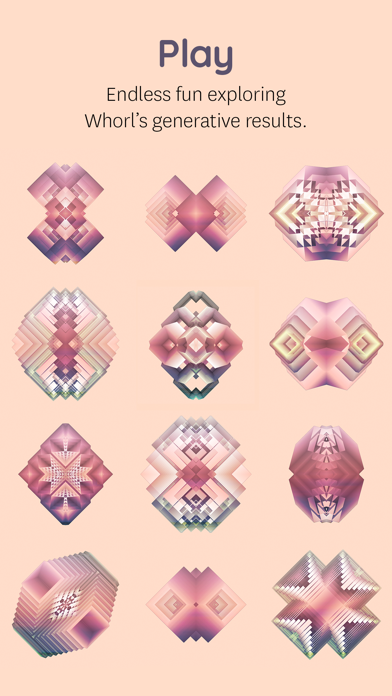
Playfully create original graphic images, generative art, and animation. Explore shapes, styles, textures, colors, patterns, and symmetry for fun, relaxation and online sharing.
STYLES
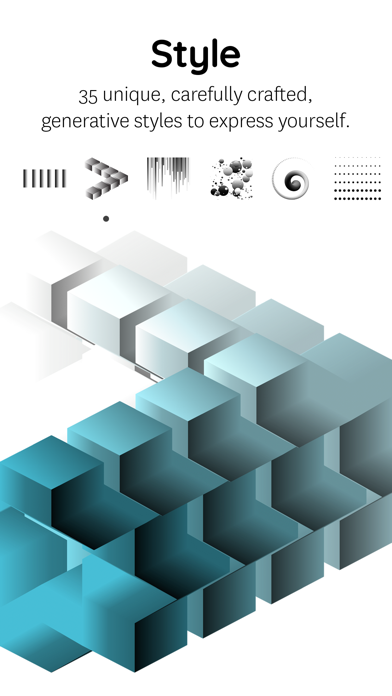
35 unique, carefully crafted generative styles to express yourself. Combine with any of the shapes and colors to play without end.
SHAPES
Explore over a hundred variations. Customize your whorl with square, triangle, round, number & letter shapes.
COLORS
Whorl’s coloring system has a unique way of applying colors to a style. Select the colors yourself or let whorl choose superb color combinations.
SCULPT
Change volume, twist, rotate and glitch. Physical manipulation, as fun and easy as playing with clay.
PATTERN
Wander the sphere of geometric patterns. Try each of the 4 different pattern types using your whorl image as the source. Each pattern type can be resized and rotated in real-time to create a wealth of variations.
REFLECT
Create symmetrical spectacle using whorl's multi-axis mirror. Select up to 4 mirror options and rotate the axis lines to reflect your Whorl.
PHOTO
Mix your own image or photo with a Whorl creation right in the app. Choose out of 8 blend modes, change Contrast, Brightness, and Grayscale levels to tune your photo into wicked art. Use the Whorl Photo feature to create artistic photos, mix two whorl images, overlay textures, patterns, logo’s, and whatever one comes up with.
The Photo overlay and pattern feature requires iOS 11 or newer. Due to hardware limitations, the devices that don’t support the Photo feature are iPhone 5s, iPad Air, iPad mini 2, iPad mini 3.
Privacy policy
http://wwwhorl.com/privacy-policy.html
HIGH RESOLUTION
With a Whorl Pro subscription, you have unlimited access to save a 4k image of your beautiful whorl creations. High-res images are great to find beautiful cut-outs & details to post online, high-res projections and making your own prints.
RECORD
Record and conduct your whorl in motion! Toggle volume, rotation, and glitch to change how your whorl will be automatically animated. Record directly inside whorl to export a video. The Screen Recording feature requires iOS 11 or newer.
SHARE
Save your image as a better rendered 1024 x 1024 pixel image to share online. We’re sharing regularly on Instagram. Find and connect with us @whorl or tag your shared whorl creations using #whorl. We love to see what you create.
PRO
Try the app as long as you like using the free styles and shapes. You get to play with the Pro elements for a certain amount of actions. To continue using all shapes, styles, colors, remove watermarks and export high-res images please consider purchasing Whorl Pro. You can purchase Whorl Pro once, or you can purchase a subscription and get Whorl Pro for a limited time.
The subscription length is either per month or per year. A yearly subscription gives you a substantial discount. Payment will be charged to iTunes Account at confirmation of purchase
. Subscription automatically renews unless auto-renew is turned off at least 24-hours before the end of the current period
. Your account will be charged for renewal within 24-hours prior to the end of the current period, and identify the cost of the renewal
. Subscriptions may be managed by the user and auto-renewal may be turned off by going to the user’s Account Settings after purchase.
Terms of service
http://wwwhorl.com/terms-of-service.html
GET IN TOUCH
For any questions or comments, we love to hear from you.
Email: [email protected]
Instagram: Follow us @whorl for regular examples and inspiration.
- iPhone o iPad con o sin Jailbreak.
- Sideloadly u otras alternativas.
- Ordenador con Windows/macOS/Linux e iTunes instalado.
PASO 1: Descargue el archivo .IPA pre-modificado desde el enlace de arriba a su ordenador. Para descargarlo desde la iOSGods App, consulte nuestro Tutorial de descarga del IPA desde la iOSGods App, que incluye un ejemplo en vídeo.
PASO 2: Descargue Sideloadly e instálelo en su Windows o Mac.
PASO 3: Abra Sideloadly en su ordenador, conecte su dispositivo iOS y espere hasta que el nombre del dispositivo aparezca en Sideloadly.
PASO 4: Una vez que su iDevice sea reconocido, arrastre el archivo .IPA modificado que descargó y suéltelo en la aplicación Sideloadly.
PASO 5: Introduzca el correo electrónico de su Apple Account y, a continuación, pulse «Start». Le pedirá que introduzca su contraseña. Proporcione la información solicitada.
PASO 6: Espere a que Sideloadly termine de hacer sideload/instalar el IPA modificado. Si surgen problemas durante la instalación, por favor lea la nota a continuación.
PASO 7: Una vez completada la instalación y al ver la app en la pantalla de inicio, deberá ir a Ajustes → General → Perfiles / VPN y Gestión de Dispositivos. Una vez allí, toque el correo electrónico que introdujo en el paso 6 y, después, toque en «Confiar en [email protected]».
PASO 8: Ahora vaya a la pantalla de inicio y abra la app recién instalada; todo debería funcionar correctamente. Es posible que tenga que seguir instrucciones adicionales específicas de cada app dentro del popup del hack en el juego.
NOTA: En iOS/iPadOS 16 y posteriores, debe activar el Modo Desarrollador. Para cuentas gratuitas de Apple Developer, deberá repetir este proceso cada 7 días. Si tiene alguna pregunta o problema, lea nuestra sección de Preguntas Frecuentes de Sideloadly del tema.