ต้องเข้าสู่ระบบ
เข้าสู่ระบบด้วยบัญชี iOSGods เพื่อดำเนินการต่อ
เข้าสู่ระบบด้วยบัญชี iOSGods เพื่อดำเนินการต่อ
สร้างศิลปะและภาพเคลื่อนไหวที่สร้างสรรค์อย่างสนุกสนานด้วย Whorl, Playful Art & Design Hack ซึ่งเป็นแอปออกแบบกราฟิกที่ปลดล็อกอย่างสมบูรณ์ผ่าน Mod IPA นี้ สำรวจสไตล์ที่ไม่ซ้ำกัน 35 แบบ รูปแบบรูปร่างกว่าร้อยแบบ และการรวมสีที่กำหนดเองเพื่อออกแบบงานศิลปะต้นฉบับสำหรับการผ่อนคลายและแชร์ โดยสามารถเข้าถึงฟีเจอร์พรีเมียมทั้งหมดโดยไม่มีข้อจำกัด
- ปลดล็อกอย่างสมบูรณ์ → ฟีเจอร์พรีเมียมและสไตล์ทั้งหมดพร้อมใช้งาน
แอปนี้ยังมาพร้อมกับ iGameGod ซึ่งช่วยให้คุณเข้าถึง Auto Touch สำหรับการทำงานซ้ำ ๆ โดยอัตโนมัติ, App Speed Manager สำหรับปรับความเร็วของเกม, การแก้ไขค่าด้วย Memory Engine และเครื่องมือสำหรับเกม iOS ที่ทรงพลังอื่น ๆ อีกมากมาย
ดาวน์โหลด Whorl, Playful Art & Design Hack modded IPA จากลิงก์ด้านบน แตะปุ่มติดตั้งและทำตามคำแนะนำบนหน้าจอเพื่อติดตั้งแฮ็กแอป iOS นี้บน iPhone, iPad หรือ Apple Silicon
ต้องการความช่วยเหลือเพิ่มเติม? ดู คำถามที่พบบ่อยของแอป iOSGods สำหรับคำตอบโดยละเอียดและเคล็ดลับการแก้ไขปัญหา
Playfully create original graphic images, generative art, and animation. Explore shapes, styles, textures, colors, patterns, and symmetry for fun, relaxation and online sharing.
STYLES
35 unique, carefully crafted generative styles to express yourself. Combine with any of the shapes and colors to play without end.
SHAPES
Explore over a hundred variations. Customize your whorl with square, triangle, round, number & letter shapes.
COLORS
Whorl’s coloring system has a unique way of applying colors to a style. Select the colors yourself or let whorl choose superb color combinations.
SCULPT
Change volume, twist, rotate and glitch. Physical manipulation, as fun and easy as playing with clay.
PATTERN
Wander the sphere of geometric patterns. Try each of the 4 different pattern types using your whorl image as the source. Each pattern type can be resized and rotated in real-time to create a wealth of variations.
REFLECT
Create symmetrical spectacle using whorl's multi-axis mirror. Select up to 4 mirror options and rotate the axis lines to reflect your Whorl.
PHOTO
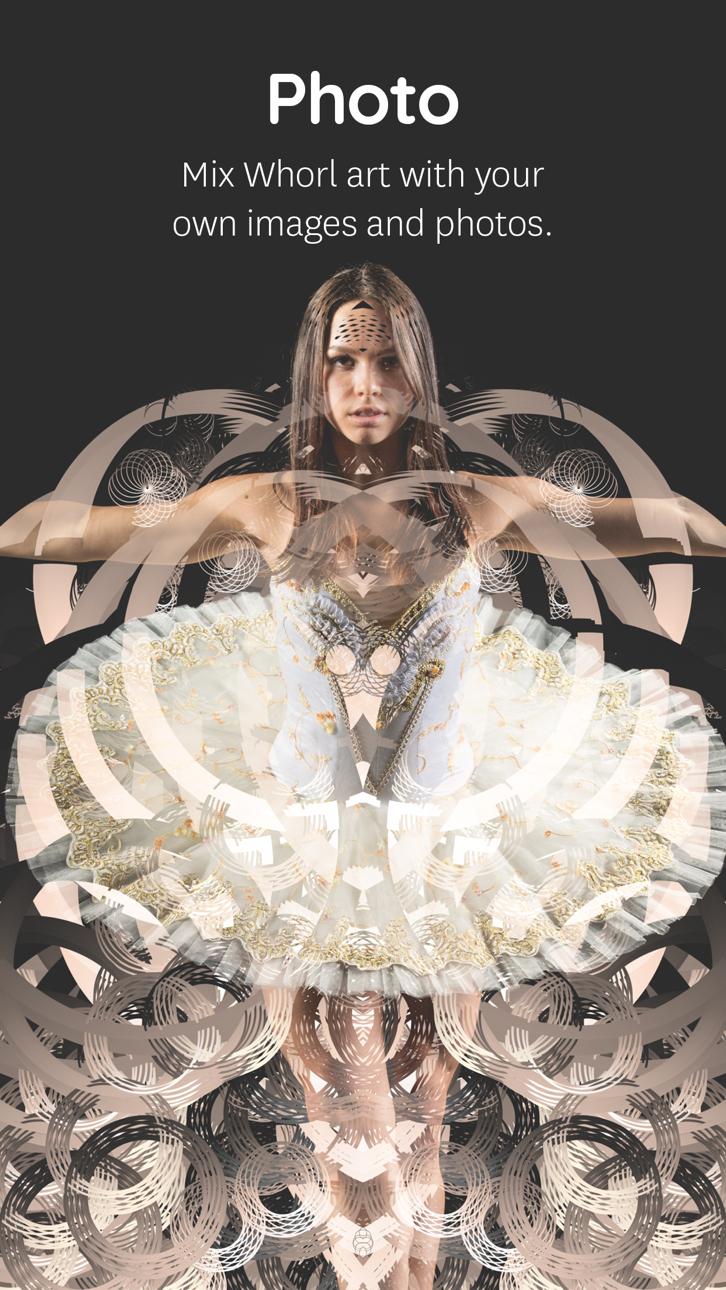
Mix your own image or photo with a Whorl creation right in the app. Choose out of 8 blend modes, change Contrast, Brightness, and Grayscale levels to tune your photo into wicked art. Use the Whorl Photo feature to create artistic photos, mix two whorl images, overlay textures, patterns, logo’s, and whatever one comes up with.
The Photo overlay and pattern feature requires iOS 11 or newer. Due to hardware limitations, the devices that don’t support the Photo feature are iPhone 5s, iPad Air, iPad mini 2, iPad mini 3.
HIGH RESOLUTION
With a Whorl Pro subscription, you have unlimited access to save a 4k image of your beautiful whorl creations. High-res images are great to find beautiful cut-outs & details to post online, high-res projections and making your own prints.
RECORD
Record and conduct your whorl in motion! Toggle volume, rotation, and glitch to change how your whorl will be automatically animated. Record directly inside whorl to export a video. The Screen Recording feature requires iOS 11 or newer.
SHARE
Save your image as a better rendered 1024 x 1024 pixel image to share online. We’re sharing regularly on Instagram. Find and connect with us @whorl or tag your shared whorl creations using #whorl. We love to see what you create.
PRO
Try the app as long as you like using the free styles and shapes. You get to play with the Pro elements for a certain amount of actions. To continue using all shapes, styles, colors, remove watermarks and export high-res images please consider purchasing Whorl Pro. You can purchase Whorl Pro once, or you can purchase a subscription and get Whorl Pro for a limited time.
The subscription length is either per month or per year. A yearly subscription gives you a substantial discount. Payment will be charged to iTunes Account at confirmation of purchase
. Subscription automatically renews unless auto-renew is turned off at least 24-hours before the end of the current period
. Your account will be charged for renewal within 24-hours prior to the end of the current period, and identify the cost of the renewal
. Subscriptions may be managed by the user and auto-renewal may be turned off by going to the user’s Account Settings after purchase.
GET IN TOUCH
For any questions or comments, we love to hear from you.
Email: [email protected]
Instagram: Follow us @whorl for regular examples and inspiration.
ภาพหน้าจอ © เจ้าของแต่ละราย · App Store



iOSGods ไม่มีความเกี่ยวข้อง ไม่ได้รับการรับรอง และไม่ได้รับการสนับสนุนจาก Apple Inc., Google LLC หรือผู้พัฒนาแอปที่แสดงไว้ที่นี่ Apple, iOS และ App Store เป็นเครื่องหมายการค้าของ Apple Inc. Android และ Google Play เป็นเครื่องหมายการค้าของ Google LLC ชื่อแอป ไอคอน ภาพ และเครื่องหมายการค้าอื่นทั้งหมดเป็นทรัพย์สินของเจ้าของแต่ละราย
- iPhone หรือ iPad ที่ไม่ได้เจลเบรก/ไม่ได้เจลเบรก หรือเจลเบรกแล้ว
- Sideloadly หรือทางเลือกอื่น
- คอมพิวเตอร์ที่ใช้ Windows/macOS/Linux และติดตั้ง iTunes ไว้
ขั้นตอนที่ 1: ดาวน์โหลดไฟล์ .IPA ที่แฮกไว้ล่วงหน้าจากลิงก์ด้านบนลงในคอมพิวเตอร์ของคุณ หากต้องการดาวน์โหลดจากแอป iOSGods โปรดดู วิธีดาวน์โหลด IPA ในแอป iOSGods ซึ่งมีตัวอย่างวิดีโอประกอบ
ขั้นตอนที่ 2: ดาวน์โหลด Sideloadly แล้วติดตั้งบน Windows หรือ Mac ของคุณ
ขั้นตอนที่ 3: เปิด Sideloadly บนคอมพิวเตอร์ เชื่อมต่ออุปกรณ์ iOS แล้วรอจนกว่าชื่ออุปกรณ์ของคุณจะปรากฏใน Sideloadly
ขั้นตอนที่ 4: เมื่อ iDevice ของคุณถูกตรวจพบแล้ว ให้ลากไฟล์ .IPA ที่ม็อดมาวางลงในโปรแกรม Sideloadly
ขั้นตอนที่ 5: กรอกอีเมล Apple Account ของคุณ จากนั้นกด "Start" ระบบจะถามรหัสผ่าน กรอกข้อมูลที่จำเป็นให้เรียบร้อย
ขั้นตอนที่ 6: รอจนกว่า Sideloadly จะ sideload/ติดตั้งไฟล์ IPA ที่แฮกเสร็จ หากเกิดปัญหาระหว่างติดตั้ง โปรดอ่านหมายเหตุด้านล่าง
ขั้นตอนที่ 7: เมื่อการติดตั้งเสร็จสิ้นและเห็นแอปบนหน้าจอหลักแล้ว ให้ไปที่ การตั้งค่า → ทั่วไป → โปรไฟล์ / VPN และการจัดการอุปกรณ์ จากนั้นแตะที่อีเมลที่คุณกรอกในขั้นตอนที่ 6 แล้วแตะ "เชื่อถือ [email protected]"
ขั้นตอนที่ 8: จากนั้นไปที่หน้าจอหลักและเปิดแอปที่ติดตั้งใหม่ ทุกอย่างควรทำงานได้ปกติ คุณอาจต้องทำตามคำแนะนำเพิ่มเติมเฉพาะแอปในป๊อปอัปของม็อดในเกม
หมายเหตุ: สำหรับ iOS/iPadOS 16 ขึ้นไป คุณต้อง เปิดโหมดนักพัฒนา (Developer Mode) สำหรับบัญชี Apple Developer แบบฟรี คุณต้องทำขั้นตอนนี้ซ้ำทุก 7 วัน หากมีคำถามหรือพบปัญหา โปรดอ่าน หัวข้อ FAQ ของ Sideloadly ในกระทู้
Game Name iOS Mod IPA is an action adventure game enhanced with powerful gameplay boosts and quality-of-life improvements. Win battles faster, earn rewards quicker, and enjoy uninterrupted play without ads.
- Unlimited Gold - spend freely to unlock premium content
- Damage Multiplier - deal significantly more damage in combat
- Defense Multiplier - take less damage and survive longer
- Reward Multiplier - earn more loot from every battle
- Max Level - instantly reach the highest player rank
- No Ads - play without interruptions or advertisements
This app also comes with iGameGod, giving you access to Auto Touch to automate repetitive tasks, App Speed Manager for adjustable gameplay speed, Memory Engine value editing, and more powerful iOS game tools.
ดาวน์โหลด Game Name Mod IPA จากลิงก์ด้านบน แตะปุ่มติดตั้งและทำตามคำแนะนำบนหน้าจอเพื่อติดตั้งแฮ็กแอป iOS นี้บน iPhone, iPad หรือ Apple Silicon
ต้องการความช่วยเหลือเพิ่มเติม ดู คำถามที่พบบ่อยของแอป iOSGods สำหรับคำตอบโดยละเอียดและเคล็ดลับการแก้ไขปัญหา
----------------------------------------------------------
--------------------------------------------------