Cần đăng nhập
Đăng nhập bằng tài khoản iOSGods để tiếp tục.
Đăng nhập bằng tài khoản iOSGods để tiếp tục.
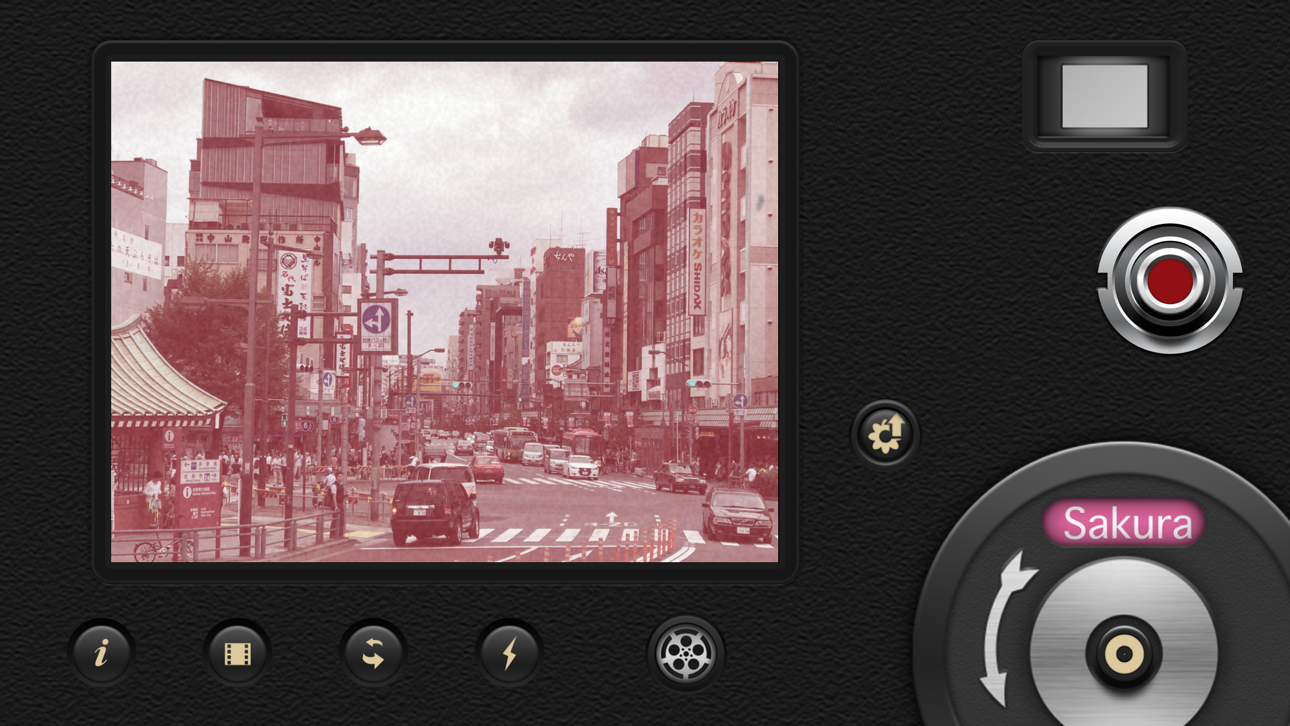
Quay video với sự quyến rũ hoài cổ của phim 8mm cổ điển bằng cách sử dụng phiên bản được sửa đổi của 8mm Vintage Camera, một Mod IPA mở khóa ứng dụng trả phí miễn phí. Ứng dụng cho phép bạn quay video lên đến 4K HD với các hiệu ứng cổ điển thời gian thực như bụi, vết xước, rò rỉ ánh sáng và rung khung được áp dụng ngay lập tức khi bạn quay phim. Những gì bạn thấy trong kính ngắm chính xác là những gì bạn nhận được, với bản xem trước trực tiếp đầy đủ của mọi hiệu ứng retro.
- Ứng dụng Trả phí Miễn phí → truy cập đầy đủ mà không cần mua
Ứng dụng này cũng đi kèm với iGameGod, cho phép bạn truy cập Auto Touch để tự động hóa các thao tác lặp lại, App Speed Manager để điều chỉnh tốc độ chơi game, chỉnh sửa giá trị bằng Memory Engine, và nhiều công cụ mạnh mẽ khác cho game iOS.
Tải 8mm Vintage Camera modded IPA từ các liên kết ở trên. Nhấn nút cài đặt và làm theo hướng dẫn để cài bản hack iOS lên iPhone, iPad hoặc Apple Silicon.
Cần thêm trợ giúp? Hãy xem Câu hỏi thường gặp ứng dụng iOSGods để có câu trả lời chi tiết và mẹo khắc phục sự cố.
8mm is so realistic it was even used to film scenes in the Oscar-winning documentary Searching for Sugar Man!
We have established the de facto standard of real-time retro film emulation. It was featured by Apple in App of the Day, App of the Week, In the Director's Chair, App Store Essentials, etc.
8mm Vintage Camera captures the beauty and magic of old-school vintage movies right through your viewfinder. Dust and scratches, retro colors, flickering, light leaks, and even frame shake, all can be instantly added with a single tap of the finger.
SHOOT BOTH PHOTOS AND VIDEOS WITH SOPHISTICATED LIVE EFFECTS
• Combine effects of film color, halation, dust & scratch, film grain, and softening to create authentic old-school movies
• Adjust the strength of the effects to achieve your own unique visual style
• 10 Lenses (frame) effects: Projector, Vignetting, Light Leak, Color Fringing, Super 8, Screen, 16mm, Tube, color negatives of Super 8 and 16mm
• 21 Retro & Aged Films: 1920, Noir, 60s, 70s, Sakura, XPro, Siena, Pela, Indigo, Tuscan, Two-Color, 2-Strip, 3X, and monochromes
• Additional 21 filters that emulate real historical films and expired films - available with the 8mm Pro subscription
• Jitter Button to imitate real 8mm projectors frame shakes
• Sound Switch to add projector sound for extra authenticity or mute the video for a silent movie effect.
• Up to 4K 30fps with original unfiltered video recording on newer devices
A COMPACT EDITOR FOR MOVIE CREATION
- Apply film and frame effects to clips
- Trim video, pan & zoom photo
- Add a soundtrack from your music library
- Choose from 5 unique themes with matching titles, transitions
8MM PRO SUBSCRIPTION
- You can subscribe or make a one-time purchase for unlimited access to all current filters and future updates
- Start your subscription with a free 7-day trial. Once the trial is over, you’ll be charged an annual subscription fee
- Your subscription will automatically renew unless auto-renew is turned off at least 24 hours before the end of the current period. You can go to your Settings > Apple ID > Subscriptions to turn auto-renew off
Ảnh chụp © chủ sở hữu tương ứng · App Store


iOSGods không liên kết, không được chứng thực hay tài trợ bởi Apple Inc., Google LLC hoặc các nhà phát triển của những ứng dụng được liệt kê ở đây. Apple, iOS và App Store là thương hiệu của Apple Inc. Android và Google Play là thương hiệu của Google LLC. Mọi tên ứng dụng, biểu tượng, hình ảnh và thương hiệu khác đều thuộc về chủ sở hữu tương ứng.

- iPhone hoặc iPad chưa jailbreak/đã đóng hoặc đã jailbreak.
- Sideloadly hoặc các lựa chọn thay thế.
- Máy tính chạy Windows/macOS/Linux đã cài iTunes.
BƯỚC 1: Tải tệp .IPA đã được hack sẵn từ liên kết phía trên về máy tính của bạn. Để tải từ iOSGods App, hãy xem Hướng dẫn tải IPA bằng iOSGods App của chúng tôi, có kèm ví dụ bằng video.
BƯỚC 2: Tải Sideloadly và cài đặt trên Windows hoặc Mac của bạn.
BƯỚC 3: Mở Sideloadly trên máy tính, kết nối thiết bị iOS của bạn và chờ cho đến khi tên thiết bị hiển thị trong Sideloadly.
BƯỚC 4: Khi thiết bị iOS của bạn đã được nhận diện, hãy kéo tệp .IPA đã chỉnh sửa mà bạn tải về và thả vào ứng dụng Sideloadly.
BƯỚC 5: Nhập email Apple Account của bạn, sau đó nhấn "Start." Bạn sẽ được yêu cầu nhập mật khẩu. Hãy cung cấp các thông tin cần thiết.
BƯỚC 6: Chờ Sideloadly hoàn tất quá trình sideload/cài đặt tệp IPA đã hack. Nếu gặp sự cố trong quá trình cài đặt, vui lòng đọc lưu ý bên dưới.
BƯỚC 7: Khi cài đặt hoàn tất và bạn thấy ứng dụng trên Màn hình chính, bạn cần truy cập Cài đặt → Cài đặt chung → Hồ sơ / VPN & Quản lý thiết bị. Tại đó, nhấn vào email bạn đã nhập ở bước 6, rồi nhấn "Tin cậy [email protected]".
BƯỚC 8: Bây giờ hãy về Màn hình chính và mở ứng dụng vừa cài đặt, mọi thứ sẽ hoạt động bình thường. Bạn có thể cần làm theo hướng dẫn riêng của từng ứng dụng trong cửa sổ popup của bản hack trong game.
LƯU Ý: Trên iOS/iPadOS 16 trở lên, bạn phải bật Chế độ nhà phát triển. Với tài khoản Apple Developer miễn phí, bạn sẽ cần lặp lại quy trình này mỗi 7 ngày. Nếu bạn có thắc mắc hoặc gặp sự cố, hãy đọc mục FAQ về Sideloadly trong chủ đề của chúng tôi.
Game Name iOS Mod IPA is an action adventure game enhanced with powerful gameplay boosts and quality-of-life improvements. Win battles faster, earn rewards quicker, and enjoy uninterrupted play without ads.
- Unlimited Gold - spend freely to unlock premium content
- Damage Multiplier - deal significantly more damage in combat
- Defense Multiplier - take less damage and survive longer
- Reward Multiplier - earn more loot from every battle
- Max Level - instantly reach the highest player rank
- No Ads - play without interruptions or advertisements
This app also comes with iGameGod, giving you access to Auto Touch to automate repetitive tasks, App Speed Manager for adjustable gameplay speed, Memory Engine value editing, and more powerful iOS game tools.
Tải Game Name Mod IPA từ các liên kết ở trên. Nhấn nút cài đặt và làm theo hướng dẫn để cài bản hack iOS lên iPhone, iPad hoặc Apple Silicon.
Cần thêm trợ giúp Hãy xem Câu hỏi thường gặp ứng dụng iOSGods để có câu trả lời chi tiết và mẹo khắc phục sự cố.
----------------------------------------------------------
--------------------------------------------------