Accesso richiesto
Accedi con il tuo account iOSGods per continuare.
Accedi con il tuo account iOSGods per continuare.
Cattura video con il fascino nostalgico della pellicola vintage 8mm usando questa versione modificata di 8mm Vintage Camera, un Mod IPA che sblocca l'app a pagamento gratuitamente. L'app ti permette di registrare fino a 4K HD con effetti vintage in tempo reale come polvere, graffi, perdite di luce e tremolii di fotogrammi applicati istantaneamente mentre filmi. Quello che vedi nel mirino è esattamente quello che ottieni, con anteprima dal vivo completa di ogni effetto retrò.
- App a Pagamento Gratuita → accesso completo senza acquisto
Questa app include anche iGameGod, che ti offre accesso ad Auto Touch per automatizzare attività ripetitive, App Speed Manager per regolare la velocità di gioco, modifica dei valori con Memory Engine e altri potenti strumenti per giochi iOS.
Scarica 8mm Vintage Camera modded IPA dai link sopra. Tocca il pulsante di installazione e segui le istruzioni per installare questo hack iOS sul tuo iPhone, iPad o Mac con Apple Silicon.
Hai bisogno di altro aiuto? Consulta le nostre Domande frequenti sull'app iOSGods per risposte dettagliate e consigli per la risoluzione dei problemi.
8mm is so realistic it was even used to film scenes in the Oscar-winning documentary Searching for Sugar Man!
We have established the de facto standard of real-time retro film emulation. It was featured by Apple in App of the Day, App of the Week, In the Director's Chair, App Store Essentials, etc.
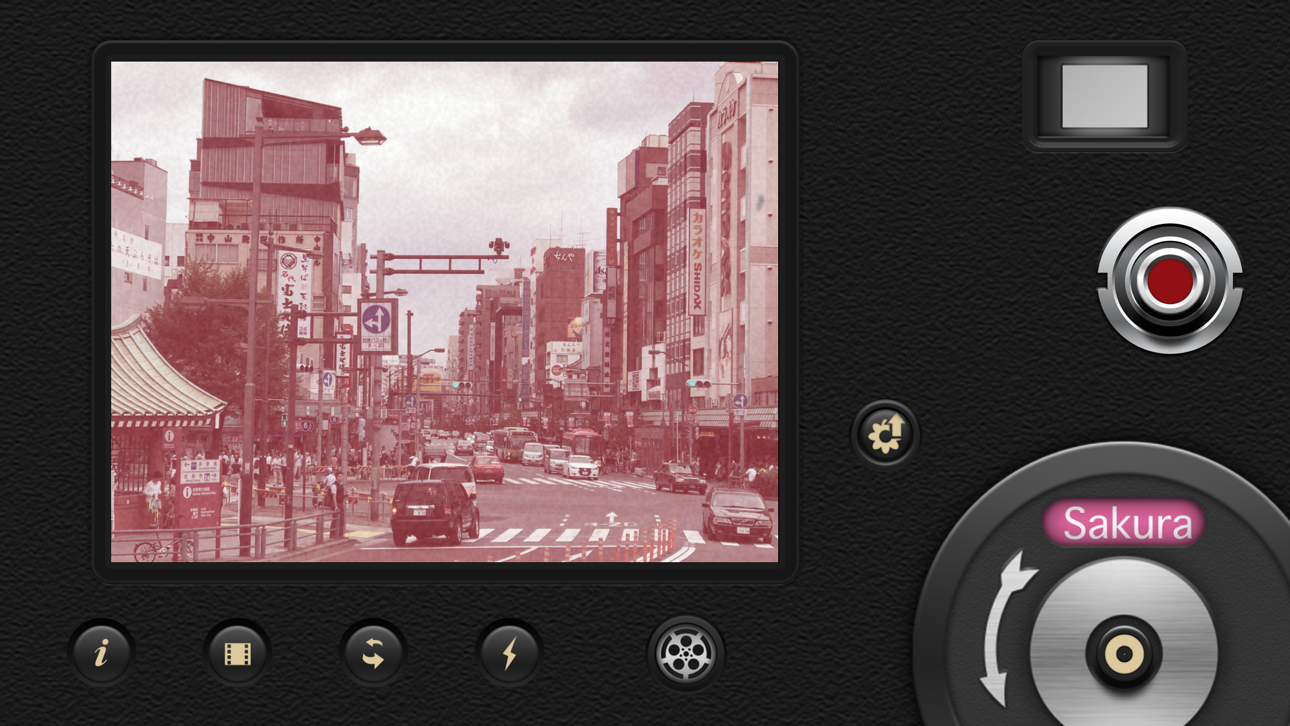
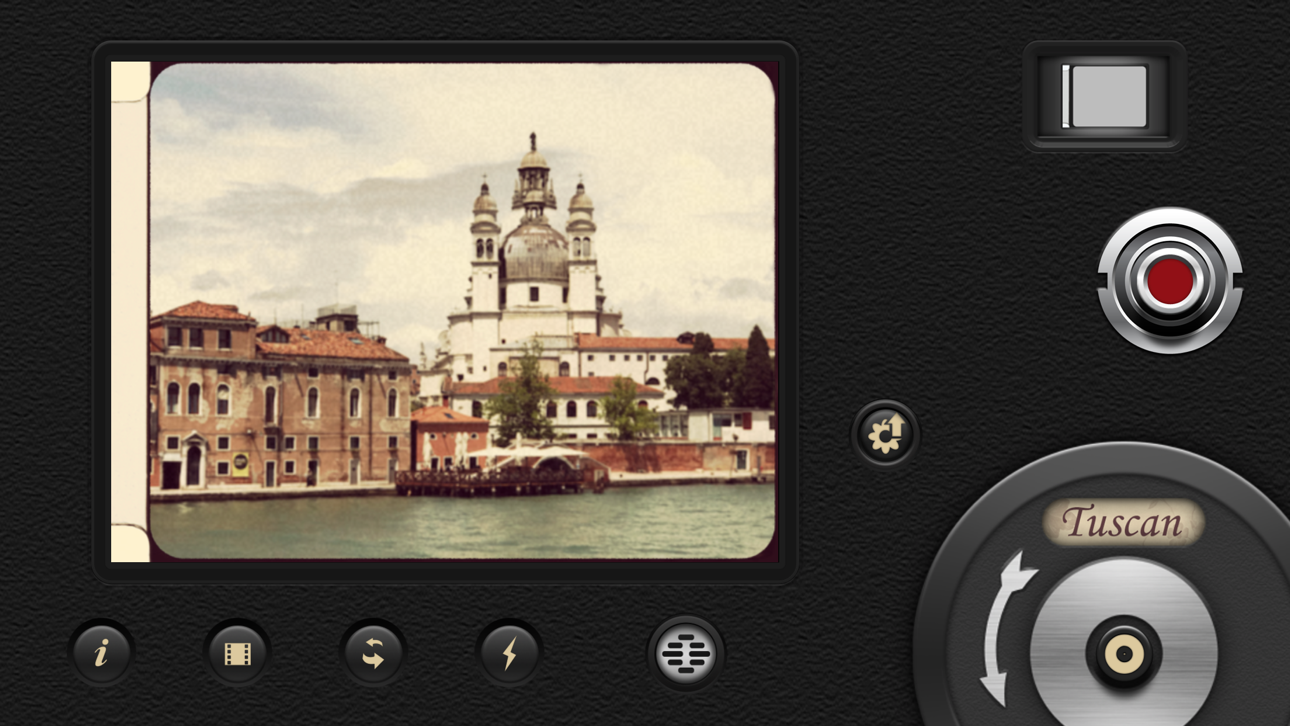
8mm Vintage Camera captures the beauty and magic of old-school vintage movies right through your viewfinder. Dust and scratches, retro colors, flickering, light leaks, and even frame shake, all can be instantly added with a single tap of the finger.
SHOOT BOTH PHOTOS AND VIDEOS WITH SOPHISTICATED LIVE EFFECTS
• Combine effects of film color, halation, dust & scratch, film grain, and softening to create authentic old-school movies
• Adjust the strength of the effects to achieve your own unique visual style
• 10 Lenses (frame) effects: Projector, Vignetting, Light Leak, Color Fringing, Super 8, Screen, 16mm, Tube, color negatives of Super 8 and 16mm
• 21 Retro & Aged Films: 1920, Noir, 60s, 70s, Sakura, XPro, Siena, Pela, Indigo, Tuscan, Two-Color, 2-Strip, 3X, and monochromes
• Additional 21 filters that emulate real historical films and expired films - available with the 8mm Pro subscription
• Jitter Button to imitate real 8mm projectors frame shakes
• Sound Switch to add projector sound for extra authenticity or mute the video for a silent movie effect.
• Up to 4K 30fps with original unfiltered video recording on newer devices
A COMPACT EDITOR FOR MOVIE CREATION
- Apply film and frame effects to clips
- Trim video, pan & zoom photo
- Add a soundtrack from your music library
- Choose from 5 unique themes with matching titles, transitions
8MM PRO SUBSCRIPTION
- You can subscribe or make a one-time purchase for unlimited access to all current filters and future updates
- Start your subscription with a free 7-day trial. Once the trial is over, you’ll be charged an annual subscription fee
- Your subscription will automatically renew unless auto-renew is turned off at least 24 hours before the end of the current period. You can go to your Settings > Apple ID > Subscriptions to turn auto-renew off
Screenshot © rispettivi proprietari · App Store


iOSGods non è affiliata, approvata né sponsorizzata da Apple Inc., Google LLC o dagli sviluppatori delle app elencate qui. Apple, iOS e App Store sono marchi di Apple Inc. Android e Google Play sono marchi di Google LLC. Tutti gli altri nomi delle app, icone, immagini e marchi appartengono ai rispettivi proprietari.

- iPhone o iPad non jailbroken/jailed oppure jailbroken.
- Sideloadly o alternative.
- Computer con Windows/macOS/Linux con iTunes installato.
PASSO 1: Scarica il file .IPA pre-modificato dal link sopra sul tuo computer. Per scaricarlo dall'iOSGods App, consulta il nostro Tutorial download IPA dell'iOSGods App, che include un esempio video.
PASSO 2: Scarica Sideloadly e installalo sul tuo Windows o Mac.
PASSO 3: Apri Sideloadly sul tuo computer, collega il tuo dispositivo iOS e attendi finché il nome del dispositivo non appare in Sideloadly.
PASSO 4: Una volta riconosciuto il tuo iDevice, trascina il file .IPA moddato che hai scaricato e rilascialo nell'applicazione Sideloadly.
PASSO 5: Inserisci l'email del tuo Apple Account, poi premi “Start”. Ti verrà quindi chiesto di inserire la password. Procedi e fornisci le informazioni richieste.
PASSO 6: Attendi che Sideloadly completi il sideload/installazione dell'IPA modificata. Se ci sono problemi durante l'installazione, leggi la nota qui sotto.
PASSO 7: Una volta completata l'installazione e vista l'app sulla schermata Home, dovrai andare in Impostazioni → Generali → Profili / Gestione VPN e dispositivi. Una volta lì, tocca l'email inserita al passo 6 e poi tocca “Autorizza [email protected]”.
PASSO 8: Ora vai sulla schermata Home e apri l'app appena installata: tutto dovrebbe funzionare correttamente. Potrebbe essere necessario seguire ulteriori istruzioni specifiche all'interno del popup dell'hack nel gioco.
NOTA: Per iOS/iPadOS 16 e versioni successive, devi attivare la Modalità sviluppatore. Per gli account Apple Developer gratuiti, dovrai ripetere questa procedura ogni 7 giorni. Se hai domande o problemi, leggi la nostra sezione FAQ Sideloadly del topic.
Game Name iOS Mod IPA is an action adventure game enhanced with powerful gameplay boosts and quality-of-life improvements. Win battles faster, earn rewards quicker, and enjoy uninterrupted play without ads.
- Unlimited Gold - spend freely to unlock premium content
- Damage Multiplier - deal significantly more damage in combat
- Defense Multiplier - take less damage and survive longer
- Reward Multiplier - earn more loot from every battle
- Max Level - instantly reach the highest player rank
- No Ads - play without interruptions or advertisements
This app also comes with iGameGod, giving you access to Auto Touch to automate repetitive tasks, App Speed Manager for adjustable gameplay speed, Memory Engine value editing, and more powerful iOS game tools.
Scarica Game Name Mod IPA dai link sopra. Tocca il pulsante di installazione e segui le istruzioni per installare questo hack iOS sul tuo iPhone, iPad o Mac con Apple Silicon.
Hai bisogno di altro aiuto Consulta le nostre Domande frequenti sull'app iOSGods per risposte dettagliate e consigli per la risoluzione dei problemi.
----------------------------------------------------------
--------------------------------------------------