ログインが必要
iOSGodsアカウントでサインインして続けてください。
iOSGodsアカウントでサインインして続けてください。

このリズムゲームのSonic Cat-Slash the Beats Mod IPAチートにより、無限の通貨とプレミアムアクセスが得られ、グラインドなしにすべての音楽とゲームプレイをアンロックできます。このやみつきになる2020年のリズムゲームでビートに合わせてタップしてスラッシュし、最初からすべてのプレミアム機能がアンロックされた状態で楽しめます。
- 無限通貨 → 曲やアップグレードに自由に使用できます
- プレミアム → すべてのプレミアムコンテンツがアンロック済み
このアプリにはiGameGodも搭載されており、繰り返し作業を自動化するAuto Touch、ゲーム速度を調整できるApp Speed Manager、Memory Engineによる値の編集など、強力なiOSゲーム用ツールをご利用いただけます。
Sonic Cat-Slash the Beats Hack modded IPAを上のリンクからダウンロードします。インストールボタンをタップし、画面の指示に従ってiPhone、iPad、Apple SiliconにこのiOSアプリハックをインストールします。
さらにヘルプが必要ですか? 詳しい回答とトラブルシューティングはiOSGodsアプリ よくある質問をご覧ください。
We believe rhythm hides in everyone’s heart!
It may be ignored, but never get lost.
Let’s hit the sonic road and find your own shining rhythm.
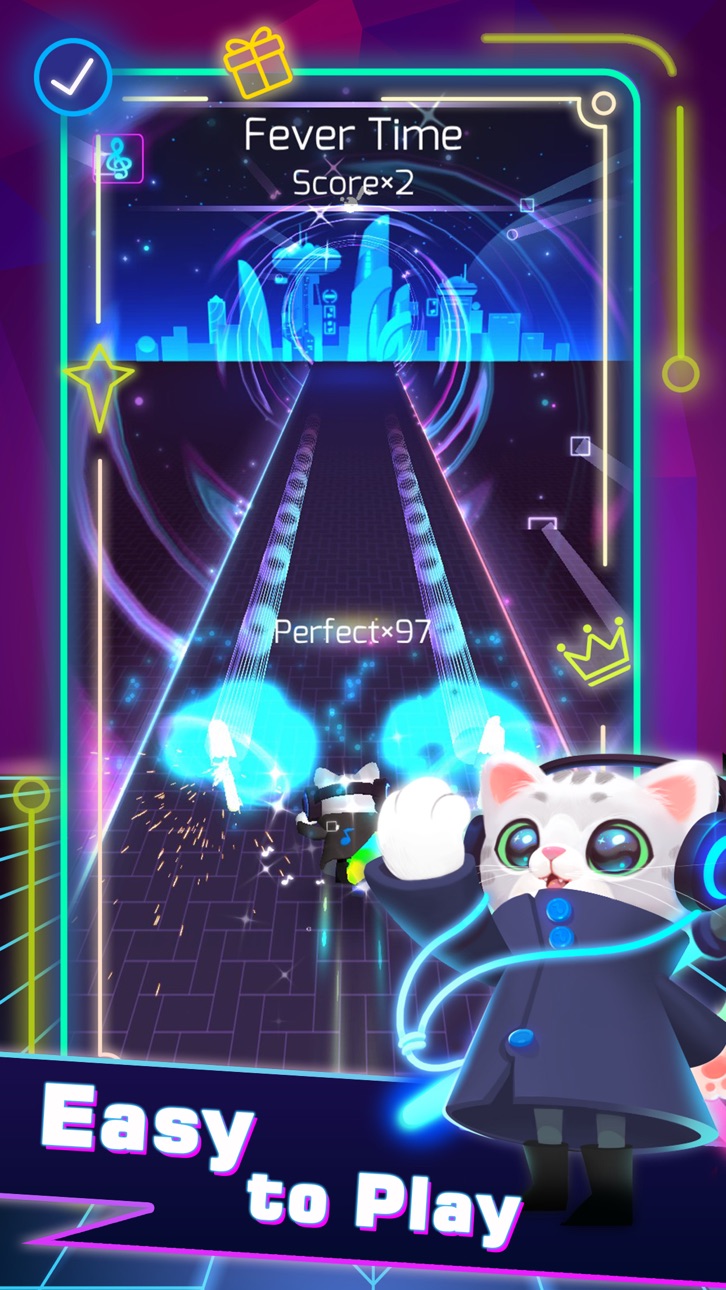
One of the most addictive games in 2020 is coming!!!!! Sonic Cat is an innovative combination of fancy music and fast-paced gameplay, all you need to do is to listen to the music and move your fingers.
Come on! Let's follow the rhythm and enjoy the beat saber!
How to play:
SIMPLY choose your favorite song, tap or hold the screen to slash every beat cube at the hit point. Concentrate yourself and maximize your reaction!
Game Features:
- Multiple Game Control Experiences
- Amounts of Songs to Satisfy Different Taste (100+ Songs will be updated)
- Various Stages with Unique Visual Design
- A Wide Variety of Skins and Weapons to Choose
We provide a combination of various music created by the world's most brilliant independent musicians. Welcome to join us, a memorable music journey with Sonic Cat is always waiting for you to start.
If any producer or label has an issue with any of the music used in the game, please send email to us and it will be deleted immediately if necessary (this includes the images used).
Support & Business Cooperation :
If you are seeking any kind of game cooperation and other supports, please send email to [email protected].
Auto Renewable Subscription:
Cats VIP Fans:
7-day VIP Service includes following products WEEKLY:
- No Pop-Up ADs
- Unlock all Songs
- Unlock all weapons & skins
- VIP Exclusive Weapons & Songs
- Cancel anytime
End of trial and subscription renewal
This price is established for United States customers. Pricing in other countries may vary and actual charges may be converted to your local currency depending on the country of residence.
Payment will be charged to your iTunes Account at confirmation of purchase.
Subscription automatically renews unless auto-renew is turned off at least 24-hours before the end of the current period.
Account will be charged for renewal within 24-hours prior to the end of the current period, and identify the cost of the renewal.
Subscriptions may be managed by the user and auto-renewal may be turned off by going to the user's Account Settings after purchase.
Any unused portion of a free trial period, if offered, will be forfeited when the user purchases a subscription to that publication, where applicable.
Canceling trial or subscription
You can turn off the auto-renew for the subscription whenever you want to through iTunes. Check https://support.apple.com/HT202039 . When your current trial/subscription period expires, you will be unsubscribed. The current active subscription period can not be cancelled. When your subscription expires, you will no longer be able to use elements included in Subscription option.
Terms of Subscription : https://bit.ly/38U8UX9
- 脱獄/Jailed済みまたは脱獄済みのiPhoneまたはiPad。
- Sideloadlyまたは代替手段。
- iTunesがインストールされているWindows/macOS/Linuxを実行しているコンピュータ。
ステップ1: 上のリンクから事前にハックされた.IPAファイルをコンピュータにダウンロードします。iOSGodsアプリからダウンロードする方法は、ビデオ例付きのiOSGodsアプリIPAダウンロードチュートリアルをご覧ください。
ステップ2: SideloadlyをダウンロードしてWindowsまたはMacにインストールします。
ステップ3: コンピュータでSideloadlyを開き、iOSデバイスを接続して、デバイス名がSideloadlyに表示されるまで待ちます。
ステップ4: iDeviceが認識されたら、ダウンロードしたModされた.IPAファイルをSideloadlyアプリにドラッグ&ドロップします。
ステップ5: Apple Accountのメールアドレスを入力し、「Start」を押します。次にパスワードの入力を求められます。必要な情報を入力してください。
ステップ6: Sideloadlyがハックされたipaのサイドロード/インストールを完了するのを待ちます。インストール中に問題が発生した場合は、以下の注意事項をお読みください。
ステップ7: インストールが完了し、ホーム画面にアプリが表示されたら、設定 → 一般 → プロファイル / VPNとデバイス管理に移動する必要があります。そこで、ステップ6で入力したメールをタップし、「Trust [email protected]」をタップします。
ステップ8: ホーム画面に戻り、新しくインストールされたアプリを開けば、すべて正常に動作するはずです。ゲーム内のハックのポップアップで、アプリごとの追加指示に従う必要がある場合があります。
注意: iOS/iPadOS 16以降では、デベロッパモードを有効にするが必要です。無料のApple Developerアカウントの場合、このプロセスを7日ごとに繰り返す必要があります。質問や問題がある場合は、トピックのSideloadly FAQセクションをお読みください。
Hack Features:
- Inf Coins (Spend)
App Installation Instructions:
---------------------------------------------------------
----------------------------------------------------------
If you require more information or help, please read our Frequently Asked Questions topic on iOSGods.com.
----------------------------------------------------------
--------------------------------------------------





![[Chiikawa Pocket JP] ちいかわぽけっと iOS Mod IPA](https://is1-ssl.mzstatic.com/image/thumb/Purple211/v4/d9/d4/90/d9d49093-38a1-37b7-3948-d98bd77634d2/AppIcon-0-0-1x_U007emarketing-0-8-0-85-220.png/100x100bb.jpg)

