تسجيل الدخول مطلوب
سجّل الدخول بحساب iOSGods للمتابعة.
Hack Features:
- Unlimited Currencies - Spend // Gain
قم بتنزيل Bistro Heroes Hack modded IPA من الروابط أعلاه. اضغط على زر التثبيت واتبع التعليمات لتثبيت هذا التعديل لـ iOS على iPhone أو iPad أو Apple Silicon.
هل تحتاج إلى مزيد من المساعدة؟ راجع الأسئلة الشائعة لتطبيق iOSGods للحصول على إجابات مفصلة ونصائح لاستكشاف الأخطاء.

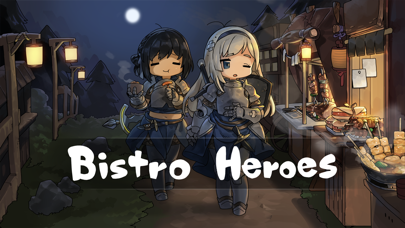
A new RPG 'Bistro Heroes', from Team Tapas, the developer of 'A Girl Adrift'!
◆ Gather various ingredients through hunting.
◆ Create tasty dishes with special ingredients to run a bistro.
◆ Collect hero clothes to create unique styles.
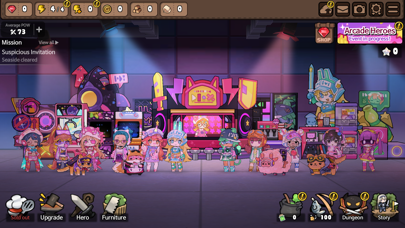
◆ Develop your town with numerous buildings and furniture.
◆ And…help the heroes save the world!
[Game Features]
- Small-sized, light RPG that can be enjoyed without additional downloads
- Various dishes made with ingredients from a fantasy world
- Cute clothes and furniture that can be used freely to decorate heroes and town
- Engaging storyline with the feel of a light novel
- Simple controls easy to learn, even for novices
- Fairytale-like atmosphere and graphics
[Community Page]
Website: https://teamtapas.com/
Facebook: https://www.facebook.com/TeamTapas/
Twitter: https://twitter.com/teamtapas
[Storing Data Safely]
- The server storage feature of the game data is activated when synced with a social account.
- The game data is stored in the server only at certain moments of gameplay and is not stored constantly in real-time.
- To safely store the data, please manually save it in the server regularly by using the server save icon on the upper right side of the game screen.
[Notes for Switching Devices]
1. To transfer data to a new device when switching your device, you must first sync with your social account.
2. After syncing with your social account, use the server save icon on the upper right to manually save your data on a manual save slot.
3. Log in with the same social account from your new device, load the data you stored from your previous device and play the game.
[Notes for Updating]
- Bistro Heroes' updates are done manually through the store page.
- If your Bistro Heroes does not update normally, please try the following method.
1. Restart the device and try again
2. Device settings - select iTunes & App Store - Check App Updates - restart and try to update again
※ The update time may differ depending on your device, so please wait a while longer if the above method does not work.
※ Deleting the app may reset some of the progressed data.
[Customer Support]
- If you experience gameplay problems, contact us via the in-game [Settings] → [Customer Support] button.
- Contact is at [email protected] for other bugs and problems.
- iPhone أو iPad بجيلبريك أو بدون جيلبريك.
- Sideloadly أو بدائلها.
- كمبيوتر يعمل بنظام Windows/macOS/Linux مع تثبيت iTunes.
الخطوة 1: قم بتنزيل ملف .IPA المعدّل مسبقًا من الرابط أعلاه إلى الكمبيوتر الخاص بك. للتنزيل من تطبيق iOSGods App، اطلع على دليل تنزيل IPA من تطبيق iOSGods App الذي يتضمن مثالًا بالفيديو.
الخطوة 2: قم بتنزيل Sideloadly وتثبيته على جهاز Windows أو Mac.
الخطوة 3: افتح Sideloadly على الكمبيوتر، ووصّل جهاز iOS الخاص بك، وانتظر حتى يظهر اسم جهازك داخل Sideloadly.
الخطوة 4: بمجرد التعرّف على جهاز iDevice الخاص بك، اسحب ملف .IPA المعدّل الذي قمت بتنزيله وأفلِته داخل تطبيق Sideloadly.
الخطوة 5: أدخل البريد الإلكتروني لحساب Apple Account الخاص بك، ثم اضغط على «Start». سيُطلب منك بعد ذلك إدخال كلمة المرور. تابع وأدخل المعلومات المطلوبة.
الخطوة 6: انتظر حتى ينتهي Sideloadly من تحميل/تثبيت ملف IPA المعدّل. في حال واجهت أي مشاكل أثناء التثبيت، يرجى قراءة الملاحظة أدناه.
الخطوة 7: بعد اكتمال التثبيت ورؤية التطبيق على الشاشة الرئيسية، انتقل إلى Settings → General → Profiles / VPN & Device Management. ثم اضغط على البريد الإلكتروني الذي أدخلته في الخطوة 6، ثم اضغط على «الوثوق بـ [email protected]».
الخطوة 8: الآن انتقل إلى الشاشة الرئيسية وافتح التطبيق الذي تم تثبيته للتو وسيعمل كل شيء بشكل صحيح. قد تحتاج إلى اتباع تعليمات إضافية خاصة بكل تطبيق داخل النافذة المنبثقة للتعديل أثناء اللعب.
ملاحظة: بدءًا من iOS/iPadOS 16 وما بعده، يجب تفعيل وضع المطور (Developer Mode). بالنسبة لحسابات Apple Developer المجانية، ستحتاج إلى تكرار هذه العملية كل 7 أيام. إذا كانت لديك أي أسئلة أو مشاكل، يرجى قراءة قسم الأسئلة الشائعة حول Sideloadly في الموضوع.